当前位置:网站首页>Learning about opencv (2)
Learning about opencv (2)
2022-07-26 10:06:00 【SingleDog_ seven】
Next, continue to opencv To study , Learning image gradient ,Canny Edge detection and image pyramid
Image gradient
sobel operator :
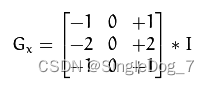
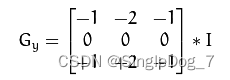
# Right - Left , On - Next
# dst = cv2.Sobel(scr,ddepth,dx,dy,ksize)
#ddepth: The depth of the image     Usually -1
#dx,dy Horizontal and vertical directions respectively
#ksize yes Soble The size of the operator      commonly 3*3
The above is right Sobel General description of operator usage .
Next are some specific applications :
cat = cv2.imread('cat.jpg',cv2.IMREAD_GRAYSCALE)
soblex = cv2.Sobel(cat,cv2.CV_64F,1,0,ksize=3)
cv_show('a',soblex)
sobley =cv2.Sobel(cat,cv2.CV_64F,0,1,ksize=3)
cv_show('b',sobley)

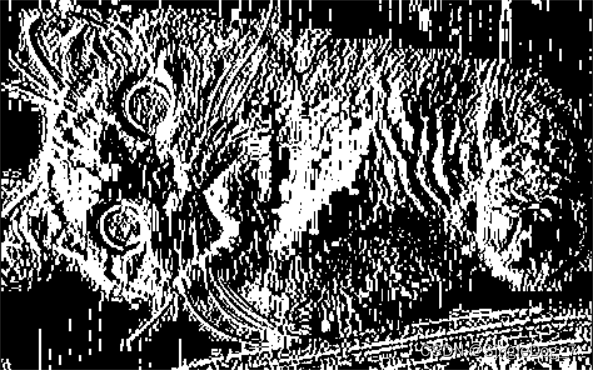
On the left is soblex, On the right is sobley.
Negative numbers will be truncated , Taking an absolute value will make the outline clearer
# White to black is a positive number , Black to white is a negative number , Negative numbers will be 0 truncation , So take the absolute value
soblex = cv2.Sobel(cat,cv2.CV_64F,1,0,ksize=3)
soblex =cv2.convertScaleAbs(soblex)
cv_show('c',soblex)

sobley =cv2.Sobel(cat,cv2.CV_64F,0,1,ksize=3)
sobley =cv2.convertScaleAbs(sobley)
cv_show('b',sobley)
among convertScaleAbs Is to take the absolute value of the object .

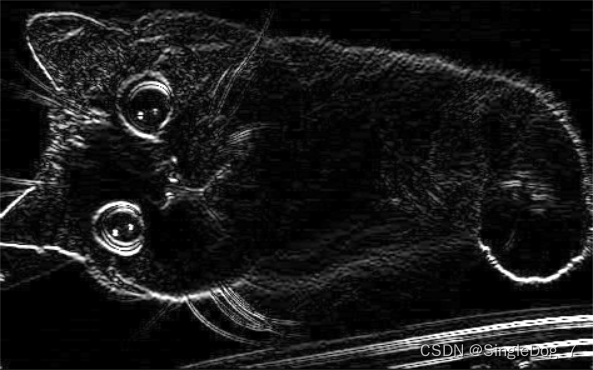
On the left is soblex, On the right is sobley.
The following is a comparison of sum and direct sum based on the above operations :
# Separate calculation x and y, And then sum up
soblexy=cv2.addWeighted(soblex,0.5,sobley,0.5,0)
cv_show('e',soblexy)

# Direct calculation :
soblexy =cv2.Sobel(cat,cv2.CV_64F,1,1,ksize=3)
soblexy =cv2.convertScaleAbs(soblexy)
cv_show('g',soblexy)
# The effect may not be very good 

The left figure is calculated first x,y And then sum up , On the right is direct summation .
scharr And laplacian operator :
scharr More sensitive to differences in results
laplacian Sensitive to noise
# More lines
img=cv2.imread('cat.jpg',cv2.IMREAD_GRAYSCALE)
scharrx = cv2.Scharr(img,cv2.CV_64F,1,0)
scharry = cv2.Scharr(img,cv2.CV_64F,0,1)
scharrx = cv2.convertScaleAbs(scharrx)
scharry = cv2.convertScaleAbs(scharry)
scharrxy = cv2.addWeighted(scharrx,0.5,scharry,0.5,0)

# It's simpler
laplacian =cv2.Laplacian(img,cv2.CV_64F)
laplacian =cv2.convertScaleAbs(laplacian)

res = np.hstack((soblexy,scharrxy,laplacian))
cv_show('v',res)
Just a comparison of three ( among soble It's direct summation )
Canny edge detection :
Use Gaussian filtering , Filter out noise
Calculate the gradient and direction of pixels (soble)
Non maximum suppression
Double threshold detection
Usually, the purpose of edge detection is to preserve the original image attributes , Significantly reduce the data size of the image .
img = cv2.imread('cat.jpg',cv2.IMREAD_GRAYSCALE)
v1=cv2.Canny(img,80,150)    #80minVal  150maxVal
v2=cv2.Canny(img,50,100)    # The smaller the size, the higher the requirements , The more edge information

res = np.hstack((v1,v2))
cv_show('res',res)
Contrast figure , For the selection of double threshold , The smaller the line, the more , The more edge information .
Image pyramid :
The pyramid of Gauss
Enlarge or reduce the image
 Convolution before pooling
print(img.shape)

up=cv2.pyrUp(img)
cv_show('up',up)
print(up.shape)

down = cv2.pyrDown(img)
cv_show('down',down)
print(down.shape)
The original (296, 474)
Magnified (592, 948)
Smaller (148, 237)
The result is irreversible , Sample first , Take another sample , The result is different from the original , Some information will be lost
( understand ) The pyramid of Laplace :
down = cv2.pyrDown(img)
down_up =cv2.pyrUp(down)
l_l=img-down_up
cv_show('l_l',l_l) 
(cv_show It's a function written by myself )
边栏推荐
- Explain automatic packing and unpacking?
- How to use Gmail to pick up / send mail on Foxmail
- AR model in MATLAB for short-term traffic flow prediction
- Xiaobai makes a wave of deep copy and shallow copy
- Rocky basic exercise -shell script 2
- Interview shock 68: why does TCP need three handshakes?
- Netease cloud UI imitation -- & gt; sidebar
- Time series anomaly detection
- Wechat H5 payment on WAP, for non wechat browsers
- R language ggpubr package ggsummarystats function visualizes the grouping box diagram (custom grouping color) and adds the statistical values corresponding to the grouping under the x-axis label (samp
猜你喜欢

Map key not configured and uniapp routing configuration and jump are reported by the uniapp < map >< /map > component

Interview shock 68: why does TCP need three handshakes?

服务发现原理分析与源码解读

Flask框架初学-03-模板

解决ProxyError: Conda cannot proceed due to an error in your proxy configuration.

AirTest

Server memory failure prediction can actually do this!
AirTest

Necessary for beginners: debug breakpoint debugging skills in idea and common breakpoint skills
服务器内存故障预测居然可以这样做!
随机推荐
Wechat applet development
Vectortilelayer replacement style
Uniapp "no mobile phone or simulator detected, please try again later" and uniapp custom components and communication
[datawhale] [machine learning] Diabetes genetic risk detection challenge
在.NET 6.0中配置WebHostBuilder
SSG framework Gatsby accesses the database and displays it on the page
Sqoop [environment setup 01] CentOS Linux release 7.5 installation configuration sqoop-1.4.7 resolve warnings and verify (attach sqoop 1 + sqoop 2 Latest installation package +mysql driver package res
Rowselection emptying in a-table
Study notes of the second week of sophomore year
Li Kou - binary tree pruning
Necessary for beginners: debug breakpoint debugging skills in idea and common breakpoint skills
Opencv image processing
AR model in MATLAB for short-term traffic flow prediction
Encapsulation of tabbarcontroller
论文笔记(SESSION-BASED RECOMMENDATIONS WITHRECURRENT NEURAL NETWORKS)
Mysql5.7.25 master-slave replication (one-way)
Usage of the formatter attribute of El table
数通基础-Telnet远程管理设备
Uni app learning summary
El table implements adding / deleting rows, and a parameter changes accordingly