当前位置:网站首页>Unity shader procedural texture
Unity shader procedural texture
2022-07-28 17:06:00 【Morita Rinko】
Procedural texture
Use scripts to generate some regular textures .
Realization effect :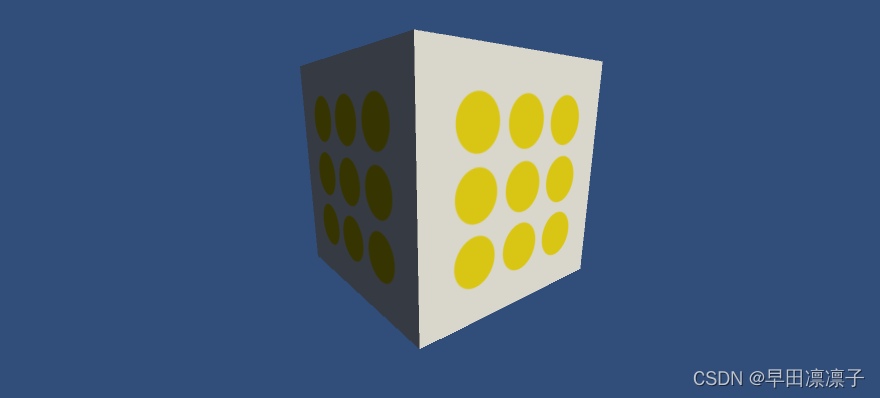
Realization way :
- First, create a new material , But do nothing about it .
- On objects that need rendering , Mount script , And assign the new material to it , Generate procedural textures through scripts , And assign it to the material used , So as to get the effect on the picture .
Script :
using System.Collections;
using System.Collections.Generic;
using UnityEngine;

[ExecuteInEditMode]
public class ProceduralTextureGeneration : MonoBehaviour
{

    // texture of material
    public Material material = null;
    // Generated procedural texture
    private Texture2D m_generatedTexture = null;
    // Set various variables , And set up set and get function , stay set Call in function _UpdateMaterial() Method , So as to update the procedural texture in real time
    #region Material properties
    [SerializeField, SetProperty("textureWidth")]
    private int m_textureWidth = 512;
    public int textureWidth
    {

        get
        {

            return m_textureWidth;
        }
        set
        {

            m_textureWidth = value;
            _UpdateMaterial();
        }
    }

    [SerializeField, SetProperty("backgroundColor")]
    private Color m_backgroundColor = Color.white;
    public Color backgroundColor
    {

        get
        {

            return m_backgroundColor;
        }
        set
        {

            m_backgroundColor = value;
            _UpdateMaterial();
        }
    }

    [SerializeField, SetProperty("textureWidth")]
    private Color m_circleColor = Color.yellow;
    public Color circleColor
    {

        get
        {

            return m_circleColor;
        }
        set
        {

            m_circleColor = value;
            _UpdateMaterial();
        }
    }
    [SerializeField, SetProperty("textureWidth")]
    private float m_blurFactor = 2.0f;
    public float blurFactor
    {

        get
        {

            return m_blurFactor;
        }
        set
        {

            m_blurFactor = value;
            _UpdateMaterial();
        }
    }
    #endregion
    // Start is called before the first frame update
    void Start()
    {

        if (material == null)
        {

            Renderer renderer = gameObject.GetComponent<Renderer>();
            if (renderer == null)
            {

                Debug.Log("Cannot find a renderer");
            }
            // Get the material from the object where the script is located
            material = renderer.sharedMaterial;
        }
        _UpdateMaterial();
    }

    // Update is called once per frame
    void Update()
    {


    }

    // Generate procedural textures for materials
    private void _UpdateMaterial()
    {

        if (material != null)
        {

            m_generatedTexture = _GenerateProceduralTexture();
            material.SetTexture("_MainTex", m_generatedTexture);
        }
    }

    // Generate procedural textures
    private Texture2D _GenerateProceduralTexture()
    {

        // Create a new texture
        Texture2D proceduralTexture = new Texture2D(textureWidth, textureWidth);
        // The distance between circles
        float circleInterval = textureWidth / 4.0f;
        float radius = textureWidth / 10.0f;
        // Fuzzy coefficient
        float edgeBlur = 1.0f / m_blurFactor;

        // Calculate the color for each pixel in the texture
        for(int w = 0; w < textureWidth; w++)
        {

            for(int h = 0; h < textureWidth; h++)
            {

                Color pixel = backgroundColor;
                // The color information of this pixel is obtained by calculating the distance from the nine centers
                for(int i = 0; i < 3; i++)
                {

                    for(int j=0;j<3; j++)
                    {

                        // Get the center coordinates of the circle
                        Vector2 circleCenter = new Vector2(circleInterval * (i + 1), circleInterval * (j + 1));
                        // Calculate the distance from the pixel to each central coordinate and compare with the radius , If it is less than 0, Is the pixel in the circle , On the contrary, it is not
                        float dist = Vector2.Distance(new Vector2(w, h), circleCenter) - radius;
                        //Mathf.SmoothStep Smooth the difference , According to the distance from the circle and the blur coefficient, the mixing difference of the color is calculated , Calculate the final color
                        // If dist * edgeBlur The result is less than 0, Then the coefficient of background color is 0, All round colors , Because at this time in the circle .
                        // If dist * edgeBlur The result is greater than 1, Then the coefficient of background color is 1, All the colors of the background , Because at this time, outside the circle .
                        // If dist * edgeBlur The result is [0,1] Between , It means at the edge , So for the mixture of two colors .
                        Color color = _MixColor(circleColor, new Color(pixel.r, pixel.g, pixel.b, 0.0f), Mathf.SmoothStep(0f, 1.0f, dist * edgeBlur));
                        // Mix with the background color
                        pixel = _MixColor(pixel, color,color.a);
                    }
                }
                // The calculated color is written into the texture
                proceduralTexture.SetPixel(w, h, pixel);
            }
        }
        // Apply texture color change settings
        proceduralTexture.Apply();
        // Returns the texture
        return proceduralTexture;
    }

    private Color _MixColor(Color color0, Color color1, float mixFactor)
    {

        Color mixColor = Color.white;
        // Take a value between the value of the first color and the value of the second color , Affected by the third parameter
        mixColor.r = Mathf.Lerp(color0.r, color1.r, mixFactor);
        mixColor.g = Mathf.Lerp(color0.g, color1.g, mixFactor);
        mixColor.b = Mathf.Lerp(color0.b, color1.b, mixFactor);
        mixColor.a = Mathf.Lerp(color0.a, color1.a, mixFactor);
        return mixColor;
    }
}
边栏推荐
- SUSE Ceph 增加节点、减少节点、 删除OSD磁盘等操作 – Storage6
- Ugui learning notes (II) Scrollview related
- Leetcode70 suppose you are climbing stairs. You need n steps to reach the roof. You can climb one or two steps at a time. How many different ways can you climb to the roof?
- Technology sharing | how to recover the erroneously deleted table and the data in the table?
- Re12:读论文 Se3 Semantic Self-segmentation for Abstractive Summarization of Long Legal Documents in Low
- 在AD中添加差分对及连线
- 3D modeling tool Archicad 26 newly released
- 【深度学习】:《PyTorch入门到项目实战》:简洁代码实现线性神经网络(附代码)
- epoll水平出发何边沿触发
- Record the processing process of CEPH two RBDS that cannot be deleted
猜你喜欢

Interesting kotlin 0x06:list minus list
![[deep learning]: day 4 of pytorch introduction to project practice: realize logistic regression from 0 to 1 (with source code)](/img/19/18d6e94a1e0fa4a75b66cf8cd99595.png)
[deep learning]: day 4 of pytorch introduction to project practice: realize logistic regression from 0 to 1 (with source code)

阿里大哥教你如何正确认识关于标准IO缓冲区的问题
[deep learning]: day 9 of pytorch introduction to project practice: dropout implementation (including source code)

Tcp/ip related

Ruoyi's solution to error reporting after integrating flyway

Easypoi multi sheet export by template

Interesting kotlin 0x07:composition
【深度学习】:《PyTorch入门到项目实战》第一天:数据操作和自动求导

飞马D200S无人机与机载激光雷达在大比例尺DEM建设中的应用
随机推荐
Games101-assignment05 ray tracing - rays intersect triangles
Question making note 3 (two point search)
Some suggestions on Oracle SQL tuning
[deep learning]: introduction to pytorch to project practice: simple code to realize linear neural network (with code)
Question making note 2 (add two numbers)
Ugui learning notes (I) rendering level
【深度学习】:《PyTorch入门到项目实战》第四天:从0到1实现logistic回归(附源码)
Mysql与Oracle的13点区别
Alibaba cloud - Wulin headlines - site building expert competition
NoSQL introduction practice notes I
Microsoft: edge browser has built-in disk cache compression technology, which can save space and not reduce system performance
The longest substring of sword finger offer without repeated characters
Ugui learning notes (V) togglegroup makes multiple choice radio boxes
It is said that NVIDIA has held talks with Softbank and will offer more than US $32billion to acquire arm
Given positive integers n and m, both between 1 and 10 ^ 9, n < = m, find out how many numbers have even digits between them (including N and m)
Unity editor learning (I) using features to change the display of fields in components
华为Mate 40系列曝光:大曲率双曲面屏,5nm麒麟1020处理器!还将有天玑1000+的版本
Comprehensively design an oppe homepage -- after sales service of the page
Easypoi multi sheet export by template
做题笔记5(有序数组的平方)