当前位置:网站首页>Detailed explanation of MSTP protocol for layer 3 switch configuration [Huawei ENSP experiment]
Detailed explanation of MSTP protocol for layer 3 switch configuration [Huawei ENSP experiment]
2022-07-28 08:52:00 【Shangjin vegetable pig】
One , Preface
MSTP: Operate between the access layer switch and the convergence layer switch MSTP, Prevent the infinite circulation of data in the switching network, resulting in the paralysis of the switching network , It can also balance the load
In the last article, we have successfully configured the route / Three layer switch DHCP Distribution address . Now let's complete the three-layer switch configuration MSTP The task of the agreement .
The task requirements are as follows :
8. To improve the reliability of the network , Each layer-2 access device needs to be interconnected with the convergence layer device , So you need to configure STP The protocol prevents the occurrence of loops on the basis of ensuring reliability .( expand )
10.MSTP、VRRP These technologies can be considered and implemented by students according to the situation .( expand )
Let's first look at the topology :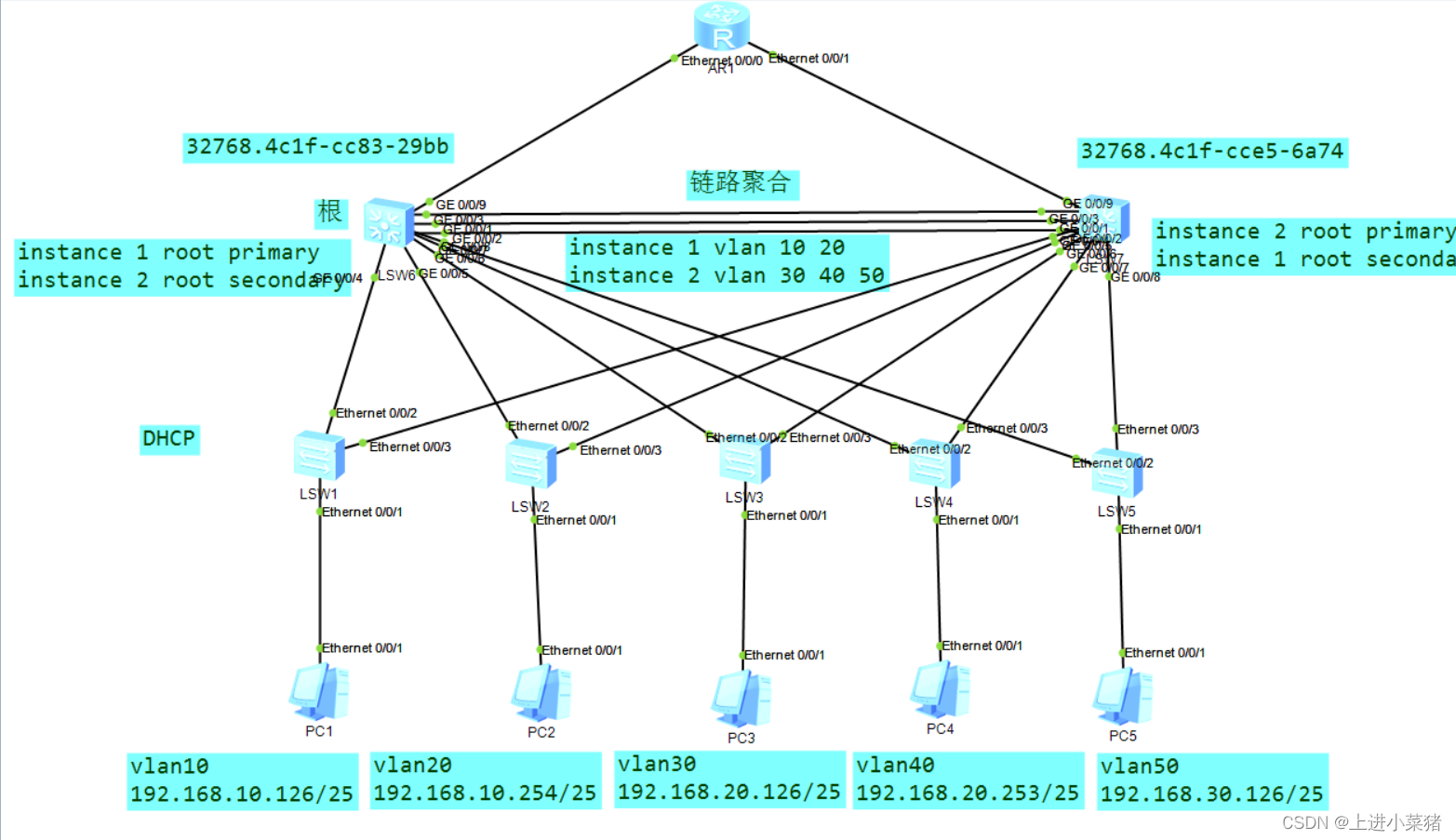
Two , Example — Simple configuration MSTP agreement
The topology is as follows :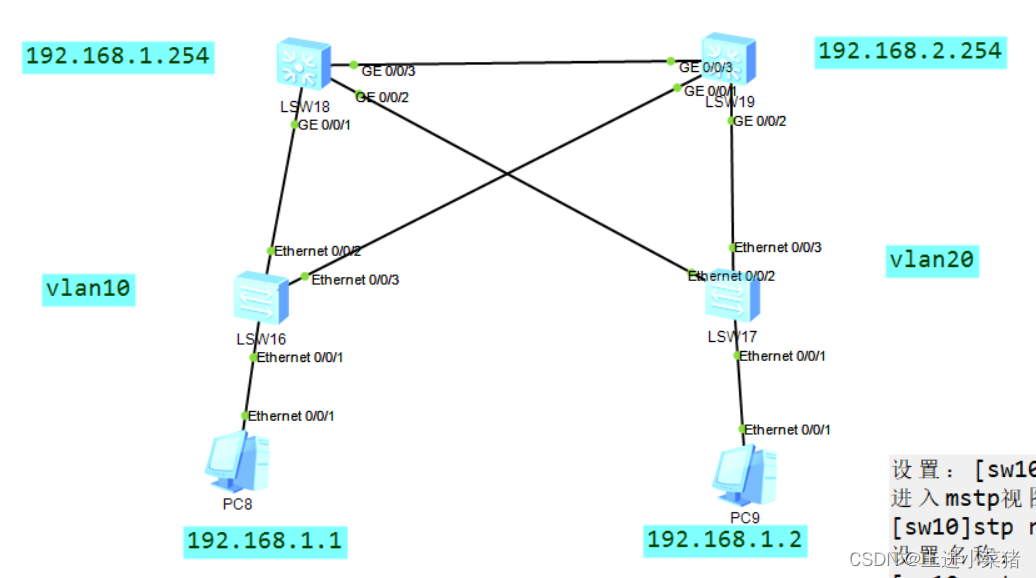
First step lsw16 To configure
1. First create vlan
vlan batch 10 20
2. To 1 Port configuration
int eth 0/0/1
3. Configure the communication mode
port link-type access
Be careful :
port default vlan 10
4. The other two ports
[sw1]port-group group-member Ethernet 0/0/2 to Ethernet 0/0/3
5. Configure to trunk
port link-type trunk
6. Run through all vlan
port trunk allow-pass vlan all
The second step lsw17 To configure
Same as above .
The only difference is :
Be careful :
port default vlan 20
Step 3: configure the convergence layer switch LSW18
1. First create vlan
vlan batch 10 20
2. grouping
port-group group-member GigabitEthernet 0/0/1 to GigabitEthernet 0/0/3
3. Configure to trunk
port link-type trunk
Output is as follows :
[cour1-GigabitEthernet0/0/1]port link-type trunk
[cour1-GigabitEthernet0/0/2]port link-type trunk
[cour1-GigabitEthernet0/0/3]port link-type trunk
4. Settings allow all vlan adopt
port trunk allow-pass vlan all
Step 4 configure the convergence layer switch LSW19
And the third step is to configure the convergence layer switch LSW18 Same steps .
Step 5 configuration mstp
stay sw10 in
Set up :[sw10]stp mode mstp
stp mode mstp
Get into mstp View :
stp region-configuration
Set the name :
[sw10-mst-region]region-name mstp
region-name mstp
Set version number
[sw10-mst-region]revision-level 0
revision-level 0
Divide into groups
[sw10-mst-region]instance 1 vlan 10
[sw10-mst-region]instance 2 vlan 20
instance 1 vlan 10
instance 2 vlan 20
Activate configuration :
[sw10-mst-region]active region-configuration
active region-configuration
Check the configuration :
[sw10-mst-region]dis current-configuration
dis current-configuration
as follows mstp All configurations of :
stp region-configuration
 region-name mstp
revision-level 0
 instance 1 vlan 10
 instance 2 vlan 20
 active region-configuration
The above steps are in sw16,17,18,19 Run once each .
see
see mstp
dis stp instance 1 brief
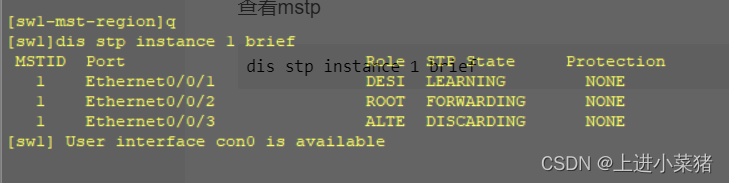
[sw1]dis stp instance 1 brief
 MSTID  Port                        Role  STP State     Protection
   1    Ethernet0/0/1               DESI  LEARNING        NONE
   1    Ethernet0/0/2               ROOT  FORWARDING      NONE
   1    Ethernet0/0/3               ALTE  DISCARDING      NONE
Convenient area :
1. First create vlan
vlan batch 10 20
2. To 1 Port configuration
int eth 0/0/1
3. Configure the communication mode
port link-type access
port default vlan 10
4. The other two ports
[sw1]port-group group-member Ethernet 0/0/2 to Ethernet 0/0/3
Configure to trunk
port link-type trunk
Run through all vlan
port trunk allow-pass vlan all
Set up :[sw10]stp mode mstp
Get into mstp View :
[sw10]stp region-configuration
Set the name :
[sw10-mst-region]region-name mstp
Set version number
[sw10-mst-region]revision-level 0
Divide into groups
[sw10-mst-region]instance 1 vlan 10
[sw10-mst-region]instance 2 vlan 20
Activate configuration :
[sw10-mst-region]active region-configuration
Check the configuration :
[sw10-mst-region]dis current-configuration
as follows mstp All configurations of :
stp region-configuration
region-name mstp
revision-level 0
instance 1 vlan 10
instance 2 vlan 20
active region-configuration
 see mstp
dis stp instance 1 brief
3、 ... and . Curriculum - Layer 3 switch configuration MSTP agreement
Look at the topology :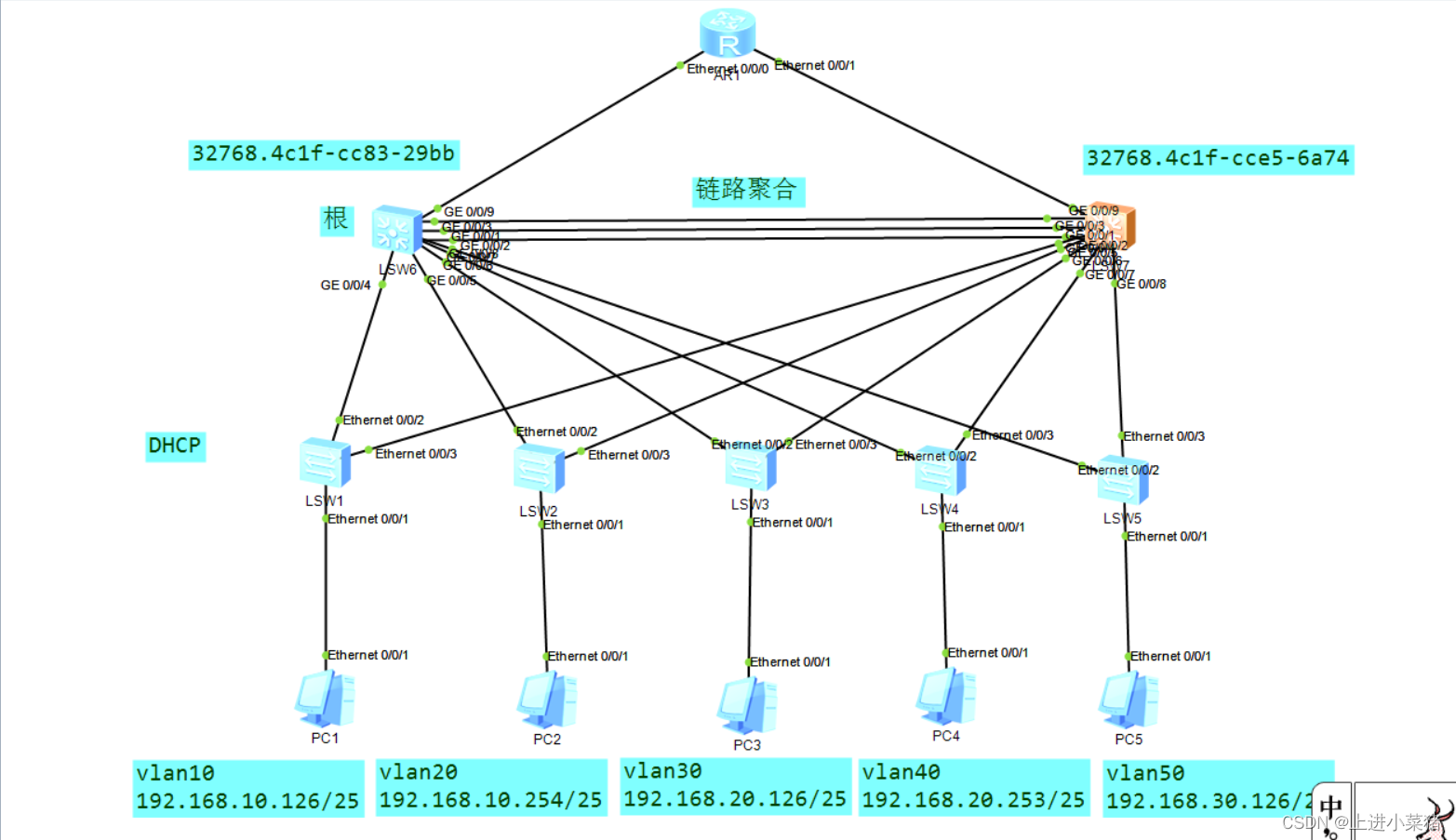
MSTP The agreement is still relatively simple .
Have a look first , What is? MSTP agreement :
MSTP Multi region spanning tree protocol :
Form trees without loops , Solve broadcast storm and realize redundant backup .
Multiple spanning trees in VLAN To achieve load balancing between , Different VLAN The traffic is forwarded in different paths .
Convergence layer : First configure the layer 3 switch :
LSW1 as follows :
stp instance 1 root primary
stp instance 2 root secondary
LSW2 as follows :
stp instance 2 root primary
stp instance 1 root secondary
explain :LSW1 yes 1 The taproot of ,2 Spare root of .LSW2 yes 2 The taproot of ,1 Spare root of .
Get into stp region-configuration View :
Set the name , Divide 1 and 2 Of vlan, Activate region-configuration
stp region-configuration
 region-name zhubo
 instance 1 vlan 10 20
 instance 2 vlan 30 40 50
 active region-configuration
see stp To configure
display stp brief
Switch layer :
It has been configured before VLAN, So we're directly :
stp region-configuration
 region-name zhubo
 instance 1 vlan 10 20
 instance 2 vlan 30 40 50
 active region-configuration
that will do .
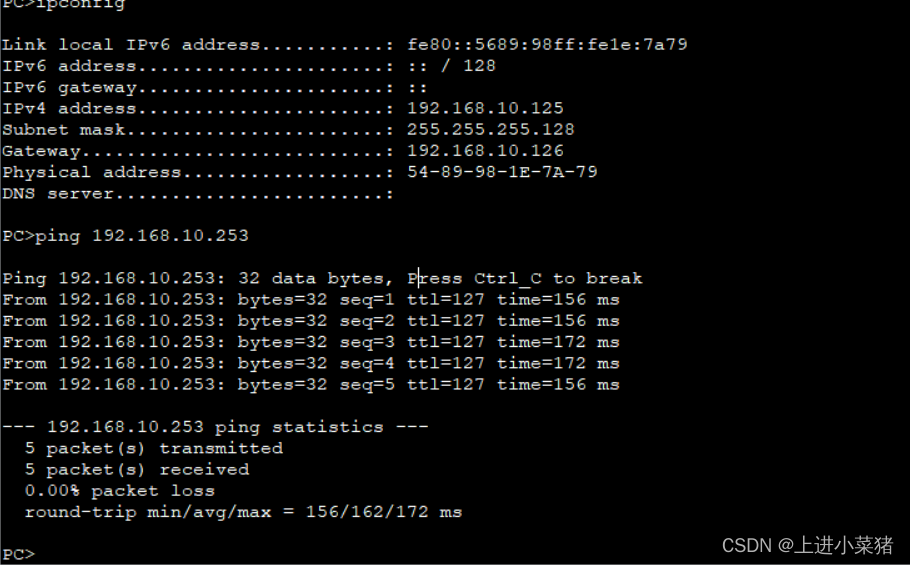
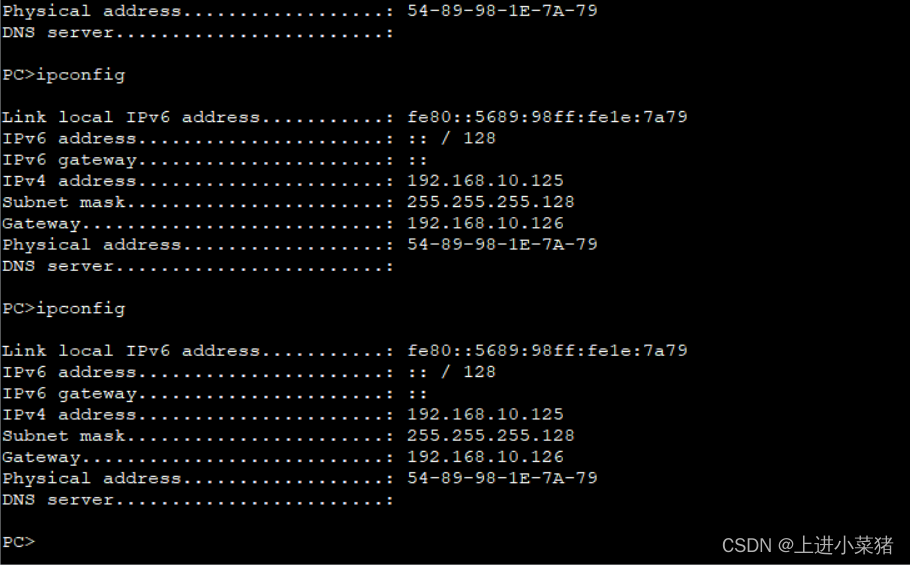
The results are as follows :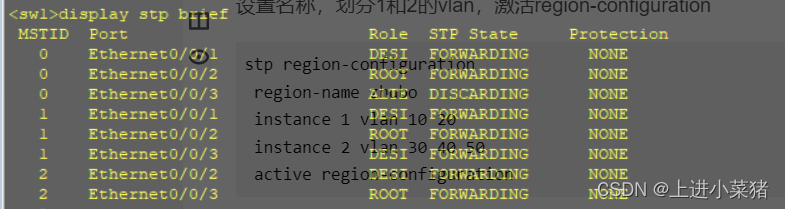
ping 192.168.10.253
边栏推荐
- 1w5 words to introduce those technical solutions of distributed system in detail
- Day112. Shangyitong: Mobile verification code login function
- postgresql查询【表字段类型】和库中【所有序列】
- 思迈特软件Smartbi完成C轮融资,推动国产BI加速进入智能化时代
- Can‘t connect to server on ‘IP‘ (60)
- [soft test software evaluator] 2013 comprehensive knowledge over the years
- SQL server time field sorting
- 1w5字详细介绍分布式系统的那些技术方案
- Feign call
- Will sqlserver CDC 2.2 generate table locks when extracting large tables from the source
猜你喜欢

图片批处理|必备小技能

I am a 27 year old technical manager, whose income is too high, and my heart is in a panic

博客搭建九:hugo添加搜索功能

Service current limiting and fusing of micro service architecture Sentinel

SQL Server查询结果导出到EXCEL表格

Gbase appears in Unicom cloud Tour (Sichuan Station) to professionally empower cloud ecology
![Chapter 2-2 calculation of piecewise function [1]](/img/40/cad6bf92849624199af0fd1ba1d433.jpg)
Chapter 2-2 calculation of piecewise function [1]

思迈特软件完成C轮融资,让BI真正实现“普惠化”

SQL injection - pre Foundation

You're not still using xshell, are you? This open source terminal tool is yyds!
随机推荐
GB/T 41479-2022信息安全技术 网络数据处理安全要求 导图概览
Does gbase 8s support storing relational data and object-oriented data?
为什么 ThreadLocal 可以做到线程隔离?
Round C financing has been completed! Smart software leads domestic Bi ecological empowerment, and products and services are a step forward
leetcode刷题,我推荐B站这个妹子学霸的视频
How to configure phpunit under window
Uniapp ---- detailed steps to obtain the longitude and latitude of the current position and other information (including applet)
Vk1620 temperature controller / smart meter LED digital display driver chip 3/4-wire interface with built-in RC oscillator to provide technical support
GBase 8s是否支持存储关系型数据和对象型数据?
Introduction of functions in C language (blood Book 20000 words!!!)
【软考软件评测师】2013综合知识历年真题
阿里技术四面+交叉面+HR面,成功拿到offer,双非本科进不了大厂?
看完这12个面试问题,新媒体运营岗位就是你的了
Half bridge buck circuit - record
PHP基础知识 - PHP 使用 MySQLI
Two dimensional array and operation
Pyspark writes data to iceberg
HCIP---LDP和MPLS技术(详解)
MySQL how to add users and set permissions?
优炫数据库导入和导出方法