当前位置:网站首页>Basic usage of Frida
Basic usage of Frida
2022-07-01 16:50:00 【╱℡&▓】
Reference link :
Frida Detailed installation tutorial - Simple books
FRIDA Android quick shelling _ Xiao Ming has many problems -CSDN Blog _frida Shelling
win10 install frida Pit and summary - Maple_feng - Blog Garden
Frida Install and use coordination burp Grab bag tutorial - Learning notes – The dwelling of Yunlong
Frida Installation and use - Mo zhenjunhan - Blog Garden
frida(hook Tools ) Environment construction of - Let's have a look
Hook frame Frida Installation of pit diary - Shangma Garden
---------
Frida-dexdump: GitHub - hluwa/frida-dexdump
Frida Official website :Frida
Frida Source code :Frida · GitHub
frida Now supports python3.8, Please go to the official website to see the supported version , It may be updated
Download from the official website Frida Address :frida · PyPI
windows Download assignments xx.y.z Version of Frida Address :https://pypi.org/project/frida/xx.y.z/#files
Frida It's easy to install , Need to be in windows install frida client And in Android installation frida Server side .
1、Windows Installation on frida client
pip install frida
pip install frida-tools
If installation fails
① install frida
Situation 1 : What you downloaded is frida-xx.yy.zz-py3.8-win-amd64.egg File format
1、 frida · PyPI Download the file :frida-12.11.17-py3.8-win-amd64.egg( Check your own version )
Suppose to 12.9.8 The version of is installed on windows Download address https://pypi.org/project/frida/12.9.8/#filesperhaps
pip3 install frida==12.9.8 -i https://pypi.tuna.tsinghua.edu.cn/simple/
2、 2.1 Save the downloaded file to C:\User\Adminstrator
2.2 And put python/lib/site-packages Under the
2.3 C:\Users\XXXX\AppData\Local\Programs\Python\Python38\Lib\site-packages This directory is under site-packages Execute under this directory CMD command :easy_install frida-12.9.4-py3.8-win-amd64.egg3、 Re execution pip install
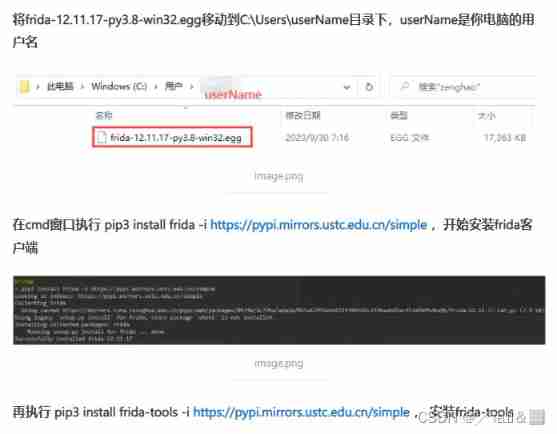
pip3 install frida -i https://pypi.mirrors.ustc.edu.cn/simple
pip3 install frida-tools -i https://pypi.mirrors.ustc.edu.cn/simple
4、 again pip If not, use easy-install install ( I didn't try this method )
Once the download is complete , Use
easy_installinstallpython3 /usr/lib/python3/dist-packages/easy_install.py frida-12.8.16-py3.6-linux-x86_64.eggWhen running to the following interface , direct Ctrl+C interrupt , Because domestic visits abroad Frida The Internet is slow
[email protected]:~/Documents# python3 /usr/lib/python3/dist-packages/easy_install.py frida-12.8.16-py3.6-linux-x86_64.egg
Processing frida-12.8.16-py3.6-linux-x86_64.egg
Copying frida-12.8.16-py3.6-linux-x86_64.egg to /usr/local/lib/python3.7/dist-packages
Adding frida 12.8.16 to easy-install.pth fileInstalled /usr/local/lib/python3.7/dist-packages/frida-12.8.16-py3.6-linux-x86_64.egg
Processing dependencies for frida==12.8.16
Searching for frida==12.8.16
Reading https://pypi.org/simple/frida/
^Cinterrupted
here , Run againpip3 install frida -i https://pypi.mirrors.ustc.edu.cn/simple/
Situation two : What you downloaded is frida-xx.y.z.tar.gz fileUnzip the file , Will see setup.py file , In the current directory cmd Input instruction :python setup.py install
Microsoft Windows [ edition  10.0.19041.1415]
(c) Microsoft Corporation. All rights reserved .

C:\Users\Admin\Desktop\dfafdaf\frida-12.9.8>python setup.py install
running install
running bdist_egg
running egg_info
writing frida.egg-info\PKG-INFO
writing dependency_links to frida.egg-info\dependency_links.txt
writing top-level names to frida.egg-info\top_level.txt
reading manifest file 'frida.egg-info\SOURCES.txt'
writing manifest file 'frida.egg-info\SOURCES.txt'
installing library code to build\bdist.win-amd64\egg
running install_lib
running build_py
creating build
creating build\lib.win-amd64-3.8
creating build\lib.win-amd64-3.8\frida
copying frida\core.py -> build\lib.win-amd64-3.8\frida
copying frida\__init__.py -> build\lib.win-amd64-3.8\frida
running build_ext
looking for prebuilt extension in home directory, i.e. C:\Users\Admin/frida-12.9.8-py3.8-win-amd64.egg
prebuilt extension not found in home directory, will try downloading it
querying pypi for available prebuilds
downloading prebuilt extension from https://files.pythonhosted.org/packages/79/c0/4a374ea482c386fc5ccc7680b062e9b7565a6c417c540dfdcb59320286b8/frida-12.9.8-py3.8-win-amd64.egg
extracting prebuilt extension
creating build\bdist.win-amd64
creating build\bdist.win-amd64\egg
creating build\bdist.win-amd64\egg\frida
copying build\lib.win-amd64-3.8\frida\core.py -> build\bdist.win-amd64\egg\frida
copying build\lib.win-amd64-3.8\frida\__init__.py -> build\bdist.win-amd64\egg\frida
copying build\lib.win-amd64-3.8\_frida.cp38-win_amd64.pyd -> build\bdist.win-amd64\egg
byte-compiling build\bdist.win-amd64\egg\frida\core.py to core.cpython-38.pyc
byte-compiling build\bdist.win-amd64\egg\frida\__init__.py to __init__.cpython-38.pyc
creating stub loader for _frida.cp38-win_amd64.pyd
byte-compiling build\bdist.win-amd64\egg\_frida.py to _frida.cpython-38.pyc
creating build\bdist.win-amd64\egg\EGG-INFO
copying frida.egg-info\PKG-INFO -> build\bdist.win-amd64\egg\EGG-INFO
copying frida.egg-info\SOURCES.txt -> build\bdist.win-amd64\egg\EGG-INFO
copying frida.egg-info\dependency_links.txt -> build\bdist.win-amd64\egg\EGG-INFO
copying frida.egg-info\top_level.txt -> build\bdist.win-amd64\egg\EGG-INFO
copying frida.egg-info\zip-safe -> build\bdist.win-amd64\egg\EGG-INFO
writing build\bdist.win-amd64\egg\EGG-INFO\native_libs.txt
creating dist
creating 'dist\frida-12.9.8-py3.8-win-amd64.egg' and adding 'build\bdist.win-amd64\egg' to it
removing 'build\bdist.win-amd64\egg' (and everything under it)
Processing frida-12.9.8-py3.8-win-amd64.egg
Removing d:\lds\environment\python\lib\site-packages\frida-12.9.8-py3.8-win-amd64.egg
Copying frida-12.9.8-py3.8-win-amd64.egg to d:\lds\environment\python\lib\site-packages
Adding frida 12.9.8 to easy-install.pth file

Installed d:\lds\environment\python\lib\site-packages\frida-12.9.8-py3.8-win-amd64.egg
Processing dependencies for frida==12.9.8
Finished processing dependencies for frida==12.9.8

C:\Users\Admin\Desktop\dfafdaf\frida-12.9.8>
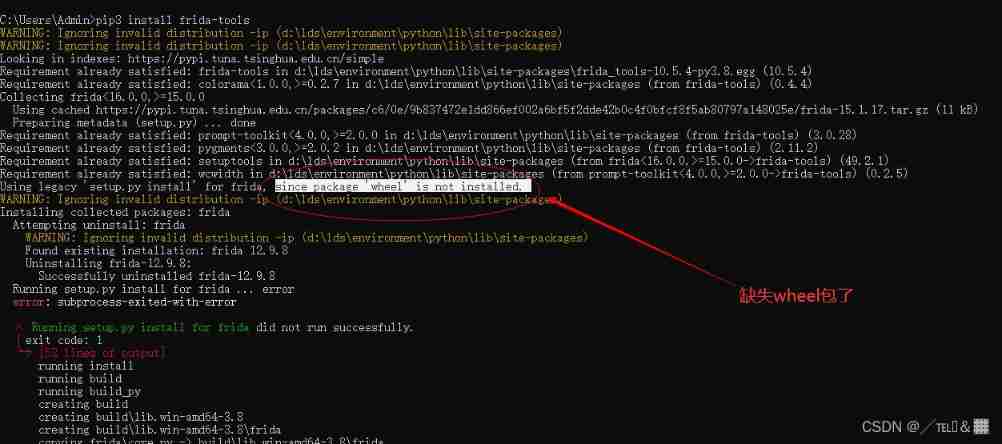
Situation three : You are missing other dependent packages ---- This is the case with me
C:\Users\Admin>pip3 install wheel
WARNING: Ignoring invalid distribution -ip (d:\lds\environment\python\lib\site-packages)
WARNING: Ignoring invalid distribution -ip (d:\lds\environment\python\lib\site-packages)
Looking in indexes: https://pypi.tuna.tsinghua.edu.cn/simple
Collecting wheel
  Downloading https://pypi.tuna.tsinghua.edu.cn/packages/27/d6/003e593296a85fd6ed616ed962795b2f87709c3eee2bca4f6d0fe55c6d00/wheel-0.37.1-py2.py3-none-any.whl (35 kB)
WARNING: Ignoring invalid distribution -ip (d:\lds\environment\python\lib\site-packages)
Installing collected packages: wheel
WARNING: Ignoring invalid distribution -ip (d:\lds\environment\python\lib\site-packages)
Successfully installed wheel-0.37.1
WARNING: Ignoring invalid distribution -ip (d:\lds\environment\python\lib\site-packages)
WARNING: Ignoring invalid distribution -ip (d:\lds\environment\python\lib\site-packages)
Then go to the normal steps to install
② install frida-tools
python install frida-tools - JebediahKerman - Blog Garden
First go https://pypi.org/project/frida/#files Choose the right file , for example frida-15.1.14-py3.8-win-amd64.egg, Link to files.pythonhosted.org Replace with mirrors.tuna.tsinghua.edu.cn/pypi/web, Then download and save the file to the current user's home Catalog .
Run the command pip install frida-tools<--------*** This sentence doesn't work , Don't use it. pip
python -m pip install frida==12.8.9       // Don't use it directly pip install
python -m pip install frida-tools==5.3.0  // Don't use it directly pip install
Finally, I use python -m pip install frida-tools==5.3.0 On the installation frida-toos
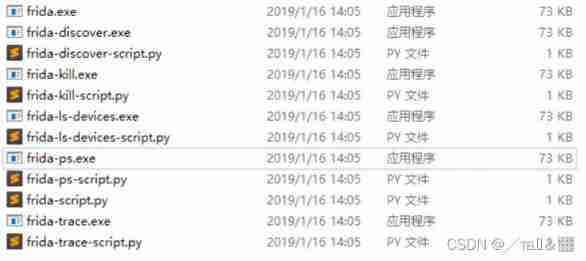
Frida Four tools are provided ,frida-trace,frida-ps,frida,frida-discover, These tools are all located in python Of Scripts Under the path
2.Android Installation on frida Server side (root Better )
When installing, it corresponds to the version of the computer client I am here frida-server-12.9.8-android-x86
see Android Mobile device settings : adb shell ----> getprop ro.product.cpu.abi

Or a line of command
adb shell getprop ro.product.cpu.abi Go to git download frida-server, Pay attention to your mobile phone ios/android Version and installed on the computer frida Versions, :
https://github.com/frida/frida/releases
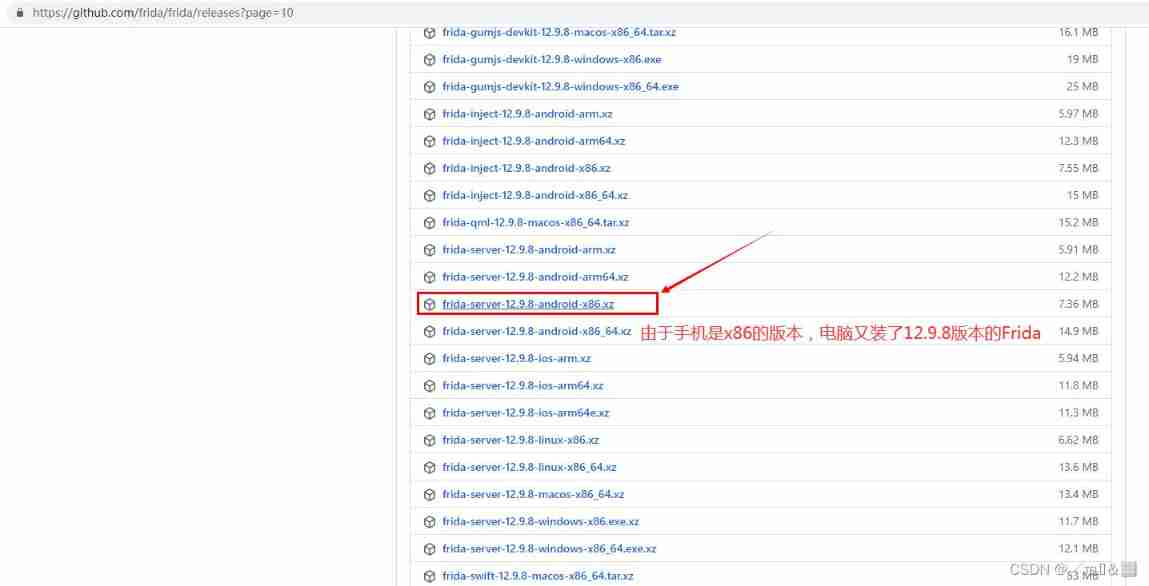
Don't forget to decompress after downloading :

 Developing Android When applied , Sometimes you need to connect to the local server , We may first think of using loaclhost or 127.0.0.1 etc. . It's not right . Because the simulator is a relatively independent system , The program running in the simulator uses loacalhost or 127.0.0.1 The simulator itself will be connected . Not your local computer .


 If you want to connect the local computer in the simulator, you can use 10.0.2.2 This IP.

 namely : Access... In the simulator 10.0.2.2  It is equivalent to accessing this machine localhost
————————————————
 Copyright notice : This paper is about CSDN Blogger 「lynchyo」 The original article of , follow CC 4.0 BY-SA Copyright agreement , For reprint, please attach the original source link and this statement .
 Link to the original text :https://blog.csdn.net/lynchyo/article/details/38443661
3. start-up frida-server
① download frida-server-12.9.8-android-x86
https://github.com/frida/frida/releases
Download the corresponding pc Client version , After that, you need to decompress
I've done it before. Look down
② Upload frida-server-12.7.5-android-x86 Executable program
Upload PC Medium frida-server-12.7.5-android-x86 Executable to Android In the simulator /data/system/frida/frida-server-12.7.5-android-x86 route ;
Get into frida-server-12.9.8-android-x86 Catalog , perform
adb -s emulator-5554 push C:\Users\gqv20\Desktop\frida-server-12.9.8-android-x86 /data/local/tmp
 perhaps
adb push C:\Users\gqv20\Desktop\frida-server-12.9.8-android-x86 /data/local/tmp

 If you start in the directory of the target file cmd You can enter the command like this :
adb push frida-server-12.9.8-android-x86 /data/system/frida/frida-server-12.9.8-android-x86
③ by frida-server-12.7.5-android-x86 The executable program gives 777 jurisdiction
Get into adb shell Command line , First enter su It's better to enter , And then into /data/system/frida/ Catalog , modify frida-server-12.9.8-android-x86 Permissions for executable programs , perform
chmod 777 ./*④ perform frida-server-12.7.5-android-x86 Executable program
stay /data/system/frida/ Execute... In directory
./frida-server-12.7.5-android-x86 command , You can start Frida Remote service area end ;
Full output command :
[email protected]:/data/system/frida #./frida-server-12.7.5-android-x86                                              <
WARNING: linker: ./frida-server-12.7.5-android-x86: unused DT entry: type 0x6ffffef5 arg 0x1c24
1. Check several services
C:\Users\gqv20>adb devices
List of devices attached
ZX1G222CLR device
2. to root jurisdiction
C:\Users\gqv20>adb shell
[email protected]:/ $ su
su
3. Enter into tmp Under the table of contents
[email protected]:/ # cd /data/local/tmp/
cd /data/local/tmp/
4. Give Execution Authority
[email protected]:/data/local/tmp # chmod 777 /data/local/tmp/frida-server-12.9.8-android-x86
chmod 777 /data/local/tmp/frida-server-12.9.8-android-x86
5. see ls
[email protected]:/data/local/tmp # ls
ls
busybox
frida-server-12.9.8-android-arm
frida-server-12.9.8-android-arm
frida-server-12.9.8-android-x86
krperm.txt
minicap
minicap.so
re.frida.server
6. The official launch of frida-server
[email protected]:/data/local/tmp # ./frida-server-12.9.8-android-x86
./frida-server-12.9.8-android-armAnother cmd Check the processes running on your phone
frida-ps -UOr use frida-ps -R It's fine too , But it needs to be forwarded
adb forward tcp:27042 tcp:27042

frida-ps -R
If there is failure frida-server There's something wrong with the version , There is still a need root jurisdiction , It is recommended to use the night God simulator

If you don't decompress it, just push When you go to the simulator or mobile phone, you will encounter the following two posts
https://github.com/frida/frida/issues/538
If there is failure frida-server There's something wrong with the version , There is still a need root jurisdiction , It is recommended to use the night God simulator
Test code
import frida
import pprint

def on_message(message,data):
    print("[on_message] message:",message,"data:",data)


rdev =frida.get_usb_device()
process = rdev .enumerate_processes()# Get all processes of the mobile phone
pprint.pprint(process)
session=rdev.attach("com.dianping.v1") #frida-ps -U  Check to app name
print(session)

script=session.create_script("""
rpc.exports.enumerateModules=function(){
return Process.enumerateModules();
};
""")

script.on("message",on_message)
script.load()
#  Get all modules used by the process
pprint.pprint([m["name"] for m in script.exports.enumerate_modules()])
--------------------------------------------------------------------------------------------------------------------------------
Frida Another build version of the environment : Let me download this thing dexdump
pip3 install frida-dexdump
Run after download , Click start on the mobile terminal app,app After starting ,pc End operation python3 main.py
Selection process ( Dual process is generally to prevent ida,gdb Wait for the program to mount ), Choose here 12597, Direct input 1, Generally choose high process , Guess the reason is that the shell protection process starts first , Start after the protected process install
be based on frida-tools Of CLI Parameters , You can dump the foreground application quickly like this :
frida-dexdump -FU Or specify and generate applications like this :
frida-dexdump -U -f com.app.pkgname Besides , You can see -hfrida-dexdump The new options available are :
-o OUTPUT, --output OUTPUT Output folder path, default is './<appname>/'. -d, --deep-search Enable deep search mode. --sleep SLEEP Waiting times for start, spawn mode default is 5s. When using , I suggest using this -d, --deep-search Options , This may take more time , But the result will be more complete .
Build and develop:
make边栏推荐
- Redis Distributed Lock
- Tutorial on the principle and application of database system (003) -- MySQL installation and configuration: manually configure MySQL (Windows Environment)
- 阿里云、追一科技抢滩对话式AI
- Zabbix2.2 monitoring system and application log monitoring alarm
- Research and investment strategy report of hydroxypropyl beta cyclodextrin industry in China (2022 Edition)
- How to maintain the laptop battery
- Template Engine Velocity Foundation
- 红队第8篇:盲猜包体对上传漏洞的艰难利用过程
- How to restore the system with one click on Lenovo laptop
- [nodemon] app crashed - waiting for file changes before starting... resolvent
猜你喜欢

Redis6.0 新功能

嗨 FUN 一夏,与 StarRocks 一起玩转 SQL Planner!

数据库系统原理与应用教程(001)—— MySQL 安装与配置:MySQL 软件的安装(windows 环境)

数据库系统原理与应用教程(006)—— 编译安装 MySQL5.7(Linux 环境)
Redis distributed lock

Internet News: "20220222" get together to get licenses; Many products of Jimi have been affirmed by consumers; Starbucks was fined for using expired ingredients in two stores

免费抽奖 | 《阿巴豆》探索未来系列盲盒数字版权作品全网首发!
软件工程导论——第六章——详细设计

巴比特 | 元宇宙每日必读:奈雪币、元宇宙乐园、虚拟股票游戏...奈雪的茶这波“操作拉满”的营销活动你看懂了吗?...

Graduation season | Huawei experts teach the interview secret: how to get a high paying offer from a large factory?
随机推荐
Buuctf gold III
Chinese diosgenin market forecast and investment strategy report (2022 Edition)
String类
剑指 Offer II 015. 字符串中的所有变位词
MLPerf Training v2.0 榜单发布,在同等GPU配置下百度飞桨性能世界第一
瑞典公布决定排除华为5G设备,但是华为已成功找到新出路
Template engine velocity Foundation
How to restore the system with one click on Lenovo laptop
Leetcode 216 combined summation III -- backtracking method
What is the effect of choosing game shield safely in the game industry?
SystemVerilog structure (II)
SQL question brushing 584 Looking for user references
sql刷题627. 变更性别
Are you still using charged document management tools? I have a better choice! Completely free
模板引擎Velocity 基礎
Analysis of PostgreSQL storage structure
Principes et applications du système de base de données (006) - - compilation et installation de MySQL 5.7 (environnement Linux)
免费抽奖 | 《阿巴豆》探索未来系列盲盒数字版权作品全网首发!
Sword finger offer II 015 All modifiers in the string
判断链表是否是回文链表