当前位置:网站首页>安装kibana
安装kibana
2022-06-29 02:23:00 【hello php】
***安装kibana需要先安装elasticsearch,安装elasticsearch需要首先安装java环境(一般需要java8及以上版本)***
第一 安装java环境(elasticsearch依赖java环境,kibana依赖elasticsearch环境,所以要先安装java,再安装elasticsearch,再安装kibana)
第二 安装elasticsearch(5.5.0版本)
第三 安装kibana
启动
第一个先启动 elasticsearch:(不能用root账号启动)
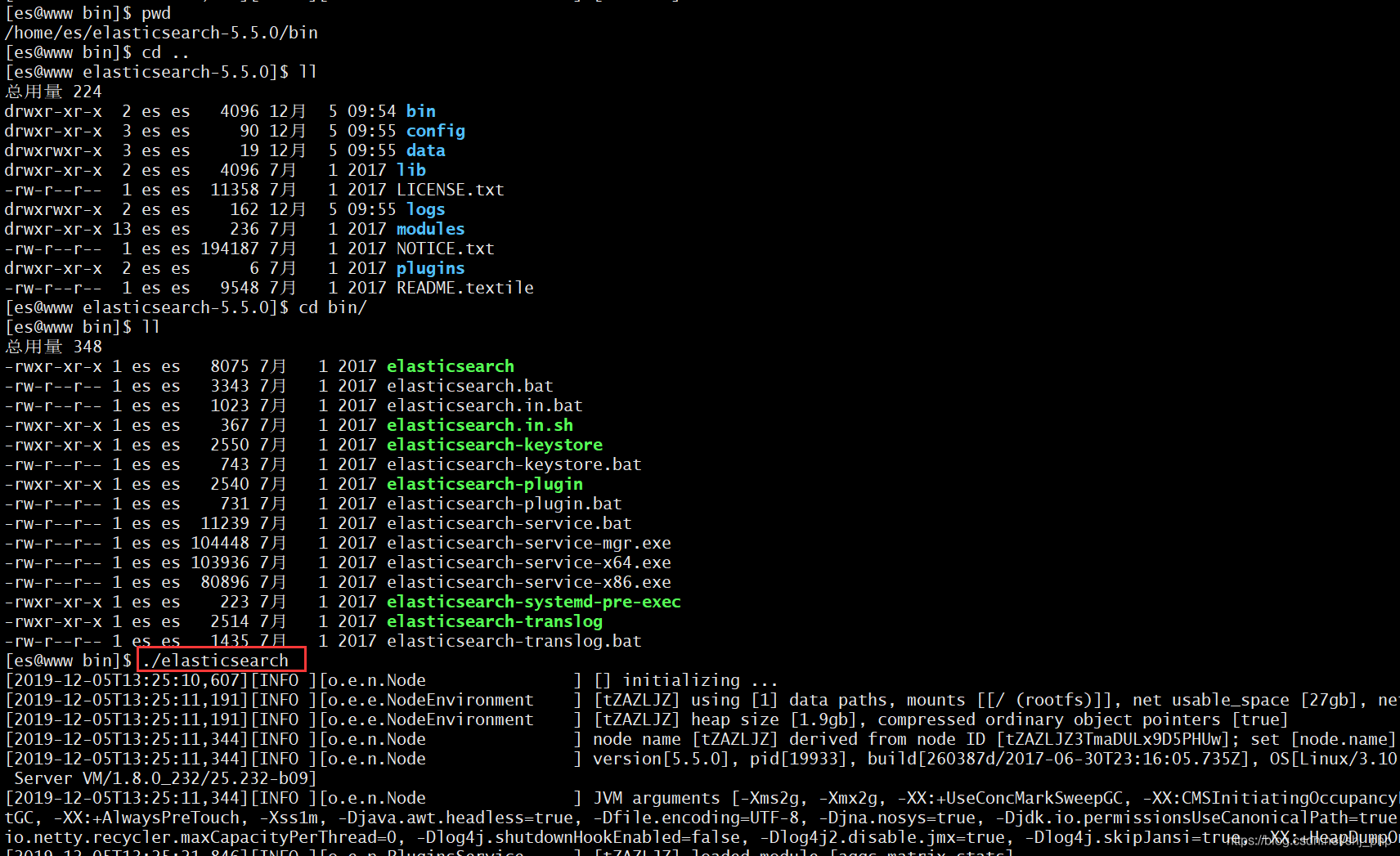
[[email protected] bin]$ pwd
/home/es/elasticsearch-5.5.0/bin
[[email protected] bin]$ cd ..
[[email protected] elasticsearch-5.5.0]$ ll
总用量 224
drwxr-xr-x  2 es es   4096 12月  5 09:54 bin
drwxr-xr-x  3 es es     90 12月  5 09:55 config
drwxrwxr-x  3 es es     19 12月  5 09:55 data
drwxr-xr-x  2 es es   4096 7月   1 2017 lib
-rw-r--r--  1 es es  11358 7月   1 2017 LICENSE.txt
drwxrwxr-x  2 es es    162 12月  5 09:55 logs
drwxr-xr-x 13 es es    236 7月   1 2017 modules
-rw-r--r--  1 es es 194187 7月   1 2017 NOTICE.txt
drwxr-xr-x  2 es es      6 7月   1 2017 plugins
-rw-r--r--  1 es es   9548 7月   1 2017 README.textile
[[email protected] elasticsearch-5.5.0]$ cd bin/
[[email protected] bin]$ ll
总用量 348
-rwxr-xr-x 1 es es   8075 7月   1 2017 elasticsearch
-rw-r--r-- 1 es es   3343 7月   1 2017 elasticsearch.bat
-rw-r--r-- 1 es es   1023 7月   1 2017 elasticsearch.in.bat
-rwxr-xr-x 1 es es    367 7月   1 2017 elasticsearch.in.sh
-rwxr-xr-x 1 es es   2550 7月   1 2017 elasticsearch-keystore
-rw-r--r-- 1 es es    743 7月   1 2017 elasticsearch-keystore.bat
-rwxr-xr-x 1 es es   2540 7月   1 2017 elasticsearch-plugin
-rw-r--r-- 1 es es    731 7月   1 2017 elasticsearch-plugin.bat
-rw-r--r-- 1 es es  11239 7月   1 2017 elasticsearch-service.bat
-rw-r--r-- 1 es es 104448 7月   1 2017 elasticsearch-service-mgr.exe
-rw-r--r-- 1 es es 103936 7月   1 2017 elasticsearch-service-x64.exe
-rw-r--r-- 1 es es  80896 7月   1 2017 elasticsearch-service-x86.exe
-rwxr-xr-x 1 es es    223 7月   1 2017 elasticsearch-systemd-pre-exec
-rwxr-xr-x 1 es es   2514 7月   1 2017 elasticsearch-translog
-rw-r--r-- 1 es es   1435 7月   1 2017 elasticsearch-translog.bat
[[email protected] bin]$ ./elasticsearch
[2019-12-05T13:25:10,607][INFO ][o.e.n.Node               ] [] initializing ...
[2019-12-05T13:25:11,191][INFO ][o.e.e.NodeEnvironment    ] [tZAZLJZ] using [1] data paths, mounts [[/ (rootfs)]], net usable_space [27gb], net total_space [36.9gb], spins? [unknown], types [rootfs]
[2019-12-05T13:25:11,191][INFO ][o.e.e.NodeEnvironment    ] [tZAZLJZ] heap size [1.9gb], compressed ordinary object pointers [true]
[2019-12-05T13:25:11,344][INFO ][o.e.n.Node               ] node name [tZAZLJZ] derived from node ID [tZAZLJZ3TmaDULx9D5PHUw]; set [node.name] to override
[2019-12-05T13:25:11,344][INFO ][o.e.n.Node               ] version[5.5.0], pid[19933], build[260387d/2017-06-30T23:16:05.735Z], OS[Linux/3.10.0-957.21.3.el7.x86_64/amd64], JVM[Oracle Corporation/OpenJDK 64-Bit Server VM/1.8.0_232/25.232-b09]
[2019-12-05T13:25:11,344][INFO ][o.e.n.Node               ] JVM arguments [-Xms2g, -Xmx2g, -XX:+UseConcMarkSweepGC, -XX:CMSInitiatingOccupancyFraction=75, -XX:+UseCMSInitiatingOccupancyOnly, -XX:+DisableExplicitGC, -XX:+AlwaysPreTouch, -Xss1m, -Djava.awt.headless=true, -Dfile.encoding=UTF-8, -Djna.nosys=true, -Djdk.io.permissionsUseCanonicalPath=true, -Dio.netty.noUnsafe=true, -Dio.netty.noKeySetOptimization=true, -Dio.netty.recycler.maxCapacityPerThread=0, -Dlog4j.shutdownHookEnabled=false, -Dlog4j2.disable.jmx=true, -Dlog4j.skipJansi=true, -XX:+HeapDumpOnOutOfMemoryError, -Des.path.home=/home/es/elasticsearch-5.5.0]
[2019-12-05T13:25:21,846][INFO ][o.e.p.PluginsService     ] [tZAZLJZ] loaded module [aggs-matrix-stats]
[2019-12-05T13:25:21,866][INFO ][o.e.p.PluginsService     ] [tZAZLJZ] loaded module [ingest-common]
[2019-12-05T13:25:21,866][INFO ][o.e.p.PluginsService     ] [tZAZLJZ] loaded module [lang-expression]
[2019-12-05T13:25:21,866][INFO ][o.e.p.PluginsService     ] [tZAZLJZ] loaded module [lang-groovy]
[2019-12-05T13:25:21,866][INFO ][o.e.p.PluginsService     ] [tZAZLJZ] loaded module [lang-mustache]
[2019-12-05T13:25:21,866][INFO ][o.e.p.PluginsService     ] [tZAZLJZ] loaded module [lang-painless]
[2019-12-05T13:25:21,866][INFO ][o.e.p.PluginsService     ] [tZAZLJZ] loaded module [parent-join]
[2019-12-05T13:25:21,866][INFO ][o.e.p.PluginsService     ] [tZAZLJZ] loaded module [percolator]
[2019-12-05T13:25:21,866][INFO ][o.e.p.PluginsService     ] [tZAZLJZ] loaded module [reindex]
[2019-12-05T13:25:21,867][INFO ][o.e.p.PluginsService     ] [tZAZLJZ] loaded module [transport-netty3]
[2019-12-05T13:25:21,867][INFO ][o.e.p.PluginsService     ] [tZAZLJZ] loaded module [transport-netty4]
[2019-12-05T13:25:21,867][INFO ][o.e.p.PluginsService     ] [tZAZLJZ] no plugins loaded
[2019-12-05T13:25:24,444][INFO ][o.e.d.DiscoveryModule    ] [tZAZLJZ] using discovery type [zen]
[2019-12-05T13:25:25,018][INFO ][o.e.n.Node               ] initialized
[2019-12-05T13:25:25,018][INFO ][o.e.n.Node               ] [tZAZLJZ] starting ...
[2019-12-05T13:25:25,427][INFO ][o.e.t.TransportService   ] [tZAZLJZ] publish_address {127.0.0.1:9300}, bound_addresses {[::1]:9300}, {127.0.0.1:9300}
[2019-12-05T13:25:28,167][WARN ][o.e.m.j.JvmGcMonitorService] [tZAZLJZ] [gc][young][1][2] duration [1s], collections [1]/[2.6s], total [1s]/[1.6s], memory [240.9mb]->[43.9mb]/[1.9gb], all_pools {[young] [225.4mb]->[7.1mb]/[266.2mb]}{[survivor] [15.4mb]->[33.2mb]/[33.2mb]}{[old] [0b]->[6.2mb]/[1.6gb]}
[2019-12-05T13:25:28,169][INFO ][o.e.m.j.JvmGcMonitorService] [tZAZLJZ] [gc][1] overhead, spent [1s] collecting in the last [2.6s]
[2019-12-05T13:25:28,729][INFO ][o.e.c.s.ClusterService   ] [tZAZLJZ] new_master {tZAZLJZ}{tZAZLJZ3TmaDULx9D5PHUw}{6_9DUDbIQkOrpUYVs6NNsQ}{127.0.0.1}{127.0.0.1:9300}, reason: zen-disco-elected-as-master ([0] nodes joined)
[2019-12-05T13:25:28,849][INFO ][o.e.h.n.Netty4HttpServerTransport] [tZAZLJZ] publish_address {127.0.0.1:9200}, bound_addresses {[::1]:9200}, {127.0.0.1:9200}
[2019-12-05T13:25:28,849][INFO ][o.e.n.Node               ] [tZAZLJZ] started
[2019-12-05T13:25:29,591][INFO ][o.e.g.GatewayService     ] [tZAZLJZ] recovered [1] indices into cluster_state
[2019-12-05T13:25:29,937][INFO ][o.e.c.r.a.AllocationService] [tZAZLJZ] Cluster health status changed from [RED] to [YELLOW] (reason: [shards started [[.kibana][0]] ...]).
第二 启动kibana

[[email protected] kibana]# pwd
/usr/local/kibana
[[email protected] kibana]# ll
总用量 836
drwxrw----   2 root root     41 7月   1 2017 bin
drwxrw----   2 root root     47 12月  5 13:07 config
drwxrw----   2 root root     18 12月  4 16:40 data
-rwxrw----   1 root root    562 7月   1 2017 LICENSE.txt
drwxrw----   6 root root    108 7月   1 2017 node
drwxrw---- 620 root root  20480 7月   1 2017 node_modules
-rwxrw----   1 root root 800210 7月   1 2017 NOTICE.txt
drwxrw----   3 root root     45 7月   1 2017 optimize
-rwxrw----   1 root root    721 7月   1 2017 package.json
drwxrw----   2 root root      6 7月   1 2017 plugins
-rwxrw----   1 root root   4909 7月   1 2017 README.txt
drwxrw----  11 root root    139 7月   1 2017 src
drwxrw----   5 root root     52 7月   1 2017 ui_framework
drwxrw----   2 root root    309 7月   1 2017 webpackShims
[[email protected] kibana]# cd bin
[[email protected] bin]# ll
总用量 8
-rwxrw---- 1 root root 612 7月   1 2017 kibana
-rwxrw---- 1 root root 619 7月   1 2017 kibana-plugin
[[email protected] bin]# ./kibana
  log   [05:21:42.932] [info][status][plugin:[email protected]] Status changed from uninitialized to green - Ready
  log   [05:21:43.076] [info][status][plugin:[email protected]] Status changed from uninitialized to yellow - Waiting for Elasticsearch
  log   [05:21:43.098] [info][status][plugin:[email protected]] Status changed from uninitialized to green - Ready
  log   [05:21:43.117] [info][status][plugin:[email protected]] Status changed from uninitialized to green - Ready
  log   [05:21:43.474] [info][status][plugin:[email protected]] Status changed from uninitialized to green - Ready
  log   [05:21:43.477] [info][listening] Server running at http://0.0.0.0:5601
  log   [05:21:43.478] [info][status][ui settings] Status changed from uninitialized to yellow - Elasticsearch plugin is yellow
  log   [05:21:43.511] [info][status][plugin:[email protected]] Status changed from yellow to green - Kibana index ready
  log   [05:21:43.512] [info][status][ui settings] Status changed from yellow to green - Ready
浏览器访问kibana:默认端口是5601
http://192.168.80.xxx:5601,页面如下:

需要注意的是:对于kibana.yml配置文件的配置:server.host: "0.0.0.0"


边栏推荐
猜你喜欢

Ctfhub web password weak password

Download and installation of MySQL

Dialogue with opensea co creation Alex: we still only touch the tip of the iceberg of NFT capability | chain catcher
【Redis】Hash类型

Target detection - ADAS practice

Boost the digital economy and face the future office | the launch of the new version of spreadjsv15.0 is about to begin

项目研发,有哪些好用的免费脑图工具软件

如何用项目甘特图,做好项目汇报

Understand flex layout in an article

干货丨微服务架构是什么?有哪些优点和不足?
随机推荐
Written examination questions, answers and analysis of Digital IC design and FPGA design (2) 2021 Huawei Hisilicon (Part 1)
table通过伪类实现 另类自适应
扁平结构转换为树结构
The 10 most commonly used gadgets for waterfall project management can be built and used freely
[redis] key hierarchy
How to become a senior digital IC Design Engineer (6-6) digital IC Verification: system level simulation
利用kubernetes資源鎖完成自己的HA應用
Koa quick start
The meaning of cross multiplication and dot multiplication (simple formula memory method)
Calculate rectangular area
How to become a senior digital IC Design Engineer (4-5) script: file comparison operation implemented by shell script
[network communication learning notes] socket IO setup and deployment
e.target与e.currentTarget的区别
如何用项目甘特图,做好项目汇报
SystemVerilog structure (I)
Koa 快速入门
Which brokerage is safer and more convenient to open an account for compass mobile stock?
String length
Target detection - ADAS practice
Ctfhub web SQL injection - integer injection