当前位置:网站首页>IDEA连接数据库时区问题,报红Server returns invalid timezone. Need to set ‘serverTimezone‘ property.
IDEA连接数据库时区问题,报红Server returns invalid timezone. Need to set ‘serverTimezone‘ property.
2022-07-27 16:23:00 【破风_1874】
目录
1、IDEA连接数据库步骤
1)点击IDEA右侧栏目的 “Database”。
2)点击 “+”,“Data Source” >> “MySQL”。
3)填写用户名 “User”、密码 “Password” 、数据库名称 “Database”,最后点击 “Test Connection” 测试连接 。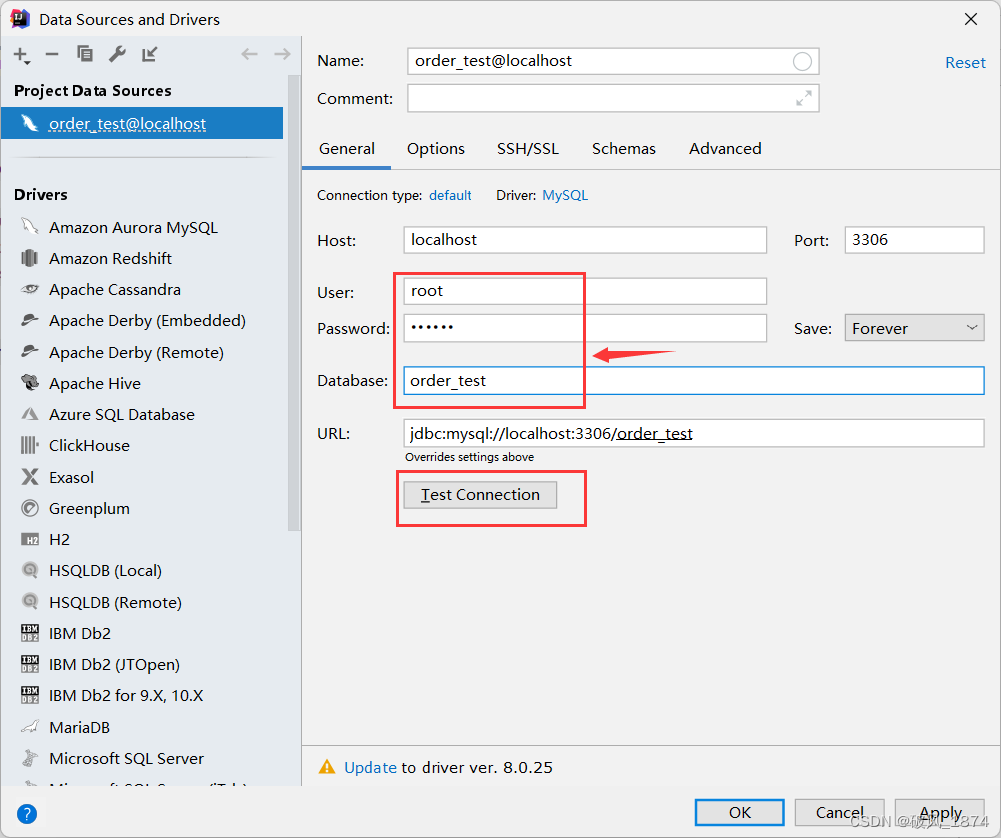
此时报红:
如图:
出现这种情况,是因为MySQL驱动的jar包中的默认时区是UTC。
UTC代表的是全球标准时间 ,但是我们使用的时间是北京时区也就是东八区,领先UTC八个小时。
因为时区的不一致,返回了无效的时区,接下来,我们以 idea 2020.2.3 为例,来解决一下问题。
2、时区不一致问题解决
2.1 解决方法一:手动设置 “serverTimezon" 属性值
1)点击 “Set time zone”,跳转到 “高级” 标签中手动设置 “serverTimezon" 属性值。

2)修改默认的 “UTC” 为 “GMT”,记得点击 “Apply” 才能生效。
3)回到 “General” 重新输入数据库密码,再次点击 “Test connect” 尝试连接数据库,会发现连接成功。
2.2 解决方法二:URL 中添加时区设置
直接在 URL 后面添加 “?serverTimezone=GMT%2B8” ,然后再点击 “Test connection” 进行连接测试,会发现成功连接上数据库。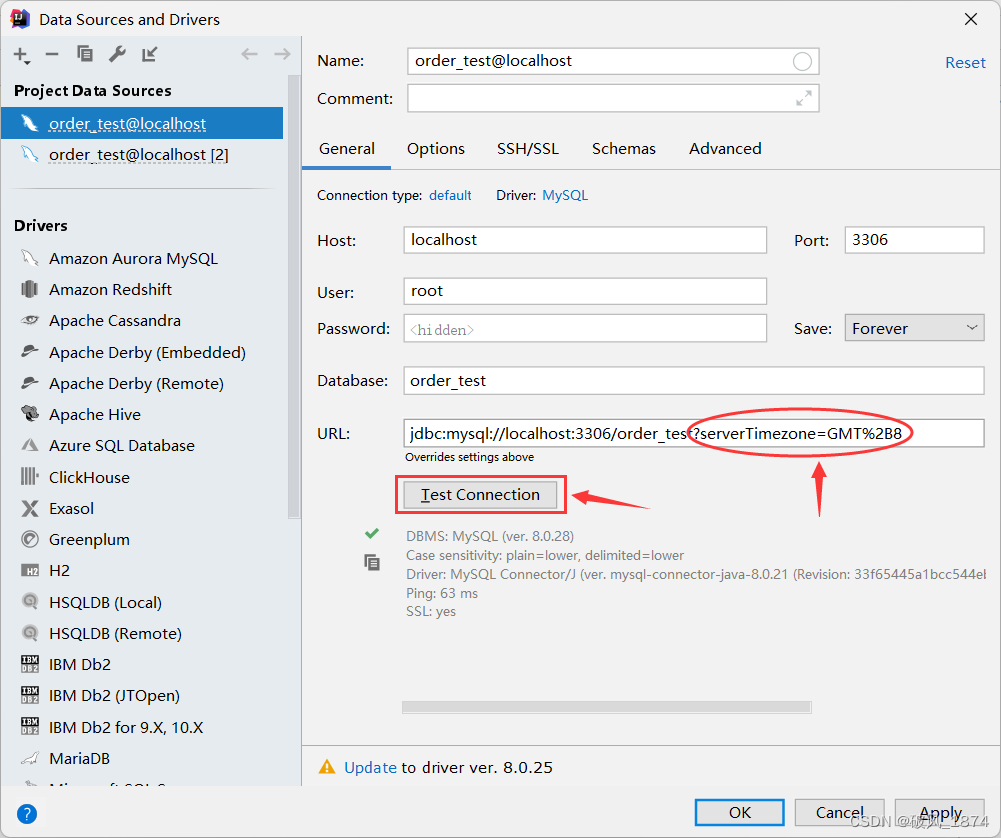
2.3 解决方法三:以管理员身份运行命令提示符(cmd),设置mysql的时区
1)进入命令窗口(Win + R)输入cmd,再进入到本地的 MySQL 的 bin 路径下, 输入如下命令:
mysql -u root -p
正确输入密码,连接上数据库。
2)继续输入如下命令:
show variables like '%time_zone';
显示为 SYSTEM ,表示没有设置时区: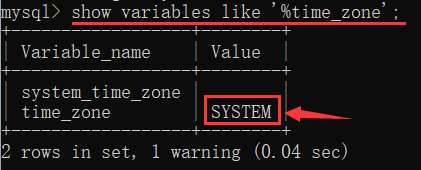
3)接下来,进行时区设置,输入如下命令:
set time_zone = '+8:00';
成功设置时区:
4)在 idea 中重新连接数据库,成功连接上。
边栏推荐
猜你喜欢




随机推荐
Uploading and downloading of files
Unity显示Kinect捕获的镜头
ridis命令笔记
Commodity comment information and comment information classification
Intelligent insomnia therapeutic instrument product dlt8p68sa Jericho
Whole body multifunctional massage instrument chip-dltap602sd
Interceptor拦截器
大冤种们,新进测试行业,如何正确选择意向企业?
如何用自动化测试搞垮团队
用函数在Excel中从文本字符串提取数字
进行接口测试时,连接数据库,对数据源进行备份、还原、验证操作
Sentinel1.8.4 persistent Nacos configuration
WSN Journal indexed by SCI(转)
I'm stupid. When completable future is used with openfegin, it even reports an error
Household mute mosquito repellent lamp chip-dltap703sd-jericho
Unity学习笔记(实现传送带)
MySQL 01 关系型数据库设计
C static method and non static method
Talking about JVM (frequent interview)
JS to realize simple form verification and select all functions