当前位置:网站首页>Beginner to embedded development
Beginner to embedded development
2022-06-25 21:11:00 【HQYJ_】
This article sorts out some basic skills in embedded development , All are sorted out according to previous engineering experience , It is suitable for novices who have not done embedded development before .
The embedded development process is generally as follows , Usually in PC The machine Windows Installation under system Ubuntu virtual machine , Build embedded development environment and cross compilation environment , After development , Compile to get bin file , And then in Windows Lower bound bin The file is sent to the embedded board through serial port or network , The program runs on the embedded board .
1、RS232 Serial port connection hole diagram
A serial port , Generally also refers to COM Interface , Slow transmission speed , Suitable for long distance transmission . It is used for data communication between host and embedded version , It is generally used for issuing instructions, etc . According to the agreement standard, it is also divided into RS-232-C、RS-422、RS485 etc. . among RS-232 It is also the most commonly used serial port , Called standard serial port .
The following is just an introduction RS-232 Wiring diagram of .RS232 Serial port is 9 Needle interface , Divided into male head and female head ,PC The serial port on the machine is generally male , Here's the picture .
The functions of each pinhole are as follows :
The signal line required for the simplest serial interface is 「2 Data sending (TxD)」、「3 Data reception (RxD) and 5 Signally (GnD)」 , Just connect this 3 The upper computer can be realized by one line PC Communication with embedded board , Here's the picture :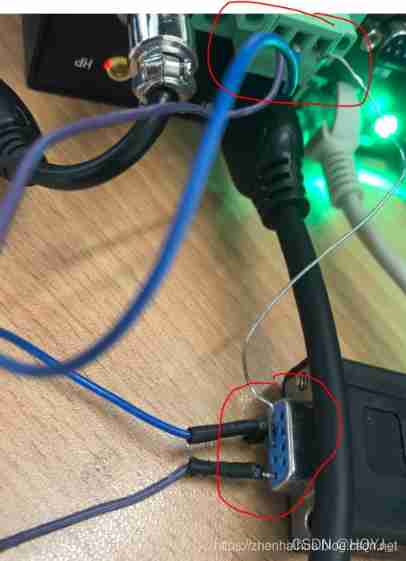
2. Serial communication tool between upper computer and embedded board
In general use SecureCRT Tool for communication between upper computer and board .
(1) A serial port connection
Open quick connect :
Choice of agreement Serial, The port and baud rate are set according to the actual situation :
Click to connect , Pop up a new window , Hit enter , The following interface shows that the upper computer is successfully connected with the board .
(2) Use Telnet Connect
Telnet Connecting is using the network ( Network cable ) Realization PC Communication between computer and board , Without serial port .
Tlenet make new connection , choice Telnet agreement ,「 The host name is the name of the board ip.」
Click to connect , Pop up a new window , Enter your username and password :
3. The upper computer and embedded board realize file transmission
stay SecureCRT Using commands in ifconfig Check the of the board ip Address :
Connect the upper computer PC The embedded network card is directly connected with the embedded network card , take PC Local connection of the machine ip Change the address to the same network segment as the embedded board , for example :
Open... In the upper computer tftpd32 Tools , stay Server interface Select the same network segment between the upper computer and the embedded board ip, as follows :
Attention and so on PC The machine is used as TFTP The server side of the protocol , The board acts as a client .
Download the file from the upper computer to the board , stay SecureCRT Enter the following command :
here -g From PC Download the file to the board ,-r Represents a remote server ( namely PC) The file of , 1080P.jpg Indicates the file to be transferred , hinder ip The address is PC The machine IP Address , for example :
After entering the above command , The card receives the file in the current directory . If you need to receive files in a directory , You need to switch to this directory , Then enter the above command .
Transfer the file from the board to the upper computer , stay SecureCRT Enter the following command :
here -p Push means ,-l Means local ( card ) The file of .
4. Commonly used Linux command
Back to root :cd /
Unzip the file :tar -xvf data.tar
Delete file :rm -f 1.txt
Change the read and write permissions of the directory :sudo chmod 777 /usr/share/themes explain : here 777 Means that every user can read and write , The following is the path
rename :mv aaa.h264 bbb.h264 explain : take aaa.h264 Rename it to bbb.264
see ip Address :ifconfig
View file properties :stat sample_nnie_main
View current path :pwd
Create folder :mkdir
change ip Address :ifconfig eth0 192.168.6.111 ( It will be lost after restart )
5. MP4、AVI And so on .h264 Format *
In embedded systems , Programs often cannot be decoded directly mp4,avi Video files in other formats , It needs to be converted to bare flow .h264 Format , The method is as follows :
PC Upload and download ffmpeg Tools , Switch to ffmpeg.exe The catalog of , use cmd Open the command line window :
.mp4 turn .h264:
.avi turn .h264:
mov turn h264:
That is to say ffmpeg Generate files in the required format under the directory .
【 Article Welfare 】 Below are some embedded tutorial materials , Interested can learn , You can also join the learning technology exchange group 943552345, Discuss problems with the leaders in the group , You can get a full set of data by joining the group ( Source code attached )
Into embedded
Analysis on the development and current situation of embedded industry
Embedded development should also understand WEB technology
Embedded operating system uC/OS
- Embedded system porting ( The main speak UBOOT transplant )
Quick start linux
Learn to Makeile, Truly experience the pleasure of doubling efficiency
RISC-V Embedded system development
Exynos4412 Bare pager LED Drive development
边栏推荐
- Cvpr2021 collection of papers | cvpr2021 latest papers | cvpr2021 review results | cvpr2021 admission results
- JS__ This, arguments, cloning, ternary operator__ Duyi
- Patrol script
- 炒股票用指南针安全还是用证券软件安全?哪里可以开户怎么开
- Section 13: simplify your code with Lombok
- ZABBIX foundation details
- MySQL lock
- Analysis and cleaning of kdevtmpfsi virus content
- Leetcode theme [array] -31- next spread
- Illustrated with pictures and texts, 700 pages of machine learning notes are popular! Worth learning
猜你喜欢

Illustrated with pictures and texts, 700 pages of machine learning notes are popular! Worth learning
This is a simple and cool way to make large screen chart linkage. Smartbi will teach you

lombok

01 network basics
MySQL installation tutorial

Decryption of APP parameters of a cross-border export e-commerce - dunhuang.com
Introduction to the basics of kotlin language: lambda expression
Chrome plugin installation
Insert and update each database

Flexible scale out: from file system to distributed file system


随机推荐
Introduction to interface test, interface protocol and common interface test tools
[machine learning] machine learning from zero to mastery -- teach you to understand the principle of decision tree
04 disk space management
The beginning of manjaro's journey
JS__ This, arguments, cloning, ternary operator__ Duyi
Working principle and experimental analysis of DHCP
Cross project measurement is a good helper for CTOs and PMOS
[nailing scenario capability package] manage the on-the-job / off-the-job situation of employees
How to close gracefully after using jedis
2022 "gold, silver and four" is a must for job hopping. You must know 100 questions in 2022 intermediate and advanced Android interview to realize your big factory dream
Data query of server SQL. The most important chapter in database learning
Differences between modems and routers (powercert animated videos)
Idea implements hot deployment
2022 oceanbase technical essay contest officially opened | come and release your force
Multi database and multi table backup and restore of MySQL under Linux
Talking about the foundation of function test today
JS__ Inheritance mode, namespace, object enumeration__ Duyi
The secret of metaktv technology of sound network: 3D space sound effect + air attenuation + vocal blur
[machine learning] machine learning from zero to mastery -- teaching you how to use decision tree to predict contact lens types
Openocd compilation and installation