当前位置:网站首页>Fabric 编写案例 链码
Fabric 编写案例 链码
2022-07-30 00:47:00 【幸运数字-12】
1 、创建链码
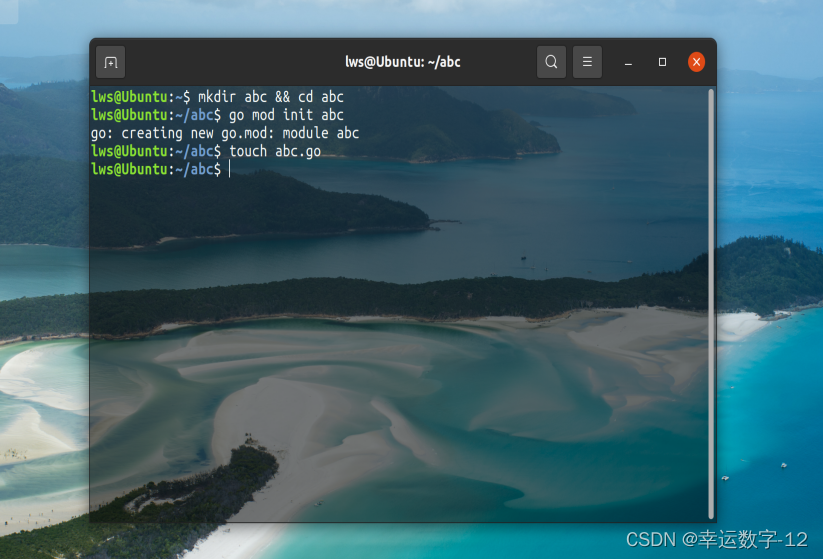
2. 编辑代码
package main

import (
  "encoding/json"
  "fmt"
  "log"

  "github.com/hyperledger/fabric-contract-api-go/contractapi"
)

// SmartContract provides functions for managing an Asset
type SmartContract struct {
  contractapi.Contract
}

// Asset describes basic details of what makes up a simple asset
type Asset struct {
  ID             string `json:"ID"`
  Color          string `json:"color"`
  Size           int    `json:"size"`
  Owner          string `json:"owner"`
  AppraisedValue int    `json:"appraisedValue"`
}

// InitLedger adds a base set of assets to the ledger
func (s *SmartContract) InitLedger(ctx contractapi.TransactionContextInterface) error {
  assets := []Asset{
    {ID: "asset1", Color: "blue", Size: 5, Owner: "Tomoko", AppraisedValue: 300},
    {ID: "asset2", Color: "red", Size: 5, Owner: "Brad", AppraisedValue: 400},
    {ID: "asset3", Color: "green", Size: 10, Owner: "Jin Soo", AppraisedValue: 500},
    {ID: "asset4", Color: "yellow", Size: 10, Owner: "Max", AppraisedValue: 600},
    {ID: "asset5", Color: "black", Size: 15, Owner: "Adriana", AppraisedValue: 700},
    {ID: "asset6", Color: "white", Size: 15, Owner: "Michel", AppraisedValue: 800},
  }

  for _, asset := range assets {
    assetJSON, err := json.Marshal(asset)
    if err != nil {
      return err
    }

    err = ctx.GetStub().PutState(asset.ID, assetJSON)
    if err != nil {
      return fmt.Errorf("failed to put to world state. %v", err)
    }
  }

  return nil
}

// CreateAsset issues a new asset to the world state with given details.
func (s *SmartContract) CreateAsset(ctx contractapi.TransactionContextInterface, id string, color string, size int, owner string, appraisedValue int) error {
  exists, err := s.AssetExists(ctx, id)
  if err != nil {
    return err
  }
  if exists {
    return fmt.Errorf("the asset %s already exists", id)
  }

  asset := Asset{
    ID:             id,
    Color:          color,
    Size:           size,
    Owner:          owner,
    AppraisedValue: appraisedValue,
  }
  assetJSON, err := json.Marshal(asset)
  if err != nil {
    return err
  }

  return ctx.GetStub().PutState(id, assetJSON)
}

// ReadAsset returns the asset stored in the world state with given id.
func (s *SmartContract) ReadAsset(ctx contractapi.TransactionContextInterface, id string) (*Asset, error) {
  assetJSON, err := ctx.GetStub().GetState(id)
  if err != nil {
    return nil, fmt.Errorf("failed to read from world state: %v", err)
  }
  if assetJSON == nil {
    return nil, fmt.Errorf("the asset %s does not exist", id)
  }

  var asset Asset
  err = json.Unmarshal(assetJSON, &asset)
  if err != nil {
    return nil, err
  }

  return &asset, nil
}

// UpdateAsset updates an existing asset in the world state with provided parameters.
func (s *SmartContract) UpdateAsset(ctx contractapi.TransactionContextInterface, id string, color string, size int, owner string, appraisedValue int) error {
  exists, err := s.AssetExists(ctx, id)
  if err != nil {
    return err
  }
  if !exists {
    return fmt.Errorf("the asset %s does not exist", id)
  }

  // overwriting original asset with new asset
  asset := Asset{
    ID:             id,
    Color:          color,
    Size:           size,
    Owner:          owner,
    AppraisedValue: appraisedValue,
  }
  assetJSON, err := json.Marshal(asset)
  if err != nil {
    return err
  }

  return ctx.GetStub().PutState(id, assetJSON)
}

// DeleteAsset deletes an given asset from the world state.
func (s *SmartContract) DeleteAsset(ctx contractapi.TransactionContextInterface, id string) error {
  exists, err := s.AssetExists(ctx, id)
  if err != nil {
    return err
  }
  if !exists {
    return fmt.Errorf("the asset %s does not exist", id)
  }

  return ctx.GetStub().DelState(id)
}

// AssetExists returns true when asset with given ID exists in world state
func (s *SmartContract) AssetExists(ctx contractapi.TransactionContextInterface, id string) (bool, error) {
  assetJSON, err := ctx.GetStub().GetState(id)
  if err != nil {
    return false, fmt.Errorf("failed to read from world state: %v", err)
  }

  return assetJSON != nil, nil
}

// TransferAsset updates the owner field of asset with given id in world state.
func (s *SmartContract) TransferAsset(ctx contractapi.TransactionContextInterface, id string, newOwner string) error {
  asset, err := s.ReadAsset(ctx, id)
  if err != nil {
    return err
  }

  asset.Owner = newOwner
  assetJSON, err := json.Marshal(asset)
  if err != nil {
    return err
  }

  return ctx.GetStub().PutState(id, assetJSON)
}

// GetAllAssets returns all assets found in world state
func (s *SmartContract) GetAllAssets(ctx contractapi.TransactionContextInterface) ([]*Asset, error) {
  // range query with empty string for startKey and endKey does an
  // open-ended query of all assets in the chaincode namespace.
  resultsIterator, err := ctx.GetStub().GetStateByRange("", "")
  if err != nil {
    return nil, err
  }
  defer resultsIterator.Close()

  var assets []*Asset
  for resultsIterator.HasNext() {
    queryResponse, err := resultsIterator.Next()
    if err != nil {
      return nil, err
    }

    var asset Asset
    err = json.Unmarshal(queryResponse.Value, &asset)
    if err != nil {
      return nil, err
    }
    assets = append(assets, &asset)
  }

  return assets, nil
}

func main() {
  assetChaincode, err := contractapi.NewChaincode(&SmartContract{})
  if err != nil {
    log.Panicf("Error creating asset-transfer-basic chaincode: %v", err)
  }

  if err := assetChaincode.Start(); err != nil {
    log.Panicf("Error starting asset-transfer-basic chaincode: %v", err)
  }
}
处理依赖

3.启动网络
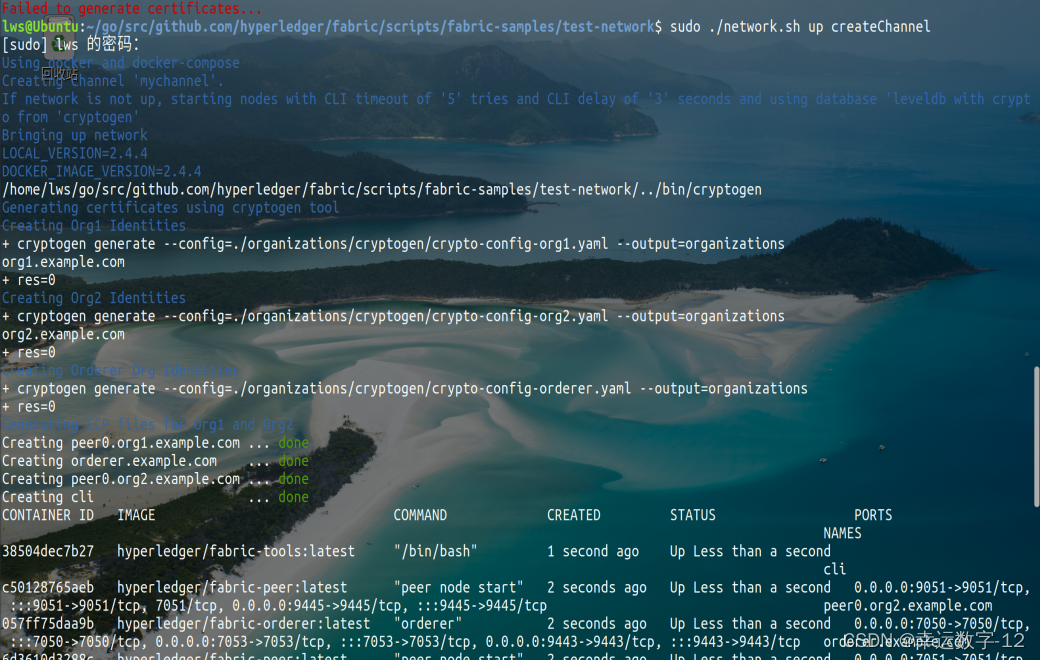

4 .打包处理安装链码
./network.sh deployCC -ccn abc -ccp ~/abc/ -ccl go


5.配置环境变量

6.创建初始资产 (invoke)

7.操作资产
查询函数

创建一处资产
刘山

创建成功。
继续查询

确实成功!!
增删改查 类似;
边栏推荐
- 测试员容易陷入的9大误区
- Worthington Enzymatic Cell Harvest & Cell Adhesion and Harvest
- 排序相关应用
- 二维数组的查找
- Since the media how to write a short video title?Three hot style title, let your video gain more traffic
- 抖音短视频流量获取攻略,掌握好这些一定可以出爆款
- Detailed introduction of @RequestParam annotation
- 自学HarmonyOS应用开发(47)- 自定义switch组件
- Worthington Optimized Technology: Cell Quantification
- I.MX6U-驱动开发-3-新字符驱动
猜你喜欢

高德地图jsapi不生效 INVALID_USER_SCODE

Linux-安装MySQL(详细教程)
How many ways does Selenium upload files?I don't believe you have me

这是一道非常有争议的题,我的分析如下: TCP/IP在多个层引入了安全机制,其中TLS协议位于______。 A.数据链路层 B.网络层 C.传输层 D.应用层

Worthington解离酶:中性蛋白酶(分散酶)详情解析

Win11的WSL2系统更换磁盘和wsl使用简介

From the perspective: the interviewer interview function test engineer mainly inspects what ability?

Unity笔记——FairyGUI

【集训DAY16】KC‘s Can 【动态规划】

KDE Frameworks 5.20.0:Plasma迎来诸多改进
随机推荐
ZLMediaKit源码分析 - NotifyCenter
Since the media increase play a short video?From the three aspects
【集训DAY18】Welcome J and Z 【动态规划】
Recurrent Neural Network (RNN)
Weekly recommended short video: What is R&D efficiency?It can achieve anti "involution"?
Navicat如何连接MySQL
1592. 重新排列单词间的空格
I.MX6U-驱动开发-3-新字符驱动
Nacos micro service ~ Nacos 】 【 configuration of the center
Worthington优化技术:细胞定量
[MySQL series] MySQL database foundation
Google Chrome (google) is set to translate Chinese, the translation option does not take effect or the translation option does not pop up
Worthington经过使用测试的细胞分离系统方案
如何在AWS里面的SQL server设置混合登陆
[Flutter] Detailed explanation of the use of the Flutter inspector tool, viewing the Flutter layout, widget tree, debugging interface, etc.
ZLMediaKit源码分析 - WebRtc连接迁移
STM32 - OLED display experiment
【集训DAY16】KC ‘ s Stars【dfs】
重建二叉树
测试员容易陷入的9大误区