当前位置:网站首页>100ask seven day IOT training camp learning notes - bare metal program framework design
100ask seven day IOT training camp learning notes - bare metal program framework design
2022-06-26 01:15:00 【_ kukukukiki__】
1. Preface
Signed up 100ask Organized a seven day IOT smart home training camp , Every day in the morning 2 An hour to talk about the basics , Afternoon 2 Hours of advanced lecture . After two days' study, I really feel more fulfilled . In the next few days, I will focus on the key points of each class 、 Record the difficulties and your understanding .
2. theory
2.1 Throw questions
In this lesson, Mr. Wei started the course with the program framework design as the starting point , Take embedded bare metal development as an example , Many beginners usually work in business layer code or even main Function , Directly call the interface used to describe or hardware ( Such as HAL library ):
void main(void)
{

    GPIO_PinState key;
    while (1)
    {

        key = HAL_GPIO_ReadPin(GPIOF, GPIO_PIN_6);
        if (key == GPIO_PIN_RESET)
            HAL_GPIO_WritePin(GPIOF, GPIO_PIN_5, GPIO_PIN_RESET);
        else
            HAL_GPIO_WritePin(GPIOF, GPIO_PIN_5, GPIO_PIN_SET);
    }
}
This will cause serious coupling between business layer code and board level code , Extend the following software functions 、 Hardware upgrade and code reuse will cause inconvenience , At the same time, it will also create obstacles for business layer developers who do not understand hardware .
To solve this problem , We layered the program structure , Separate business logic from hardware driver code :
// main.c
void main(void)
{

    int key;
    while (1)
    {

        key = read_key();
        if (key == UP)
            led_on();
        else
            led_off();
    }
}

// key.c
int read_key(void)
{

    GPIO_PinState key;
    key = HAL_GPIO_ReadPin(GPIOF, GPIO_PIN_6);
    if (key == GPIO_PIN_RESET)
        return 0;
    else
        return 1;
}

// led.c
void led_on(void)
{

    HAL_GPIO_WritePin(GPIOF, GPIO_PIN_5, GPIO_PIN_RESET);
}

void led_off(void)
{

    HAL_GPIO_WritePin(GPIOF, GPIO_PIN_5, GPIO_PIN_SET);
}
This solves the problem of coupling business logic code with hardware driver code , But there are still two unsolved problems :
One 、 Software compatibility problems caused by hardware version iteration
Two 、 Functional scalability issues
2.2 Introduce function pointer
Here we have to solve the first problem , Usually there are 3 Methods :
Macro switch
#define HARDWARE_VER 1

// key.c
//  Return value : 0 Indicates being pressed , 1 Indicates that it is loosened
int read_key(void)
{

    GPIO_PinState key;
#if (HARDWARE_VER == 1)
    key = HAL_GPIO_ReadPin(GPIOF, GPIO_PIN_6);
#else
    key = HAL_GPIO_ReadPin(GPIOF, GPIO_PIN_7);
#endif
    if (key == GPIO_PIN_RESET)
        return 0;
    else
        return 1;
}
Macro switch if more than one , It will be a disaster to maintain .
stay EEPROM Save the hardware version number in , Call the hardware version difference interface according to the version number
// key.c
//  Return value : 0 Indicates being pressed , 1 Indicates that it is loosened
int read_key(void)
{

    GPIO_PinState key;
    int ver = read_hardware_ver();

	if (ver == 1)
	    key = HAL_GPIO_ReadPin(GPIOF, GPIO_PIN_6);
	else (ver == 2)
	    key = HAL_GPIO_ReadPin(GPIOF, GPIO_PIN_7);

    if (key == GPIO_PIN_RESET)
        return 0;
    else
        return 1;
}
Similar to macro switches , More than one , It's hard to maintain .
A function pointer
// key.c
int (*read_key)(void);

//  Return value : 0 Indicates being pressed , 1 Indicates that it is loosened
int read_key_ver1(void)
{

    GPIO_PinState key;
    key = HAL_GPIO_ReadPin(GPIOF, GPIO_PIN_6);
    if (key == GPIO_PIN_RESET)
        return 0;
    else
        return 1;
}

//  Return value : 0 Indicates being pressed , 1 Indicates that it is loosened
int read_key_ver2(void)
{

    GPIO_PinState key;
    key = HAL_GPIO_ReadPin(GPIOF, GPIO_PIN_6);
    if (key == GPIO_PIN_RESET)
        return 0;
    else
        return 1;
}

void key_init()
{

    int ver = read_hardware_ver();
    if (ver == 1)
        read_key = read_key_ver1;
    else
        read_key = read_key_ver2;
}

// main.c
void main(void)
{

    int key;

    key_init();

    while (1)
    {

        key = read_key();
        if (key == UP)
            led_on();
        else
            led_off();
    }
}
I think this method should belong to the 2 An upgraded version of the method , It is also necessary to write the hardware version number to EEPROM in , Make judgments in the software , But the difference lies in the introduction of function pointers , You only need to judge once according to the version number during power on initialization , Assign the interface corresponding to the version to the pointer , There is no need to make a lot of judgment calls in subsequent code .
So the first problem is solved , Let's look at the second question , How to solve the problem of software scalability ?
There is a design principle in the design pattern :OCP, Opening and closing principle , Good design needs to be open to extensions , Turn off for changes . In other words, only new code is added during function expansion , Do not modify the existing code .
Back to the question , If we need to increase the number of buttons , According to our previous thinking, it should be :
// key.c
//  Return value : 0 Indicates being pressed , 1 Indicates that it is loosened
int read_key1(void)
{

    GPIO_PinState key;
    key = HAL_GPIO_ReadPin(GPIOF, GPIO_PIN_6);
    if (key == GPIO_PIN_RESET)
        return 0;
    else
        return 1;
}

//  Return value : 0 Indicates being pressed , 1 Indicates that it is loosened
int read_key2(void)
{

    GPIO_PinState key;
    key = HAL_GPIO_ReadPin(GPIOF, GPIO_PIN_7);
    if (key == GPIO_PIN_RESET)
        return 1;
    else
        return 0;
}
or
// key.c
//  Return value : 0 Indicates being pressed , 1 Indicates that it is loosened
int read_key(int which)
{

    GPIO_PinState key;
    switch (which)
    {

        case 0:
			key = HAL_GPIO_ReadPin(GPIOF, GPIO_PIN_6);
            if (key == GPIO_PIN_RESET)
                return 0;
            else
                return 1;
            break;

        case 1:
			key = HAL_GPIO_ReadPin(GPIOF, GPIO_PIN_7);
            if (key == GPIO_PIN_RESET)
                return 1;
            else
                return 0;
            break;

    }
}
Both of these methods can alleviate the problem to some extent , But to cure the symptoms is not to cure the root . The former method will increase with the number of keys , More and more confusion at the call , Difficult to maintain . The latter method , As long as there is a button to add, it will modify our read_key function , In violation of the OCP principle .
2.3 Introduce structure
In order to solve problems with new ideas , Here new knowledge points are introduced : Structure .
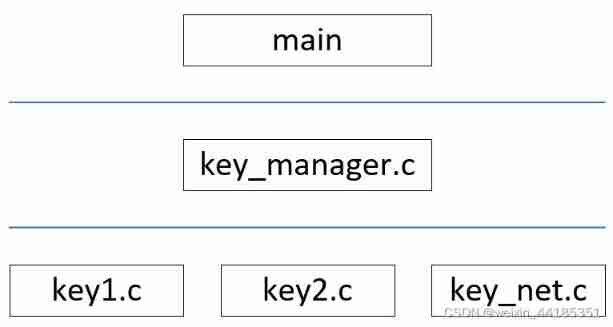
Let's start by layering the program ,main Functions belong to the application layer or business logic layer ,key_manager It belongs to the middle layer , The bottom layer belongs to the hardware driver layer , The management of keys is realized through the middle layer , At the same time, the business logic layer and the driver layer are decoupled .
2.3.1 key_system
// key_manager.h
typedef struct key {

	char *name;
    void (*init)(struct key *k);
    int (*read)(void);
}key, *p_key;

//  Initialization of all keys
void key_init(void);

//  According to the key name Get the key
key *get_key(char *name);
// key_manager.c
int key_cnt = 0;
key *keys[32];

void register_key(key *k)
{

	keys[key_cnt] = k;
	key_cnt++;
}

void key_init(void)
{

	k1_init();
	k2_init();
}

key *get_key(char *name)
{

	int i = 0;
	for (i = 0; i < key_cnt; i++)
		if (strcmp(name, keys[i]->name) == 0)
			return keys[i];

	return 0;
}
// key1.c
//  Return value : 0 Indicates being pressed , 1 Indicates that it is loosened
static int read_key1(void)
{

    GPIO_PinState key_status;
    key_status = HAL_GPIO_ReadPin(GPIOF, GPIO_PIN_6);
    if (key_status == GPIO_PIN_RESET)
        return 0;
    else
        return 1;
}

static key k1 = {
    "k1", 0, read_key1};

void k1_init(void)
{

	register_key(&k1);
}
// key2.c
//  Return value : 0 Indicates being pressed , 1 Indicates that it is loosened
static int read_key2(void)
{

    GPIO_PinState key_status;
    key_status = HAL_GPIO_ReadPin(GPIOF, GPIO_PIN_7);
    if (key_status == GPIO_PIN_RESET)
        return 1;
    else
        return 0;
}

static key k2 = {
    "k2", NULL, read_key2};

void k2_init(void)
{

	register_key(&k2);
}
// main.c
void main(void)
{

	key *k;

	key_init();

	/*  Use a key  */
	k = get_key("k1");
	if (k == NULL)
		return;

	while (1)
	{

		if (k->read(k) == 0)
			led_on();
		else
			led_off();
	}
}
2.3.2 key_system_read_multi_key
There are still some problems with the current code , There is no decoupling between the business layer and the driver layer , stay main There are also specific keys in the function read Function call and state judgment . meanwhile , As the business layer, the middle layer is expected to read the status of all keys at the same time .
Then optimize the implementation of the middle tier :
// key_manager.h
typedef struct key {

	char *name;
    unsigned char id;
    void (*init)(struct key *k);
    int (*read)(void);
}key, *p_key;

#define KEY_UP 0xA
#define KEY_DOWN 0xB

//  Initialization of all keys
void key_init(void);

//  Read the status of all keys
int read_key(void);
// key_manager.c
int key_cnt = 0;
key *keys[32];

void register_key(key *k)
{

	keys[key_cnt] = k;
	key_cnt++;
}

void key_init(void)
{

	k1_init();
	k2_init();
}

int read_key(void)
{

    int val;
	for (int i = 0; i < key_cnt; i++)
    {

        val = keys[i]->read();
        if (val == -1)
            continue;
        else
            return val;
    }
    return -1;
}
// key1.c
//  Return value : 0 Indicates being pressed , 1 Indicates that it is loosened
#define KEY1_ID 1
static int read_key1(void)
{

    static GPIO_PinState pre_key_status;
    GPIO_PinState key_status;
    key_status = HAL_GPIO_ReadPin(GPIOF, GPIO_PIN_6);

    if (key_status == pre_key_status)
        return -1;
    pre_key_status = key_status;
    if (key_status == GPIO_PIN_RESET)
        return KEY_DOWN | (KEY1_ID << 8);
    else
        return KEY_UP | (KEY1_ID << 8);
}

static key k1 = {
    "k1", KEY1_ID, NULL, read_key1};

void k1_init(void)
{

	register_key(&k1);
}
// key2.c
//  Return value : 0 Indicates being pressed , 1 Indicates that it is loosened
#define KEY2_ID 2
static int read_key1(void)
{

    static GPIO_PinState pre_key_status;
    GPIO_PinState key_status;
    key_status = HAL_GPIO_ReadPin(GPIOF, GPIO_PIN_7);

    if (key_status == pre_key_status)
        return -1;
    pre_key_status = key_status;
    if (key_status == GPIO_PIN_RESET)
        return KEY_UP | (KEY2_ID << 8);
    else
        return KEY_DOWN | (KEY2_ID << 8);
}

static key k2 = {
    "k2", KEY2_ID, NULL, read_key2};

void k2_init(void)
{

	register_key(&k2);
}
// main.c
void main(void)
{

	int val;

	key_init();

	while (1)
	{

		val = read_key();

		if (val == -1)
		{

			/*  There are no buttons  */
		}
		else
		{

            key_status = val & 0xFF;
            key_id = (val>>8) & 0xFF:
			switch (key_status)
			{

				case KEY_UP:
                    /* key_id  Release  */
					break;
				case KEY_DOWN:
                    /* key_id  Press down  */
					break;
                default:
                    break;
            }
		}
	}
}
2.3.3 key_system_read_usr_irq
however , There are still some problems with this code , For example, the key detection now belongs to polling , If you can change key detection to interrupt mode , In the use of RTOS There is no need to poll regularly , You can wait for an interrupt to trigger .
here , You can introduce a fifo, Interrupt events as producers of data , The application layer acts as a consumer of data , Further decoupling .
here fifo The realization is from github Casually found on the .
// key_manager.h
typedef struct key {

	char *name;
    unsigned char id;
    void (*init)(struct key *k);
    int (*read)(void);
}key, *p_key;

#define KEY_UP 0xA
#define KEY_DOWN 0xB

//  Initialization of all keys
void key_init(void);

//  Read key status
int read_key(void)

//  towards fifo Write a key status
void put_buffer(int val);

//  from fifo Read a key state
int read_buffer(void);
// key_manager.c
int key_cnt = 0;
key *keys[32];

//  Define a Fifo Buffer
static RingBufferPointer fifo;

void put_buffer(int val)
{

    ringBufferAdd(fifo, val);
}

int read_buffer()
{

    int val = -1;
    if (isRingBufferNotEmpty(fifo))
        val = ringBufferGet(fifo);
    return val;
}

void register_key(key *k)
{

	keys[key_cnt] = k;
	key_cnt++;
}

void key_init(void)
{

    fifo = getRingBufferInstance(100);
	k1_init();
	k2_init();
}

int read_key(void)
{

	return read_buffer();
}
// key0.c
#define KEY0_ID 0

static key k0 = {
    "k0", KEY0_ID, NULL, NULL};

void k0_init(void)
{

	register_key(&k0);
}

void key0_irq(void)
{

    int val;
    GPIO_PinState key_status;
    key_status = HAL_GPIO_ReadPin(KEY0_GPIO_Port, KEY0_Pin);

    if (key_status == GPIO_PIN_RESET)
        val = KEY_DOWN | (KEY0_ID << 8);
    else
        val = KEY_UP | (KEY0_ID << 8);
    put_buffer(val);
}
// key1.c
#define KEY1_ID 1

static key k1 = {
    "k1", KEY1_ID, NULL, read_key1};

void k1_init(void)
{

	register_key(&k1);
}

void key1_irq(void)
{

    int val;
    GPIO_PinState key_status;
    key_status = HAL_GPIO_ReadPin(GPIOF, GPIO_PIN_6);

    if (key_status == GPIO_PIN_RESET)
        val = KEY_DOWN | (KEY1_ID << 8);
    else
        val = KEY_UP | (KEY1_ID << 8);
    put_buffer(val);
}
// key2.c
#define KEY2_ID 2

static key k2 = {
    "k2", KEY2_ID, NULL, read_key2};

void k2_init(void)
{

	register_key(&k2);
}

void key2_irq(void)
{

    int val;
    GPIO_PinState key_status;
    key_status = HAL_GPIO_ReadPin(GPIOF, GPIO_PIN_7);

    if (key_status == GPIO_PIN_RESET)
        val = KEY_DOWN | (KEY2_ID << 8);
    else
        val = KEY_UP | (KEY2_ID << 8);
    put_buffer(val);
}
// stm32f7xx_it.c
void EXTI2_IRQHandler(void)
{

  HAL_GPIO_EXTI_IRQHandler(KEY1_Pin);
}

void EXTI3_IRQHandler(void)
{

  HAL_GPIO_EXTI_IRQHandler(KEY0_Pin);
}

void EXTI15_10_IRQHandler(void)
{

  HAL_GPIO_EXTI_IRQHandler(KEY2_Pin);
}
// main.c
void main(void)
{

    int val;
    char key_status;
    char key_id;

	key_init();

    //  If it is rtos The polling method is not applicable
	while (1)
	{

        val = read_key();
        if (val != -1)
        {

            key_status = val & 0xFF;
            key_id = (val >> 8) & 0xFF;
            switch (key_status)
            {

                case KEY_DOWN:
                    if (key_id == 0)
                    {

                        HAL_GPIO_WritePin(LED0_GPIO_Port, LED0_Pin, GPIO_PIN_RESET);
                    }
                    else if (key_id == 1)
                    {

                        HAL_GPIO_WritePin(LED1_GPIO_Port, LED1_Pin, GPIO_PIN_RESET);
                    }
                    else if (key_id == 2)
                    {

                        HAL_GPIO_WritePin(LED0_GPIO_Port, LED0_Pin, GPIO_PIN_SET);
                        HAL_GPIO_WritePin(LED1_GPIO_Port, LED1_Pin, GPIO_PIN_SET);
                    }
                    break;
                case KEY_UP:
                    break;
            }
        }
	}
}

void HAL_GPIO_EXTI_Callback(uint16_t pin)
{

    HAL_Delay(50);
    switch (pin)
    {

        case KEY0_Pin:
            key0_irq();
            break;
        case KEY1_Pin:
            key1_irq();
            break;
        case KEY2_Pin:
            key2_irq();
            break;
        default:
            break;
    }
}
3. Experimental process
According to the idea above , Practice on the development board .
3.1 establish cubemx engineering
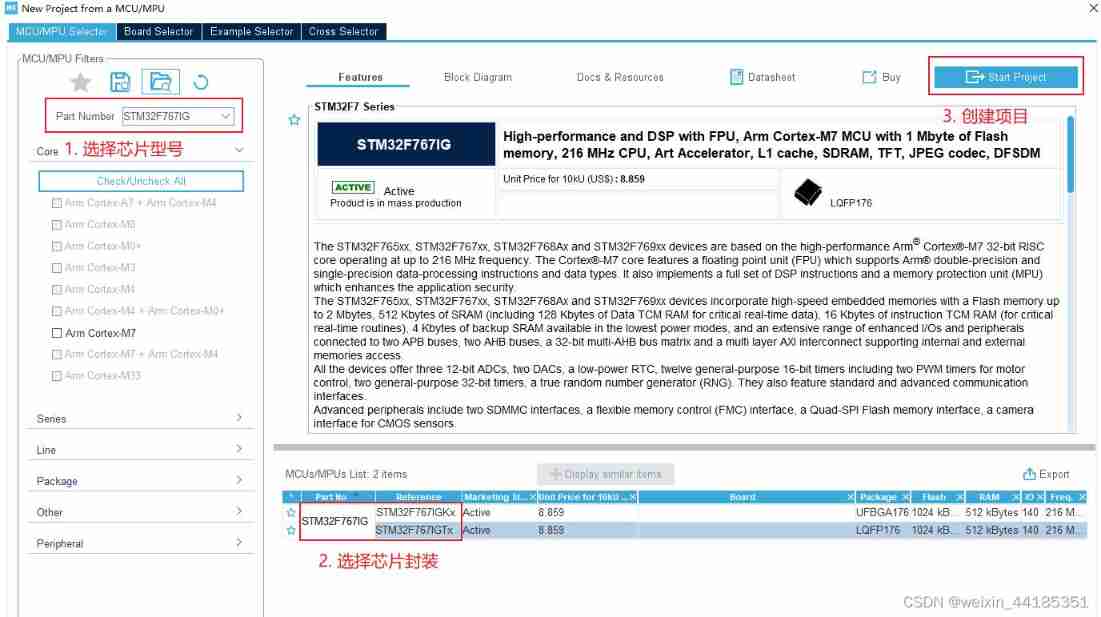
After checking the schematic diagram of the development board, we know , The resources are distributed as follows :
- The development board has user buttons 3 individual , Namely KEY0(PH3)、KEY1(PH2)、KEY2(PC13)
- The development board has LED2 individual , Namely LED0(PB1)、LED1(PB0)

For this 5 individual GPIO To configure , And then generate the code .
3.2 Project structure

3.3 Experimental results
Press down KEY0,LED0 Light up , Press down KEY1,LED1 Light up , Press down KEY2,LED0、LED1 It goes out at the same time . The experiment is finished .
4. summary
Actually, according to Mr. Wei's course , take led A subsystem has also been established , Manage through the middle tier led, To reduce code coupling , Enhance code scalability 、 reusability . Because of ideas and key The subsystems are basically the same , There is no further implementation .
Through this lesson, I learned the idea of hierarchical design of software structure , Consider future functional extensions from the beginning of the design 、 The robustness of the code . By sacrificing a little bit of operational efficiency , To improve the maintainability of the whole project .
边栏推荐
- 经典面试题之老鼠试药与汉明码
- FreeRTOS+STM32L+ESP8266+MQTT协议传输温湿度数据到腾讯云物联网平台
- Idempotence of interfaces -- talk about idempotence of interfaces in detail, that is, solutions
- Spark log analysis
- Solve STM32 operation μ Solution to sudden failure of task scheduling in c/os-ii system
- Qt Cmake 纯C 代码调用系统控制台输入scanf 及 中文输出乱码
- 数据分析——切片器、数据透视表与数据透视图(职场必备)
- Case: drawing Matplotlib dynamic graph
- Balanced binary tree AVL
- 随便画画的
猜你喜欢

从查询数据库性能优化谈到redis缓存-谈一谈缓存的穿透、雪崩、击穿

About the use of hc-12 radio frequency module

Redis的安装及启动

.net使用Access 2010数据库
FreeRTOS+STM32L+ESP8266+MQTT协议传输温湿度数据到腾讯云物联网平台

FPGA notes -- implementation of FPGA floating point operation
Binary sort tree

Msp430f5529lp official board (red) can not debug the problem

Duck feeding data instant collection solution resources

Case: drawing Matplotlib dynamic graph
随机推荐
Development and monitoring of fusion experiment pulse power supply by LabVIEW
Nacos registry
Spark log analysis
ETCD数据库源码分析——集群间网络层服务端接口
开窍之问答
Redis的安装及启动
. user. PHP website installation problems caused by INI files
FIFO code implemented in C language
containerd客户端比较
Final review [machine learning]
Post ordered clue binary tree
使用Gin框架运行Demo时报错“ listen tcp :8080: bind: An attempt was made to access a socket in a way forbidden”
返回值为Object型方法调用equals()
在线小工具分享(不定时更新,当前数量:2)
智慧家——全家具功能
Casually painted
Balanced binary tree AVL
RT-Thread 项目工程搭建和配置--(Env Kconfig)
认识map
下载安装Flume