当前位置:网站首页>MySQL 5.7.25 source code installation record
MySQL 5.7.25 source code installation record
2022-07-26 09:49:00 【Color the sky】
On the official website :http://dev.mysql.com/downloads/mysql/ Download the database of the version to be installed in :
mysql-5.7.25-linux-glibc2.12-x86_64.tar.gz
decompression
tar -zxvf mysql-5.7.25-linux-glibc2.12-x86_64.tar.gz
Move and modify the file name
#mv /data/software/mysql-5.7.25-linux-glibc2.12-x86_64 /usr/local/mysqlCreate data storage directory
#mkdir /data/mysql5.7_3306 newly build mysql user 、 Group and directory
#useradd -r -s /sbin/nologin -g mysql mysql -d /usr/local/mysqlChange directory owner
#cd /usr/local/mysql
#chown -R mysql .
#chgrp -R mysql .
Initialize database
#bin/mysqld --initialize --user=mysql --basedir=/usr/local/mysql --datadir=/data/mysql5.7_3306
Record the initial password ::+uJDQDtF6/u
#bin/mysql_ssl_rsa_setup --datadir=/data/mysql5.7_3306
Modify the system configuration file ( 5.7.18 At first, the later version did not my-default.cnf If necessary, you can copy the previous my.cnf file )
cd /usr/local/mysql/support-files
# Copy the startup file
# cp mysql.server /etc/init.d/mysql
# vim /etc/init.d/mysql
# vim /etc/init.d/mysql Modify the file storage path
basedir=/usr/local/mysql
datadir=/data/mysql5.7_3306

Copied one from another 5.5.59 Of my.cnf Put it in /etc Under the table of contents , start-up mysql /etc/init.d/mysql start Report errors

Check the log and find (/data/mysql5.7_3306/localhost.localdomain.err)

thread_concurrency This variable prompts undefined ,mysql stay 5.7.2 After abolishing this configuration , Restart after deletion

Sign in
mysql -hlocalhost -uroot -p
If appear :-bash: mysql: command not found
Is executed : # ln -s /usr/local/mysql/bin/mysql /usr/bin
There's no need to execute if it doesn't appear
 Change Password
mysql>set password for [email protected] = password('123456');
mysql>flush privileges;

 Set up root The account can be logged in remotely
mysql>grant all privileges on *.* TO'root'@'%' identified by 'root' with grant option;
mysql>flush privileges;

 Change Password
mysql>set password for [email protected]'%'= password('123456');
mysql>flush privileges;

 See the table
mysql> use mysql;
mysql> select host,user from user;
To configure mysql Auto start
# chmod 755 /etc/init.d/mysql
# chkconfig --add mysql
# chkconfig --level 345 mysql on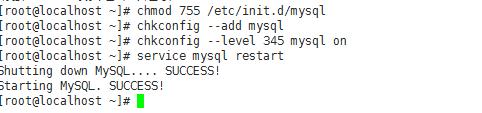
Copy of the 5.5.59 Version of my.cnf
# Example MySQL config file for large systems.
#
# This is for a large system with memory = 512M where the system runs mainly
# MySQL.
#
# MySQL programs look for option files in a set of
# locations which depend on the deployment platform.
# You can copy this option file to one of those
# locations. For information about these locations, see:
# http://dev.mysql.com/doc/mysql/en/option-files.html
#
# In this file, you can use all long options that a program supports.
# If you want to know which options a program supports, run the program
# with the "--help" option.

# The following options will be passed to all MySQL clients
[client]
#password	= your_password
port		= 3306
socket		= /tmp/mysql.sock

# Here follows entries for some specific programs

# The MySQL server
[mysqld]
port		= 3306
socket		= /tmp/mysql.sock
skip-external-locking
key_buffer_size = 256M
max_allowed_packet = 1M
table_open_cache = 256
sort_buffer_size = 1M
read_buffer_size = 1M
read_rnd_buffer_size = 4M
myisam_sort_buffer_size = 64M
thread_cache_size = 8
query_cache_size= 16M
# Try number of CPU's*2 for thread_concurrency
#thread_concurrency = 8

innodb_file_per_table=1

# Don't listen on a TCP/IP port at all. This can be a security enhancement,
# if all processes that need to connect to mysqld run on the same host.
# All interaction with mysqld must be made via Unix sockets or named pipes.
# Note that using this option without enabling named pipes on Windows
# (via the "enable-named-pipe" option) will render mysqld useless!
#
#skip-networking

# Replication Master Server (default)
# binary logging is required for replication
log-bin=mysql-bin

# binary logging format - mixed recommended
binlog_format=mixed

#slave_skip_errors = 1062

# required unique id between 1 and 2^32 - 1
# defaults to 1 if master-host is not set
# but will not function as a master if omitted
server-id	= 229
#binlog-do-db=ztong  # Specify the database that needs logging
# Replication Slave (comment out master section to use this)
#
# To configure this host as a replication slave, you can choose between
# two methods :
#
# 1) Use the CHANGE MASTER TO command (fully described in our manual) -
#    the syntax is:
#
#    CHANGE MASTER TO MASTER_HOST=<host>, MASTER_PORT=<port>,
#    MASTER_USER=<user>, MASTER_PASSWORD=<password> ;
#
#    where you replace <host>, <user>, <password> by quoted strings and
#    <port> by the master's port number (3306 by default).
#
#    Example:
#
#    CHANGE MASTER TO MASTER_HOST='125.564.12.1', MASTER_PORT=3306,
#    MASTER_USER='joe', MASTER_PASSWORD='secret';
#
# OR
#
# 2) Set the variables below. However, in case you choose this method, then
#    start replication for the first time (even unsuccessfully, for example
#    if you mistyped the password in master-password and the slave fails to
#    connect), the slave will create a master.info file, and any later
#    change in this file to the variables' values below will be ignored and
#    overridden by the content of the master.info file, unless you shutdown
#    the slave server, delete master.info and restart the slaver server.
#    For that reason, you may want to leave the lines below untouched
#    (commented) and instead use CHANGE MASTER TO (see above)
#
# required unique id between 2 and 2^32 - 1
# (and different from the master)
# defaults to 2 if master-host is set
# but will not function as a slave if omitted
#server-id       = 2
#
# The replication master for this slave - required
#master-host     =   <hostname>
#
# The username the slave will use for authentication when connecting
# to the master - required
#master-user     =   <username>
#
# The password the slave will authenticate with when connecting to
# the master - required
#master-password =   <password>
#
# The port the master is listening on.
# optional - defaults to 3306
#master-port     =  <port>
#
# binary logging - not required for slaves, but recommended
#log-bin=mysql-bin

# Uncomment the following if you are using InnoDB tables
#innodb_data_home_dir = /var/mysql/data
#innodb_data_file_path = ibdata1:10M:autoextend
#innodb_log_group_home_dir = /var/mysql/data
# You can set .._buffer_pool_size up to 50 - 80 %
# of RAM but beware of setting memory usage too high
#innodb_buffer_pool_size = 256M
#innodb_additional_mem_pool_size = 20M
# Set .._log_file_size to 25 % of buffer pool size
#innodb_log_file_size = 64M
#innodb_log_buffer_size = 8M
#innodb_flush_log_at_trx_commit = 1
#innodb_lock_wait_timeout = 50

[mysqldump]
quick
max_allowed_packet = 16M

[mysql]
no-auto-rehash
# Remove the next comment character if you are not familiar with SQL
#safe-updates

[myisamchk]
key_buffer_size = 128M
sort_buffer_size = 128M
read_buffer = 2M
write_buffer = 2M

[mysqlhotcopy]
interactive-timeout
边栏推荐
猜你喜欢

【Datawhale】【机器学习】糖尿病遗传风险检测挑战赛

2022年中科磐云——服务器内部信息获取 解析flag

After attaching to the process, the breakpoint displays "currently will not hit the breakpoint, and no symbols have been loaded for this document"

图解用户登录验证流程,写得太好了!

服务器、客户端双认证(2)

Due to fierce competition in the new market, China Mobile was forced to launch a restrictive ultra-low price 5g package
uni-app学习总结
Server and client dual authentication (2)
正则表达式

Node memory overflow and V8 garbage collection mechanism
随机推荐
asp. Net using redis cache
B站这个视频我是跪着看完的
SSG框架Gatsby访问数据库,并显示到页面上
2019 ICPC Asia Yinchuan regional (water problem solution)
POJ 1012 Joseph
QT handy notes (II) edit control and float, qstring conversion
copyTo
高斯消元求解异或线性方程组
反射机制的原理是什么?
uni-app学习总结
ie7设置overflow属性失效解决方法
官方颁发的SSL证书与自签名证书结合实现网站双向认证
Process32first returns false, error x message 24
高斯消元求解矩阵的逆(gauss)
Mo team learning notes (I)
服务器环境配置全过程
Interview shock 68: why does TCP need three handshakes?
“互联网+”时代的现代医学
解决ProxyError: Conda cannot proceed due to an error in your proxy configuration.
Calling DLL to start thread