当前位置:网站首页>零基础学习CANoe Panel(12)—— 进度条(Progress Bar)
零基础学习CANoe Panel(12)—— 进度条(Progress Bar)
2022-07-25 12:25:00 【蚂蚁小兵】
- 我是蚂蚁小兵,专注于车载诊断领域,尤其擅长于对CANoe工具的使用
- 寻找组织 ,答疑解惑,摸鱼聊天,博客源码,点击加入【相亲相爱一家人】
- 零基础学习CANoe Panel设计目录汇总,点击跳转
前言
进度条(
Progress Bar)条,任何UI设计工具都有的,下面我简单写一个刷写服务来演示下进度条的使用演示软硬件环境
Windows11 x64;CANoe 11 SP2 x64

进度条(Progress Bar)
1️⃣ 下面我拉了三个控件 Button ,Input/Output box ,Progress Bar 来模拟下载服务
Button:开始下载Input/Output box:下载进度描述,属性设置透明额,所以截图看不到Progress Bar:下载进度百分比

2️⃣ 因为目的在于演示进度条的使用,所以这里简单模拟的下载过程,这里定义一个定时器,加到100,模拟刷写的进度。
/*@!Encoding:936*/
variables
{

  msTimer timer_demo;
  char  tempText[0x500];
  int step_counter;

}

on timer timer_demo
{

    step_counter = step_counter +1 ;

    snprintf(tempText,elCount(tempText),"Downloading %.2f%%......",(double)step_counter);
    sysSetVariableString (sysvar::Panel::ProgressBar_Log,tempText);
    sysSetVariableFloat(sysvar::Panel::ProgressBar_Self,(double)step_counter);

    if (step_counter < 100)
        setTimer(timer_demo,100);

}

on sysvar Panel::ProgressBar_Start
{

  if(@this)
  {

    snprintf(tempText,elCount(tempText),"Satrt Downloading......");
    sysSetVariableString (sysvar::Panel::ProgressBar_Log,tempText);
    StartDownload();
  }
}


void StartDownload()
{

   step_counter = 0;
   setTimer(timer_demo,1000);
}

/*以上代码时Editor控件演示代码*/
3️⃣ Run起CANoe,测试过程如下:

属性设置
上面的示例,我并没有做任何的属性设置,完全时默认的
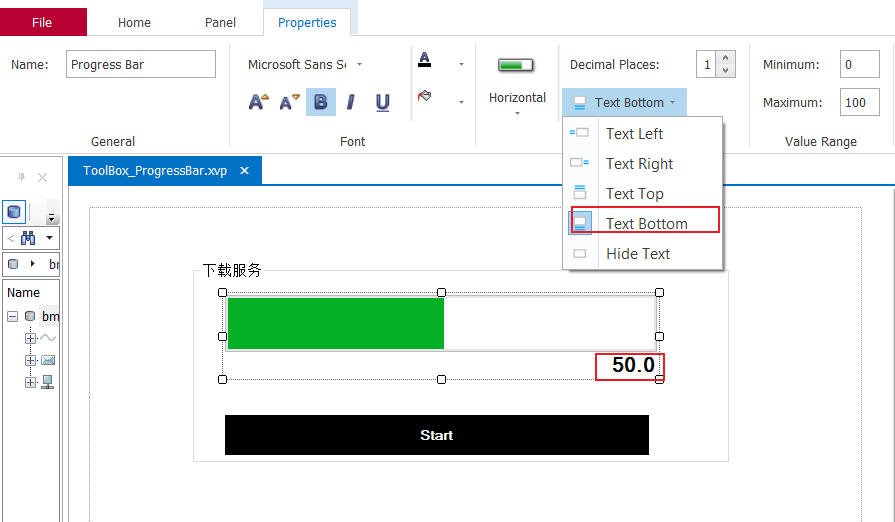
1️⃣ 隐藏进度条本身的文本
- 大多数我们并不用它,会使用前面示例的那样,所以都是先择把它隐藏掉
2️⃣ 进度条方向
- 可以选择垂直或者水平进度条

3️⃣ 文本小数点位数
- 如果你不设置隐藏文本,那么设置才有意义。

怎么把进度条设计的花里胡哨
1️⃣ 看下图,默认Style 属性事 Windows Style的,进度条的颜色和背景色都是灰的,不可设置,所以我们要设计好看的进度条,就要改下Style属性

2️⃣ 下面我选择 Classic Style With Frame 模式,并把进度条的背景色设置成浅黄,进度条设置成正黄,如下图

3️⃣ 运行效果图

4️⃣ 里程表样式(Level Meter Style)(可选了解)
- 只有
Style属性选择其Level Meter Style,Level Meter setting里面的属性才可以被设置,就是进度条最前面加了一条可选择颜色的竖线。


总结


- 要有最朴素的生活,最遥远的梦想,即使明天天寒地冻,路遥马亡!
- 如果这篇博客对你有帮助,请 “点赞” “评论”“收藏”一键三连 哦!码字不易,大家的支持就是我坚持下去的动力。

边栏推荐
- Moving Chinese figure liushenglan
- Plus SBOM: assembly line BOM pbom
- 跌荡的人生
- 感动中国人物刘盛兰
- [advanced C language] dynamic memory management
- 卷积核越大性能越强?一文解读RepLKNet模型
- [ROS advanced chapter] Lecture 9 programming optimization of URDF and use of xacro
- 【9】 Coordinate grid addition and adjustment
- 【三】DEM山体阴影效果
- Experimental reproduction of image classification (reasoning only) based on caffe resnet-50 network
猜你喜欢

The first scratch crawler

想要做好软件测试,可以先了解AST、SCA和渗透测试
![SSTI 模板注入漏洞总结之[BJDCTF2020]Cookie is so stable](/img/19/0b943019fe1c959c4b79035a814410.png)
SSTI 模板注入漏洞总结之[BJDCTF2020]Cookie is so stable

想要做好软件测试,可以先了解AST、SCA和渗透测试

2.1.2 application of machine learning

WPF project introduction 1 - Design and development of simple login page

485 communication (detailed explanation)
485通讯( 详解 )

2022.07.24(LC_6126_设计食物评分系统)

2022.07.24 (lc_6125_equal row and column pairs)
随机推荐
JS 将伪数组转换成数组
pytorch环境配置及基础知识
A turbulent life
想要做好软件测试,可以先了解AST、SCA和渗透测试
Keeping MySQL highly available
Table partition of MySQL
Use of hystrix
Ecological profile of pytorch
More accurate and efficient segmentation of organs-at-risk in radiotherapy with Convolutional Neural
Can flinkcdc import multiple tables in mongodb database together?
【6】 Map box settings
I register the absolutely deleted data in the source sqlserver, send it to maxcomputer, and write the absolute data when cleaning the data
Cmake learning notes (II) generation and use of Library
Alibaba cloud technology expert Qin long: reliability assurance is a must - how to carry out chaos engineering on the cloud?
【四】布局视图和布局工具条使用
微软Azure和易观分析联合发布《企业级云原生平台驱动数字化转型》报告
SSTI 模板注入漏洞总结之[BJDCTF2020]Cookie is so stable
【九】坐标格网添加以及调整
推荐系统-协同过滤在Spark中的实现
Pytorch main module