当前位置:网站首页>Opencv learning notes -day 12 (ROI region extraction and inrange() function operation)
Opencv learning notes -day 12 (ROI region extraction and inrange() function operation)
2022-06-30 08:48:00 【Chasing foot dream】
OpenCV Learning notes
day12-roi Region extraction
utilize mask( Mask ) Technology to extract solid color background image ROI People and things in the area , And add the extracted person or object to other images .
Through the first cvtColor() function , The original RGB Color image conversion to hsv Images in color space ( High color contrast ), And then through inRange() Function to obtain ROI Regional Mask, recycling bitwise_not() Function negates and extracts ROI Area .
Finally, the original image and ROI Region images are overlapped to achieve the purpose of extraction .
function
inRange() Function can realize the binarization function , Multiple channels can be operated at the same time
The main function is to set the pixel value within two thresholds to white (255), The pixel value not within the threshold interval is set to black (0)
// Definition
CV_EXPORTS_W void inRange(InputArray src, InputArray lowerb,
                          InputArray upperb, OutputArray dst);
inRange( Input , Upper boundary , Lower boundary , Output )
| Parameters | explain |
|---|---|
| src | InputArray |
| lowerb | The upper boundary threshold to be extracted |
| upperb | The threshold value of the lower boundary to be extracted |
| dst | OutputArray |
example 1
inRange(hsv,Scalar(35,43,46),Scalar(77,255,255),mask);
// Deduct the green part of the picture
In the above example Scalar(35,43,46) yes green The lower boundary of ,Scalar(77,255,255) yes green The lower boundary of , This statement sets the pixels within these two thresholds to white (255), Pixels outside the threshold are set to black (0)
The display effect is shown in the figure 
Supplement the boundary threshold of other colors :
Code
quickopencv.h
#pragma once

#include <opencv2\highgui.hpp>

#include <opencv2\imgproc.hpp>

using namespace cv;
// Defining classes
class QuickDemo{

public:
	void colorSpace_Demo(Mat &image);// Color space conversion function 2021-12-24
	void mat_creation_demo(Mat &image);//Mat Object and creation 2021-12-27
	void pixel_vist_Demo(Mat &image);// Read and write operation of image pixels 2022-1-3
	void operators_demo(Mat &image);// Arithmetic operation of image pixels 2022-1-4
	void tracking_bar_demo(Mat &image);// Scroll bar operation demonstration 2022-1-7
	void key_demo(Mat &image);// Keyboard response operation 2022-1-12
	void color_style_demo(Mat &image);//OpenCV With color table operation 2022-1-12
	void bitwise_demo(Mat &image);// Bit operation ( Logical operation )2022-1-17
	void channels_demo(Mat &image);// Channel separation and merge 2022-1-17
	void inrange_demo(Mat &image);//roi Region extraction  2022-1-20
};
QuickDemo.cpp
#include <opencv2\highgui.hpp>

#include <opencv2\imgproc.hpp>

#include<quickopencv.h>

#include <iostream>
void QuickDemo::inrange_demo(Mat &image)
{

	Mat hsv;
	cvtColor(image, hsv, COLOR_BGR2HSV);// First of all, will bgr convert to hsv
	Mat mask;
	inRange(hsv,Scalar(35,43,46),Scalar(77,255,255),mask);// Deduct the green part of the picture
	//inRange( Input , Upper boundary , Lower boundary , Output )
	// Check whether the array elements are in the other two arrays ( Upper boundary , Lower boundary ) Between element values , Upper boundary Scalar(35,43,46) Is the green upper boundary ,
	// Lower boundary Scalar(77,255,255) Is the green lower boundary , The function sets the pixel value within two boundary thresholds to white (255),
	// The pixel value not within the threshold interval is set to black (0)  That is, binarization
	imshow("mask", mask);// Show results 1  Green screen background setting 255  To extract 0
	bitwise_not(mask, mask);// Invert inverts the binary image , About to extract some settings 255
	imshow("mask_2", mask);// Show results 2  After reversing
	Mat back = Mat::zeros(image.size(), image.type());// Black background
	image.copyTo(back, mask);// hold mask and image After overlapping, put mask The pixel value in is 0(black) The point corresponding to image The point in the becomes transparent , And keep other points
	// The effect is to keep the part to be extracted
	imshow("roi Region extraction ", back);// Show results 3 roi Extract the results
}
#include <iostream>
#include <opencv2\highgui.hpp>
#include <opencv2\imgproc.hpp>
#include<quickopencv.h>

using namespace cv;
using namespace std;


int main()
{

	Mat scr = imread("...\\pictures\\image\\ Green screen Pikachu .jfif");// Open a picture
	if (!scr.data == 1)// Sentenced to empty
		return -1;
	namedWindow(" window 1", WINDOW_NORMAL);// establish  WINDOW_FREERATIO window
	imshow(" window 1",scr);// Show in the created window
	QuickDemo qd;
	qd.inrange_demo(scr);
	waitKey(0);
	return 0;
}
Original picture 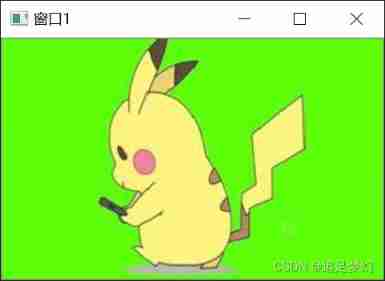
Show results 1 Green screen background setting 255 To extract 0
Show results 2 After reversing The part to be extracted is set to 255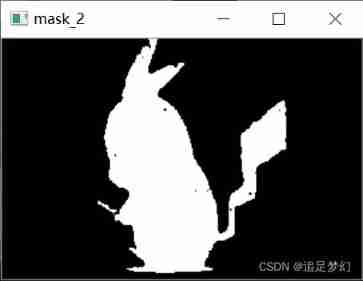
Show results 3 roi Extract the results 
边栏推荐
- Graffiti Wi Fi & ble SoC development slide strip
- CUDA implements matrix replication
- Interpretation of orientedrcnn papers
- Comparaison de deux façons d'accéder à la base de données SQL Server (sqldatareader vs sqldataadapter)
- Is it safe to open an account? How can anyone say that it is not reliable.
- Based on svelte3 X desktop UI component library svelte UI
- Anchorgenerator for mmdet line by line interpretation
- Unsupportedclassversionerror is reported when starting jar package. How to repair it
- Conversion between map, string and JSON
- Unity basic lighting model
猜你喜欢

Swagger use

Circuit analysis of current probe

C#访问MongoDB并执行CRUD操作
Use Huawei performance management service to configure the sampling rate on demand

Rew acoustic test (III): generate test signal

Resnet50+fpn for mmdet line by line code interpretation

Axure make menu bar effect

【NVMe2.0b 14】NVMe Admin Command Set

Mmcv expanding CUDA operator beginner level chapter

Flink SQL 自定义 Connector
随机推荐
JVM调优相关命令以及解释
文件上传 upload 组件 on-success 事件,添加自定义参数
Flink Sql -- toAppendStream doesn‘t support consuming update and delete changes which
mysql基础入门 day3 动力节点[老杜]课堂笔记
[untitled]
Alcohol tester scheme: what principle does the alcohol tester measure alcohol solubility based on?
Emoji icons supported by markdown
Detailed explanation of pytoch's scatter function
Unity simple shader
Rew acoustic test (V): equipment required for test
Icon resources
[untitled]
Occasionally, Flink data is overstocked, resulting in checkpoint failure
Viteproject require Syntax Compatibility Problem Solving require is not defined
Source code interpretation of detectron2 1--engine
CUDA realizes L2 European distance
Gilbert Strang's course notes on linear algebra - Lesson 1
从0开始构建一个瀚高数据库Docker镜像
2021-02-19
Circuit analysis of current probe