当前位置:网站首页>Web development framework - Express (installation and use, static hosting, routing processing, use of Middleware)
Web development framework - Express (installation and use, static hosting, routing processing, use of Middleware)
2022-06-27 02:28:00 【Front end pony】
Express - be based on Node.js Platform web Application development framework - Express Chinese document | Express Chinese net  https://www.expressjs.com.cn/ Express yes be based on Node.js Developed web Development framework , It's a Node.js modular ; Since it's based on Node.js, So use Express The premise is that the computer must have been installed Node Environmental Science ,Node It's easy to install , No more details here .
Catalog
3、 ... and 、 adopt Express Hosting static files
5、 ... and 、Express middleware
1. Application level middleware
4. Third-party middleware —— body-parser
One 、Express install
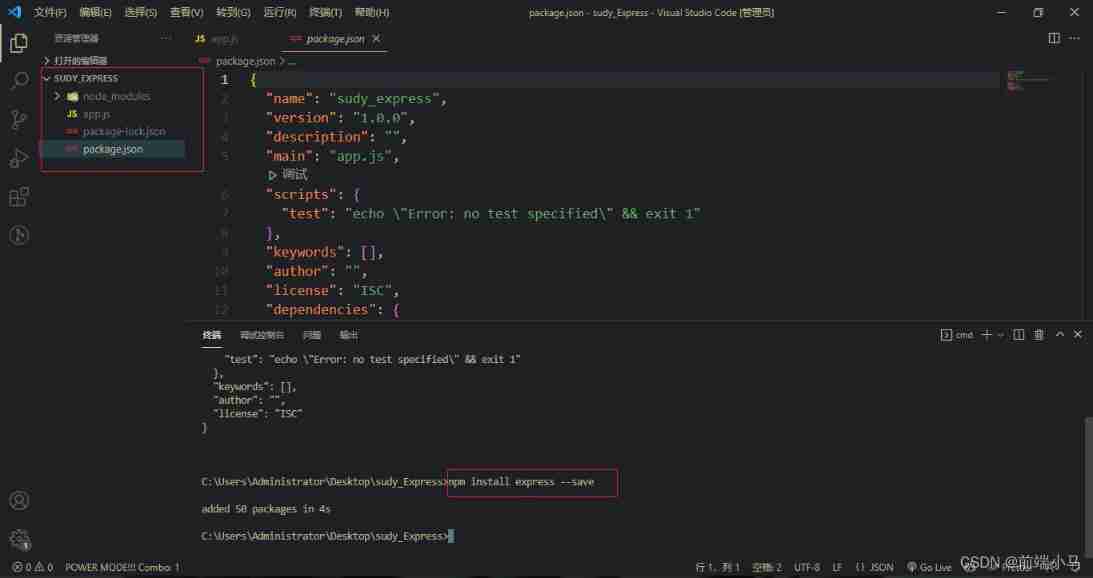
First, create a folder study_Express As a project file , Create an entry file in the file app.js;

Use commands in the integrated terminal npm init -y Initialize a package.json file ;

Use command npm install express -- save download Express; After successful installation, the following is true :
Two 、Express Use
download Express after , It can be used normally , stay app.js Create an application server example in ;
// study_Express/app.js

const express = require('express') //require Function introduced express package
const app = express() // Call function
const port = 3000 // Set port 3000

app.get('/', (req, res) => {
  res.send('Hello World!') //app Object call get API, Listen to the root path  /, Return when there is a root path request “Hello World!”
})

app.listen(port, () => {
  console.log(`Example app listening on port ${port}`) // monitor 3000 port , Trigger the callback function after starting the service
})
Start the service after creation ;

At this point, let's look at the local address 3000 port , I can go back “Hello World!”;

The above is the simplest application server .
3、 ... and 、 adopt Express Hosting static files
The so-called managed static file is to make the image 、 file 、js/css/html Files, etc. can be accessed through url Address to access ; Let's create a new file static.js To demonstrate the hosting of static files ;
// study_Express/static.js

const express = require('express') //require Function introduced express package
const app = express() // Call function

// Implement static resource services
let server = app.use(express.static('public')) //public Is the root directory of static resources , Static resources are placed in this folder

server.listen(3000, () => { // Create a listener
  console.log(' Server started successfully ...')
})
Tips :app.use Statement can write multiple entries to set the root directory of multiple static resources , Access does not affect each other .
In the above code, we set the root directory to public, So create this directory and add the sample files 1.html and 1.jpg For static hosting ;

Next , Start the service ;

At this point, you can use... In the browser url To access the static resources we just added .


besides , We can also set a virtual directory for the access path , The specific way is to app.use Add a new parameter after ; as follows , Set up virtual directory /express;
let server = app.use('/express',express.static('public')) //use The first parameter of specifies the virtual directory ( route )Tips : No matter what changes are made to the application server file, the service needs to be restarted .
Next, we will access the static resources url You also need to add this virtual directory in ;


Four 、 Routing processing
Routing is the process of path distribution according to the request path and request mode ;
http The common request methods of are post( add to )、get( Inquire about )、put( to update )、delete( Delete ), That is, add, delete, modify, and query ; Let's create a new file router.js To demonstrate routing processing :
// study_express/router.js

const express = require('express') //require Function introduced express package
const app = express() // Call function

// Four basic routing processes ( Handle specific requests )
app.get('/', (req, res) => {
  res.send('get data !')
})

app.post('/', (req, res) => {
  res.send('post data !')
})

app.put('/', (req, res) => {
  res.send('put data !')
})

app.delete('/', (req, res) => {
  res.send('delete data !')
})

// Use it directly use Distribution can handle all routing requests ( Handle all requests )
// app.use((req,res) => {
//   res.send('ok!')
// })

app.listen(3000, () => { // Create a listener
  console.log('router Server started successfully ...')
})
Next, perform interface test , Because the browser is not very convenient , What I'm using here is ApiPost;
Add : ApiPost Test interface method
First, in the ApiPost Normal login ;
Then create a new directory --> Right mouse button --> newly build --> New interface ;
Enter the interface address , We use a local address 、3000 port ;
After entering the address , Start the server ;
Next, select the sending method to test :

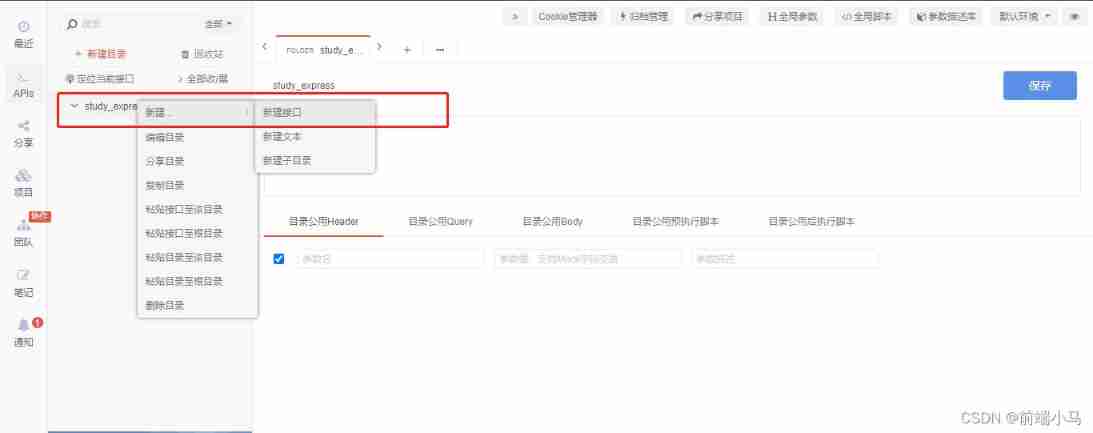


The test results are as follows :


5、 ... and 、Express middleware
middleware It's a function , It can access the request object (request objeck(req))、 The response object (response object(res)) , and Web Application in request · Middleware in the response loop process ;
The middleware also has a third parameter next, Used to pass this request to the next step ; essentially , One Express Applications are just calling various middleware . Middleware is divided into the following categories :
- Application level middleware (app.use)
- Routing level middleware (app.get/post...)
- Error handling middleware
- Built in middleware ( Such as the static resource hosting we used before static Built in middleware )
- Third-party middleware
1. Application level middleware
Application level middleware is bound to app object Use app.use() and app.METHOD();
newly build 1.js File for demonstration , Access is realized through three middleware /user route , Record the visit time 、 Access log and access times .
// study_Express/1.js

const express = require('express') //require Function introduced express package
const app = express() // Call function

let total = 0; // Traffic volume

// Application level middleware
app.use('/user', (req, res, next) => { // The first middleware
  console.log(' Access time :' + Date.now()) // Record the visit time
  next() // Go to the next middleware , Don't use next The following middleware will not be executed
})

app.use('/user', (req, res, next) => { // The second middleware
  console.log(' journal :××× Visited /user') // Log access logs
  next()
})

app.use('/user', (req, res) => { // The third middleware
  total++; // More visits
  console.log(' Current traffic :' + total)
  res.send(' Return results ')
})

app.listen(3000, () => { // Create a listener
  console.log(' Middleware server started successfully ...')
})
Access after starting the service /user route ;

Relevant information will be printed in the background , Every time I refresh , Times plus one ;

2. Routing level middleware
New file 2.js demonstrate , Print out... Using two middleware 1、2.
// study_Express/2.js

const express = require('express') //require Function introduced express package
const app = express() // Call function

// Routing level middleware
app.get('/luyou', (req, res, next) => {
  console.log(1)
  next()
})

app.get('/luyou', (req, res) => {
  console.log(2)
})

app.listen(3000, () => { // Create a listener
  console.log(' The routing level middleware server was started successfully ...')
})
Access after starting the service /luyou route ;

Print the results in the background ;

Besides , Call in the routing level middleware next when , You can add one route Parameters next('route'), Jump to the next route ;
Pay attention to distinguish between :
next(); Jump to the next middleware .
next('route'); Jump to next route , The next route is through get、post Or the route bound by other methods .
As the following way of writing :
const express = require('express') //require Function introduced express package
const app = express() // Call function

// Routing level middleware
app.get('/luyou', (req, res, next) => { // The first middleware   The first route
  console.log(1)
  next('route') // Jump to next route
}, (req, res) => { // The second middleware
  console.log(2)
})

app.get('/luyou', (req, res) => { // The third middleware   The second route
  console.log(3);
  res.send(' The routing level middleware returns the result ')
})

app.listen(3000, () => { // Create a listener
  console.log(' The routing level middleware server was started successfully ...')
})
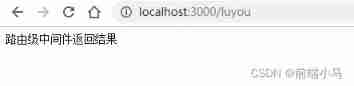
The first middleware and the second middleware are nested , Only one route is used , In the first middleware next('route'); Directly jump to the next route , So the result of the second middleware 2 It won't print , as follows :

3. Error handling middleware
Error handling middleware requires 4 Parameters , Four parameters must be provided to identify it as an error handling middleware function . Even if you don't need to use next object , It must also be specified . otherwise , The next Objects will be interpreted as regular middleware and cannot handle errors . The format is as follows :
app.use(function (err, req, res, next) {
  console.error(err.stack)
  res.status(500).send('Something broke!')
})
4. Third-party middleware —— body-parser
There are many third-party middleware , Here we focus on Parameter passing body-parser, The usage of other third-party middleware is the same ;

First npm install body-parser, Commands used in the terminal npm install body-parser --save;

After the installation is successful, it will be in package.json The file shows ;

New file 3.js demonstrate , Realize simple login form verification function ;
// study_Express/3.js

const express = require('express') //require Function introduced express package
const app = express() // Call function

const bodyParser = require('body-parser') // introduce body-parser

// mount ( Enable ) Built in middleware static, Hosting static resources
app.use(express.static('public'))

// Mount parameter processing middleware ( Here we analyze post Data submitted by form )
app.use(bodyParser.urlencoded({
  extended: false
}))

// Handle get Data submitted
// app.get('/login', (req, res) => {
//   let data = req.query;
//   console.log(data);
//   res.send('get Data at the time of submission ')
// })

// Handle post Data submitted
app.post('/login', (req, res) => {
  let data = req.body;
  if (data.username == ' Front end pony ' && data.password == '123456') {
    res.send(' Login successful !')
  } else {
    res.send(' Wrong user name or password !')
  }
})

app.listen(3000, () => {
  console.log(' The third-party middleware service is started ...')
})
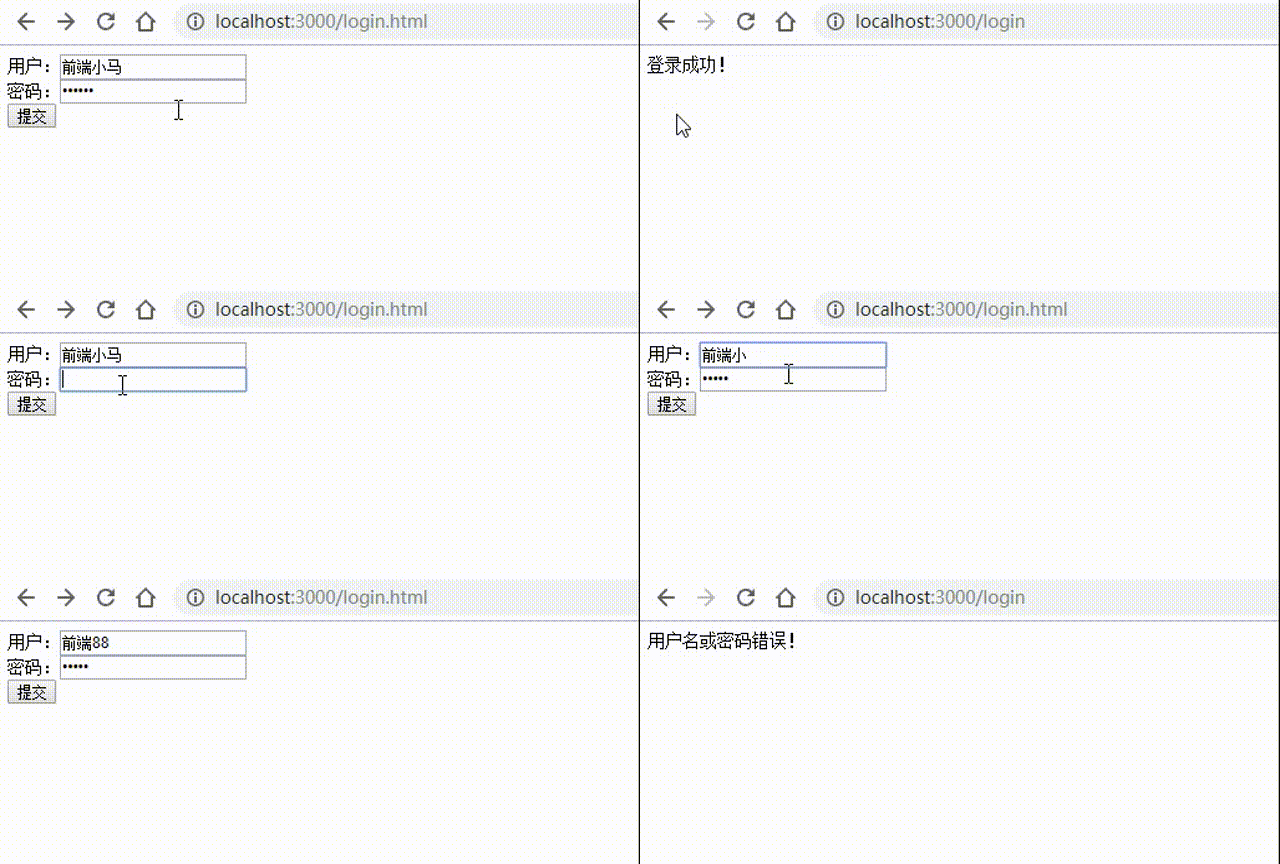
To show the effect , We're in the catalog public So let's make a new one html File to make forms , And host it ;
<!DOCTYPE html>
<html>

<head>
  <meta charset="UTF-8">
  <title> Forms </title>
  <style></style>
</head>

<body>
  <form action="http://localhost:3000/login" method="post">
     user :<input type="text" name="username"><br>
     password :<input type="password" name="password"><br>
    <input type="submit" value=" Submit ">
  </form>
</body>

</html>
Access after starting the service /login.html, It can be verified normally :
边栏推荐
- paddlepaddle 20 指数移动平均(ExponentialMovingAverage,EMA)的实现与使用(支持静态图与动态图)
- TopoLVM: 基于LVM的Kubernetes本地持久化方案,容量感知,动态创建PV,轻松使用本地磁盘
- Memcached foundations 12
- Fork (), exec (), waitpid (), $? > > in Perl 8 combination
- 学习太极创客 — MQTT(七)MQTT 主题进阶
- Oracle/PLSQL: Lpad Function
- pytorch 22 8种Dropout方法的简介 及 基于Dropout用4行代码快速实现DropBlock
- Oracle/PLSQL: VSize Function
- Learn Tai Chi Maker - mqtt (VIII) esp8266 subscribe to mqtt topic
- H5 liquid animation JS special effect code
猜你喜欢

Installing the Damon database using the command line

参数估计——《概率论及其数理统计》第七章学习报告(点估计)
Consumers pursue the iPhone because its cost performance exceeds that of domestic mobile phones

STM32入门介绍

【数组】剑指 Offer II 012. 左右两边子数组的和相等 | 剑指 Offer II 013. 二维子矩阵的和

Learning Tai Chi Maker - mqtt (VII) advanced mqtt theme
Flink學習2:應用場景
使用命令行安装达梦数据库

Svg drag dress Kitty Cat
Learn from Taiji Maker - mqtt Chapter 2 (I) QoS service quality level
随机推荐
Oracle/PLSQL: Cast Function
剑指Offer || :栈与队列(简单)
Oracle/PLSQL: NumToYMInterval Function
Fork (), exec (), waitpid (), $? > > in Perl 8 combination
Oracle/PLSQL: Rtrim Function
Precautions for using sneakemake
Oracle/PLSQL: Translate Function
Parameter estimation -- Chapter 7 study report of probability theory and mathematical statistics (point estimation)
I earned 3W yuan a month from my sideline: the industry you despise really makes money!
Getting started with bluecms code auditing
ConstraintLayout(约束布局)开发指南
DAMA、DCMM等数据管理框架各个能力域的划分是否合理?有内在逻辑吗?
Memcached foundation 9
bluecms代码审计入门
学习太极创客 — MQTT 第二章(二)ESP8266 QoS 应用
mmdetection ValueError: need at least one array to concatenate解决方案
Oracle/PLSQL: Substr Function
学习太极创客 — MQTT(七)MQTT 主题进阶
Memcached Foundation 12
Flink learning 5: how it works