当前位置:网站首页>钉钉第三方服务商应用ISV应用开发及上架教程
钉钉第三方服务商应用ISV应用开发及上架教程
2022-07-26 17:31:00 【renkai721】
当我们对接钉钉第三方服务商应用,也叫ISV应用,就是企业微信的第三方服务商应用。有以下几个要点步骤。
第一章 服务商入驻
认证产品方案服务商
2、这里的第一步非常的重要,如果第一步没有完成,后面的步骤是无法看到的,比如新建第三方应用等操作。
3、如果上面的认证没有完成,技术人员可以先去认证成为开发者,输入自己相关的信息,例如手机号等。

第二章 应用配置
钉钉企业应用列表

2、选择【第三方企业应用】,然后点击右边的创建应用。
3、新建的时候,选择【H5微应用】,这样既可以在PC端也可以在手机端,本文只是DEMO,所以选择的是JSP,前后端一起的。
4、也可以参照下面的教程,都是填写一些基本信息。
第三章 应用开发
1、进入到具体的开发,可以参照下面的博文,比较全面。
2、代码参照地址,记得配置IP白名单,这里叫出口IP配置,不然调用接口提示没有权限。
钉钉H5微应用开发,服务端示例代码https://gitee.com/lne/ding-server#https://gitee.com/link?target=https%3A%2F%2Fwww.cnblogs.com%2Fapplerosa%2Fp%2F11509512.html3、该代码对应的操作图文教程,如下:
钉钉H5微应用开发,服务端示例代码-图文教程钉钉第三方企业/服务提供商的小程序/微应用开发,实现授权,回调,响应下单,用户免登等基础功能的教程说明; https://www.cnblogs.com/applerosa/p/11509512.html4、参照上面的教程后,基本的suit推送,登录都是可以的,为了后续的上架,我们还需要对现有的功能进行扩展。钉钉官网要求ISV应用上架必须具备的改造。
改造1,通讯录加密,因为后续选择价格便宜的计算巢方式上架。官方给出的教程地址如下:
通讯录加密 - 钉钉开放平台本文档介绍了通讯录加密的操作流程。 https://open.dingtalk.com/document/isv/address-book-encryption1、这里需要注意,不管自己的代码逻辑有没有用到通讯录的(用户名称、用户职位、部门名称)这三个字段,接入的代码必须要有。
2、我这里多赘述一下教程。首先我们需要把自己的index页面的地址按照下面的示例,改造出来。最终的效果就是最下面的一长串一样,中间的都不用改。

3、前端页面引入 open-data SDK,在页面中引入以下SDK。
<!-- 注意,这行引入,必须放入到整个页面的所有JS的第一行 -->
<script src="https://auth.dingtalk.com/opendata-1.1.0.js"></script>
4、如下图所示,还有一个要注意的点就是,页面要设置viewport,不然有输入框的页面,在获得焦点后,移动端页面会被放大,这个要注意。还有,下面的一堆JS,都是【安全与监控】-【监控中心】页面复制而来的代码,每个JSP或HTML的页面必须添加,用于监控,不然监控不到数据,后续是无法上架的。

5、前端页面加载 open-data 中的数据。在页面初始化时,需要调用 DTOpenData.init 方法初始化SDK,入参是开通应用企业的corpId。该方法会返回一个boolean值,标识初始化成功或失败。如果初始化失败,一般说明当前用户未登录,需要自动跳转到上面提到的“统一登录”的url进行登录操作。
<script>
  if (window.DTOpenData.init('$CORPID$')) {
    // 入参是开通应用企业的corpId
    // SDK初始化成功,继续执行页面逻辑
  } else {
    // 说明当前用户未登录,需要跳转到钉钉统一登录
    window.location.href = '$统一登录链接url$';
  }
</script>
6、大概的意思就是,你原来是直接在自己的onload事件里面调用了登录接口,现在把那个登录接口放在这个if里面就可以了。可以参照下图

7、如果在PC上开发,模拟手机端,console控制台会报错,自己把它注释掉就行。或者如下图所示,如果它检测不到自己的环境,就会输出文字【这不是钉钉的环境,报错啦】,而不是不错。
 8、pom中依赖的jar。
<!--		dingtalk第三方企业应用		-->
		<dependency>
			<groupId>org.apache.httpcomponents</groupId>
			<artifactId>httpclient</artifactId>
			<version>4.5.1</version>
		</dependency>
		<dependency>
			<groupId>org.apache.httpcomponents</groupId>
			<artifactId>httpcore</artifactId>
			<version>4.4.4</version>
		</dependency>
		<dependency>
			<groupId>org.apache.httpcomponents</groupId>
			<artifactId>httpmime</artifactId>
			<version>4.3.5</version>
		</dependency>
		<dependency>
			<groupId>commons-io</groupId>
			<artifactId>commons-io</artifactId>
			<version>2.4</version>
		</dependency>
		<dependency>
			<groupId>com.aliyun</groupId>
			<artifactId>alibaba-dingtalk-service-sdk</artifactId>
			<version>2.0.0</version>
		</dependency>
		<dependency>
			<groupId>com.aliyun</groupId>
			<artifactId>dingtalk</artifactId>
			<version>1.3.77</version>
			<scope>system</scope>
			<systemPath>${pom.basedir}/lib/dingtalk-1.3.77.jar</systemPath>
		</dependency>
		<dependency>
			<groupId>com.aliyun</groupId>
			<artifactId>dingtalk-shaded</artifactId>
			<version>1.3.77</version>
			<scope>system</scope>
			<systemPath>${pom.basedir}/lib/dingtalk-1.3.77-shaded.jar</systemPath>
		</dependency>
9、pom中build的配置
<build>
		<finalName>dingtalkd3f</finalName>
		<plugins>
			<!-- 指定编译java版本 -->
			<plugin>
				<groupId>org.apache.maven.plugins</groupId>
				<artifactId>maven-compiler-plugin</artifactId>
				<configuration>
					<source>1.8</source>
					<target>1.8</target>
					<encoding>UTF-8</encoding>
				</configuration>
			</plugin>
			<!-- mvn jar 打包 -->
			<!-- 必须指定1.4.2.RELEASE启动,否则jsp页面无法访问 -->
			<plugin>
				<groupId>org.springframework.boot</groupId>
				<artifactId>spring-boot-maven-plugin</artifactId>
				<version>1.4.2.RELEASE</version>
				<configuration>
					<mainClass>cn.renkai721.Dingtalkd3fApplication</mainClass>
					<!-- 包含本地自己引入的jar-->
					<includeSystemScope>true</includeSystemScope>
				</configuration>
			</plugin>
		</plugins>
		<resources>
			<resource>
				<directory>src/main/java</directory>
				<includes>
					<include>**/**</include>
				</includes>
				<filtering>false</filtering>
			</resource>
			<resource>
				<directory>src/main/resources</directory>
				<!-- 加载resources下所有的文件,配置文件和资源文件-->
				<includes>
					<include>**/**</include>
				</includes>
				<filtering>false</filtering>
			</resource>
			<resource>
				<directory>src/main/webapp</directory>
				<!-- 如果不配置,jsp无法访问 -->
				<targetPath>META-INF/resources</targetPath>
				<includes>
					<include>**/**</include>
				</includes>
				<filtering>false</filtering>
			</resource>
			<resource>
				<directory>lib</directory>
				<includes>
					<include>**/*.jar</include>
				</includes>
			</resource>
		</resources>
	</build>
10,系统用到的【dingtalk-1.3.77.jar】和【dingtalk-1.3.77-shaded.jar】,阿里官网nexus下载的地址如下,
alibaba Nexus jar包下载 https://s01.oss.sonatype.org/?spm=ding_open_doc.document.0.0.5283b670U93ous#nexus-search;quick~dingtalk网站打开较慢,多等待,多刷新即可。

11、核心加解密的时候,使用的参数如下
@PostMapping(value = "/dingCallback")
public Object dingCallback(
        @RequestParam(value = "signature") String signature,
        @RequestParam(value = "timestamp") Long timestamp,
        @RequestParam(value = "nonce") String nonce,
        @RequestBody(required = false) JSONObject body,
        HttpServletRequest request) throws DingTalkEncryptException {
    log.info("接收d3f post请求:[signature=[{}], timestamp=[{}], nonce=[{}] ]",
            signature, timestamp, nonce);
    // 这里的token是登录管理后台-第三方企业应用-应用详情-应用功能-事件与回调
    // id 说明:
    // 1、开发者后台配置的订阅事件为应用级事件推送,
    //      此时OWNER_KEY为应用的APP_KEY(企业内部应用)或SUITE_KEY(三方应用)。
    // 2、调用订阅事件接口订阅的事件为企业级事件推送,
    //      此时OWNER_KEY为:企业的CORP_ID(企业内部应用)或SUITE_KEY(三方应用)
    DingTalkEncryptor dingTalkEncryptor = new DingTalkEncryptor(
            MsgUtil.val("dingtalkd3f.token"),
            MsgUtil.val("dingtalkd3f.aesKey"),
            MsgUtil.val("dingtalkd3f.suiteKey"));
    try {
        // 从post请求的body中获取回调信息的加密数据进行解密处理
        String encrypt = body.getString("encrypt");
        String plainText = dingTalkEncryptor.getDecryptMsg(signature, timestamp.toString(), nonce, encrypt);
        JSONObject callBackContent = JSON.parseObject(plainText);
        log.info("plainText={}", plainText);
        // 根据回调事件类型做不同的业务处理
        String eventType = callBackContent.getString("EventType");
        if ("check_create_suite_url".equalsIgnoreCase(eventType)) {
            // 创建应用,验证回调URL创建有效事件(第一次保存回调URL之前)
            log.info("[callback] 检查钉钉向回调URL POST数据解密后是否成功 plainText={}",plainText);
            // 返回success的加密信息表示回调处理成功
            return dingTalkEncryptor.getEncryptedMap("success", timestamp, nonce);
        } else if ("check_update_suite_url".equalsIgnoreCase(eventType)) {
            log.info("验证更新回调URL有效性: " + plainText);
            return dingTalkEncryptor.getEncryptedMap("success", timestamp, nonce);
        } else if ("tmp_auth_code".equalsIgnoreCase(eventType)) {
            // 授权开通
            // 本事件应用应该异步进行授权开通企业的初始化,目的是尽最大努力快速返回给钉钉服务端。用以提升企业管理员开通应用体验
            // 即使本接口没有收到数据或者收到事件后处理初始化失败都可以后续再用户试用应用时从前端获取到corpId并拉取授权企业信息,进而初始化开通及企业。
            log.info("[callback] 企业开通授权 plainText={}", plainText);
            Boolean active = d3fService.suiteActive(callBackContent);
            return dingTalkEncryptor.getEncryptedMap(active ? "success" : "active_failure", timestamp, nonce);
        } else if ("suite_relieve".equalsIgnoreCase(eventType)) {
            log.info("[callback] 企业解除授权 plainText={}", plainText);

            return dingTalkEncryptor.getEncryptedMap("success", timestamp, nonce);
        } else if ("check_url".equalsIgnoreCase(eventType)) {
            log.info("[callback] 应用功能-事件与回调-回调请求地址-验证有效性 plainText={}", plainText);
            return dingTalkEncryptor.getEncryptedMap("success", timestamp, nonce);
        }else if ("sync_http_push_high".equalsIgnoreCase(eventType)) {
            DingtalkEventTypeParent dingtalkEventTypeParent =
                    JSONObject.parseObject(plainText,DingtalkEventTypeParent.class);
            if(dingtalkEventTypeParent.getBizData() != null && dingtalkEventTypeParent.getBizData().size() > 0){
                for(DingtalkBizDataParent obj:dingtalkEventTypeParent.getBizData()){
                    String corp_id = obj.getCorp_id();
                    try{
                        // 一个事件错误继续执行下一个事件,不中断
                        if(MyConstants.NUM_2 == obj.getBiz_type().intValue()){
                            // 当biz_type=2时,数据为第三方企业应用的票据suiteTicket最新状态。
                            DingtalkBizData2 dingtalkBizDataSuitTicket =
                                    JSONObject.parseObject(obj.getBiz_data(), DingtalkBizData2.class);
                            if("suite_ticket".equalsIgnoreCase(dingtalkBizDataSuitTicket.getSyncAction())){
                                // suite_ticket用于用签名形式生成accessToken(访问钉钉服务端的凭证),需要保存到应用的db。
                                // 钉钉会定期向本callback url推送suite_ticket新值用以提升安全性。
                                // 应用在获取到新的时值时,保存db成功后,返回给钉钉success加密串(如本demo的return)
                                // 钉钉开放平台会向应用的回调URL推送的suite_ticket(约5个小时推送一次)
                                String suite_ticket_value = dingtalkBizDataSuitTicket.getSuiteTicket();
                                log.info("[callback] 验证回调地址有效性 suite_ticket={}", suite_ticket_value);
                                String suiteId = MsgUtil.val("dingtalkd3f.suiteId");
                            }
                        }else if(MyConstants.NUM_4 == obj.getBiz_type().intValue()){
                            // 当biz_type=4时,数据为企业授权应用的最新状态。
                            // org_suite_auth,org_suite_change两个事件都表示企业对于第三方企业应用的授权信息,需要等同处理,在很短时间内发生的两个事件,有可能会覆盖,保证只给出最新的授权信息
                            // org_suite_auth:表示企业授权第三方企业应用
                            // org_suite_change:表示企业变更授权范围
                            // org_suite_relieve:表示企业解除授权
String suit_id=obj.getBiz_id();
                                    String userId = dingtalkBizData4.getAuth_user_info().getUserId();
                                    String full_corp_name = dingtalkBizData4.getAuth_corp_info().getFull_corp_name();
                                    String corp_name = dingtalkBizData4.getAuth_corp_info().getCorp_name();
                                    String inviteCode = dingtalkBizData4.getAuth_corp_info().getInviteCode();
                                    Integer agentid = dingtalkBizData4.getAuth_info().getAgent().get(0).getAgentid();
                                    String permanent_code = dingtalkBizData4.getPermanent_code();
                            log.info("第三方应用授权,变更,解除,obj={}",obj);
                            DingtalkBizData4 dingtalkBizData4 =
                                    JSONObject.parseObject(obj.getBiz_data(), DingtalkBizData4.class);
                            if("org_suite_auth".equalsIgnoreCase(dingtalkBizData4.getSyncAction())){
                                log.info("第三方应用授权 dingtalkBizData4={}",dingtalkBizData4);
                            }else if("org_suite_change".equalsIgnoreCase(dingtalkBizData4.getSyncAction())){
                                // 添加新人或删除人了
                                log.info("修改应用可见范围,公司名称={},corp_id={}",user_corp_name,corp_id);
                                DingtalkBizData4AuthOrgScopes auth_org_scopes = dingtalkBizData4.getAuth_scope().getAuth_org_scopes();
                                String[] users = auth_org_scopes.getAuthed_user();

                            }else if("org_suite_relieve".equalsIgnoreCase(dingtalkBizData4.getSyncAction())){
                                log.info("解除第三方应用 org_suite_relieve corp_id={}",corp_id);
                            }
                        }else if(MyConstants.NUM_7 == obj.getBiz_type().intValue()){
                            DingtalkBizData7 dingtalkBizData7 =
                                    JSONObject.parseObject(obj.getBiz_data(), DingtalkBizData7.class);
                            if("org_micro_app_stop".equalsIgnoreCase(dingtalkBizData7.getSyncAction())){
                                // 停用
                                log.info("客户停用,corp_id={}",corp_id);
                            }else if("org_micro_app_restore".equalsIgnoreCase(dingtalkBizData7.getSyncAction())){
                                // 启用
                                log.info("客户启用,corp_id={}",corp_id);
                            }
                        }
                    }catch (Exception e){
                        e.printStackTrace();
                        log.error("error e={}",e);
                    }
                }
                return dingTalkEncryptor.getEncryptedMap("success", timestamp, nonce);
            }

        }
    } catch (Exception e) {
        log.error("process callback fail e={}",e);
    }
    return dingTalkEncryptor.getEncryptedMap("failure", timestamp, nonce);
}
12、官网的事件订阅地址
配置事件订阅 - 钉钉开放平台钉钉会向应用推送订阅的事件,例如部门变更、签到通知、打卡通知等。通过订阅这些事件,可以更好地与钉钉集成。你只需告诉钉钉当某个事件发生时,钉钉需要推送消息到哪个URL,钉钉会以HTTPhttps://open.dingtalk.com/document/orgapp-server/configure-event-subcription13、API Explorer,这个工具可以很快的找到自己需要的API,然后可以点击测试,也可以很快的导航到对应的DOC文档中去,很实用。记得进入页面后选择【第三方企业应用】。API Explorer企业注册并上传企业通讯录后,手机端随时随地找人不再难,与同事和客户免费电话多方通话,重要事DING一下电话使命必达。还可以申请免费企业云邮箱和请假系统、财务报销系统,以及自有OA的移动化管理使用https://open-dev.dingtalk.com/apiExplorer?spm=ding_open_doc.document.0.0.717f722fyXp9c3#/?devType=isv&api=oauth2_1.0%23CreateJsapiTicket
14、钉钉的授权事件,也就是需要解密知道当前监听事件的消息是哪种操作,请看下面的文档。
授权事件 - 钉钉开放平台本文介绍了授权的RDS和SyncHTTP推送的数据格式。https://open.dingtalk.com/document/isvapp-server/authorization-event15、这些事件中biz_type=2,4的时候,关键信息,一定要保存下来。比如2的时候,需要保存【suite_ticket】,接收到【tmp_auth_code】时候,需要激活应用。接收到4的时候,关键信息一定要保存下来,后面会用到agentId,等。
/**
    * 激活应用授权
    * tmp_auth_code
    */
public Boolean suiteActive(JSONObject activeNode) throws ApiException {
    Boolean isActive = false;
    String corpId = activeNode.get("AuthCorpId").toString();
    String tempAuthCode = activeNode.get("AuthCode").toString();
    String suiteToken = this.getSuiteToken();
    String permanentCode = this.getPermanentCode(suiteToken, tempAuthCode);
    if (!com.alibaba.druid.util.StringUtils.isEmpty(permanentCode)) {
        isActive = this.activateSuite(suiteToken, corpId, permanentCode);
        if (isActive) {
            this.getCorpAuthInfoByActive(corpId);
        }
    } else {
        log.error("获取永久授权码出错");
    }
    return isActive;
}

public String getSuiteToken() {
		String url_suite_token = "https://oapi.dingtalk.com/service/get_suite_token";
		DingTalkClient client = new DefaultDingTalkClient(url_suite_token);
		OapiServiceGetSuiteTokenRequest request = new OapiServiceGetSuiteTokenRequest();
		request.setSuiteKey(MsgUtil.val("dingtalkd3f.suiteKey"));
		request.setSuiteSecret(MsgUtil.val("dingtalkd3f.suiteSecret"));
		String suite_ticket = this.get_suite_ticket();
		request.setSuiteTicket(suite_ticket);
		String suiteId = MsgUtil.val("dingtalkd3f.suiteId");
		RBucket<String> idBucket = redissonClient.getBucket(QywxProperties.dingtalk_suite_token+suiteId);
		String accessToken = idBucket.get();
		log.info("accessToken={}",accessToken);
		if(com.alibaba.druid.util.StringUtils.isEmpty(accessToken)){
			try {
				OapiServiceGetSuiteTokenResponse response = client.execute(request);
				accessToken = response != null ? response.getSuiteAccessToken() : "";
				idBucket.set(accessToken,response.getExpiresIn(),TimeUnit.SECONDS);
			} catch (ApiException e) {
				e.printStackTrace();
				log.error("获取第三方应用凭证suite_access_token出错, code={}, msg={}", e.getErrCode(), e.getErrMsg());
			}
			log.info("获取第三方应用凭证suite_access_token, accessToken={}", accessToken);
		}
		return accessToken;
	}

public String getPermanentCode(String suiteAccessToken, String tempCode) {
		String url_permanent_code = "https://oapi.dingtalk.com/service/get_permanent_code";
		StringBuilder url = new StringBuilder();
		url.append(url_permanent_code);
		url.append("?suite_access_token=").append(suiteAccessToken);
		DingTalkClient client = new DefaultDingTalkClient(url.toString());
		OapiServiceGetPermanentCodeRequest req = new OapiServiceGetPermanentCodeRequest();
		req.setTmpAuthCode(tempCode);
		String permanentCode = "";
		try {
			OapiServiceGetPermanentCodeResponse rsp = client.execute(req);
			permanentCode = (rsp != null ? rsp.getPermanentCode() : "");
		} catch (ApiException e) {
			e.printStackTrace();
			log.error("获取永久授权码出错, tempCode={}, code={}, msg={}", tempCode, e.getErrCode(), e.getErrMsg());
		}
		log.info("获取永久授权码, tempCode={}, permanentCode={}", tempCode, permanentCode);
		return permanentCode;
	}

public Boolean activateSuite(String suiteAccessToken, String corpId, String permanentCode) {
		String url_activate_suite = "https://oapi.dingtalk.com/service/activate_suite";
		StringBuilder url = new StringBuilder();
		url.append(url_activate_suite);
		url.append("?suite_access_token=").append(suiteAccessToken);
		DingTalkClient client = new DefaultDingTalkClient(url.toString());
		OapiServiceActivateSuiteRequest req = new OapiServiceActivateSuiteRequest();
		req.setSuiteKey(MsgUtil.val("dingtalkd3f.suiteKey"));
		req.setAuthCorpid(corpId);
		req.setPermanentCode(permanentCode);
		boolean isActive = false;
		try {
			OapiServiceActivateSuiteResponse rsp = client.execute(req);
			isActive = rsp.getErrmsg().equals("ok");
		} catch (ApiException e) {
			e.printStackTrace();
			log.error("激活应用的企业授权出错, corpId={}, permanentCode={}, code={}, msg={}", corpId, permanentCode, e.getErrCode(), e.getErrMsg());
		}
		log.debug("激活应用的企业授权, corpId={}, permanentCode={}, isActive={}", corpId, permanentCode, isActive);
		return isActive;
	}


public void getCorpAuthInfoByActive(String corpId) {
		String corpToken = get_access_token(corpId);
		log.info("获取企业授权凭证:{}", corpId);
		JsonNode corpAuthInfo = getCorpAuthInfo(corpId);
		log.info("获取企业信息详情:{}", corpAuthInfo);
	}

	public JsonNode getCorpAuthInfo(String corpId) {
		String url_get_auth_info = "https://oapi.dingtalk.com/service/get_auth_info";
		DingTalkClient client = new DefaultDingTalkClient(url_get_auth_info);
		OapiServiceGetAuthInfoRequest req = new OapiServiceGetAuthInfoRequest();
		req.setAuthCorpid(corpId);
		JsonNode result = JsonTool.emptyNode();
		try {
			String suite_ticket = this.get_suite_ticket();
			OapiServiceGetAuthInfoResponse response = client.execute(req,
					MsgUtil.val("dingtalkd3f.suiteKey"),
					MsgUtil.val("dingtalkd3f.suiteSecret"),
					suite_ticket);
			result = JsonTool.getNode(response);
		} catch (ApiException e) {
			log.error("获取企业授权-详情 出错, corpId={}, code={}, msg={}", corpId, e.getErrCode(), e.getErrMsg());
		}
		log.info("获取企业授权-详情, corpId={}, auth_result={}", corpId, result);
		return result;
	}


public String get_access_token(String corp_id) {
		// 调用服务端API获取应用资源时,需要通过access_token来鉴权调用者身份进行授权
		String suiteId = MsgUtil.val("dingtalkd3f.suiteId");
		RBucket<String> idBucket = redissonClient.getBucket(QywxProperties.dingtalk_corp_token+"_"+corp_id+suiteId);
		String corp_token = idBucket.get();
		log.info("corp_token={}",corp_token);
		if(com.alibaba.druid.util.StringUtils.isEmpty(corp_token)){
			DefaultDingTalkClient client= new DefaultDingTalkClient("https://oapi.dingtalk.com/service/get_corp_token");
			OapiServiceGetCorpTokenRequest req= new OapiServiceGetCorpTokenRequest();
			req.setAuthCorpid(corp_id);
			String suite_ticket = this.get_suite_ticket();
			OapiServiceGetCorpTokenResponse execute= null;
			try {
				execute = client.execute(req,
						MsgUtil.val("dingtalkd3f.suiteKey"),
						MsgUtil.val("dingtalkd3f.suiteSecret"),
						suite_ticket);
				corp_token = execute.getAccessToken();
				Long expires_in = execute.getExpiresIn();
				if(expires_in != null){
					idBucket.set(corp_token,expires_in, TimeUnit.SECONDS);
				}else{
					log.error("corp_token api is error");
				}
			} catch (ApiException e) {
				e.printStackTrace();
			}
		}
		return corp_token;
	}
16、【部署与发布】-【版本管理与发布】,选择要授权的体验组织,然后点击【授权】,后台应该就会收到授权的事件了,如果授权成功,过一会刷新页面就能看到了,如果确认自己的代码没有问题,前端提示授权失败,或其它的没有展示,都是钉钉自己的问题,过一会再试试就OK了。自己也可以生成二维码,让其它的组织加入进来。
17、到此开发的后台基本完毕。
第四章 应用上架
1、上面开发完毕后,就是上架的流程,这个比较难搞,官方写的不清楚。请按照下面的流程来做。
2、点击【部署与发布】-【应用部署】-部署方式选择,计算巢部署。
3、然后关键的操作来了,一定要使用阿里云超管RAM帐号操作,不是普通的子账号或有权限的人的帐号来操作。然后超管需要绑定自己的钉钉号。操作步骤是,登录阿里云控制台
阿里云控制台首页欢迎登录阿里云,全球领先的云计算及人工智能科技公司,阿里云为200多个国家和地区的企业、开发者和政府机构提供云计算基础服务及解决方案。阿里云云计算、安全、大数据、人工智能、企业应用、物联网等云计算服务。

然后去绑定钉钉帐号,

4、接下来,点击【资源管理】
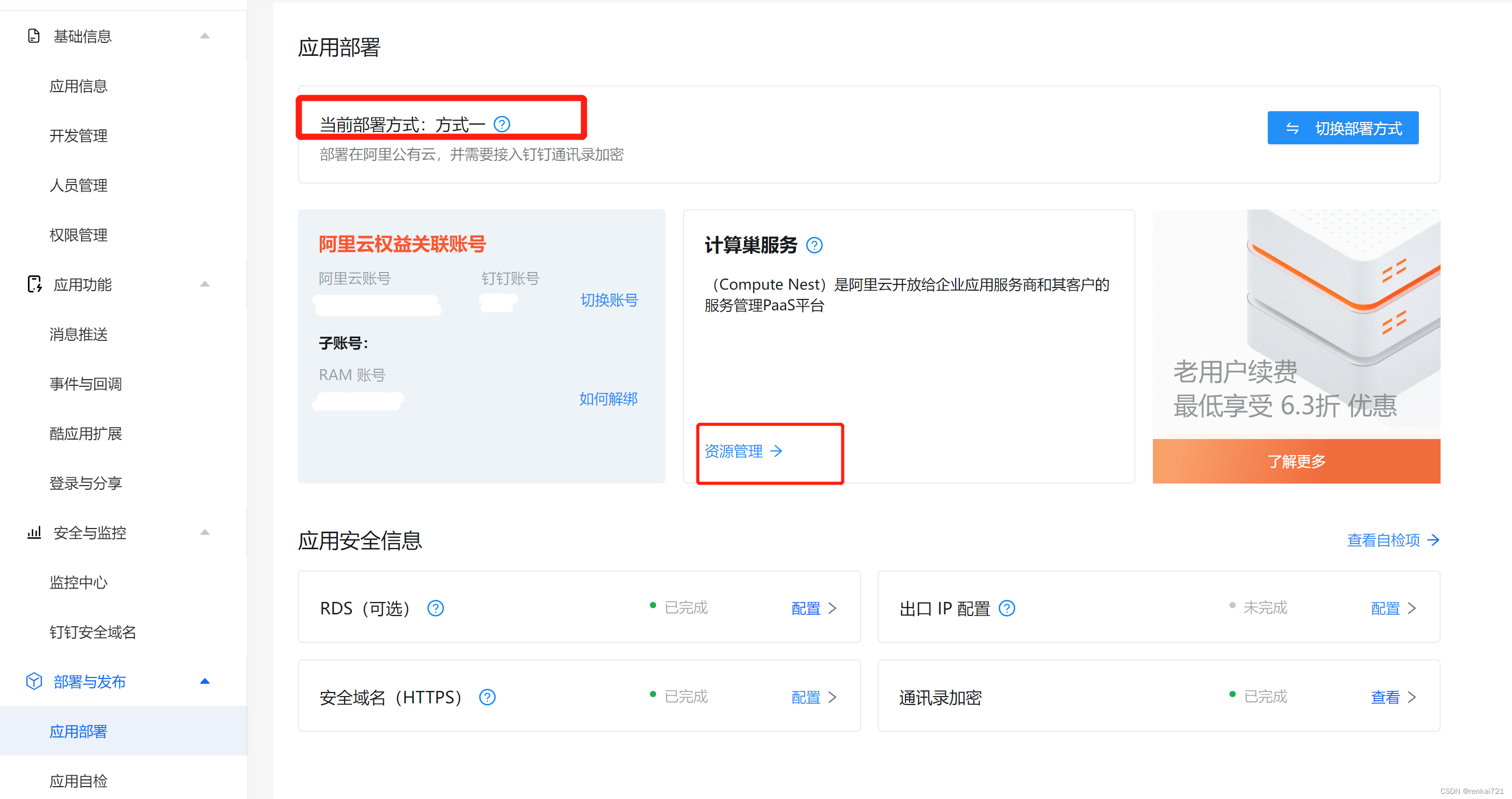
5、进去以后,主要导入ECS,自己的后台服务器;RDS,自己的数据库,注意代码上线不能使用外网地址,必须使用内网链接地址;SLB负载均衡的机器,如果没有SLB,必须要购买一台。这里的ECS和RDS就不多说了。主要说一下SLB。

6、我们随便找一台有nginx的ECS机器,然后在上面装好nginx,在nginx里面转发到自己的后台服务中去,然后SLB负载这里只配置一个http80的端口和一个https443的端口,注意443必须使用公司以及域名的SSL证书。
7、这样配置好了后,回到钉钉的页面,点击【安全与监控】-【钉钉安全域名】,然后就能看到刚才生成的安全域名了。这时候点击提交,去自己的代码里面把以前自己监听的http地址或自定义域名改成这个域名,注意nginx里面要监听这个安全域名,不然你还是访问不到。
8、把自己的以前配置的页面,首页或后台http push的地址都改成这个安全域名就可以了。至于那个页面中一直显示的出口IP未配置,不用去管。直接去点击自检,然后提交上线,这时候有一堆的文件或截图要弄,需要耐心,一步一步去操作。没有的话去网上找些资料改一改。
9、然后需要【安全验收】,【产品验收】,【稳定性验收】,也可以参照下面的几个官网教程
应用部署 - 钉钉开放平台计算巢为服务商提供了一套环境管理应用,一键云资源与应用诊断,一体化监控事件收集和预警体系https://open.dingtalk.com/document/isv/deploy-applications-1计算巢应用导入资源 - 钉钉开放平台本文档介绍了如何访问计算巢关联应用以及资源导入。https://open.dingtalk.com/document/isv/create-a-compute-nest-application安全准入评估指南 - 钉钉开放平台本文介绍了安全准入指南,包括应用基础信息、安全技术、安全管理和其他钉钉自检评估项的安全准入评估要求。https://open.dingtalk.com/document/operation-specification/security-access-evaluation-guide安全性认证 - 钉钉开放平台本文介绍了安全测试报告相关内容,包括常见问题、安全测试用例、安全测试结果等。https://open.dingtalk.com/document/operation-specification/Security-certification10、上面的【安全准入评估指南 - 钉钉开放平台】和【安全性认证 - 钉钉开放平台】很重要,其中的工作量也很大。
11、到此需要完成的基本差不多,只需要完成对应的指标即可申请上架和付款。其中的ISV上架的保证金是10万元。


12、等待审核。
边栏推荐
- 202. Happy number
- Spark unified memory partition
- [cloud native] IVX low code development was introduced into Tencent map and previewed online
- LeetCode50天刷题计划(Day 5—— 最长回文子串 10.50-13:00)
- The Agile Manifesto has four values and twelve principles
- openssl
- Spark统一内存划分
- 【集训Day1】 Dwarves line up
- JS recursive Fibonacci sequence deep cloning
- [Day2] cinema ticket
猜你喜欢

即刻报名|飞桨黑客马拉松第三期盛夏登场,等你挑战

效率提升98%!高海拔光伏电站运维巡检背后的AI利器
![[cloud native] IVX low code development was introduced into Tencent map and previewed online](/img/f1/40ca06bf65fbc0097f5b61ec7d2509.png)
[cloud native] IVX low code development was introduced into Tencent map and previewed online
相对路径与绝对路径

JS closure simulates private variable interview questions and immediately executes function Iife

8.1 Diffie-Hellman密钥交换

ICML 2022(第四篇)|| 图分层对齐图核实现图匹配

大咖访谈 | 开源对安全是双刃剑——《大教堂与集市》中文译本作者卫剑钒

【元宇宙欧米说】剖析 Web3 风险挑战,构筑 Web3 生态安全

What is the PMP exam outline in 2022?
随机推荐
如何组装一个注册中心?
Relative path and absolute path
How to become a better data scientist by learning to ask questions
AI遮天传 ML-集成学习
《敏捷宣言》四大价值观,十二大原则
2022年的PMP考试大纲是什么?
5、 Parameter server principle, code implementation
Simple uploading and downloading of Web project files
面试OPPO,16道题甩过来,我人傻了
RedisDesktopManager去除升级提示
AI遮天传 ML-无监督学习
【集训Day3】delete
.Net CLR GC 动态加载短暂堆阈值的计算及阈值超量的计算
Win10 连接无线不能输入密码字符,一输入就卡死
Three ways of de duplication in SQL
Mondriaans's dream (state compression DP)
ACL experiment demonstration (Huawei router device configuration)
7月30号PMP考试延期后我们应该做什么?
点云目标检测KITTI数据集bin文件可视化,一站式解决
202. Happy number