当前位置:网站首页>Zipkin installation and use
Zipkin installation and use
2022-07-26 09:16:00 【Or turn around】
In front of blog Introduced in apm Principles and open source apm frame , Here we continue to introduce Zipkin Installation and use .
Zipkin Official website :https://zipkin.io/pages/quickstart.
Navigation before :
Selection and practice of distributed tracking system
Elastic APM Installation and use
Cat Installation and use
Zipkin Server deployment
According to the official website document , There are two ways to deploy the server :
1.Java8 And above , You can download the official package directly to run :
curl -sSL https://zipkin.io/quickstart.sh | bash -s
java -jar zipkin.jar
2. Download the source code and package it yourself
# get the latest source
git clone https://github.com/openzipkin/zipkin
cd zipkin
# Build the server and also make its dependencies
./mvnw -DskipTests --also-make -pl zipkin-server clean install
# Run the server
java -jar ./zipkin-server/target/zipkin-server-*exec.jar
The official package downloaded by bloggers will report an error after running , So run in the second way zipkin Server side .
Zipkin Use
Officially supported clients :
There are more clients supported by the community , Almost all mainstream languages support , See the official website for details :
https://zipkin.io/pages/tracers_instrumentation.html.
Let's say python For example, . The environment is :python2.7, Use py_zipkin library .
Create the first service :
import time

import requests
from flask import Flask
from flask import request
from py_zipkin.zipkin import zipkin_span, create_http_headers_for_new_span, ZipkinAttrs

app = Flask(__name__)

app.config.update({
    "ZIPKIN_HOST": "127.0.0.1",
    "ZIPKIN_PORT": "9411",
    "APP_PORT": 5000,
})


def do_stuff():
    time.sleep(0.5)
    headers = create_http_headers_for_new_span()
    requests.get('http://localhost:8000/service1/', headers=headers)
    return 'OK'


def http_transport(encoded_span):
    # encoding prefix explained in https://github.com/Yelp/py_zipkin#transport
    # body = b"\x0c\x00\x00\x00\x01"+encoded_span
    body = encoded_span
    zipkin_url = "http://127.0.0.1:9411/api/v1/spans"
    # zipkin_url = "http://{host}:{port}/api/v1/spans".format(
    #   host=app.config["ZIPKIN_HOST"], port=app.config["ZIPKIN_PORT"])
    headers = {"Content-Type": "application/x-thrift"}

    # You'd probably want to wrap this in a try/except in case POSTing fails
    r = requests.post(zipkin_url, data=body, headers=headers)
    print(type(encoded_span))
    print(encoded_span)
    print(body)
    print(r)
    print(r.content)


@app.route('/')
def index():
    with zipkin_span(
            service_name="webapp",
            zipkin_attrs=ZipkinAttrs(
                trace_id=request.headers.get('X-B3-TraceID', None),
                span_id=request.headers.get('X-B3-SpanID', None),
                parent_span_id=request.headers.get('X-B3-ParentSpanID', None),
                flags=request.headers.get('X-B3-Flags', None),
                is_sampled=request.headers.get('X-B3-Sampled', None),
            ),
            span_name='index',
            transport_handler=http_transport,
            port=5000,
            sample_rate=100,  # 0.05, # Value between 0.0 and 100.0
    ) as zipkin_context:
        with zipkin_span(service_name="webapp", span_name='do_stuff'):
            do_stuff()
        print zipkin_context.zipkin_attrs.trace_id
        time.sleep(1)

    return 'OK', 200


if __name__ == '__main__':
    app.run(host="0.0.0.0", port=5000, debug=True)
Create a second service :
# coding=utf-8
import time

import requests
from flask import Flask
from flask import request
from py_zipkin.zipkin import zipkin_span, ZipkinAttrs

app = Flask(__name__)
app.config.update({
    "ZIPKIN_HOST": "127.0.0.1",
    "ZIPKIN_PORT": "9411",
    "APP_PORT": 8000,
})


def do_stuff():
    time.sleep(0.5)
    with zipkin_span(service_name="service1", span_name='service1_db_search'):
        db_search()
    return 'OK'


def db_search():
    time.sleep(2)

def http_transport(encoded_span):
    # encoding prefix explained in https://github.com/Yelp/py_zipkin#transport
    # body = b"\x0c\x00\x00\x00\x01" + encoded_span
    body = encoded_span
    zipkin_url = "http://127.0.0.1:9411/api/v1/spans"
    # zipkin_url = "http://{host}:{port}/api/v1/spans".format(
    #    host=app.config["ZIPKIN_HOST"], port=app.config["ZIPKIN_PORT"])
    headers = {"Content-Type": "application/x-thrift"}

    # You'd probably want to wrap this in a try/except in case POSTing fails
    requests.post(zipkin_url, data=body, headers=headers)


@app.route('/service1/')
def index():
    with zipkin_span(
            service_name="service1",
            zipkin_attrs=ZipkinAttrs(
                trace_id=request.headers.get('X-B3-TraceID', None),
                span_id=request.headers.get('X-B3-SpanID', None),
                parent_span_id=request.headers.get('X-B3-ParentSpanID', None),
                flags=request.headers.get('X-B3-Flags', None),
                is_sampled=request.headers.get('X-B3-Sampled', None),
            ),
            span_name='index_service1',
            transport_handler=http_transport,
            port=8000,
            sample_rate=100,  # 0.05, # Value between 0.0 and 100.0
    ) as zipkin_context:
        with zipkin_span(service_name="service1", span_name='service1_do_stuff'):
            do_stuff()
        print zipkin_context.zipkin_attrs.trace_id
    return 'OK', 200


if __name__ == '__main__':
    app.run(host="0.0.0.0", port=8000, debug=True)
visit http://127.0.0.1:5000/, Then login zikin backstage http://127.0.0.1:9411/ You can see the following interface :

Click the search button , You can see the call information :
Click on show Entering the call link, you can see the message tree :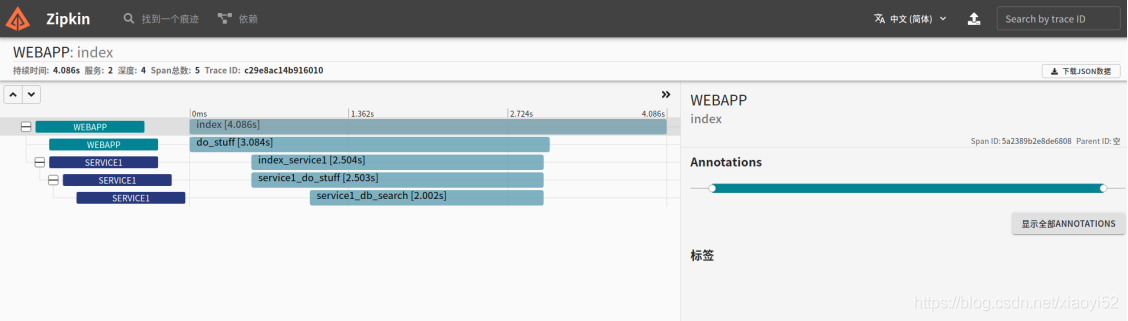
Be careful :zipkin Version must be py_zipkin==0.20.0(ubuntu+python2.7), When using 0.20.1 when , Some service names are displayed as UNKNOWN: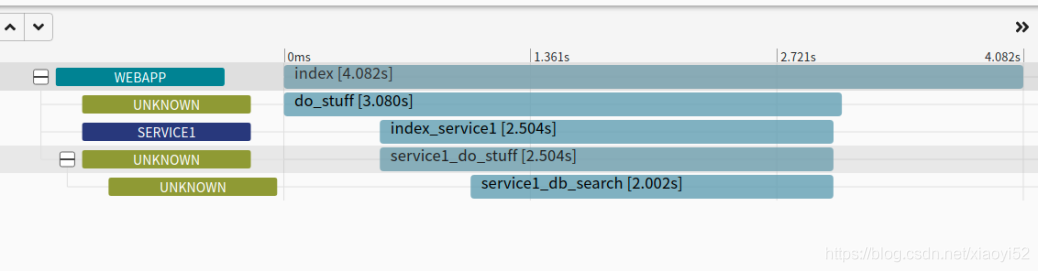
Zipkin storage
According to the deployment above ,zipkin The data of is stored in memory by default . Data will be lost when the service is restarted . Next, change the storage mode to mysql.
newly build zipkin database , In source code zipkin-storage/mysql-v1/src/main/resources In the directory sql Script (https://github.com/openzipkin/zipkin/blob/master/zipkin-storage/mysql-v1/src/main/resources/mysql.sql), perform sql The script creates the data table .
start-up zipkin Specify database parameters on the server :
STORAGE_TYPE=mysql MYSQL_USER=root MYSQL_PASS=123456 MYSQL_HOST=127.0.0.1 MYSQL_TCP_PORT=3306 java -jar zipkin-server-*exec.jar
In this way, the buried point data will be stored in the database .zipkin_spans The data are as follows :
Reference material :
[1]https://zipkin.io/
[2]https://www.cnblogs.com/xiao987334176/p/12074335.html
边栏推荐
- (2006, MySQL server has gone away) problem handling
- jvm命令归纳
- The Child and Binary Tree-多项式开根求逆
- 【Mysql】redo log,undo log 和binlog详解(四)
- 基于序的评价指标 (特别针对推荐系统和多标签学习)
- Error: Cannot find module ‘umi‘ 问题处理
- Nuxt - Project packaging deployment and online to server process (SSR server rendering)
- Nuxt - 项目打包部署及上线到服务器流程(SSR 服务端渲染)
- Mutual transformation of array structure and tree structure
- 力扣——二叉树剪枝
猜你喜欢

论文笔记: 知识图谱 KGAT (未完暂存)

CF1481C Fence Painting

Nuxt - 项目打包部署及上线到服务器流程(SSR 服务端渲染)

Datawhale panda book has been published!

围棋智能机器人阿法狗,阿尔法狗机器人围棋

Li Mu D2L (VI) -- model selection
Vertical search

Qtcreator reports an error: you need to set an executable in the custom run configuration

(1) CTS tradefed test framework environment construction
QtCreator报错:You need to set an executable in the custom run configuration.
随机推荐
Original root and NTT 5000 word explanation
围棋智能机器人阿法狗,阿尔法狗机器人围棋
(2006,Mysql Server has gone away)问题处理
Numpy Foundation
Error: Cannot find module ‘umi‘ 问题处理
公告 | FISCO BCOS v3.0-rc4发布,新增Max版,可支撑海量交易上链
Rocky基础练习题-shell脚本2
ONTAP 9文件系统的限制
十大蓝筹NFT近半年数据横向对比
JS - DataTables 关于每页显示数的控制
js闭包:函数和其词法环境的绑定
Matlab 绘制阴影误差图
Node-v download and application, ES6 module import and export
Study notes of canal
Conditions for JVM to trigger minor GC
Study notes of automatic control principle -- correction and synthesis of automatic control system
HBuilderX 运行微信开发者工具 “Fail to open IDE“报错解决
Pat grade a a1013 battle over cities
The idea shortcut key ALT realizes the whole column operation
Li Mu D2L (IV) -- softmax regression