当前位置:网站首页>pyQt界面制作(登录+跳转页面)
pyQt界面制作(登录+跳转页面)
2022-07-03 14:26:00 【彩色海绵】
4.1制作登录界面
首先打开Qt-Designer,选择Widget,它和Main Window的区别在于:Main Window有工具栏菜单栏状态栏等,而Widget就适合做个简单的登录界面。如下图:

首先如下列图,在这里可以设置标题为登录,然后插入一个logo图片,也可以给字体标题设置大小样式等。
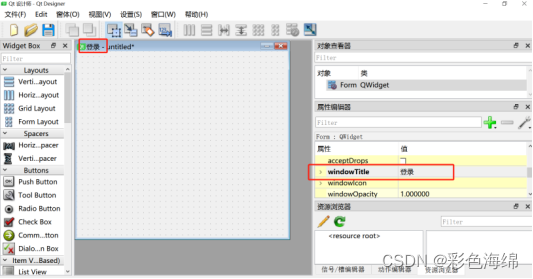

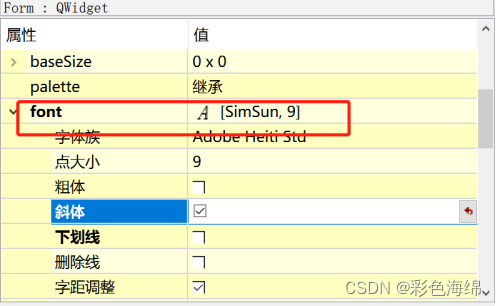
接下来输入框都是用Line Edit,登录按钮是Push Button。设置登录界面大小固定,禁止随意缩放,将其最大窗口和最小窗口都设为长380,宽300。


密码设置为password形式,其密码设置为1234,点击登录按钮可以进入主界面。
4.2制作主界面
接下来再新建,选择Main Window,Main Window有工具栏菜单栏状态栏等,适合做主界面。如下图:

其中点击绘图按钮,可以出图,点击取消则返回上一页(登录页),如下代码部分是对中间绘图区域的样式设置:
self.label_3.setObjectName("label_3")
self.label_3.setFrameShape(QtWidgets.QFrame.Box)
# 设置阴影 据说只有加了这步才能设置边框颜色。///可选样式有Raised、Sunken、Plain(这个无法设置颜色)等
self.label_3.setFrameShadow(QtWidgets.QFrame.Raised)
# 设置背景颜色,包括边框颜色
# self.label.setStyleSheet()
self.label_3.setFrameShape(QFrame.Box)
# 设置边框样式
# 设置背景填充颜色'background-color: rgb(0, 0, 0)'
# 设置边框颜色border-color: rgb(255, 170, 0);
self.label_3.setStyleSheet( 'border-width: 1px;border-style: solid;border-color: rgb(255, 170, 0);background-color: rgb(100, 149, 237);')
4.3 pyqt界面代码实现
界面开发完成后,将.ui文件转换为.py文件。将login.ui和main.ui转换成login.py文件和main.py。放置好控件之后,保存会是以ui文件的形式。这时候需要使用PyUIC工具来将其转化为Py文件才能在Pycharm中打开。打开转化完成的Python文件,可以看到整个界面是以一个类的形式编写的,这时候是不能直接运行的。因为现在只是一个类,我们需要将其进行实例化。
如何显示我们创建好的GUi程序,我们需要QtWidgets.QMainWindow()中的show()函数来显示界面。这里一般有三种写法。
第一种是直接实例化一个QtWidgets.QMainWindow()类,然后使用show()函数。
第二种是创建一个新的类,同时继承QtWidgets.QMainWindow()和UI_MainWindow()两个类,这样这个新的类就会同时拥有两个类的方法。
第三种是让UI_MainWindow()继承QtWidgets.QMainWindow(),并且i重写其中的def init()方法。
本设计设计界面与业务逻辑分离实现。
这一步主要实现业务逻辑,也就是点击登录和退出按钮后程序要执行的操作。为了后续维护方便,采用界面与业务逻辑相分离来实现。也就是通过创建主程序调用界面文件方式实现。这有2个好处。第1就是实现逻辑清晰。第2就是后续如果界面或者逻辑需要变更,好维护。新建index.py文件程序,调用login.py文件和main.py。index.py文件代码如下:
import sys
from PyQt5 import QtCore, QtGui, QtWidgets
from PyQt5.QtWidgets import QApplication, QMainWindow, QPushButton
# 导入login.py、main.py里面全部内容
import login
import main
from PyQt5.QtCore import Qt
class Win_Login:
    def __init__(self):
        self.ui = QUiLoader().load(login.ui)
class main(main.Ui_MainWindow, QMainWindow):
    def __init__(self):
        super(main, self).__init__()
        self.setupUi(self)  # 初始化
        self.pushButton_1.clicked.connect(self.display)
    def display(self):
        self.label_3.resize(400, 300)  # 重设Label大小
        self.label_3.setScaledContents(True)  # 设置图片自适应窗口大小
        self.label_3.setPixmap(QtGui.QPixmap("CO2.png"))
  class login(login.Ui_Form, QMainWindow):
    def __init__(self):
        super(login, self).__init__()
        self.setupUi(self)
if __name__ == '__main__':
    QApplication.setAttribute(Qt.AA_EnableHighDpiScaling)  # 支持高分屏自动缩放
    app = QApplication(sys.argv)
    # 为main_window类和login_window类创建对象
    main_window = main()
    login_window = login()
    # 显示登陆窗口
    login_window.show()
    # 将显示main_window与单击登录页面按钮绑定
    login_window.btn_login.clicked.connect(main_window.show)
    main_window.pushButton_2.clicked.connect(main_window.close)
    # 关闭程序,释放资源
    sys.exit(app.exec_())
问题补充:
(1)但是此时又遇到问题,设计的界面大小和pycharm运行后的显示窗口大小不一致,见下图,查了资料发现是分辨率问题,所以需要在显示窗口函数加一句话:
QApplication.setAttribute(Qt.AA_EnableHighDpiScaling)
#支持高分屏自动缩放。

(2)这里调用爆红了,为什么呢?是因为它没把这个目录当成模块的目录,可以设置将此目录生成源代码目录。


4.4 最终实现的功能界面样式


边栏推荐
- 动态获取权限
- puzzle(016.3)千丝万缕
- 7-8 overspeed judgment
- Exercise 7-6 count capital consonants
- Exercise 10-2 recursive factorial sum
- 中国PETG市场预测及战略研究报告(2022版)
- Sendmail无法发送邮件及发送过慢解决
- 中国锂电池电解液行业市场专项调研报告(2022版)
- Exercise 10-6 recursively find Fabonacci sequence
- US stock listing of polar: how can the delivery of 55000 units support the valuation of more than 20billion US dollars
猜你喜欢
Exercise 10-8 recursive implementation of sequential output of integers
Exercise 6-6 use a function to output an integer in reverse order
7-8 overspeed judgment

必贝特医药冲刺科创板:年营收97万亏损1.37亿 拟募资20亿

Concat and concat_ Ws() differences and groups_ Use of concat() and repeat() functions

X86 assembly language - Notes from real mode to protected mode
NFT new opportunity, multimedia NFT aggregation platform okaleido will be launched soon
concat和concat_ws()区别及group_concat()和repeat()函数的使用

JS input number and standard digit number are compared. The problem of adding 0 to 0

常见问题之PHP——ldap_add(): Add: Undefined attribute type in
随机推荐
超简单手机地图开发
Print. JS -- web page file printing
编程语言:类型系统的本质
Similarities and differences between Allegro, OrCAD, net alias, port, off page connector and how to select them
JS Part III
天图投资冲刺港股:资产管理规模249亿 投了小红书与奈雪
Although not necessarily the best, it must be the hardest!
556. The next larger element III
Leetcode(4)——尋找兩個正序數組的中比特數
如何查询淘宝天猫的宝贝类目
Programming language: the essence of type system
Why is this error reported when modifying records in the database
虽然不一定最优秀,但一定是最努力的!
Preliminary summary of structure
Interface for querying IP home
ShowMeBug入驻腾讯会议,开启专业级技术面试时代
fpga阻塞赋值和非阻塞赋值
Doris学习笔记之数据表的创建
puzzle(016.4)多米诺效应
Thinking about the arrangement problem in the backtracking problem (leetcode questions 46 and 47)