当前位置:网站首页>Express - static resource request
Express - static resource request
2022-06-30 09:16:00 【The man of Jike will never admit defeat】
Express の Static resource requests
We talked about Download files , Actually, after talking about file downloading , You can handle static resources . Common static resource files include images ,CSS and JS file .
Use sendFile() Respond to static resource requests
const express = require('express');
const path = require('path');

const app = express();

app.get('/static/:file', (req, res) => {

  let filename = req.params.file;
  let options = {

    root: path.join(__dirname, '../resource')
  };
  if (filename.indexOf('.css') !== -1) {

    res.sendFile('index.css', options);
  }
  // .js .jpg  Omit
});

app.listen(3000, () => {

  console.log('server started ...');
});
Look ahead Download files This part , Otherwise, I'm afraid you'll have to guess what's going on in the code .
Such a request is no problem , The key is sendFile() Function is automatically set according to the file suffix Content-Type Response header for , Avoid us writing one more line of code 🤭

The problem now is , We use three if Deal with... Separately CSS,JS And picture type files . If one day you want to add a pair of PDF Handling of type , And at home if; If I don't want to deal with image type files anymore , Also delete one if. So this can , But not the best .
Use static middleware
One side , We all put all the static files in one directory , For example, below . If the user accesses /index.css,/index.js In this way, static resources can be returned directly . Use express.static(root, [options]) middleware .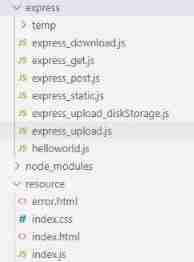
Pay attention to directory deconstruction , We passed on to static The function is Relative paths Oh .
const express = require('express');
const app = express();

//  The key
app.use(express.static('../resource'));

app.listen(3000, () => {

  console.log('server started ...');
});
When we visit http://localhost:3000/index.js
Use multiple static resource directories
If we want to resource Create two folders under to store CSS, JS file , like this . Just call... More than once express.static() that will do .express It will find the static resource files according to the order in which directories are added in the code .
app.use(express.static('../resource/css'));
app.use(express.static('../resource/js'));

Create static resources URL Unified access path
If we want to access static resources in all URL add /static, like this ,http://localhost:3000/static/index2.js.
app.use(express.static('../resource');
app.use('/static', express.static('../resource/css'));
app.use('/static', express.static('../resource/js'));

See the code above , Specifying a prefix and not specifying a prefix can coexist . Look at the picture below , I didn't use it /static Prefix ~
Using absolute paths
my JS The files are written in node/express Under the table of contents , Static resources are stored in node/resource Next , So I am node/express Under boot node process , Accessing static resources is no problem . But if I was node Start the process under the directory , You won't find this file .

How to solve this problem ? The official website suggests that absolute paths are more secure .
app.use('/static', express.static(path.join(__dirname, '../resource/js')));
app.use('/static', express.static(path.join(__dirname, '../resource/css')));
This is normal 
options Parameters
options It's an object parameter , You can set a lot of values . I chose one that I felt was more useful , Others can see file , Although not everyone introduced 🤭
index attribute
Usually we visit a website , It is usually direct input http://localhost:3000 Jump to the home page , Instead of typing http://localhost:3000/index.html. So use index Sure . This property can receive strings or arrays .
app.use(express.static(path.join(__dirname, '../resource'), {

  index: ['index.html']
}));

边栏推荐
- Dart basic notes
- Implementing custom drawer component in quick application
- Interviewer: do you understand the principle of recyclerview layout animation?
- Invalid update: invalid number of sections. The number of sections contained in the table view after
- 8.8 heap insertion and deletion
- C accesses mongodb and performs CRUD operations
- Interpretation of source code demand:a rotation equivariant detector for aerial object detection
- Application of hongruan face recognition
- 100 lines of code and a voice conversation assistant
- Influencing factors of echo cancellation for smart speakers
猜你喜欢

Opencv learning notes -day 11 (split() channel separation function and merge() channel merge function)

Wechat development tool (applet)

Opencv learning notes -day2 (implemented by the color space conversion function cvtcolar(), and imwrite image saving function imwrite())

Talking about kotlin process exception handling mechanism

Pit encountered by fastjason

Rew acoustic test (I): microphone calibration

Rew acoustic test (II): offline test

Opencv learning notes -day8 (keyboard typing (waitkey()); Wait for typing) action: triggers some action when the appropriate character is typed using the keyboard)

Esp32 things (II): sharpening the knife without mistaking firewood - make preparations before project development

Applet learning path 2 - event binding
随机推荐
Bind threads to run on a specific CPU logical kernel
Opencv learning notes-day6-7 (scroll bar operation demonstration is used to adjust image brightness and contrast, and createtrackbar() creates a scroll bar function)
Detectron2 source code reading 2--- using the configurable decorator to build the dataloader
Qt通过Url下载文件
[paid promotion] collection of frequently asked questions, FAQ of recommended list
100 lines of code and a voice conversation assistant
Detailed explanation of pytoch's scatter function
Mmdet line by line deltaxywhbboxcoder
Talk about the kotlin cooperation process and the difference between job and supervisorjob
Opencv learning notes -day10 logical operation of image pixels (usage of rectangle function and rect function and bit related operation in openCV)
Use V-IF with V-for
Esp32 things (x): other functions
Invalid update: invalid number of sections. The number of sections contained in the table view after
Detailed explanation of pipline of mmdetection
Unsupportedclassversionerror is reported when starting jar package. How to repair it
9.JNI_ Necessary optimization design
Interpretation of orientedrcnn papers
About Lombok's @data annotation
QT downloading files through URL
Agp7.0|kts makes a reinforced plug-in