当前位置:网站首页>Bind threads to run on a specific CPU logical kernel
Bind threads to run on a specific CPU logical kernel
2022-06-30 08:37:00 【The bright moon is like me】
It is said that in the process of calculation , Switching the logical kernel will cause additional overhead , Affect the efficiency of program operation . Recently started to try simulation optimization (Sim-Opt) Research in , It happens that this content is involved in the requirements . So I made some attempts .
On the first code :
using System.Runtime.InteropServices;
using System.Diagnostics;
using System.Management;

namespace BandThreadToCPU
{

    class Program
    {

        //SetThreadAffinityMask: Set hThread run on logical processer(LP:) dwThreadAffinityMask
        [DllImport("kernel32.dll")]
        static extern UIntPtr SetThreadAffinityMask(IntPtr hThread, UIntPtr dwThreadAffinityMask);

        //Get the handler of current thread
        [DllImport("kernel32.dll")]
        static extern IntPtr GetCurrentThread();

        //The real function
        public static void ChangeValue(object lpIdx)
        {

            //Bind current thread to a specific logical processer
            ulong LpId = SetCpuID((int)lpIdx);
            SetThreadAffinityMask(GetCurrentThread(), new UIntPtr(LpId));

            // Let program run for a while
            Stopwatch stopwatch = new Stopwatch();
            stopwatch.Start();
            for (int i = 0; i < 1000000; i++)
            {

                for (int j = 0; j < 1000000; j++)
                {

                    int _data = j;
                }
            }
            stopwatch.Stop();
            Console.WriteLine("Running Time: " + stopwatch.ElapsedMilliseconds.ToString());
        }

        //Get CPU id. index:0 -> id:1, 1->2, 2->4, 3->8, 4->16, ...
        static ulong SetCpuID(int lpIdx)
        {

            ulong cpuLogicalProcessorId = 0;
            if (lpIdx < 0 || lpIdx >= System.Environment.ProcessorCount)
            {

                lpIdx = 0;
            }
            cpuLogicalProcessorId |= 1UL << lpIdx;
            return cpuLogicalProcessorId;
        }

        static void Main(string[] args)
        {

            // Specify the cpu logical processor index you want. CPU lp index start from 0
            int LOGICAL_PROCESSOR_IDX = 4;

            // Get the ManagementClass object
            ManagementClass mc = new ManagementClass(new ManagementPath("Win32_Processor"));
            // Get the properties in the class
            ManagementObjectCollection moc = mc.GetInstances();

            foreach (ManagementObject mo in moc)
            {

                PropertyDataCollection properties = mo.Properties;
                // Print CPU properties
                foreach (PropertyData property in properties)
                {

                    Console.WriteLine( property.Name + ": " + property.Value);
                }
            }

            Stopwatch stopwatch = new Stopwatch();
            Thread thread = new Thread(new ParameterizedThreadStart(ChangeValue));
            stopwatch.Start();
            thread.Start(LOGICAL_PROCESSOR_IDX);
            thread.Join();
            stopwatch.Stop();
            Console.WriteLine("Total running time: " + stopwatch.ElapsedMilliseconds.ToString());
            Console.ReadKey();
        }
    }
}
among :
SetThreadAffinityMask Will thread and core Binding .
GetCurrentThread Get the handle of the current thread .
ChangeValue The real business operation logic is here , Here is Demo, So there is only a time-consuming loop written in it .
SetCpuID Here is the more interesting ,CPU Logical processor index (index) It's from 0 At the beginning , however SetThreadAffinityMask When binding, you need to use the logical processor ID,index and id a 2 Exponential power relation of . namely :idx=0 Corresponding id=1(2 Of 0 Power );idx=3 Corresponding id=8(2 Of 3 Power ).
The operation effect is as follows , You can see ,04 Number CPU core It's full , But other core Did not come to help .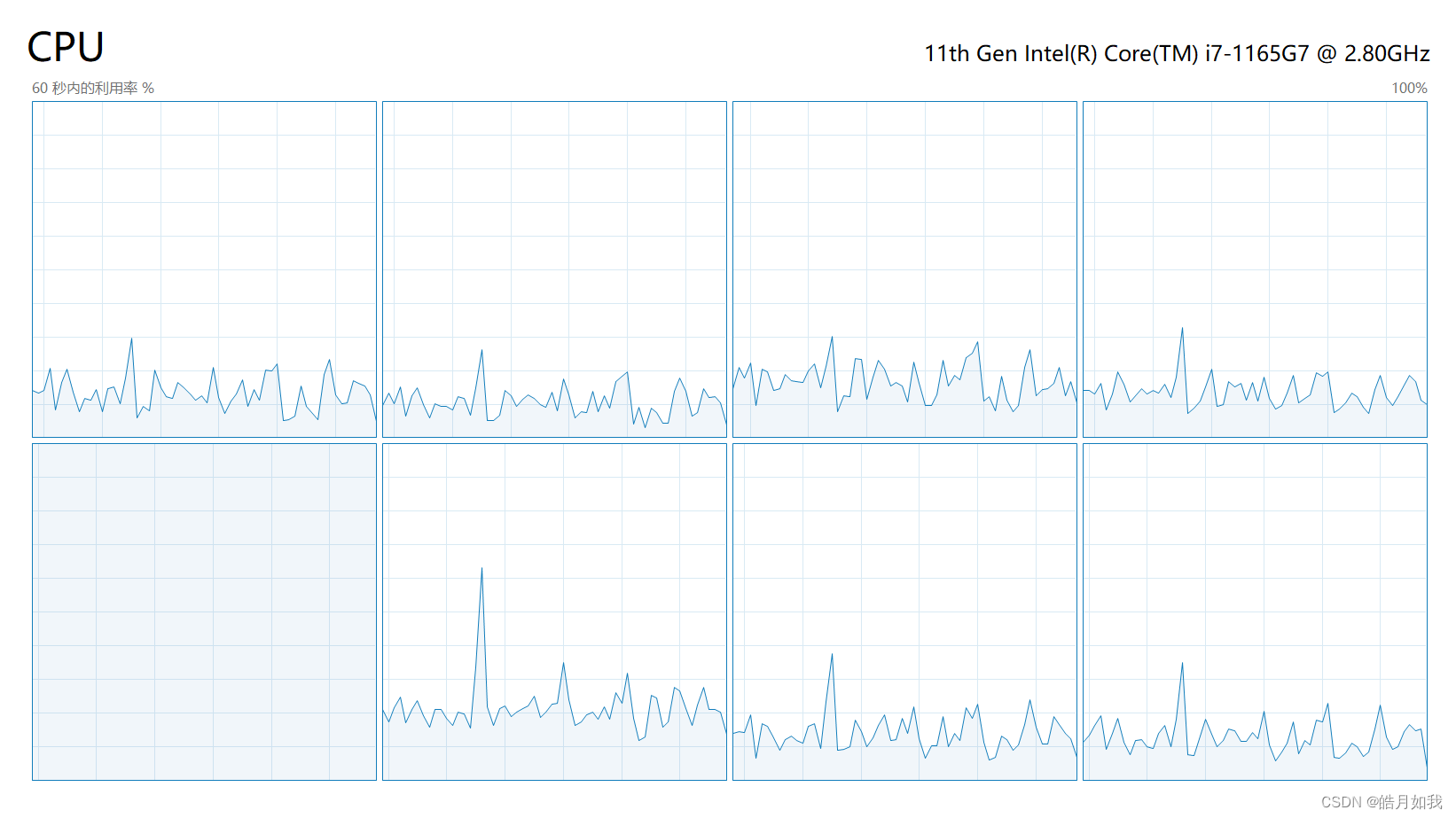
This article mainly refers to jimmy-yang The article :《C# The thread is bound to the specified cpu》 The main part of the code also comes from this . The main focus is on code simplification , Deleted parts irrelevant to the main purpose , And changed the names of some variables or functions , Modified comments . Make the key content more prominent , Easy to understand .
边栏推荐
- PHP API to obtain QR code and combine to generate pictures
- Redis design and Implementation (III) | interaction between server and client (event IO model)
- 酒精测试仪方案:酒精测试仪是根据什么原理测酒精溶度?
- Redis设计与实现(一)| 数据结构 & 对象
- 涂鸦Wi-Fi&BLE SoC开发幻彩灯带
- 【NVMe2.0b 14-1】Abort、Asynchronous Event Request、Capacity Management command
- Cesium learning notes (III) creating instances
- Redis design and Implementation (I) | data structure & object
- 【NVMe2.0b 14-7】Set Features(上篇)
- 证券开户的优惠怎样才能得到?在线开户安全?
猜你喜欢

Detectron2 source code reading 3-- encapsulating dataset with mapper

Redis设计与实现(八)| 事务

【NVMe2.0b 14-3】Doorbell Buffer Config command、Device Self-test command

【NVMe2.0b 14】NVMe Admin Command Set

Redis design and Implementation (VI) | cluster (sharding)

【NVMe2.0b 14-1】Abort、Asynchronous Event Request、Capacity Management command

Sword finger offer II 075 Array relative sort (custom sort, count sort)

Axure make menu bar effect

codeforces每日5题(均1700)-第三天

Redis设计与实现(一)| 数据结构 & 对象
随机推荐
Tidb 6.0: making Tso more efficient tidb Book rush
[untitled]
Redis design and Implementation (I) | data structure & object
Gilbert Strang's course notes on linear algebra - Lesson 1
[untitled]
挖财开户安全吗?怎么有人说不靠谱。
Emoji icons supported by markdown
Redis design and Implementation (VII) | publish & subscribe
[untitled]
Cesium learning notes (II) uploading data using rest API
微信公众号第三方平台开发,零基础入门。想学我教你啊
Redis design and Implementation (V) | sentinel sentry
Introduction to MySQL basics day4 power node [Lao Du] class notes
TiDB v6.0.0 (DMR) :缓存表初试丨TiDB Book Rush
Leetcode47. full arrangement II
Redis设计与实现(三)| 服务器与客户端的交互(事件IO模型)
Redis design and Implementation (II) | database (deletion strategy & expiration elimination strategy)
Unit Test
Gilbert Strang's course notes on linear algebra - Lesson 2
MIME类型大全