当前位置:网站首页>Boot indicator monitoring
Boot indicator monitoring
2022-06-26 18:46:00 【51CTO】
1、SpringBoot Actuator
1、 brief introduction
- In the future, after every micro service is deployed on the cloud , We all need to monitor it 、 track 、 Audit 、 Control, etc. .
- SpringBoot I'll take it Actuator scene , So that each of us Microservices Quick reference to get Production level application monitoring 、 Audit and other functions .
2、1.x And 2.x Different

3、 How to use
- Introduce the scene
- visit http://localhost:8080/actuator/ You can view various indicators
- Recorded all kinds of http://localhost:8080/actuator/xxx xxx For monitoring endpoints
- springboot Many monitoring endpoints are provided ----> Check out the official documents
- All monitoring endpoints are enabled by default , But not all of them are exposed
- Many monitoring endpoints JMX Way to expose , But not with WEB The way to expose
- What endpoint is exposed by default ----> Look at the official documents
- How to JMX、WEB Expose endpoints in a way ??

- Expose profile settings for monitoring endpoints
- Test various monitoring endpoints
- http://localhost:8080/actuator/beans Components in the current container
- http://localhost:8080/actuator/conditions take effect | Don't take effect Automatic configuration of ( The current environment )
- http://localhost:8080/actuator/configprops Properties of the current application configuration
- http://localhost:8080/actuator/env Environment variable information
- http://localhost:8080/actuator/metrics Indicator information
- http://localhost:8080/actuator/metrics/jvm.gc.pause An indicator of a specific item
- http://localhost:8080/actuator/ Endpoint name / Details path
- ......
4、 visualization
- Integrated visualization platform ----> Aspect view indicator monitoring
- A free open source project : https://github.com/codecentric/spring-boot-admin
- The project can be used for indicator monitoring and safety monitoring -- Only use its indicator monitoring function

- Detailed use steps : See the address above gethub Introduce
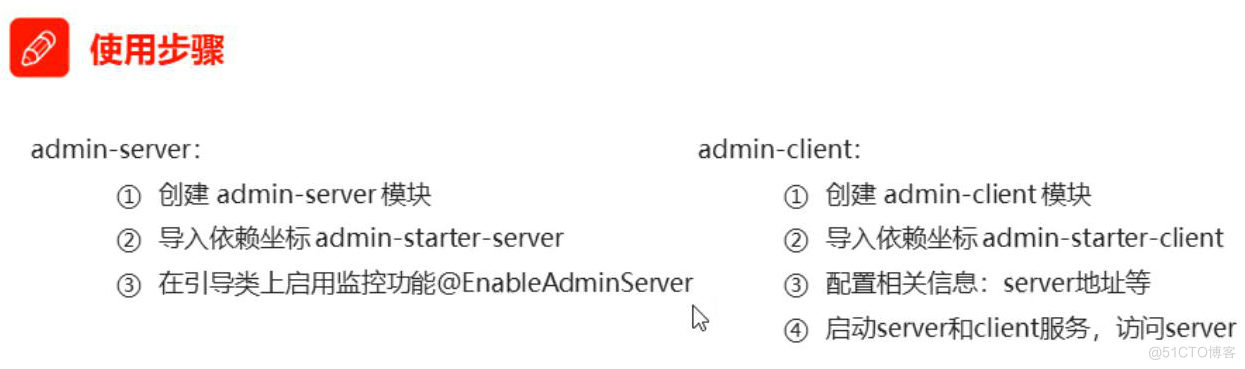
- Use steps :
- 1、 Create a Monitoring server ( Equivalent to a project )
- stay pom Introduce in the file jar package
       <!-- Indicators monitor -->


       <

       dependency

       >


       <

       groupId

       >de.codecentric

       </

       groupId

       >


       <

       artifactId

       >spring-boot-admin-starter-server

       </

       artifactId

       >


       <

       version

       >2.3.1

       </

       version

       >


       </

       dependency

       >


<!-web Common in the development of -->


       <

       dependency

       >


       <

       groupId

       >org.springframework.boot

       </

       groupId

       >


       <

       artifactId

       >spring-boot-starter-web

       </

       artifactId

       >


       </

       dependency

       >
- 1.
- 2.
- 3.
- 4.
- 5.
- 6.
- 7.
- 8.
- 9.
- 10.
- 11.
- Add... On the startup entry class :@EnableAdminServer annotation
- modify Tomcat port , Do not project ( Microservices ) Port conflict for
- 2、 Register client , Put every micro service ( project ) Add to monitoring server
- introduce jar package ( Indicators monitor ( Safe use to introduce ))
       <!-- Indicators monitor  -->


       <

       dependency

       >


       <

       groupId

       >de.codecentric

       </

       groupId

       >


       <

       artifactId

       >spring-boot-admin-starter-client

       </

       artifactId

       >


       <

       version

       >2.3.1

       </

       version

       >


       </

       dependency

       >


       <!-- Safe  -->


       <

       dependency

       >


       <

       groupId

       >org.springframework.boot

       </

       groupId

       >


       <

       artifactId

       >spring-boot-starter-security

       </

       artifactId

       >


       </

       dependency

       >
- 1.
- 2.
- 3.
- 4.
- 5.
- 6.
- 7.
- 8.
- 9.
- 10.
- 11.
- In microservice ( project ) Configure the port location of the monitoring server in also Expose all endpoints
- spring.boot.admin.client.url=http://localhost:8080 ( Monitor server location )
- management.endpoints.web.exposure.include=*
- spring.boot.admin.client.instance.prefer=true( Use ip Mode injection monitor )
- spring.application.name= The name of the current project
- In fact, the monitoring server calls the bottom of the project http://localhost:8080/actuator , We can also write a front-end monitoring page ourselves
2、Actuator Endpoint ( Monitor endpoints )
1、 The most commonly used endpoint
ID | describe |
| Expose audit event information for the current application . Need one |
| Show all of the Spring Bean A complete list of . |
| Expose available cache . |
| Display all condition information of automatic configuration , Include the reasons for the match or mismatch . |
| Show all |
| expose Spring Properties of |
| Show all the applied Flyway Database migration . Need one or more |
| Display application health information . |
| Show HTTP Tracking information ( By default , lately 100 individual HTTP request - Respond to ). Need one |
| Display application information . |
| Show Spring |
| Display and modify the configuration of logs in the application . |
| Show all the applied Liquibase Database migration . Need one or more |
| Shows the current application's “ indicators ” Information . |
| Show all |
| Show scheduled tasks in the application . |
| Allow from Spring Session Retrieve and delete user sessions from supported session stores . Need to use Spring Session Based on the Servlet Of Web Applications . |
| Make the application shut down normally . Default disabled . |
| Show by |
| Execute thread dump . |
If your application is Web Applications (Spring MVC,Spring WebFlux or Jersey), You can use the following additional endpoints :
ID | describe |
| return |
| adopt HTTP expose JMX bean( Need to introduce Jolokia, Do not apply to WebFlux). Need to introduce dependency |
| Return the contents of the log file ( If set |
| With Prometheus The format that the server can grab exposes metrics . Need to rely on |
Most commonly used Endpoint
- Health: health
- Metrics: Runtime metrics
- Loggers: logging
2、Health Endpoint ( Health check endpoint )
Health check endpoint , We generally use it on cloud platforms , The platform will check the health of the application regularly , We just need Health Endpoint It can return a collection of health status of a series of components of the current application for the platform . Check the running status of the current program
Important points :
- Only one current application is displayed by default The overall state
- Turn on Health Monitoring endpoint's Show in detail
management
endpoints
# Settings for all endpoints
enabled-by-default
true
# Open all monitoring endpoints
web
exposure
include
'*'
# With web Monitoring endpoints exposed in the way ,* Represents total exposure
endpoint
# Detailed settings for a certain endpoint
health
show-details
always
# Show health Monitor endpoint details
- 1.
- 2.
- 3.
- 4.
- 5.
- 6.
- 7.
- 8.
- 9.
- health endpoint The result returned , It should be a summary report after a series of health checks ( Database health 、redis Health, etc )
- Many health checks are automatically configured by default , such as : database 、redis etc.
- You can easily add a custom health check mechanism

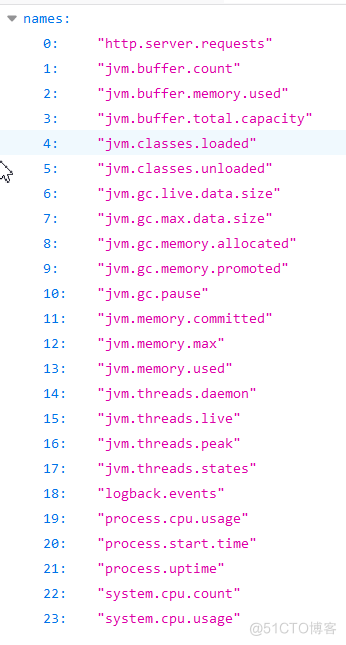
3、Metrics Endpoint ( Runtime metric endpoint )
Provide detailed 、 Hierarchical 、 Spatial index information , This information can be pull( Take the initiative to push ) perhaps push( Passive acquisition ) The way to get ;
- adopt Metrics Docking multiple monitoring systems
- Simplify the core Metrics Development
- Add custom Metrics Or expand the existing Metrics
- All kinds of Metrics The indicators are shown in the figure below
- http://localhost:8080/actuator/metrics/ Specifically indicators An indicator of a specific item
4、 Manage monitoring endpoints
1、 On and off Monitor endpoints
- Default owned Endpoint Excepting shutdown It's all on .
- Need to enable or disable Some Endpoint.
- The configuration mode is management.endpoint. Endpoint name .enabled = true
- Disable or enable all Endpoint
- management.endpoints.enabled-by-default = true
2、 expose Monitor endpoints
Exposure to support
- HTTP: By default, only expose health and info Endpoint
- JMX: Default exposure all Endpoint
- JMX The way is java Provide the underlying data monitoring
- DOS command :jconsole You can see the present java Operation details

- Excepting health and info, The rest Endpoint Should be protected access . If you introduce SpringSecurity, Security access rules are configured by default
ID | JMX | Web |
| Yes | No |
| Yes | No |
| Yes | No |
| Yes | No |
| Yes | No |
| Yes | No |
| Yes | No |
| Yes | Yes |
| N/A | No |
| Yes | No |
| Yes | Yes |
| Yes | No |
| N/A | No |
| N/A | No |
| Yes | No |
| Yes | No |
| Yes | No |
| Yes | No |
| N/A | No |
| Yes | No |
| Yes | No |
| Yes | No |
| Yes | No |
| Yes | No |
3、 customized Endpoint
1、 customized Of a component health information
- Custom status check information
- Realization HealthIndicator Interface perhaps Inherit AbstractHealthIndicator abstract class
- For implementing the interface Realization health Method
- Judge in this method What is the condition of the component health / unhealthy
- Health.up(); health
- Health.down(); unhealthy
- For inheritance AbstractHealthIndicator The abstract class Implement the... In the classification doHealthCheck Method
- Judge in this method What is the condition of the component health / unhealthy
- builder.up(); health
- builder.budn(); unhealthy
- builder.status(Status. state ); Return detailed status
- Set the specific display details
- Health.down() .withDetail("key1", "value1") .withDetail("key2", "value2")......;
// Implementation of the interface
public
class
MyHealthIndicator
implements
HealthIndicator {
public
Health
health() {
// Judge in this method What is the condition of the component health / unhealthy
int
errorCode
=
check();
// perform some specific health check
if (
errorCode
!=
0) {
return
Health.
down().
withDetail(
"Error Code",
errorCode).
build();
}
return
Health.
up().
build();
}
}
// structure Health, The specific direction details returned
Health
build
=
Health.
down()
.
withDetail(
"msg",
"error service")
.
withDetail(
"code",
"500")
.
withException(
new
RuntimeException())
.
build();
}
- 1.
- 2.
- 3.
- 4.
- 5.
- 6.
- 7.
- 8.
- 9.
- 10.
- 11.
- 12.
- 13.
- 14.
- 15.
- 16.
- 17.
- 18.
- 19.
- 20.
- 21.
- 22.
- 23.
// Inherit AbstractHealthIndicator The abstract class
public
class
MyComHealthIndicator
extends
AbstractHealthIndicator {
/**
* The real test method
* @param builder
* @throws Exception
*/
protected
void
doHealthCheck(
Health.
Builder
builder)
throws
Exception {
// Judge in this method What is the condition of the component health / unhealthy
//mongodb. Get the connection to test
Map
<
String,
Object
>
map
=
new
HashMap
<>();
// Check complete
if(
1
==
2){
// builder.up(); // health
builder.
status(
Status.
UP);
map.
put(
"count",
1);
map.
put(
"ms",
100);
}
else {
// builder.down();
builder.
status(
Status.
OUT_OF_SERVICE);
map.
put(
"err",
" Connection timeout ");
map.
put(
"ms",
3000);
}
builder.
withDetail(
"code",
100)
.
withDetails(
map);
}
}
- 1.
- 2.
- 3.
- 4.
- 5.
- 6.
- 7.
- 8.
- 9.
- 10.
- 11.
- 12.
- 13.
- 14.
- 15.
- 16.
- 17.
- 18.
- 19.
- 20.
- 21.
- 22.
- 23.
- 24.
- 25.
- 26.
- 27.
- 28.
- 29.
- 30.
- 31.
- 32.
- 33.
- 34.
2、 customized info Information ( Customize the details of the current application )
- There is nothing in the default customization information
There are two common customization methods :
1、 Writing configuration files
info
appName
boot-admin
# The name of the current app
version
2.0.1
# The current version of the application
mavenProjectName
@[email protected]
# Use @@ Can get maven Of pom File value
mavenProjectVersion
@[email protected]
- 1.
- 2.
- 3.
- 4.
- 5.
2、 To write InfoContributor
- Write configuration classes Realization InfoContributor Interface Medium contribute Method
- stay contribute Method to write prompt information
- builder .withDetail("key1", "value1") .withDetail("key2", "value2")......;
import
java.
util.
Collections;
import
org.
springframework.
boot.
actuate.
info.
Info;
import
org.
springframework.
boot.
actuate.
info.
InfoContributor;
import
org.
springframework.
stereotype.
Component;
public
class
ExampleInfoContributor
implements
InfoContributor {
public
void
contribute(
Info.
Builder
builder) {
builder.
withDetail(
"example",
Collections.
singletonMap(
"key",
"value"));
}
}
- 1.
- 2.
- 3.
- 4.
- 5.
- 6.
- 7.
- 8.
- 9.
- 10.
- 11.
- 12.
- 13.
- 14.
- 15.
- 16.
visit http://localhost:8080/actuator/info It will output all the data returned in the above way info Information
3、 customized Metrics Information
1、SpringBoot Support Automatic adaptation Metrics indicators
- JVM metrics, report utilization of:
- Various memory and buffer pools
- Statistics related to garbage collection
- Threads utilization
- Number of classes loaded/unloaded
- CPU metrics
- File descriptor metrics
- Kafka consumer and producer metrics
- Log4j2 metrics: record the number of events logged to Log4j2 at each level
- Logback metrics: record the number of events logged to Logback at each level
- Uptime metrics: report a gauge for uptime and a fixed gauge representing the application’s absolute start time
- Tomcat metrics (
server.tomcat.mbeanregistry.enabled
- must be set to
true
- for all Tomcat metrics to be registered)
- Spring Integration metrics
2、 Add customization Metrics indicators
Mode one :
- In which class do you want to add indicator monitoring information ----- Add a... To this class Counter counter attribute
- For this class Pass a in the constructor MeterRegistry Index factory
- Invocation in construction method counter = meterRegistry.counter (" Index name ");
- stay Add... To other methods :
- counter.increment(); Method every time it is called +1
Mode two :
- Add... To the configuration class MeterBinder Components
- Method return value :return (registry) -> Gauge.builder("queueSize", queue::size).register(registry);
// Mode one :
class
MyService{
// This is an ordinary Service class
Counter
counter;
public
MyService(
MeterRegistry
meterRegistry){
// The constructor of this class
//MeterRegistry Index factory
counter
=
meterRegistry.
counter(
"myservice.method.running.counter");
// Give the name of indicator gas
}
public
void
hello() {
counter.
increment();
// This method is not called to count +1
}
}
// Mode two :
MeterBinder
queueSize(
Queue
queue) {
return (
registry)
->
Gauge.
builder(
"queueSize",
queue::
size).
register(
registry);
}
- 1.
- 2.
- 3.
- 4.
- 5.
- 6.
- 7.
- 8.
- 9.
- 10.
- 11.
- 12.
- 13.
- 14.
- 15.
- 16.
- 17.
- 18.
- 19.
- 20.
4、 Customize the monitoring endpoint
1、SpringBoot Default monitoring endpoint for
- What we used above is springboot Default monitoring endpoint for
- springboot There are many default monitoring points for -- You can view the official documentation | There are also
- When we visit : http://localhost:8080/actuator You can see the exposed monitoring endpoint
2、 Customize a monitoring endpoint
- Customize the monitoring endpoint
- Define a class
- On this class Use @Endpoint(id = "container") Note that this class is a monitoring endpoint , And specify the endpoint name
- On this class Use @Component Put it in a container
- Write a reading method ( Method name 、 Return value custom ), Add... To this method @ReadOperation
- Write a writing method ( Method name 、void Customize ), Add... To this method @WriteOperation
- Use monitoring endpoints
- open DOS:jconsole Use the methods in our monitoring endpoint
(
id
=
"container")
public
class
DockerEndpoint {
public
Map
getDockerInfo(){
// Endpoint read operation
return
Collections.
singletonMap(
"info",
"docker started...");
}
private
void
restartDocker(){
// Endpoint write operations
System.
out.
println(
"docker restarted....");
}
}
- 1.
- 2.
- 3.
- 4.
- 5.
- 6.
- 7.
- 8.
- 9.
- 10.
- 11.
- 12.
- 13.
- 14.
- 15.
- 16.
- 17.
- 18.
scene :
Development ReadinessEndpoint To manage whether the program is ready , perhaps LivenessEndpoint To manage whether the program survives ;
Of course , This can also be used directly
边栏推荐
猜你喜欢

成功解决之idea引用Lombok的@Slf4j后无法正常使用log

LeetCode 面试题29 顺时针打印矩阵

DVD digital universal disc
![[kubernetes] kubernetes principle analysis and practical application (under update)](/img/37/40b8317a4d8b6f9c3acf032cd4350b.jpg)
[kubernetes] kubernetes principle analysis and practical application (under update)

Take you to resolve hash conflicts and implement a simple hash table,

50 lines of code to crawl TOP500 books and import TXT documents

手机影像内卷几时休?

The cross compilation environment appears So link file not found problem

Numpy之matplotlib

JVM入個門(1)
随机推荐
Clion compiling catkin_ WS (short for ROS workspace package) loads cmakelists Txt problems
Usage and difference between ros:: spinonce() and ros:: spin()
一些基本错误
问题解决:虚拟机无法复制粘贴文件
Redis single sign on system + voting system
Microservice architecture
Record of user behavior log in SSO microservice Engineering
Insert string B into string A. how many insertion methods can make the new string a palindrome string
LeetCode 238 除自身以外数组的乘积
微信小程序 自定义 弹框组件
成功解决之微服务@Value获取配置文件乱码问题
商品秒杀系统
Solidity - 合约继承子合约包含构造函数时报错 及 一个合约调用另一合约view函数收取gas费用
Procedure steps for burning a disc
8VC Venture Cup 2017 - Final Round C. Nikita and stack
LeetCode 面试题29 顺时针打印矩阵
(multi threading knowledge points that must be mastered) understand threads, create threads, common methods and properties of using threads, and the meaning of thread state and state transition
To: seek truth from facts
redis 基础知识
Comparing the size relationship between two objects turns out to be so fancy