当前位置:网站首页>Hamad application layout scheme 03 of hashicopy (run a job)
Hamad application layout scheme 03 of hashicopy (run a job)
2022-06-11 14:38:00 【Hua Weiyun】
One Nomad The term
1.1 Nomad cluster
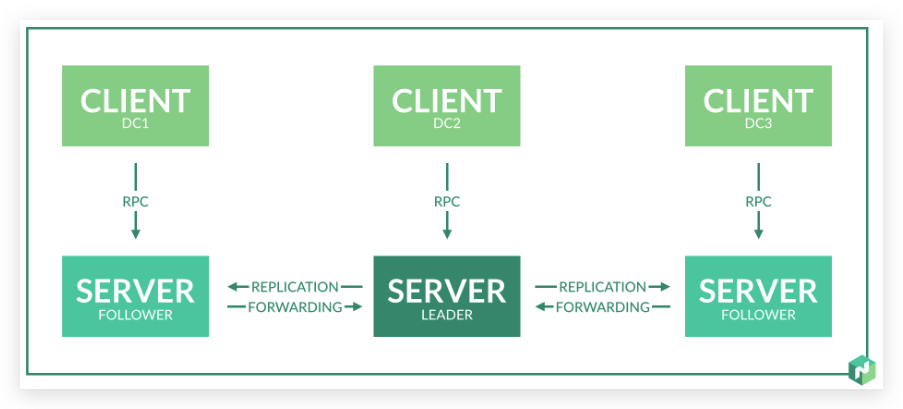
- Agent:Nomad Agents run in server or client mode Nomad process . The agent is Nomad The basic building blocks of a cluster .
- Dev Agent:Nomad The development agent is a special configuration , It's for the use of Nomad Running the experiment provides useful defaults . It runs in server and client mode , Will not persist its cluster state to disk , This allows the agent to start from a repeatable clean state , You don't have to delete the disk based state between runs .Nomad The development agent is only used for development and experimental use . To understand production Nomad Deploy , See the enterprise reference architecture and Deployment Guide collection .
- Server: Running in server mode Nomad agent . Nomadic servers are the brains of clusters . Each region has a server cluster , They manage all jobs and clients , Run the assessment , And create task assignments . Servers replicate data with each other , And conduct leadership elections , To ensure high availability . Servers are federated across regions , send Nomad It can be felt all over the world . All servers in a region are members of the same gossip domain and consensus group .
- Leader:leader It's a Nomad The server , It performs most of the cluster management . It is responsible for application planning , Derive for workload Vault token , And maintain the cluster state .
- Follower: Not leader Nomad The server . Followers create scheduling plans and submit them to leaders , So as to provide more scheduling capabilities for the cluster .
- Client: Running in client mode Nomad agent . The client agent is responsible for registering itself with the server , Monitor any work to be assigned , And perform the task . The client creates multiple connections to the server . This will enable the need for NAT Penetrating topology . Once connected , The server will use this connection to... If necessary RPC The call is forwarded to the client .
1.2 Nomad object
- Job: A job defines one or more task groups that contain one or more tasks .
- job specification:Nomad Operation specification ( Or abbreviation “JobSpec”) Defined Nomad Mode of operation . It describes the type of job 、 Tasks and resources required for job operation , Other job information is also included ( Such as restraint 、 Expand 、 Auto zoom policy 、 Consulting service information, etc )
- task group: A task group is a set of tasks that must be run together . for example ,web The server may require that the log shipping collaboration process also be running at all times . A task group is a scheduling unit , This means that the entire group must run on the same client node , And cannot be split . The running instance of the task group is the assignment .
- task driver: A task driver represents the basic method of executing a task .Nomad Several built-in task drivers are provided :Docker、QEMU、Java And static binaries .Nomad It also allows third-party task drivers to pass through their pluggable architecture .
- task: The task is Nomad The smallest unit of work in . Tasks are performed by task drivers , This makes Nomad Be able to flexibly handle the types of tasks it supports . A task specifies the task driver it needs 、 Driver configuration 、 Constraints and required resources .
- Allocation: Assignment is the mapping between task groups and client nodes in a job . A single job may have hundreds or thousands of task groups , This means that there must be an equivalent number of assignments to map work to the client machine . Assigned by Nomad Server created , As part of the scheduling decisions made during the evaluation .
- Evaluation: The assessment is Nomad The mechanism for making scheduling decisions . When the desired state ( Homework ) Or actual state ( The client ) When something changes ,Nomad A new assessment will be created to determine if any action must be taken . If necessary , The assessment may lead to a change in the allocation .
1.3 Scheduling
- Bin packing: Boxing is an algorithm , Its name comes from the practice of arranging irregularly sized objects into boxes or boxes in the real world . The boxing algorithm attempts to create the densest arrangement of objects , So as to use the least number of boxes . stay Nomad Under the circumstances , These objects are the allocations of the deployment .Bin Packaging reduces provisioning by consolidating utilization and highlighting , Benefit those who use the metering and billing platform .
- Spread scheduling: The arrangement plan is the opposite of packing . The goal of decentralized scheduling is to allocate as much as possible in the fleet a Stage load . This scheduling algorithm is most suitable for users who have invested in local data centers or committed nodes .
Two start-up Nomad
Nomad Rely on a long-running agent on each machine in the cluster . The agent can run in server mode , You can also run in client mode . The cluster server is responsible for managing the cluster . All other agents in the cluster should be in client mode .Nomad The client is a very lightweight process , It registers the host , Execute heartbeat , And run the tasks assigned to it by the server . The agent must run on each node of the cluster , So that the server can assign work to these machines .
In development mode ( Also known as the development agent ) start-up Nomad agent .Nomad Development agents quickly start an agent , The agent acts as a client and server , Interact with test job configurations or prototypes . You can also use it nomad Command line tools to discover agent status and server Membership . Last , Use nomad job init and nomad job run Command to create and start a sample job .
2.1 start-up agent
Now? , Use sudo The command is used in development mode Nomad agent Command to start a Nomad agent . Usually , Any agent in client mode must be started with root level privileges .Nomad Use operating system primitives for resource isolation , This requires higher permissions . The agent runs as a non root user , But some task drivers are not available .
add to -bind Flag and set the value to 0.0.0.0. Besides , Use -log level Flag and set the output log level to INFO. By default ,Nomad dev The proxy is bound to 127.0.0.1, This can lead to Vagrant Port forwarding problem .Nomad The development agent also defaults to debug level logging , It may be a little noisy .
nomad agent -dev -bind 0.0.0.0 -log-level INFO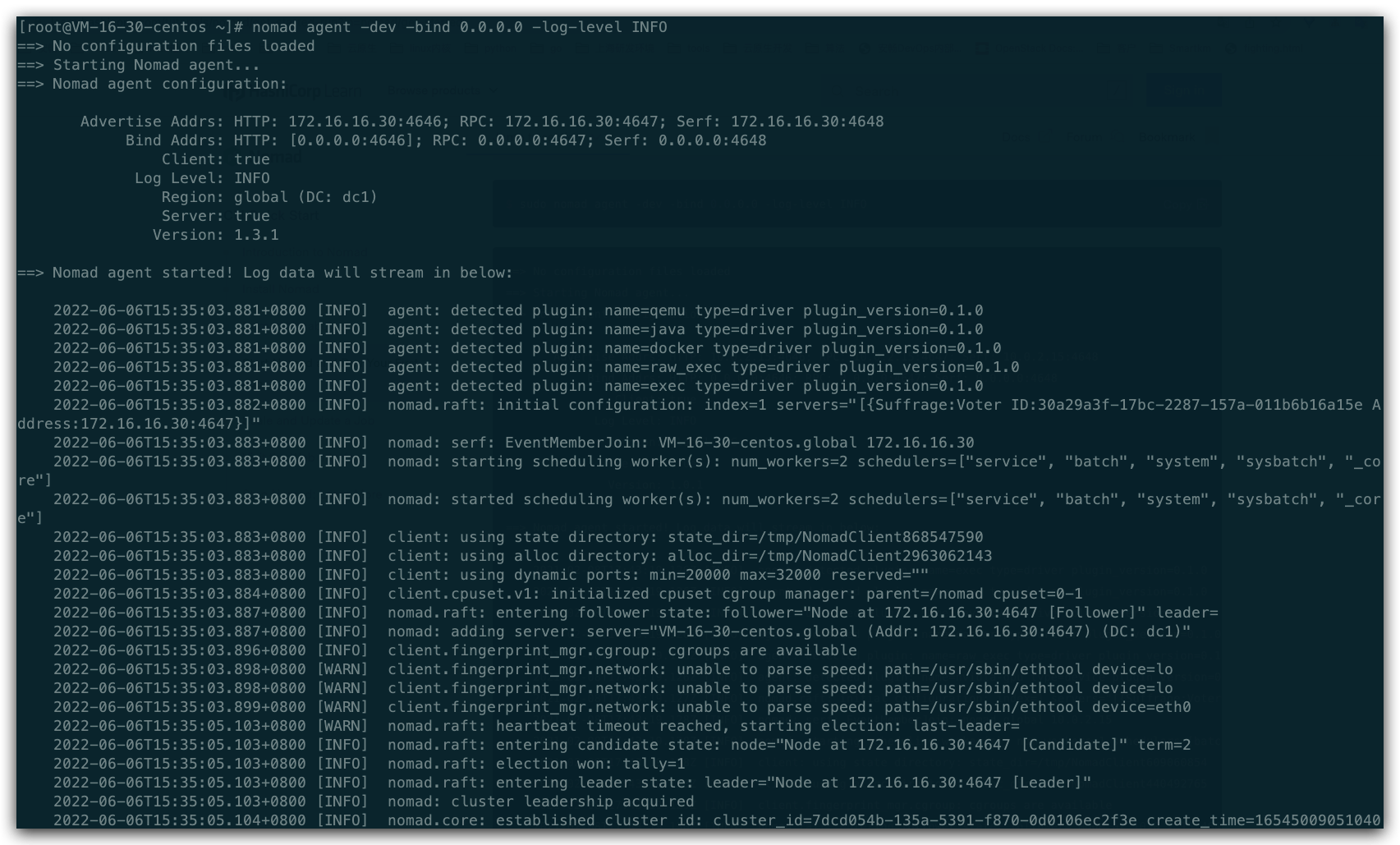
The output indicates that the agent has started in server and client mode . Wait to move on to the next section , Until you see the agent gaining leadership .
During startup , You might even see a log line , It tells you that there is a new version of Nomad You can use .
Today's ambition provides information , There is no impact on the currently running agent .
2.2 Find out node
[[email protected] ~]# nomad node statusID DC Name Class Drain Eligibility Status47275a3d dc1 VM-16-30-centos <none> false eligible readyThe output shows your nodes ID、 Its data center 、 The name of the node 、 Node class 、 Emission mode and current status . node ID It's randomly generated UUID.
The agent is also in server mode , This means that it is used to connect all server instances together gossip Part of the agreement . You can use server members Command to view the members of the Bagua circle .
Since you have only one local agent , So your output should include only one node .
[[email protected] ~]# nomad server membersName Address Port Status Leader Raft Version Build Datacenter RegionVM-16-30-centos.global 172.16.16.30 4648 alive true 3 1.3.1 dc1 globalThe output shows your agent 、 The address where it runs 、 Health 、 Some version information as well as data center and region . By providing -detailed Flag to view other metadata .
[[email protected] ~]# nomad server members -detailedName Address Port Status Leader Protocol Raft Version Build Datacenter Region TagsVM-16-30-centos.global 172.16.16.30 4648 alive true 2 3 1.3.1 dc1 global expect=1,dc=dc1,id=30a29a3f-17bc-2287-157a-011b6b16a15e,region=global,raft_vsn=3,vsn=1,rpc_addr=172.16.16.30,build=1.3.1,bootstrap=1,role=nomad,port=46473、 ... and Run the first Job
Jobs are used by users Nomad The main configuration with which you interact . The homework is Nomad Declarative specification of the task that should be run . The job has a globally unique name and one or more task groups , These task groups themselves are a collection of one or more tasks .
The format of the job is recorded in the job specification . They can be either in HashiCorp The configuration language specifies , It can also be in JSON It is specified in ; however , You should use... Only when the machine generates the configuration JSON.
3.1 Generate a simple job
nomad job initYou can run cat example.nomad View the contents of the file . This sample job file declares a file named redis The task of , It USES Docker The driver runs redis Containers .
And Nomad The main way to interact is to use Nomad job run command .run Command to get a job file and register it to Nomad. This is used to register new jobs and update existing jobs .
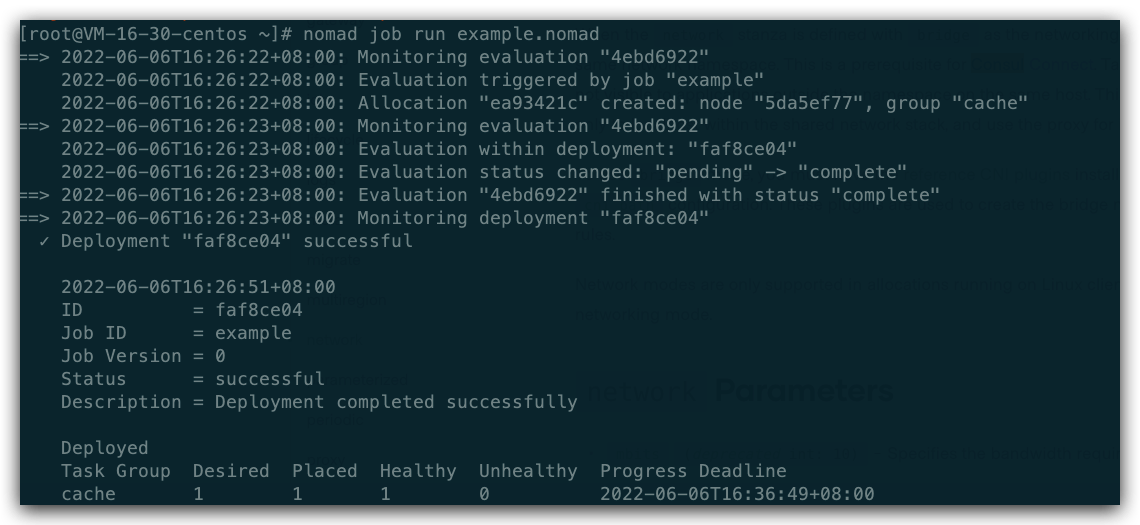
Now by using nomad job run Command to run the job to register the sample job .
here , The output indicates that the result of the evaluation job submission is to create an assignment that is now running on the local node .
If nomad Homework run example.nomad The output of the command contains the following messages , Please verify Docker Is it installed in nomad Client nodes or -dev On the proxy node . The wandering environment automatically provides you with this .
nomad job run example.nomad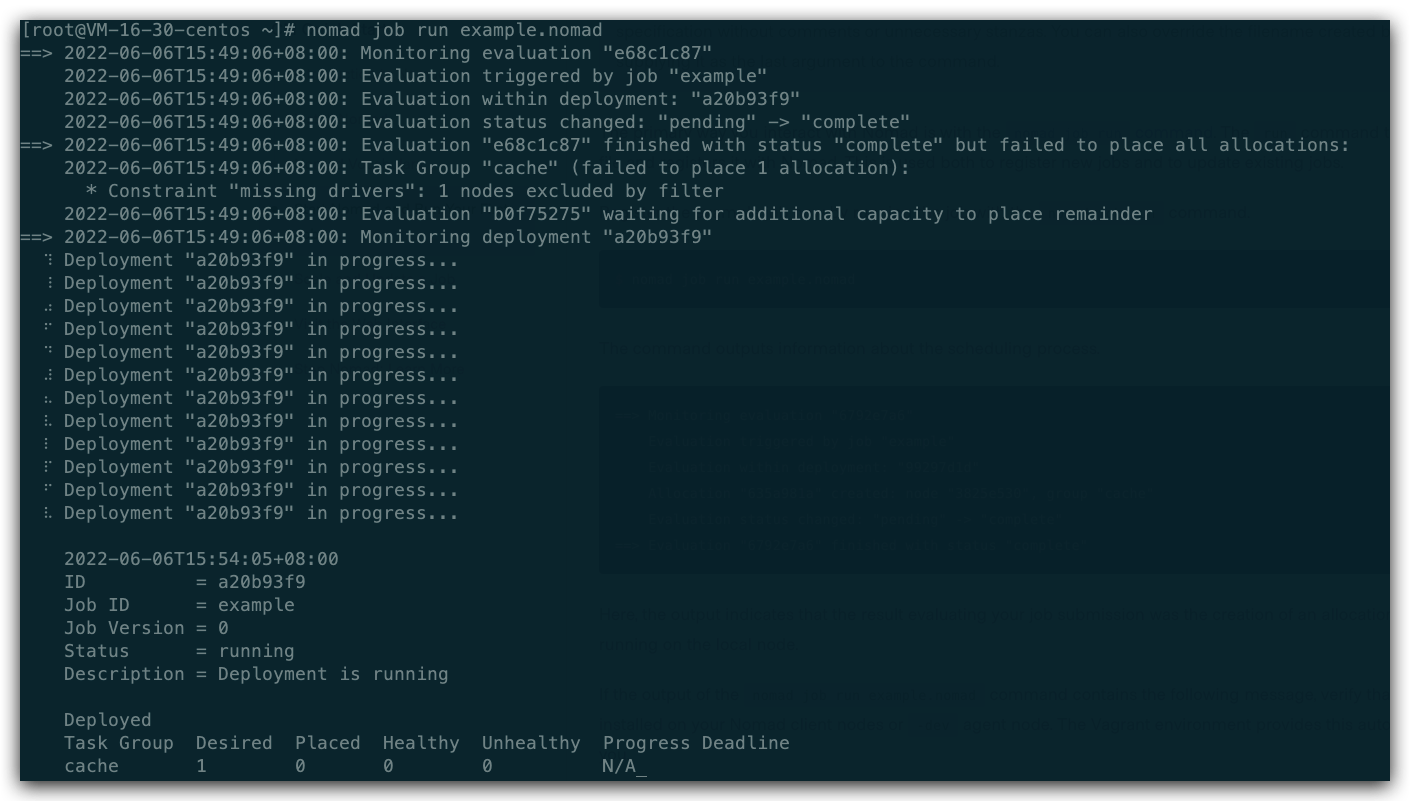
This message indicates that... Is not running Docker Task driver Nomad The client is available . This is usually because Docker Stopped or not installed .
Whenever a job is updated ,Nomad Will create an assessment , To determine what needs to be done . Because this is a new assignment ,Nomad Decide that an assignment should be created , And arranged it on your local agent .
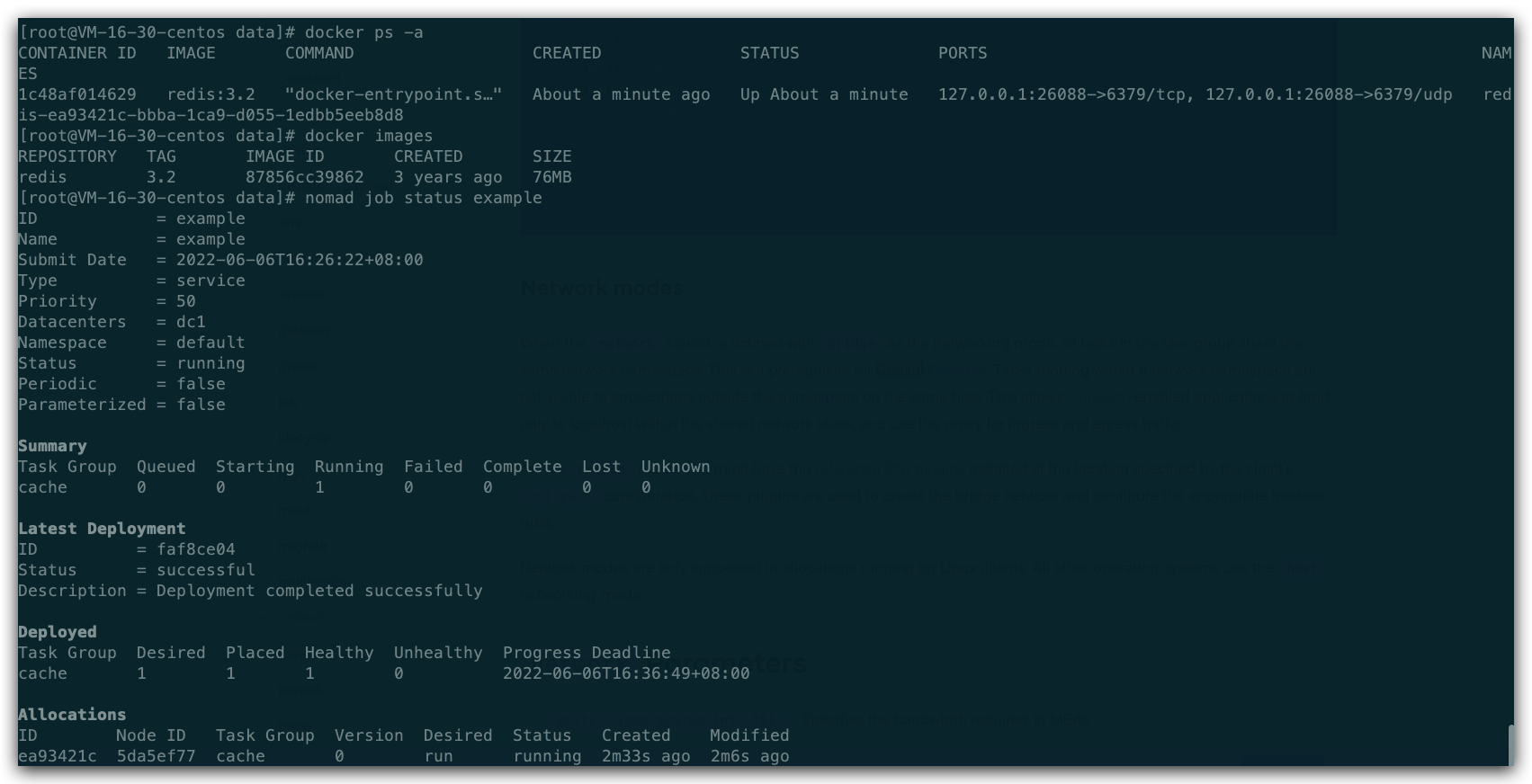
Use nomad job status Command to check the status of the job :
nomad job status example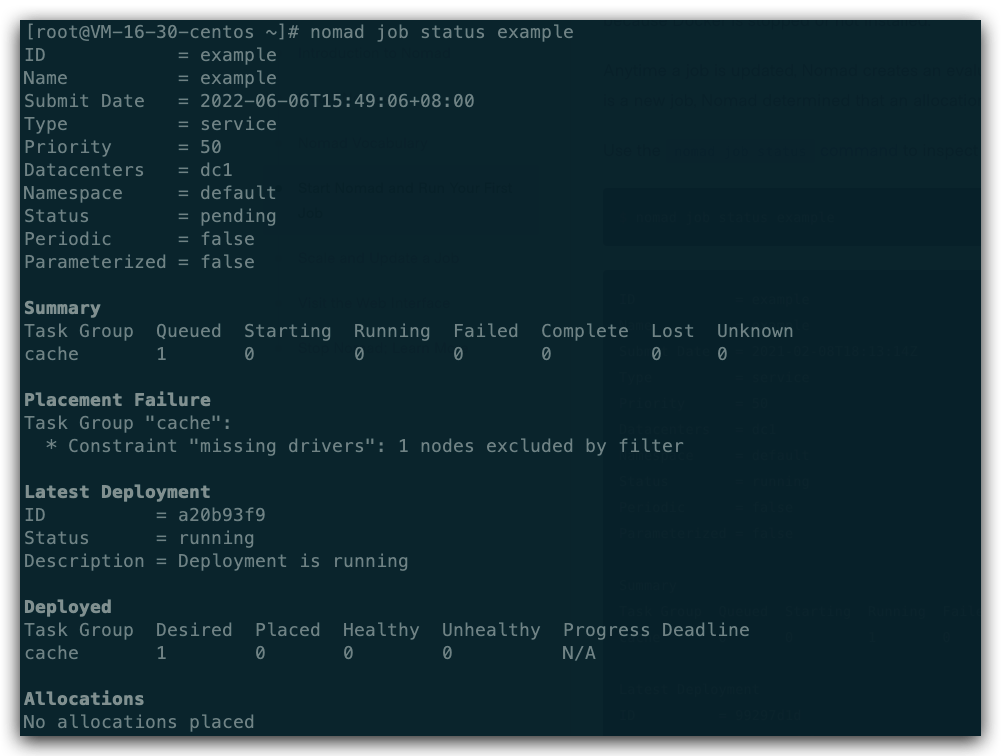
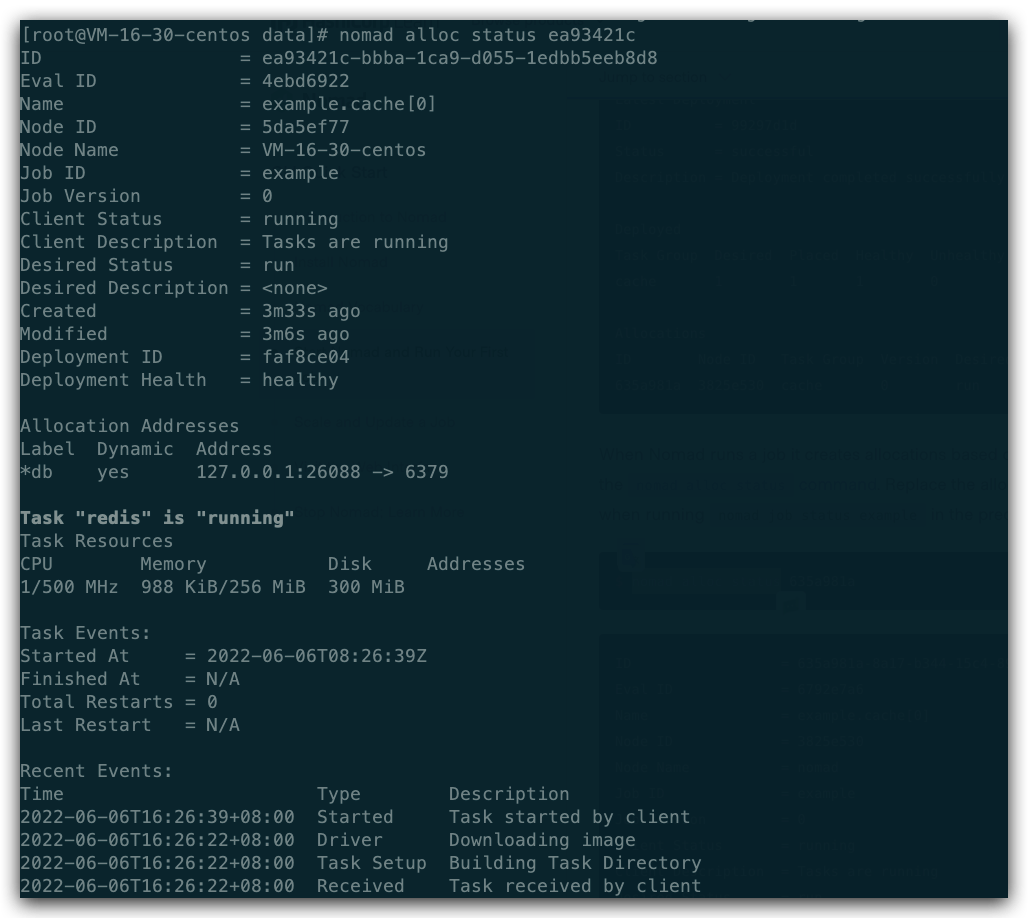
Nomad When running a job , The assignment will be created according to the task group in the job . To check the allocation , Please use nomad alloc status command . Assign... In the command ID Replace with running... In the previous step nomad Assignment received when the job status example ID.
But the current conditions do not allow , Need to be in node Node installation Docke/Consul And start the , After the environment meets the conditions , Run again .
Look again job state .
nomad alloc status ea93421cWhen Nomad When running a job , It creates assignments based on task groups in the job . To check the allocation , Please use nomad alloc status command . Assign... In the command ID Replace with running... In the previous step nomad job status The distribution received when the example ID.
3.2 obtain job journal
For each task defined in the job specification ,Nomad Will automatically capture and write stdout and stderr Information in the log file of . have access to nomad alloc logs Command to get these logs . To see stderr journal , Must be assigned in the command ID And task name -stderr sign .
function nomad alloc logs Command from the assignment redis Task get log , Assign... Again ID Replace to the appropriate place in the command .
nomad alloc logs 635a981a redis 
Other commands include the following job The executive order of , for example
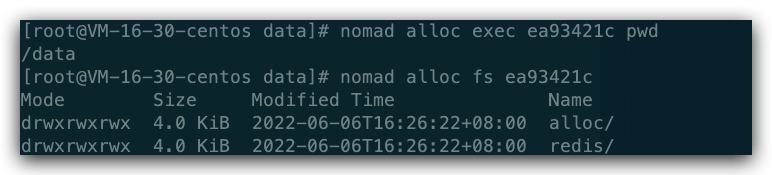
At this point, start a redis Of job.
other
- It needs to be installed in advance consul And start the .
- It needs to be installed in advance docker And start the .
Reference link
边栏推荐
- Extracting storage is the best memory method
- HMS core shows the latest open capabilities in mwc2022, helping developers build high-quality applications
- Current situation and future development trend of global and Chinese metal casting robot market
- Hashicopy之nomad应用编排方案03(运行一个job)
- LeetCode每日一题——加一
- 数字化转型项目做了多年,主架构师都绝望了:当初就不应该用外包!
- one hundred and twenty-three thousand four hundred and sixty-five
- Analyse approfondie de la conception du système relationnel du Groupe de cercles
- Alibaba Cloud 3 (Soaring Falcon) x86_ 64 (py3.7.8) system Yum source
- In depth research and analysis report on global and Chinese content audit market
猜你喜欢

mysql高级语句

Ali, tell me about the application scenarios of message oriented middleware?
2022年全国最新消防设施操作员(初级消防设施操作员)题库及答案

线程池的七个参数与拒绝策略
![[public class preview]: mxplayer Ott audio and video transcoding practice and optimization](/img/d8/a367c26b51d9dbaf53bf4fe2a13917.png)
[public class preview]: mxplayer Ott audio and video transcoding practice and optimization

【Try to Hack】URL

How to manually package your own projects

Recommended open source scheduling libraries worth learning
【公开课预告】:MXPlayer OTT音视频转码实践和优化

MySQL create table error 1067 - invalid default value for 'update_ time‘
随机推荐
In depth research and analysis report on global and Chinese spray drying machinery market
深度剖析「圈組」關系系統設計 | 「圈組」技術系列文章
Current situation and future development trend of global and Chinese transcranial magnetic stimulation coil Market from 2022 to 2028
浙江大学搞出了一款无人机,自动规避障碍,像鸟一样穿过树林,真正的蜂群来了...
2021-2027 China scaffold and accessories market status analysis and development prospect forecast report
Xiaomi 9-wire brush ROM
Zhejiang University has developed a UAV, which can automatically avoid obstacles and walk through the woods like a bird. The real swarm is coming
[team learning] task06:for, if, and while
数据库“百亿蓝海”中,每位玩家都能找到一叶扁舟 | C位面对面
In depth research and analysis report on global and Chinese octamethylcyclotetrasiloxane (D4) market
In depth research and analysis report on global and Chinese p-chlorotrifluoromethane Market
【Flink】Flink CancellationException null DefaultExecutionGraphCache LeaderRetrievalHandler
一些经典的嵌入式C面试题汇总
[Clickhouse] the clckhouse view can be inserted but not queried
Sum of two leetcode numbers
In depth research and analysis report on ready to eat meat market for vacuum low temperature cooking in the world and China
China's technology goes to sea, tidb database's overseas exploration road | interview with excellent technical team
树莓派获得网络安装系统功能,无需借助其他设备
2021 年 CNCF 调查:Kubernetes 跨越鸿沟的一年
【Try to Hack】URL