当前位置:网站首页>opencv学习笔记三
opencv学习笔记三
2022-06-26 08:23:00 【Cloudy_to_sunny】
import cv2 #opencv读取的格式是BGR
import numpy as np
import matplotlib.pyplot as plt#Matplotlib是RGB
%matplotlib inline
def cv_show(img,name):
    b,g,r = cv2.split(img)
    img_rgb = cv2.merge((r,g,b))
    plt.imshow(img_rgb)
    plt.show()
def cv_show1(img,name):
    plt.imshow(img)
    plt.show()
    cv2.imshow(name,img)
    cv2.waitKey()
    cv2.destroyAllWindows()
直方图

cv2.calcHist(images,channels,mask,histSize,ranges)
- images: 原图像图像格式为 uint8 或 float32。当传入函数时应 用中括号 [] 括来例如[img]
- channels: 同样用中括号括来它会告函数我们统幅图 像的直方图。如果入图像是灰度图它的值就是 [0]如果是彩色图像 的传入的参数可以是 [0][1][2] 它们分别对应着 BGR。
- mask: 掩模图像。统整幅图像的直方图就把它为 None。但是如 果你想统图像某一分的直方图的你就制作一个掩模图像并 使用它。
- histSize:BIN 的数目。也应用中括号括来
- ranges: 像素值范围常为 [0256]
img = cv2.imread('cat.jpg',0) #0表示灰度图
hist = cv2.calcHist([img],[0],None,[256],[0,256])
hist.shape
(256, 1)
plt.hist(img.ravel(),256);
plt.show()

img = cv2.imread('cat.jpg')
color = ('b','g','r')
for i,col in enumerate(color):
    histr = cv2.calcHist([img],[i],None,[256],[0,256])
    plt.plot(histr,color = col)
    plt.xlim([0,256])

mask操作
# 创建mast
mask = np.zeros(img.shape[:2], np.uint8)
print (mask.shape)
mask[100:300, 100:400] = 255
cv_show1(mask,'mask')
(414, 500)

img = cv2.imread('cat.jpg', 0)
cv_show1(img,'img')

masked_img = cv2.bitwise_and(img, img, mask=mask)#与操作
cv_show1(masked_img,'masked_img')

hist_full = cv2.calcHist([img], [0], None, [256], [0, 256])
hist_mask = cv2.calcHist([img], [0], mask, [256], [0, 256])
plt.subplot(221), plt.imshow(img, 'gray')
plt.subplot(222), plt.imshow(mask, 'gray')
plt.subplot(223), plt.imshow(masked_img, 'gray')
plt.subplot(224), plt.plot(hist_full), plt.plot(hist_mask)
plt.xlim([0, 256])
plt.show()

直方图均衡化


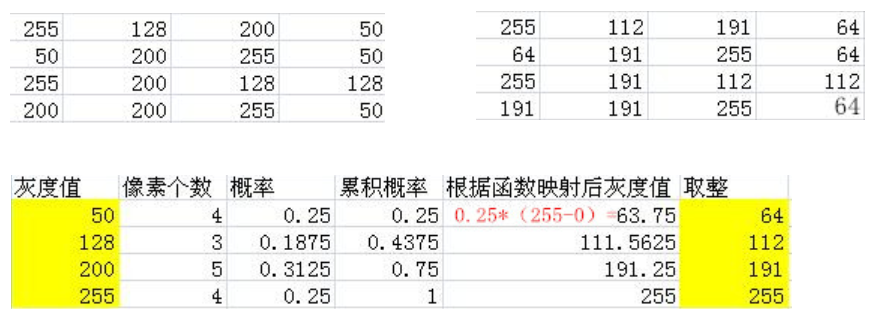
img = cv2.imread('clahe.jpg',0) #0表示灰度图 #clahe
plt.hist(img.ravel(),256);
plt.show()

equ = cv2.equalizeHist(img)
plt.hist(equ.ravel(),256)
plt.show()

res = np.hstack((img,equ))
cv_show1(res,'res')
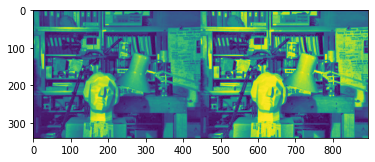
自适应直方图均衡化
clahe = cv2.createCLAHE(clipLimit=2.0, tileGridSize=(8,8))
res_clahe = clahe.apply(img)
res = np.hstack((img,equ,res_clahe))
cv_show1(res,'res')

模板匹配
模板匹配和卷积原理很像,模板在原图像上从原点开始滑动,计算模板与(图像被模板覆盖的地方)的差别程度,这个差别程度的计算方法在opencv里有6种,然后将每次计算的结果放入一个矩阵里,作为结果输出。假如原图形是AxB大小,而模板是axb大小,则输出结果的矩阵是(A-a+1)x(B-b+1)
# 模板匹配
img = cv2.imread('lena.jpg', 0)
template = cv2.imread('face.jpg', 0)
h, w = template.shape[:2]
img.shape
(263, 263)
template.shape
(110, 85)
- TM_SQDIFF:计算平方不同,计算出来的值越小,越相关
- TM_CCORR:计算相关性,计算出来的值越大,越相关
- TM_CCOEFF:计算相关系数,计算出来的值越大,越相关
- TM_SQDIFF_NORMED:计算归一化平方不同,计算出来的值越接近0,越相关
- TM_CCORR_NORMED:计算归一化相关性,计算出来的值越接近1,越相关
- TM_CCOEFF_NORMED:计算归一化相关系数,计算出来的值越接近1,越相关
公式:https://docs.opencv.org/3.3.1/df/dfb/group__imgproc__object.html#ga3a7850640f1fe1f58fe91a2d7583695d
methods = ['cv2.TM_CCOEFF', 'cv2.TM_CCOEFF_NORMED', 'cv2.TM_CCORR',
           'cv2.TM_CCORR_NORMED', 'cv2.TM_SQDIFF', 'cv2.TM_SQDIFF_NORMED']
res = cv2.matchTemplate(img, template, cv2.TM_SQDIFF)
res.shape
(154, 179)
min_val, max_val, min_loc, max_loc = cv2.minMaxLoc(res) #值越小越好
min_val
39168.0
max_val
74403584.0
min_loc
(107, 89)
max_loc
(159, 62)
for meth in methods:
    img2 = img.copy()

    # 匹配方法的真值
    method = eval(meth)
    print (method)
    res = cv2.matchTemplate(img, template, method)
    min_val, max_val, min_loc, max_loc = cv2.minMaxLoc(res)

    # 如果是平方差匹配TM_SQDIFF或归一化平方差匹配TM_SQDIFF_NORMED,取最小值
    if method in [cv2.TM_SQDIFF, cv2.TM_SQDIFF_NORMED]:
        top_left = min_loc
    else:
        top_left = max_loc
    bottom_right = (top_left[0] + w, top_left[1] + h)

    # 画矩形
    cv2.rectangle(img2, top_left, bottom_right, 255, 2)

    plt.subplot(121), plt.imshow(res, cmap='gray')
    plt.xticks([]), plt.yticks([])  # 隐藏坐标轴
    plt.subplot(122), plt.imshow(img2, cmap='gray')
    plt.xticks([]), plt.yticks([])
    plt.suptitle(meth)
    plt.show()
4

5

2
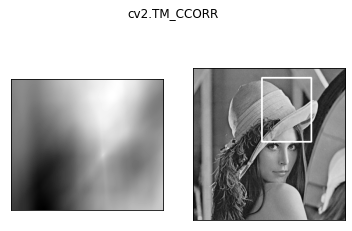
3

0

1

匹配多个对象
img_rgb = cv2.imread('mario.jpg')
img_gray = cv2.cvtColor(img_rgb, cv2.COLOR_BGR2GRAY)
template = cv2.imread('mario_coin.jpg', 0)
h, w = template.shape[:2]

res = cv2.matchTemplate(img_gray, template, cv2.TM_CCOEFF_NORMED)
threshold = 0.8
# 取匹配程度大于%80的坐标
loc = np.where(res >= threshold)
for pt in zip(*loc[::-1]):  # *号表示可选参数
    bottom_right = (pt[0] + w, pt[1] + h)
    cv2.rectangle(img_rgb, pt, bottom_right, (0, 0, 255), 2)

cv_show(img_rgb,'img_rgb')
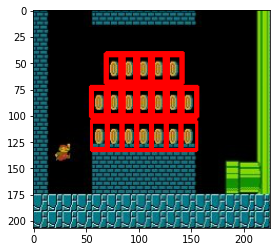
边栏推荐
- Analysis of internal circuit of operational amplifier
- Time functions supported in optee
- Chapter VII (structure)
- Win10 mysql-8.0.23-winx64 solution for forgetting MySQL password (detailed steps)
- I Summary Preface
- Cause analysis of serial communication overshoot and method of termination
- The difference between setstoragesync and setstorage
- 你为什么会浮躁
- Uniapp wechat withdrawal (packaged as app)
- Uniapp scrolling load (one page, multiple lists)
猜你喜欢

(4) Independent key

Go语言浅拷贝与深拷贝

Learning signal integrity from scratch (SIPI) -- 3 challenges faced by Si and Si based design methods

See which processes occupy specific ports and shut down

73b2d wireless charging and receiving chip scheme

Database learning notes II

Read excel table and render with FileReader object

1GHz active probe DIY
1. error using XPath to locate tag

Vs2019-mfc setting edit control and static text font size
随机推荐
Chapter 3 (data types and expressions)
Test method - decision table learning
2020-10-29
Undefined symbols for architecture i386与第三方编译的静态库有关
Go语言浅拷贝与深拷贝
"System error 5 occurred when win10 started mysql. Access denied"
Uniapp scrolling load (one page, multiple lists)
CodeBlocks集成Objective-C开发
The solution of installing opencv with setting in pycharm
I Summary Preface
Apple motherboard decoding chip, lightning Apple motherboard decoding I.C
Microcontroller from entry to advanced
optee中支持的时间函数
JS Date object
Chapter 9 (using classes and objects)
Jupyter的安装
Discrete device ~ resistance capacitance
Area of Blue Bridge Cup 2 circle
Comparison between Apple Wireless charging scheme and 5W wireless charging scheme
1. error using XPath to locate tag