当前位置:网站首页>[200 opencv routines] 217 Mouse interaction to obtain polygon area (ROI)
[200 opencv routines] 217 Mouse interaction to obtain polygon area (ROI)
2022-07-03 15:40:00 【Xiaobai youcans】
OpenCV routine 200 piece General catalogue
【youcans Of OpenCV routine 200 piece 】217. Mouse interaction to obtain polygon area
function cv.selectROI You can select the rectangular area of interest on the image with the mouse (ROI,region of interest).
If you want to select the polygon area of interest on the image with the mouse , You can use mouse interaction to draw .
The function prototype :
function cv.polylines() Used to draw polygonal curves or polylines .
function cv.fillPoly() Used to draw one or more filled polygon areas .
cv.polylines(img, pts, isClosed, color[, thickness=1, lineType=LINE_8, shift=0]) → img
cv.fillPoly(img, pts, color[, lineType=LINE_8, shift=0, offset=Point()]) → img
Parameter description :
- img: Input / output image , Allows single channel grayscale images or multi-channel color images
- pts: Polygon vertex coordinates , A two-dimensional Numpy List of arrays
- isClosed: Closing sign ,True Represents a closed polygon ,False Indicates that the polygon is not closed
Pay special attention to polygon vertex coordinates pts The format of :
- pts It's a list , The elements in the list are two-dimensional Numpy Array , Each element represents a set of vertex coordinates .
- A two-dimensional Numpy The shape of the array is (m,2), Each row represents the coordinates of a vertex of the polygon (xi,yi), The data format should be integer .
for example :
    points1 = np.array([[200,100], [295,169], [259,281], [141,281], [105,169]], np.int)
    points2 = np.array([[200,400], [259,581], [105,469], [295,469], [141,581]])
points1、points2 It's in the shape of (m,2) Two dimensions of Numpy Array .
For the function cv.polylines And cv.fillPoly, You can't directly put two dimensions Numpy Array points1 or points2 As a function parameter , Instead, use it as an element of the list , Such as : [points1]、[points2] or [points1, points2].
routine A4.9: Mouse interaction to obtain polygon area (ROI)
function cv.selectROI You can select the rectangular area of interest on the image with the mouse (ROI,region of interest).
If you want to select the polygon area of interest on the image with the mouse , You can use mouse interaction to draw .
    # A4.9  Mouse interaction to obtain polygon area
    def mouseHandler(event, x, y, flags, param):  #  Mouse interaction  ( Left click to select points and right click to complete )
        global drawing
        setpoint = (x, y)
        if event == cv.EVENT_LBUTTONDOWN:  #  Left mouse click events
            drawing = True  #  Turn on drawing status
            pts.append(setpoint)  #  Select polygon vertices
            print(" Choose the vertex  {}:{}".format(len(pts), setpoint))
        elif event == cv.EVENT_RBUTTONDOWN:  #  Right click the event
            drawing = False  #  End drawing state
            print(" Finish drawing .\n ROI  Vertex coordinates :")
            print(pts)

    #  Draw polygons interactively with the mouse  ROI
    img = cv.imread("../images/imgLena.tif")  #  Read color images (BGR)

    #  Mouse interaction  ROI
    print(" Click the left mouse button : choice  ROI  The vertices ")
    print(" Right click : end  ROI  choice ")
    print(" Press  ESC  sign out ")
    pts = []  # ROI  Vertex coordinate vector
    drawing = True  #  Turn on drawing status
    cv.namedWindow('origin')  #  Create an image window
    cv.setMouseCallback('origin', mouseHandler)  #  The window is bound to the callback function
    while True:
        imgCopy = img.copy()
        if len(pts) > 0:
            cv.circle(imgCopy, pts[-1], 5, (0,0,255), -1)  #  Draw the nearest vertex
            if len(pts) > 1:
                for i in range(len(pts)-1):
                    cv.circle(imgCopy, pts[i], 5, (0,0,255), -1)  #  Draw the vertices
                    cv.line(imgCopy, pts[i], pts[i+1], (255,0,0), 2)  #  Draw boundary segments
            if drawing==False:
                cv.line(imgCopy, pts[0], pts[-1], (255,0,0), 2)  #  Finish the last segment
        cv.imshow('origin', imgCopy)
        key = 0xFF & cv.waitKey(1)  #  Press  ESC  sign out
        if key == 27:  # Esc  sign out
            break
    cv.destroyAllWindows()  #  Image window

    points = np.array(pts, np.int)  # ROI  Polygon vertex coordinate set
    cv.polylines(img, [points], True, (255,255,255), 2)  #  stay  img  draw  ROI  polygon
    mask = np.zeros(img.shape[:2], np.uint8)  #  Black Mask , single channel
    cv.fillPoly(mask, [points], (255,255,255))  #  polygon  ROI  White window
    imgROI = cv.bitwise_and(img, img, mask=mask)  #  Bitwise AND , from  img  Extract from  ROI

    plt.figure(figsize=(9, 6))
    plt.subplot(131), plt.title("origin image"), plt.axis('off')
    plt.imshow(cv.cvtColor(img, cv.COLOR_BGR2RGB))
    plt.subplot(132), plt.title("ROI mask"), plt.axis('off')
    plt.imshow(mask, cmap='gray')
    plt.subplot(133), plt.title("ROI cropped"), plt.axis('off')
    plt.imshow(cv.cvtColor(imgROI, cv.COLOR_BGR2RGB))
    plt.tight_layout()
    plt.show()
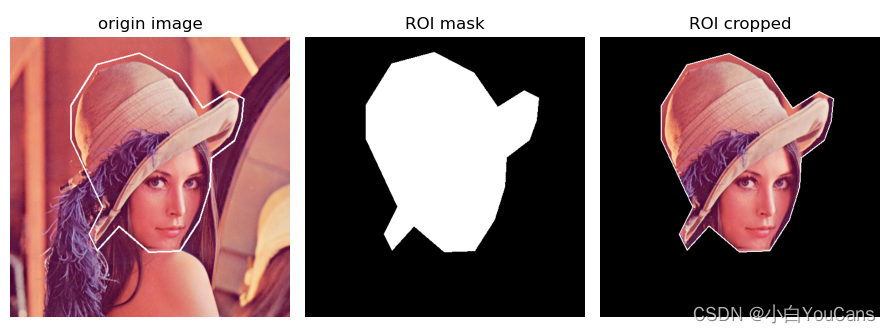
【 At the end of this section 】
Copyright notice :
[email protected] Original works , Reprint must be marked with the original link :(https://blog.csdn.net/youcans/article/details/125490992)
Copyright 2022 youcans, XUPT
Crated:2022-6-26
Welcome to your attention 『youcans Of OpenCV routine 200 piece 』 series , Ongoing update
Welcome to your attention 『youcans Of OpenCV Learning lessons 』 series , Ongoing update
210. There are so many holes in drawing a straight line ?
211. Draw vertical rectangle
215. Draw approximate ellipses based on polylines
216. Draw polylines and polygons
217. Mouse interaction to obtain polygon area
边栏推荐
- Detailed pointer advanced 1
- [cloud native training camp] module VIII kubernetes life cycle management and service discovery
- 秒杀系统3-商品列表和商品详情
- Custom annotation
- 几种常见IO模型的原理
- Approval process design
- Win10 enterprise 2016 long term service activation tutorial
- Srs4.0+obs studio+vlc3 (environment construction and basic use demonstration)
- 阿飞的期望
- Baidu AI Cloud helps Shizuishan upgrade the smart health care model of "Internet + elderly care services"
猜你喜欢
![App mobile terminal test [5] file writing and reading](/img/f1/4bff6e66b77d0f867bf7237019e982.png)
App mobile terminal test [5] file writing and reading
百度智能云助力石嘴山市升级“互联网+养老服务”智慧康养新模式
Create gradle project

几种常见IO模型的原理

Unity功能——Unity离线文档下载及使用

Find mapping relationship

Kubernetes will show you from beginning to end

Redis lock Optimization Practice issued by gaobingfa

Microservice - declarative interface call openfeign
![[cloud native training camp] module VIII kubernetes life cycle management and service discovery](/img/87/92638402820b32a15383f19f6f8b91.png)
[cloud native training camp] module VIII kubernetes life cycle management and service discovery
随机推荐
[cloud native training camp] module VIII kubernetes life cycle management and service discovery
Kubernetes帶你從頭到尾捋一遍
互斥对象与临界区的区别
深度学习之三维重建
Srs4.0+obs studio+vlc3 (environment construction and basic use demonstration)
几种常见IO模型的原理
请做好3年内随时失业的准备?
秒殺系統3-商品列錶和商品詳情
Subclass hides the function with the same name of the parent class
Second kill system 3 - list of items and item details
win32创建窗口及按钮(轻量级)
Markdown file titles are all reduced by one level
Visual upper system design and development (Halcon WinForm) -2 Global variable design
Summary of JVM knowledge points
Tensorflow realizes verification code recognition (I)
从 flask 服务端代码自动生成客户端代码 -- flask-native-stubs 库介绍
[daily training] 395 Longest substring with at least k repeated characters
视觉上位系统设计开发(halcon-winform)-1.流程节点设计
Leasing cases of the implementation of the new regulations on the rental of jointly owned houses in Beijing
关于网页中的文本选择以及统计选中文本长度