当前位置:网站首页>Learning and Development notes of mongdb
Learning and Development notes of mongdb
2022-06-13 00:36:00 【A small snail in a big city】
1.《MongoDB course Novice tutorial 》
(1)https://www.runoob.com/mongodb/mongodb-tutorial.html
(2)https://www.mongodb.org.cn/drivers/
This is the foundation , stay mongoshell Next pair mongoDB Direct manipulation , For the following node.jsAPI Lay a foundation for operation
in addition mongoDB Different drivers are required in the application to operate mongoDB, link (2) You can select different language drivers in
C,C++,Perl,Jave,Node.js,C#,.NET,PHP
note: Personally, I think it is better than the official website
2.《Node.js course 》
(1)https://www.runoob.com/nodejs/nodejs-mongodb.html《 Novice tutorial 》
(2)http://nodejs.cn/learn《 Official website tutorial 》
note: I suggest you learn from the novice first , There are enough foundations , Detailed enough
Then watch the official website tutorial , To supplement
Node.js Installation in different environments is a difficult problem , Especially for embedded platforms , Good luck
3.《mongoose.js course 》
Then use it , First you have to install node.js and mongodb
Mongoose Is in node.js In asynchronous environment mongodb Object model tools for easy operation
(1)http://cw.hubwiz.com/card/c/543b2e7788dba02718b5a4bd/1/1/2/《 Huizhi online tutorial 》
(2)https://mongoosejs.com/docs/index.html《 Official website tutorial 》
note: These two tutorials have their own merits ,
Personally, I suggest (1), There are enough foundations , Detailed enough
Then watch the official website tutorial , To supplement
4 mongodb $unwind Polymerization pipe
$unwind: Split an array type field in the document into multiple fields , Each contains a value in the array .
demand :
{

    "_id" : ObjectId("5951c5de567ebff0d5011fba"),
    "name" : " Chen Xiaochan ",
    "address" : " Chaoyang District of Beijing ",
    "weekday" : [
        1,
        2,
        3,
        4,
        5
    ]
}
Yes weekday To break up :
db.getCollection('chenxiaochantest').aggregate(
 [
  {

     $unwind:"$weekday"
  }
 ]
)
Break up the results : Use **$unwind Can be weekday** Each data in is decomposed into a document , And in addition to weekday The value of is different , The other values are the same .
/* 1 */
{

    "_id" : ObjectId("5951c5de567ebff0d5011fba"),
    "name" : " Chen Xiaochan ",
    "address" : " Chaoyang District of Beijing ",
    "weekday" : 1
}

/* 2 */
{

    "_id" : ObjectId("5951c5de567ebff0d5011fba"),
    "name" : " Chen Xiaochan ",
    "address" : " Chaoyang District of Beijing ",
    "weekday" : 2
}

/* 3 */
{

    "_id" : ObjectId("5951c5de567ebff0d5011fba"),
    "name" : " Chen Xiaochan ",
    "address" : " Chaoyang District of Beijing ",
    "weekday" : 3
}

/* 4 */
{

    "_id" : ObjectId("5951c5de567ebff0d5011fba"),
    "name" : " Chen Xiaochan ",
    "address" : " Chaoyang District of Beijing ",
    "weekday" : 4
}

/* 5 */
{

    "_id" : ObjectId("5951c5de567ebff0d5011fba"),
    "name" : " Chen Xiaochan ",
    "address" : " Chaoyang District of Beijing ",
    "weekday" : 5
}
5 MongoDB Aggregation operation $group Use
grammar
{
     $group: {
     _id: <expression>, <field1>: {
     <accumulator1> : <expression1> }, ... } }
Parameter description :
_id : Mandatory must exist . It can be for null.
The remaining calculation fields are optional , And use the operator to calculate . Specific use , This is illustrated by the following code :
First, prepare some data :
// insert data
db.getCollection('sales').insertMany([
{
     "_id" : 1, "item" : "abc", "price" : 10, "quantity" : 2, "date" : ISODate("2014-03-01T08:00:00Z") },
{
     "_id" : 2, "item" : "jkl", "price" : 20, "quantity" : 1, "date" : ISODate("2014-03-01T09:00:00Z") },
{
     "_id" : 3, "item" : "xyz", "price" : 5, "quantity" : 10, "date" : ISODate("2014-03-15T09:00:00Z") },
{
     "_id" : 4, "item" : "xyz", "price" : 5, "quantity" : 20, "date" : ISODate("2014-04-04T11:21:39.736Z") },
{
     "_id" : 5, "item" : "abc", "price" : 10, "quantity" : 10, "date" : ISODate("2014-04-04T21:23:13.331Z") }
]);
Example : according to item Fields are grouped , Count each one item The number of documents below
db.sales.aggregate([
    {

        $group : {

            _id : "$item",
            count: {
     $sum : 1}
        }
    }
]);

//  Return results
{
     "_id" : "xyz", "count" : 2 }
{
     "_id" : "jkl", "count" : 1 }
{
     "_id" : "abc", "count" : 2 }
Example : according to item Fields are grouped , Count each one item below price Total of ,quantity The average of
db.sales.aggregate([
    {

        $group : {

            _id : "$item",
            totalPrice: {
     $sum : "$price"},
            avgQuantity: {
     $avg: "$quantity" }
        }
    }
]);

//  Return results
{
     "_id" : "xyz", "totalPrice" : 10, "avgQuantity" : 15 }
{
     "_id" : "jkl", "totalPrice" : 20, "avgQuantity" : 1 }
{
     "_id" : "abc", "totalPrice" : 20, "avgQuantity" : 6 }
Example : according to item Fields are grouped , Count each one item below quantity Maximum and minimum values of
db.sales.aggregate([
    {

        $group : {

            _id : "$item",
            maxQuantity: {
     $max : "$quantity"},
            minQuantity: {
     $min: "$quantity" }
        }
    }
]);

//  Return results
{
     "_id" : "xyz", "maxQuantity" : 20, "minQuantity" : 10 }
{
     "_id" : "jkl", "maxQuantity" : 1, "minQuantity" : 1 }
{
     "_id" : "abc", "maxQuantity" : 10, "minQuantity" : 2 }
* Example : Keep the first and the last
db.sales.aggregate([
    {

        $group : {

            _id : "$item",
            first: {
     $first : "$quantity"},
        }
    }
]);

//  Return results
{
     "_id" : "xyz", "first" : 10 }
{
     "_id" : "jkl", "first" : 1 }
{
     "_id" : "abc", "first" : 2 }
db.sales.aggregate([
    {

        $group : {

            _id : "$item",
            last: {
     $last : "$quantity"},
        }
    }
]);

//  Return results
{
     "_id" : "xyz", "last" : 20 }
{
     "_id" : "jkl", "last" : 1 }
{
     "_id" : "abc", "last" : 10 }
Example : monthly , Group documents by day and year , And calculate the total price and average quantity , And calculate the number of documents in each group
db.sales.aggregate([
{
$group : {
// _id : { filed : value } This structure is custom , Used to define what groups are grouped by
// "$date" This field indicates the operation , $month、$dayOfMonth and $year It means from $date Get the corresponding date data
_id : {
month: {
$month: "$date" }, day: {
$dayOfMonth: "$date" }, year: {
$year: "$date" } },
// [ "$price", "$quantity" ] It refers to the operation of these two data ,$multiply Sum multiple fields
totalPrice: {
$sum: {
$multiply: [ "$price", "$quantity" ] } },
// "$quantity" Value is to manipulate this data ,$avg To find the average
averageQuantity: {
$avg: "$quantity" },
// There are several sets of statistics
count: {
$sum: 1 }
}
}
]);
// Return results :
{
"_id" : {
"month" : 4, "day" : 4, "year" : 2014 }, "totalPrice" : 200, "averageQuantity" : 15, "count" : 2 }
{
"_id" : {
"month" : 3, "day" : 15, "year" : 2014 }, "totalPrice" : 50, "averageQuantity" : 10, "count" : 1 }
{
"_id" : {
"month" : 3, "day" : 1, "year" : 2014 }, "totalPrice" : 40, "averageQuantity" : 1.5, "count" : 2 }
5.1 Special operation mode
In addition to the above operation , Officials also introduced another method of operation
//  The data are as follows
{
     "_id" : 8751, "title" : "The Banquet", "author" : "Dante", "copies" : 2 }
{
     "_id" : 8752, "title" : "Divine Comedy", "author" : "Dante", "copies" : 1 }
{
     "_id" : 8645, "title" : "Eclogues", "author" : "Dante", "copies" : 2 }
{
     "_id" : 7000, "title" : "The Odyssey", "author" : "Homer", "copies" : 10 }
{
     "_id" : 7020, "title" : "Iliad", "author" : "Homer", "copies" : 10 }
Example 1 : Use $push operation , Concatenate data into an array
//  according to  author  grouping , Will be the same  author  Of title  Spliced into an array
db.books.aggregate(
   [
     {
     $group : {
     _id : "$author", books: {
     $push: "$title" } } }
   ]
);

//  Return results
{
     "_id" : "Homer", "books" : [ "The Odyssey", "Iliad" ] }
{
     "_id" : "Dante", "books" : [ "The Banquet", "Divine Comedy", "Eclogues" ] }
There is a problem in the above operation , If there is duplicate data , Duplicate data will also be put into the returned results , In this case, use the following operation :
// Use $addToSet operation
db.books.aggregate(
   [
     {
     $group : {
     _id : "$author", books: {
     $addToSet: "$title" } } }
   ]
);
Example 2 : Use $$ROOT ( System variables ) operation
The returned generated document must not exceed BSON Document size limit .
//  Query operation
db.books.aggregate(
   [
     {
     $group : {
     _id : "$author", books: {
     $push: "$$ROOT" } } }
   ]
)

//  Return results
{

  "_id" : "Homer",
  "books" :
     [
       {
     "_id" : 7000, "title" : "The Odyssey", "author" : "Homer", "copies" : 10 },
       {
     "_id" : 7020, "title" : "Iliad", "author" : "Homer", "copies" : 10 }
     ]
}

{

  "_id" : "Dante",
  "books" :
     [
       {
     "_id" : 8751, "title" : "The Banquet", "author" : "Dante", "copies" : 2 },
       {
     "_id" : 8752, "title" : "Divine Comedy", "author" : "Dante", "copies" : 1 },
       {
     "_id" : 8645, "title" : "Eclogues", "author" : "Dante", "copies" : 2 }
     ]
}
6 mongodb Embedded array The operator $slice usage
Suppose an embedded array of documents arr The length is 10, The data Namely 1-10 :
{

    _id:1000,
    arr : {

        1,2,3,4,5,6,7,8,9,10
    }
}
Now let's explain $slice usage :
Normal usage and limit Paging query Not much difference Such as
db.col.find( {
    _id:1000},
    {

        "arr":{

            $slice : [0,5]
         }
    }
)

     The result is  1,2,3,4,5
Let's see below. Values in reverse order
db.col.find( {
    _id:1000},
    {

        "arr":{

            $slice : [-1,5]
         }
    }
)
 The result is  10
db.col.find( {
    _id:1000},
    {

        "arr":{

            $slice : [-5,5]
         }
    }
    )
     The result is  6 7 8 9 10
6 mongodb The query returns the specified array object in the array
MongoDB Provides : $elemMatch, $slice, and $. Operator to return the specified array data .
The following example passes $slice Operator returns the last data in the array .
db.inventory.find( { status: “A” }, { name: 1, status: 1, instock: { $slice: -1 } } )
$elemMatch, $slice, and $ These three operators are the only way to specify that the data in the returned array , You cannot specify an array index to return data from an array . for example { “instock.0”: 1 } The first element in the array is not returned .
7 Specify array position :
 Yes num:12 Conduct +2, How to operate ?
$ : Will remember the location of the query results .
db.ArrayTest.updateOne({“address.street”: “JingKe”},{ KaTeX parse error: Expected '}', got 'EOF' at end of input: inc: {"address..num": 2}})
8 MongoDB Addition, deletion and modification of array elements
1、 Place holder $
 Place holder $ Is mainly used to return the value of the first matched array element in the array ( A subset of ), The point is the first
 When the element position in the specified array is not displayed at the time of update , Place holder $ Used to identify the position of elements
 The document of the first matching element value found by the array filter condition will be updated

 Examples of use
        > db.students.insertMany([
                {
     "_id" : 1, "semester" : 1, "grades" : [ 70, 87, 90 ] },
                {
     "_id" : 2, "semester" : 1, "grades" : [ 90, 90, 92 ] },
                {
     "_id" : 3, "semester" : 1, "grades" : [ 85, 100, 90 ] },
                {
     "_id" : 4, "semester" : 2, "grades" : [ 79, 85, 80 ] },
                {
     "_id" : 5, "semester" : 2, "grades" : [ 88, 88, 92 ] },
                {
     "_id" : 6, "semester" : 2, "grades" : [ 95, 90, 96 ] }])

         Use styles :
                db.collection.find( {
     <array>: <value> ... },
                                    {
     "<array>.$": 1 } )
                db.collection.find( {
     <array.field>: <value> ...},
                                    {
     "<array>.$": 1 } )
         Update element value style :
                db.collection.update(
                   {
     <array>: value ... },
                   {
     <update operator>: {
     "<array>.$" : value } }
                )

         Update the document style embedded in the array ( Use .$. Member mode )
                db.collection.update(
                   {
     <query selector> },
                   {
     <update operator>: {
     "array.$.field" : value } }
                )

         Placeholder for update operation $ Match the first element of the query document
         The array field must be the filter condition of the query

 Update array element values

        // The following query semester The value is 1,grades by 90 Documents
        // The results are as follows , All contain 90 All documents are returned
        > db.students.find( {
     semester: 1, grades: {
     $eq: 90 } })// Equivalent :db.students.find({semester:1,grades:90})
        {
     "_id" : 1, "semester" : 1, "grades" : [ 70, 87, 90 ] }
        {
     "_id" : 2, "semester" : 1, "grades" : [ 90, 90, 92 ] }
        {
     "_id" : 3, "semester" : 1, "grades" : [ 85, 100, 90 ] }

        // Here is a placeholder $ To filter the results of the array , That is, only the first one is 90 Will be displayed , The rest of the element values are not displayed
        > db.students.find( {
     semester: 1, grades: {
     $eq: 90 } },{
     "grades.$": 1 } )
        {
     "_id" : 1, "grades" : [ 90 ] }
        {
     "_id" : 2, "grades" : [ 90 ] } // Note that this is the first one in the document 90
        {
     "_id" : 3, "grades" : [ 90 ] }

        // Now use placeholders to update
        > db.students.update({
    semester: 1, grades:90},{
    $set:{
    "grades.$":95}})
        WriteResult({
     "nMatched" : 1, "nUpserted" : 0, "nModified" : 1 })  // Tips 1 Documents were updated

        // Here's the document _id by 1 The array value of is updated to 95
        > db.students.find( {
     semester: 1})
        {
     "_id" : 1, "semester" : 1, "grades" : [ 70, 87, 95 ] }
        {
     "_id" : 2, "semester" : 1, "grades" : [ 90, 90, 92 ] }
        {
     "_id" : 3, "semester" : 1, "grades" : [ 85, 100, 90 ] }

        // Use multi:true Options , We can see as follows ,2 Matching documents were updated
        // But only the first element value is updated ( file _id by 2 The value is 90 The second element of is not updated )
        > db.students.update({
    semester: 1, grades:90},{
    $set:{
    "grades.$":95}},{
    multi:true})
        WriteResult({
     "nMatched" : 2, "nUpserted" : 0, "nModified" : 2 })

        > db.students.find( {
     semester: 1})
        {
     "_id" : 1, "semester" : 1, "grades" : [ 70, 87, 95 ] }
        {
     "_id" : 2, "semester" : 1, "grades" : [ 95, 90, 92 ] }
        {
     "_id" : 3, "semester" : 1, "grades" : [ 85, 100, 95 ] }

 Update the document embedded in the array

        // Add a document to the collection
        > db.students.insert(
        ... {

        ... _id:7,
        ... grades: [
        ...      {
     grade: 80, mean: 75, std: 8 },
        ...      {
     grade: 85, mean: 90, std: 5 },
        ...      {
     grade: 90, mean: 85, std: 3 }
        ...   ]
        ... })
        WriteResult({
     "nInserted" : 1 })

        // As shown below , Use array names .$. Member name
        //
        > db.students.update(
        ... {
     _id: 7, "grades.grade": 85 },
        ... {
     $set: {
     "grades.$.std" : 6 } })
        WriteResult({
     "nMatched" : 1, "nUpserted" : 0, "nModified" : 1 })

        > db.students.find({
    "grades.grade":85},{
     "grades.$": 1 })
        {
     "_id" : 7, "grades" : [ {
     "grade" : 85, "mean" : 90, "std" : 6 } ] }

 Update the document embedded in the array ( Multiple condition matching )

        // For multi condition matching , Use $elemMatch
        > db.students.update({
    "_id":7,grades:{
    $elemMatch:{
    grade:{
    $lte:90},mean:{
    $gt:80}}}},
        ... {
     $set: {
     "grades.$.std" : 6 } })
        WriteResult({
     "nMatched" : 1, "nUpserted" : 0, "nModified" : 1 }) // A prompt is updated

        // The verification results , Although there are 2 Embedded documents meet the query conditions , But only the first one was updated
        > db.students.find({
    "grades.std":6}).pretty()
        {

                "_id" : 7,      // Author: Leshami
                "grades" : [    // Blog : http://blog.csdn.net/leshami
                        {

                                "grade" : 80,
                                "mean" : 75,
                                "std" : 8
                        },
                        {

                                "grade" : 85,
                                "mean" : 90,
                                "std" : 6
                        },
                        {

                                "grade" : 90,
                                "mean" : 85,
                                "std" : 3
                        }
                ]
        }
2、 The operator $addToSet
 When the array element value does not exist , Add the value to the array . otherwise , Do nothing .
         style :
                {
     $addToSet: {
     <field1>: <value1>, ... } }

        $addToSet Make sure no duplicate items are added to the array collection , The existing repeating elements are not affected .
        $addToSet There is no guarantee of the order of the elements when they are added
         If <field1> It's empty , operation failed , If the added value is an array , Then the entire value will be appended as a single element

        > db.students.update({
    "_id":6},{
    $addToSet:{
    grades:99}})
        WriteResult({
     "nMatched" : 1, "nUpserted" : 0, "nModified" : 1 })

        > db.students.find({
    "_id":6})
        {
     "_id" : 6, "semester" : 2, "grades" : [ 95, 90, 96, 99 ] }

        // Try adding again 99, The following prompts are matched , But no updates
        > db.students.update({
    "_id":6},{
    $addToSet:{
    grades:99}})
        WriteResult({
     "nMatched" : 1, "nUpserted" : 0, "nModified" : 0 })

        // The following will grades:[100,101] Add as a whole element to the array
        > db.students.update({
    "_id":6},{
    $addToSet:{
    grades:[100,101]}})
        WriteResult({
     "nMatched" : 1, "nUpserted" : 0, "nModified" : 1 })

        // verification ,100,101 As a whole , Not a single element
        > db.students.find({
    "_id":6})
        {
     "_id" : 6, "semester" : 2, "grades" : [ 95, 90, 96, 99, [ 100, 101 ] ] }

        // combination $each Operator usage $addToSet
        //$addToSet combination $each, allow $addToSet Add multiple values to the array at once
        // as follows , We need to [96,99,100,101] These values are added to the array
        >db.students.update({
    "_id":6},{
    $addToSet:{
    grades:{
    $each:[96,99,100,101]}}})

        // Such as the following query results ,96,99 The element value already exists before , Therefore not added , and 100,101 Is added
        > db.students.update({
    "_id":6},{
    $addToSet:{
    grades:{
    $each:[96,99,100,101]}}})
        WriteResult({
     "nMatched" : 1, "nUpserted" : 0, "nModified" : 1 })
        > db.students.find({
    "_id":6})
        {
     "_id" : 6, "semester" : 2, "grades" : [ 95, 90, 96, 99, [ 100, 101 ], 100, 101 ] }
3、 The operator $push
$push Add a specified value to the array , If it is a nested document , Use . Member mode
         style :
                {
     $push: {
     <field1>: <value1>, ... } }
         Behavior :
                 If the updated document does not exist in the array , that $push Array fields and values will be added
                 If the field is not an array , operation failed
                 If the value is an array , Then the entire array is added to the array as a single element

        $push Modification order of ( Refer to the comprehensive example later in this dot )
                 Update the added element to the array
                 If sorting is specified , Then apply sorting
                 If you specify slice, So cut the array
                 Storage array

         Example :
        // When the field does not exist
        > db.students.update({
    "_id":1},{
    $push:{
    score:80}})
        WriteResult({
     "nMatched" : 1, "nUpserted" : 0, "nModified" : 1 })

        // View the added results ,score Add as an array field to the document
        > db.students.find({
    "_id":1})
        {
     "_id" : 1, "semester" : 1, "grades" : [ 70, 87, 95 ], "score" : [ 80 ] }

        // Again score The fields go $push
        > db.students.update({
    "_id":1},{
    $push:{
    score:90}})
        WriteResult({
     "nMatched" : 1, "nUpserted" : 0, "nModified" : 1 })

        // View the added results , because score Array field exists , So append an array element to it 90
        > db.students.find({
    "_id":1})
        {
     "_id" : 1, "semester" : 1, "grades" : [ 70, 87, 95 ], "score" : [ 80, 90 ] }

        > //$push combination $each, Once to the array push Multiple element values , The same element value is not ignored
        > // Here is $push And $addToSet The biggest difference , A filter weight , An unfiltered weight
        > db.students.update({
    "_id":1},{
    $push:{
    score:{
    $each:[80,100,120]}}})
        WriteResult({
     "nMatched" : 1, "nUpserted" : 0, "nModified" : 1 })
        > db.students.find({
    "_id":1})
        {
     "_id" : 1, "semester" : 1, "grades" : [ 70, 87, 95 ], "score" : [ 80, 90, 80, 100, 120 ] }

        //$push combination $each,$slice,$sort Comprehensive example of
        // First add the document to the collection
        > db.students.insert({

           "_id" : 8,
           "quizzes" : [
              {
     "wk": 1, "score" : 10 },
              {
     "wk": 2, "score" : 8 },
              {
     "wk": 3, "score" : 5 },
              {
     "wk": 4, "score" : 6 }
           ]
        })

        // Use the following update operation
        > db.students.update(
           {
     _id: 8 },
           {

             $push: {

               quizzes: {
       // Use $each Add to array 3 Elements
                  $each: [ {
     wk: 5, score: 8 }, {
     wk: 6, score: 7 }, {
     wk: 7, score: 6 } ],
                  $sort: {
     score: -1 },  // be based on socre Flashback to arrange
                  $slice: 3              // Keep only 3 Elements
               }
             }
           }
        )

        // The updated results are as follows ,score,10,8,8 Reserved , The rest are deleted
        > db.students.find({
    "_id":8}).pretty()
        {

                "_id" : 8,
                "quizzes" : [
                        {

                                "wk" : 1,
                                "score" : 10
                        },
                        {

                                "wk" : 2,
                                "score" : 8
                        },
                        {

                                "wk" : 5,
                                "score" : 8
                        }
                ]
        }
4、 The operator $pop
$pop Operator removes the first or last element in the array (1 For the last element ,-1 For the first element )
         If the array is a nested document , Use . Member mode
         style :
                {
     $pop: {
     <field>: <-1 | 1>, ... } }

        // see "_id" The value is 1 Documents
        > db.students.find({
    "_id":1})
        {
     "_id" : 1, "semester" : 1, "grades" : [ 70, 87, 95 ], "score" : [ 80, 90, 80, 100, 120, 80, 100, 120 ] }

        // remove score The last element
        > db.students.update({
    "_id":1},{
    $pop:{
    score:1}})
        WriteResult({
     "nMatched" : 1, "nUpserted" : 0, "nModified" : 1 })

        > db.students.find({
    "_id":1})
        {
     "_id" : 1, "semester" : 1, "grades" : [ 70, 87, 95 ], "score" : [ 80, 90, 80, 100, 120, 80, 100 ] }

        // remove score First element
        > db.students.update({
    "_id":1},{
    $pop:{
    score:-1}})
        WriteResult({
     "nMatched" : 1, "nUpserted" : 0, "nModified" : 1 })

        > db.students.find({
    "_id":1})
        {
     "_id" : 1, "semester" : 1, "grades" : [ 70, 87, 95 ], "score" : [ 90, 80, 100, 120, 80, 100 ] }

        // Remove the last element of the nested array
        > db.students.update({
    "_id":8},{
    $pop:{
    quizzes:1}})
        WriteResult({
     "nMatched" : 1, "nUpserted" : 0, "nModified" : 1 })

        > db.students.find({
    "_id":8})
        {
     "_id" : 8, "quizzes" : [ {
     "wk" : 1, "score" : 10 }, {
     "wk" : 2, "score" : 8 } ] }
5、 The operator $pull
$pull Operator removes all instances of values or values that match the specified criteria from the existing array
         style :
                {
     $pull: {
     <field1>: <value|condition>, <field2>: <value|condition>, ... } }
         explain :
                 If specified <condition> When the array element is an embedded document ,$pull Operator application <condition>, Just like every array element is a document in a collection
                 If specified <value> To remove the array ,$pull Only remove the array elements that meet the specified conditions ( Exactly match , Including the order )
                 If specified <value> To remove a document ,$pull Only remove elements of the array that exactly match fields and values ( The order can be different )

         Example :

         Remove all specific element values
                > db.students.find({
    "_id":6})
                {
     "_id" : 6, "semester" : 2, "grades" : [ 95, 90, 96, 99, [ 100, 101 ], 100, 101 ] }

                // Remove single array element values
                > db.students.update({
    "_id":6},{
    $pull:{
    grades:99}})
                WriteResult({
     "nMatched" : 1, "nUpserted" : 0, "nModified" : 1 })

                // Remove nested array element values
                > db.students.update({
    "_id":6},{
    $pull:{
    grades:[100,101]}})
                WriteResult({
     "nMatched" : 1, "nUpserted" : 0, "nModified" : 1 })

                // The verification results
                > db.students.find({
    "_id":6})
                {
     "_id" : 6, "semester" : 2, "grades" : [ 95, 90, 96, 100, 101 ] }

              // Use $in To remove all matching elements
                > db.students.update({
    "_id":6},{
    $pull:{
    grades:{
    $in:[95,96]}}})
                WriteResult({
     "nMatched" : 1, "nUpserted" : 0, "nModified" : 1 })

                // The verification results
                > db.students.find({
    "_id":6})
                {
     "_id" : 6, "semester" : 2, "grades" : [ 90, 100, 101 ] }

         Remove all numeric elements that match a specific condition
                // Remove array grades Medium greater than or equal to 100 The elements of
                > db.students.update({
    "_id":6},{
    $pull:{
    grades:{
    $gte:100}}})
                WriteResult({
     "nMatched" : 1, "nUpserted" : 0, "nModified" : 1 })

                // The following query 100,101 The element value no longer exists
                > db.students.find({
    "_id":6})
                {
     "_id" : 6, "semester" : 2, "grades" : [ 90 ] }

         Remove document type array items
                > db.survey.insert([
                {

                   _id: 1,
                   results: [
                      {
     item: "A", score: 5 },
                      {
     item: "B", score: 8, comment: "Strongly agree" }
                   ]
                },
                {

                   _id: 2,
                   results: [
                      {
     item: "C", score: 8, comment: "Strongly agree" },
                      {
     item: "B", score: 4 }
                   ]
                }])

                // Below update operation , remove results Nested documents in an array score The value of is 8,item The value is B The numeric element of
                > db.survey.update(
                  {
     },
                  {
     $pull: {
     results: {
     score: 8 , item: "B" } } },
                  {
     multi: true }
                )
                WriteResult({
     "nMatched" : 2, "nUpserted" : 0, "nModified" : 1 })   //2 A match ,1 Updates

                > db.survey.find().pretty()
                {
     "_id" : 1, "results" : [ {
     "item" : "A", "score" : 5 } ] }
                {

                        "_id" : 2,
                        "results" : [
                                {

                                        "item" : "C",
                                        "score" : 8,
                                        "comment" : "Strongly agree"
                                },
                                {

                                        "item" : "B",
                                        "score" : 4
                                }
                        ]
                }
6、 The operator $pullAll
 This operator removes all instances of the specified value from an existing array ( That is, delete multiple values at once ).
        $pull The operator is to remove an element of a specified query ,$pullAll Remove matching list all elements worth
         style :
                {
     $pullAll: {
     <field1>: [ <value1>, <value2> ... ], ... } }
         explain :
                 When the specified <field> Is an embedded document or array , Use . Member mode
                 If <value> Is a document or array ,$pullAll Only exactly remove matching assignments <value> Elements of array ( Sequence requires matching )

         Example
        > db.students.find({
    "_id":{
    $in:[1,5]}})
        {
     "_id" : 1, "semester" : 1, "grades" : [ 70, 87, 95 ], "score" : [ 90, 80, 100, 120, 80, 100 ] }

        > db.students.find({
    "_id":1})
        {
     "_id" : 1, "semester" : 1, "grades" : [ 70, 87, 95 ], "score" : [ 90, 80, 80 ] }

        > db.students.find({
    "_id":5}).pretty()
        {

                "_id" : 5,
                "semester" : 2,
                "grades" : [
                        88,
                        88,
                        92
                ],
                "quizzes" : [
                        {

                                "wk" : 5,
                                "score" : 8
                        },
                        {

                                "wk" : 6,
                                "score" : 7
                        },
                        {

                                "wk" : 7,
                                "score" : 6
                        }
                ]
        }

        > db.students.update({
    "_id":5},{
    $pullAll:{
    "quizzes":[{
    "wk" : 5,"score" : 8}]}})
        WriteResult({
     "nMatched" : 1, "nUpserted" : 0, "nModified" : 1 })

        > db.students.update({
    "_id":5},{
    $pullAll:{
    "quizzes":[{
    "wk" : 7,"score" : 6}]}})
        WriteResult({
     "nMatched" : 1, "nUpserted" : 0, "nModified" : 1 })
        > db.students.find({
    "_id":5}).pretty()
        {

                "_id" : 5,
                "semester" : 2,
                "grades" : [
                        88,
                        88,
                        92
                ],
                "quizzes" : [
                        {

                                "wk" : 6,
                                "score" : 7
                        }
                ]
        }
9 MongoDB——》 Aggregate query (project、match、limit、skip、unwind、group、sort)
db: Current database name
test: Current collection name
test The data in the set is shown in the following figure :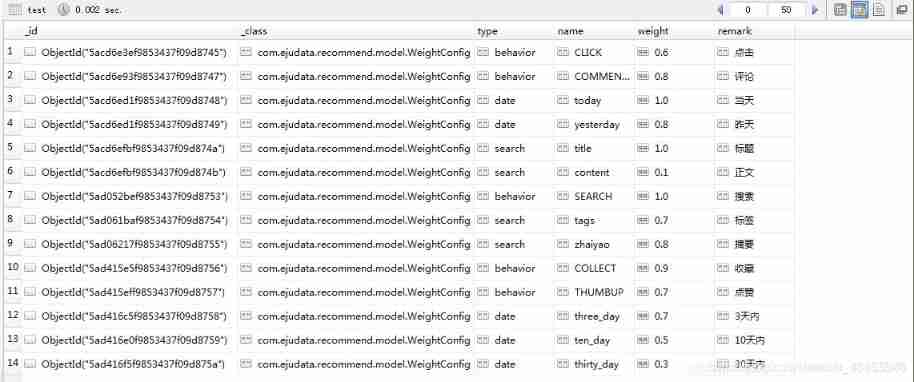
1 polymerization
1、 polymerization
2、 Aggregate operator 
Two 、 Aggregate operator
1、$project
     Modify the structure of the input document
     rename 、 Add or remove fields
     Create calculation results and nested documents
1) example : obtain test A collection of weight Fields and name Field (_id Show )
db.test.aggregate(
    {
     $project : {

        weight: 1 ,
        name : 1
    }}
 );

2) example : obtain test A collection of weight Fields and name Field (_id No display )
db.test.aggregate(
    {
     $project : {

         _id : 0 ,
        weight: 1 ,
        name : 1
    }}
 );
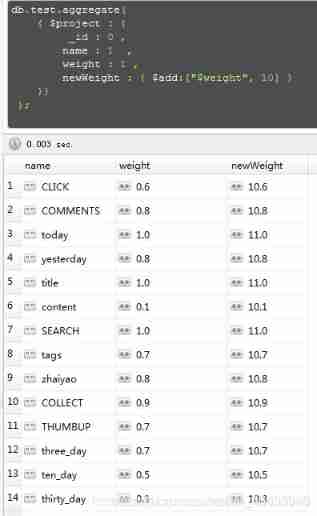
 3) example : Use $add to weight Add... To the value of the field 10, Then assign the result to a new field :newWeight
db.test.aggregate(
    {
     $project : {

         _id : 0 ,
        name : 1  ,
        weight : 1 ,
        newWeight : {
     $add:["$weight", 10] }
    }}
 );
 4) example : hold weight Rename it to newWeight
db.test.aggregate(
    {
     $project : {

         _id : 0 ,
        name : 1  ,
        weight : 1 ,
        newWeight : "$weight"
    }}
 );

2、$match
     For filtering data , Output only documents that meet the criteria
     stay $match Cannot be used in $geoNear Geospatial operators and $where Expression operators
1) example : obtain test A collection of weight>=0.5 And weight<=1
db.test.aggregate( {

    $match :
        {
     weight :
            {
     $gte : 0.5, $lte : 1 }
        }
});
perhaps
db.test.aggregate([
    {
    $match :
        {
     weight :
            {
     $gte : 0.5, $lte : 1 }
        }
    }
]);
 2) example : obtain test A collection of weight>=0.5 And weight<=1, Then send the eligible records to the next stage $group The pipeline operator handles
db.test.aggregate([
    {
    $match :
        {
     weight :
            {
     $gte : 0.5, $lte : 1 }
        }
    },
    {
     $group:
        {
     _id: null,
          count: {
     $sum: 1 }
        }
    }
]);

3、$group
     Group documents in a collection , Can be used for statistical results
     stay $match Cannot be used in $geoNear Geospatial operators and $where Expression operators
1) example : obtain test A collection of weight>=0.5 And weight<=1, Then send the eligible records to the next stage $group The pipeline operator handles 
4、$limit
$limit Will accept a number n, Returns the first... In the result set n A document
1) example : Inquire about 5 Document records
db.test.aggregate({
     $limit : 5 });

5、$skip
$skip Accept a number n, Before discarding the result set n A document
     Limit the number of documents that can be passed to the next pipeline of the aggregation operation
1) example : obtain test In the set 5 Data after a piece of data 
边栏推荐
- How to visit a website
- 天津银行周传凯:从 0 到 1,我的分布式数据库落地经验谈
- Also on STM32 using dma+ serial port to obtain variable length data
- 1. Google grpc framework source code analysis Hello World
- [colorful] Net dto mapping
- Browser console injection JS
- Programming training 1
- 杂记:intel11代和12代移动版支持原生Thunderbolt4接口,桌面版不支持
- Transaction verification of btcd transaction process (2)
- Packaging and uplink of btcd transaction process (III)
猜你喜欢

Static analysis of malicious code

Stm32f4 development of DMA transmission to GPIO port

Masa auth - overall design from the user's perspective
![[matlab] 3D curve and 3D surface](/img/50/44fec1cae6e2bbab1d9e000578f281.png)
[matlab] 3D curve and 3D surface
Information collection for network security (2)
![[Error] invalid use of incomplete type 使用了未定义的类型](/img/8a/7cb5d270cfd8831ddc146687fe4499.png)
[Error] invalid use of incomplete type 使用了未定义的类型

Easyexcel read excel simple demo

Summary of openstack installation problems

Kali system -- fierce of DNS collection and analysis

Can branches sign labor contracts with employees
随机推荐
Assembly language learning
从ADK的WinPE自己手动构建自己的PE
1115. alternate printing foobar
Conversion of integer part and decimal part between binary / octal / decimal / hexadecimal
USTC of China University of science and technology: Minrui Wang | distribution network voltage stabilization based on transformer Multi-Agent Reinforcement Learning
[LeetCode]7. Integer inversion thirty-nine
[C] Inverts the binary of a decimal number and outputs it
哲学和文学的区别
JPA execution failed in scheduled task -executing an update/delete query transactionrequiredexception
Converting Chinese numbers to Arabic numbers in Delphi
2022 constructeur - direction de l'équipement - Fondation générale (constructeur) Questions d'examen du certificat d'exploitation et examen de simulation
Stm32f4 development of DMA transmission to GPIO port
Binary search the specified number of numbers in the array binary advanced
On the usage details and special usage of switch case
BUUCTF之BabySQL[极客大挑战 2019]
也许尘埃落地,我们才能想清楚互联网的本质
Basic operations of FreeMarker
How to quickly query the online status of mobile phones
[LeetCode]13. Roman numerals to integers thirty
The difference between philosophy and Literature