当前位置:网站首页>MySQL advanced statement
MySQL advanced statement
2022-06-11 14:02:00 【Be a super hard worker】
1、mysql Refine Query

1.1、select
select--- Displays all data records for one or more fields in the table
grammar :selcet " Field " from " Table name "
give an example :
------------------------------
select date,store_name,sales from stroe_info ## Change combination sequence
select date,store_name from store_info # Display the specified fields 
1.2、distinct
distinct---- Do not display duplicate data records
grammar :select distinct " Field " from " Table name ";
give an example :
-------------------
select distinct date from store_info;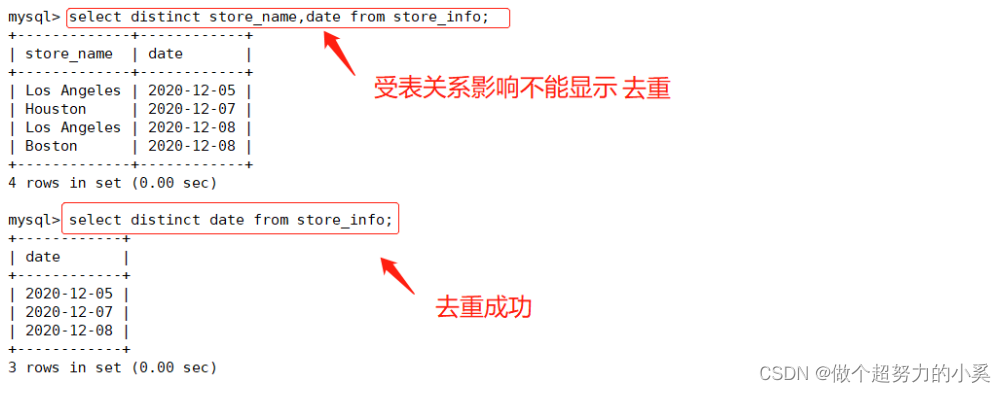
1.3、where
where---- Conditional query
grammar :select " Field " from " Table name " where " Conditions ";
give an example :
-------------------
select store_name from store_info where sales>1000;
select * from store_info where sales>1000;
1.4、and or
and or---- And or
grammar :select " Field " from " Table name " where " Conditions 1" and or " Conditions 2";
give an example :
-------------------
select * from store_info where sales>500 and sales<1000;
select * from store_info where (sales>200 and sales<500) or sales>1000;
1.5、in
in---- Data records showing known values
grammar :select " Field " from " Table name " where " Field " in (' value 1',' value 2'....);
give an example :
-------------------
select * from store_info where store_name in ('Boston','Houston');
select * from store_info where store_name not in ('Boston','Houston');
1.6、between
between---- Display data records in the range of two values
grammar :select " Field " from " Table name " where " Field " between ' value 1' and ' value 2';
give an example :
-------------------
select * from store_info where sales between 500 and 1500;
select * from store_info where date between '2020-12-06' and '2020-12-10';
1.7、 wildcard
Wildcards are both and like Used together
%: Percentage sign 0 individual , One or more characters
——: The underline represents a single character
'A_Z': With 'A' At first , With 'z' Is another string with one at the end .
----------- give an example :'ABZ' and 'A2z' In line with this , and 'AKKZ' It does not accord with
'ABC%':'ABC' Starting string .
------------ give an example :'ABCD' and 'ABCABC'. All fit the pattern
'%XYZ': With 'XYZ' a null-terminated string .
------------ give an example :'wXYZ' and 'ZZXYZ' All fit the pattern
'%AN%': contain 'AN' The string of this pattern
------------ give an example :'LOS ANGELES' and ' SAN FRANCISCO' accord with
'_AN%': All the second letters are 'A' And the third letter is 'N' String .
------------ give an example :'SAN FRANCISCO' accord with ,'los ANGELES' Do not conform to the 
1.8、order by
order by---- Sort by keyword
grammar :select " Field " from " Table name " where " Field " order by " Field " [ASC DESC]
##ASC Is sorted in ascending order , Is the default sort method
##DESC It's sorted in descending order
give an example :
-------------------
mysql> select * from store_info order by sales; ## Ascending
mysql> select * from store_info order by sales asc; # Ascending
mysql> select * from store_info order by sales desc; ## In reverse order 
2、mysql Database functions
2.1、 Mathematical functions
 Mathematical functions
abs(x)           return x The absolute value of
rand()           return 0 To 1 The random number
mod(x,y)         return x Divide y The remainder after
power(x,y)       return x Of y Power
round(x)         Return from x The nearest integer
round(x,y)       Retain x Of y The rounded value of a decimal place
sqrt(x)          return x The square root of
truncate(x,y)       Return to digital x Truncated to y A decimal value
ceil(x)             Returns greater than or equal to x Minimum integer of
floor(x)            Returns less than or equal to x Maximum integer for
greatest(x1,x2...)  Returns the maximum value in the collection
least(x1,x2....) Returns the smallest value in the set 
2.2、 Aggregate functions
 Aggregate functions
avg()            Returns the average value of the specified column
count()          Returns the value of the specified column NULL  The number of values
min()            Returns the minimum value of the specified column
max()            Returns the maximum value of the specified column
sum(x) Returns the sum of all values in the specified column 
2.3、 String function
String function :
trim() Returns a value with the specified format removed
concat (X, y) The parameters that will be provided x and y Concatenate into a string
substr (x,y) Get from string x No y A string starting at a position , Follow substring() Functions work the same
substr (X,Y,z) Get from string x No y The starting length of a position is z String
length(x) Return string x The length of
replace (x,Y1Z) The string z Alternative string x String in y
upper (x) The string x All of the letters of the alphabet become capital letters
lower (x) The string x All of the letters of the are changed into lower case letters
left (x,y) Return string x Before y Characters
right (x,y) Return string x After y Characters
repeat (x,y) The string x repeat γ Time
space (x) return x A space
strcmp (x,y) Compare x and y, The value returned can be -1,0,1
reverse (x) The string x reverse
--------------------------------------------------
If sql_mode Open the PIPES_AS_CONCAT,"||" Treat as a continuous operator of a string, not an or operator , And string splicing function concat Similar , This is the sum of Oracle The database is used in the same way 
3、mysql Refine Query 2
3.1、group by
group by------ Yes group by The query results of the following fields are summarized and grouped , Usually used in combination with aggregate functions
group by There is a principle , Where there are group by The fields that appear later , Must be in select Behind the
Where there are select Later on , Fields that do not appear in the aggregate function , Must appear in group by Back
--------------
grammar :select " Field 1",SUM(" Field 2") from " Table name " group by " Field 1";
give an example :
select store_name from store_info group by store_name;
3.2、having
having The existence of sentences makes up for where Keywords cannot be combined with aggregate functions
----------------
grammar :select " Field 1",SUM(" Field 2") from " Table name " group by " Subsegment 1" having ( Function conditions );
give an example :
mysql> select store_name,sum(sales) from store_info group by store_name having sum(sales) > 1000;
3.3、 Alias
Alias ---- Field alias Table alias
grammar : SELECT " Form alias ". " Field 1” [AS] " Field alias " FROM " Table name ” [AS] " Form alias ”;
give an example :
mysql> select store_name,sum(sales) as total_sales from store_info group by store_name having sum(sales) > 1000;
3.4、 Subquery
----- Subquery ---- Connect tables , stay WHERE Clause or HAVING Clause to insert another sQL sentence
grammar : SELECT " Field 1" FROM " form 1" WHERE " Field 2”[ Comparison operator ]
# External query
(SELECT " Field 1" FROM " form 2" WHERE " Conditions ") ;
# Internal query
#### Can be symbolic operators , for example =、>、<、>=、<=、 It can also be a literal operator , for example like、IN、between3.5、exists
exists--- It is used to test whether the inner query produces any results , Whether Boolean value is true or not
 grammar :select " Field 1" from " form 1" where exists (select * from " form 2" where " Conditions ")
4、mysql Three connections
4.1、 Internal connection
inner join: Only rows with equal join fields in two tables are returned
give an example :
select * from location A INNER JOIN store_info B ON A.store_name = B.store
4.2、 Left connection
left join: Returns records that include all records in the left table and the same join field in the right table
give an example :
select * from location A left join store_info B ON A.store_name = B.store_name;
4.3、 The right connection
right join: Returns records that include all records in the right table and join fields in the left table
give an example :
select * from scores A right join students B on A.stuid = B.stuid;5、 View
It can be thought of as a virtual table or a storage query
(1) The difference between a view and a table is , There is the actual stored information in the form , And a view is a structure built on a table , It doesn't actually store data itself .
(2) The temporary table disappears automatically when the user exits or loses the connection to the database , And the view doesn't disappear .
(3) Views don't contain data , Just store its definition , Its purpose is to simplify complex queries . For example, you need to query several tables , But also to carry out statistical sorting and other operations , Write SQL Sentences can be cumbersome , Join several tables with views , Then query the view , Just like querying a table , Very convenient .
# grammar :
CREATE VIEW " View table name " AS "SELECT sentence ";
----------
give an example :
create view V_REGION_SALES as select A.Region REGION,SUM(B.Sales) SALES from location A,
store_info B where A.store_name =B.store_name group by REGION;
SELECT * FROM V_REGION_SALES;
DROP VIEW V_REGION_SALES;
6、UNION combine
Put two sql The results of the statement are combined , Two sql The fields generated by the statement need to be of the same data record type
UNION: The data record value of the generated result will not be repeated , And sort according to the order of the fields
grammar : [SELECT sentence 1] UNION [SELECT sentence 2];
UNIONALL: List the data record values of the generated results , With or without repetition
grammar : [SELECT sentence 1] UNION ALL [SELECT sentence 2] ;
give an example :
------------------
select store_name from location union select store_name from store_info;
select store_name from location union all select store_name from store_info;
7、 Intersection value
Take two. SQL The intersection of statement results
---- Intersection value ---- Take two. sQL The intersection of statement results
SELECT A.Store_ Name FROM location A INNER JOIN Store_ Info B ON A.Store_ Name = B.Store_ Name ;
SELECT A.Store_ Name FROM location A INNER JOIN Store_ Info B USING(Store_ Name) ;
# Take two. sQL The intersection of statement results , And there's no repetition
SELECT DISTINCT A.Store_ Name FROM location A INNER JOIN Store_ Info B USING (Store_ Name) ;
SELECT DISTINCT Store_ Name FROM location WHERE (Store_ Name) IN (SELECT Store_ Name FROM Store_ Info);
SELECT DISTINCT A.Store_ Name FROM location A LEFT JOIN Store_ Info B USING(Store_ Name) WHERE B.Store_ Name IS NOT NULL;
SELECT A.Store_ Name FROM (SELECT B.Store_ Name FROM location B INNER JOIN Store_ Info C ON B.Store_ Name = C.Store_ Name) A
GROUP BY A. Store_ Name;
7、 Null value (NULL) and No value (’ ') The difference between
1. The length of no value is 0, Not taking up space ; and NULL The length of the value is NULL, It takes up space .
2. Is NULL perhaps Is NOT NULL,  It is used to judge whether the field is NULL  Or not NULL, It is impossible to find out whether there is nothing .
 The judgment without value uses =' perhaps <>" To deal with it .<> The representative is not equal to .
4. Through count () When specifying the number of rows in the field statistics , If you encounter NULL  The value is automatically ignored , If there is no value, it will be added to the record for calculation .
8、 Regular expressions
----  Regular expressions ----
 Matching mode                    describe
^                    Match the start character of the text
$                    Match the end character of the text
.                    Match any single character
*                    Match zero or more characters before it
+                    Match preceding characters 1 Times or times
 character string                 Match contains the specified string
p1|p2                matching p1 or p2
[...]                Match any character in the character set
[^...]               Match any characters that are not in brackets
{n}                  Match the previous string n Time
{n,m}                Match the previous string at least n Time , at most m Time


 grammar :SELECT  " Field " FROM " Table name ”WHERE " Field " REGEXP { Pattern };
SELECT * FROM Store_ Info WHERE Store_ Name REGEXP 'os' ;
SELECT * FROM Store_ Info WHERE Store_ Name REGEXP I^[A-G] ' ;
SELECT * FROM Store_ Info WHERE Store_ Name REGEXP 'Ho | Bo' ;
9、 stored procedure
 A stored procedure is a set of functions to accomplish sQL Statement set .
 In the process of using stored procedures, common or complex work is used in advance sQL The statement is written and stored with a specified name , This process is compiled and optimized and stored in the database server .
 When you need to use this stored procedure , Just call it . Stored procedures perform better than traditional SQL Faster 、 More efficient execution .
Advantages of stored procedures
After one execution , The generated binary code will reside in the buffer , Improve execution efficiency
SQL Statement plus a collection of control statements , High flexibility
Store on the server side , When called by the client , Reducing network load can be called repeatedly , Can be modified at any time , Does not affect client calls
Can complete all database operations , You can also control the information access rights of the database
9.1、 Create stored procedure
DELIMITER $$                      # Change the closing sign of the statement from a semicolon ; Temporarily changed to two $$( It can be custom )
CREATE PROCEDURE Proc()           # Create stored procedure , The process name is Proc, With no arguments
> BEGIN                           # The process body takes the keyword BEGIN Start
-> select * from Store_ Info;     # Process style sentences
-> END $$                         # The process body takes the keyword END end
DELIMITER ;                       # Returns the ending symbol of the statement to a semicolon ;
9.2、 Calling stored procedure
call proc;9.3、 View stored procedures
SHOW CREATE PROCEDURE [ database . ] Stored procedure name ;
# View the specific information of a stored procedure
SHOW CREATE PROCEDURE Proc;
SHOW PROCEDURE STATUS [LIKE ' 8Proc8' ] \G9.4、 Parameters of stored procedure
IN Input parameters : Indicates that the caller passes a value... To the procedure ( The incoming value can be literal or variable )
OUT Output parameters : Indicates that the procedure passes out a value to the caller ( Multiple values can be returned ) ( Outgoing values can only be variables )
INOUT Input/output parameter : It means that the caller passes in a value to the procedure , It also indicates that the procedure passes out a value to the caller ( Values can only be variables )
9.5、 Delete stored procedure
 The method to modify the contents of stored procedures is to delete the original stored procedures , Then create a new stored procedure with the same name .
DROP PROCEDURE IF EXISTS Proc;
# Delete... Only if it exists , Don't add IF EXISTS  when , If the specified procedure does not exist , Then there is an error
9.6、 Control statement of stored procedure
9.6.1、 Conditional statements :if-then-else .... end if
DELIMITER $$
CREATE PROCEDURE proc2 (IN pro int)
-> begin
-> declare var int ;
-> set var=pro*2;
if var>=10 then
-> update t set id=id+1;
-> else
-> update t set id=id-1;
-> end if;
-> end $$;
DELIMITER ;
CALL Proc2 (6) ;9.6.2、while......end while
DELIMITER $$                                            # Modify the default terminator to $$
-> create procedure yxp()                           # Create stored procedure yxp
-> begin                                                # The process body takes the keyword begin Start
-> declare i int;                               # Defining variables i by int type ( Maximum length 10)
-> set i = 1;                                           # Set up i = 1;
->  while i <= 100                                  # Use while loop ,i To be less than 100
-> do insert into nametest(name,age) values
            # If the conditions are met, add data , The content is variable i
-> set i=i+1;                                       # Variable i Add... After each cycle 1
-> end while;                                           # end while loop
-> end $$                                               # End of creating stored procedure
delimiter ;                                             # Modify the default terminator to the original ;
CALL proc6; # call yxp stored procedure 边栏推荐
- Redis uses 10 tips, please accept!
- 自定义Terraform-Providers(Terraform Plugin Framework)-04
- Three level classification display
- Alibaba Cloud 3 (Soaring Falcon) x86_ 64 (py3.7.8) system Yum source
- 解决循环依赖BUG。Relying upon circular references is discouraged and they are prohibited by default.
- BS-XX-007基于JSP实现户籍管理系统
- 2022 Gansu Province safety officer B certificate test question simulation test question bank and online simulation test
- sqlmap检测SQL-lab靶场
- C # set the cursor shape of forms and systems
- 全球手机市场衰退,连苹果也对iPhone14不抱过高期待
猜你喜欢

CVPR 2022 | 神经辐射场几何编辑方法NeRF-Editing

Three level classification display

论文导读 | 机器学习在数据库基数估计中的应用

基于FPGA的VGA协议实现
RS485(Modbus RTU)工业RFID读写器CK-FR03-A01与PLC三菱FX5U的通讯操作说明
![[signal de-noising] chromatographic baseline estimation and de-noising based on sparsity (beads) with matlab code and papers](/img/7f/8ffc83e5717275b27f1fd34111ca15.png)
[signal de-noising] chromatographic baseline estimation and de-noising based on sparsity (beads) with matlab code and papers
![[Clickhouse] the clckhouse view can be inserted but not queried](/img/72/717d70af49be2b1dc2331fe603d106.jpg)
[Clickhouse] the clckhouse view can be inserted but not queried

【Flink】Flink CancellationException null DefaultExecutionGraphCache LeaderRetrievalHandler

LNMP deployment

How to write high-performance code (IV) optimize data access
随机推荐
Unity 检测对象是否在相机的视锥体范围内
Installation and use of Anaconda
Optimal dispatching (thermal power, wind and energy storage) (realized by Matlab)
C # set the cursor shape of forms and systems
Teatalk · online speech record | complete! It is important to select the right data migration strategy for safe cloud deployment
Can't understand kotlin source code? Starting with the contracts function~
Hashicopy之nomad应用编排方案06(配置task)
Hashicopy之nomad应用编排方案08(检测Job)
Learning notes of yolov3: model structure of yolov3
JSTL 自定义标签
Stochastic dynamic economic dispatching model of wind power (realized by matlab code)
小米9线刷ROM
强大的全文本搜索工具——AnyTXT Searcher
论文导读 | 机器学习在数据库基数估计中的应用
Part 23, two-way circular linked list model.
折叠表达式
MySQL数据库创建索引的方法和好处
2022工具钳工(中级)操作证考试题库及答案
2022.2.27 library management system 3 - book borrowing and returning registration module
RS485(Modbus RTU)工业RFID读写器CK-FR03-A01与PLC三菱FX5U的通讯操作说明