当前位置:网站首页>Collect | thoroughly understand the meaning and calculation of receptive field
Collect | thoroughly understand the meaning and calculation of receptive field
2022-06-11 15:53:00 【Xiaobai learns vision】
Click on the above “ Xiaobai studies vision ”, Optional plus " Star standard " or “ Roof placement ”
Heavy dry goods , First time delivery
What is the receptive field
The receptive field is defined as the region in the input space that a particular CNN’s feature is looking at (i.e. be affected by).
—— A guide to receptive field arithmetic for Convolutional Neural Networks
Feel the field (Receptive Field), It refers to the neurons in the neural network “ What you see ” Input area , In a convolutional neural network ,feature map The calculation of an element on the input image is affected by an area on the input image , This area is the receptive field of this element .
In convolutional neural networks , The deeper the neurons, the larger the input area , As shown in the figure below ,kernel size Are all 3×3,stride Are all 1, The green mark is Layer2 The area each neuron sees , The yellow mark is Layer3 The area you see , In particular ,Layer2 Every neuron can see Layer1 On 3×3 Size area ,Layer3 Every neuron sees Layer2 On 3×3 Size area , This area can see again Layer1 On 5×5 Size area .

therefore , Receptive field is a relative concept , A layer feature map The elements on the front see that the range of areas on different layers is different , Usually without special designation , The receptive field refers to seeing the area on the input image .
To calculate the receptive field , Here we use the concept of visual system :
receptive field=center+surround
Calculate the receptive field accurately , I need to answer two questions , That is, where is the center of vision and how wide is the field of vision .
Only to see ” The right range of information ” To make the right judgment , Otherwise, it's possible “ elephant ” perhaps “ The hills are small ”;
In the problem of target recognition , We need to know which area the neurons see , Then we can reasonably infer where the object is and judge what it is .
however , There are many kinds of network architecture , The parameter configuration of each layer is also different , How to calculate the feeling field ?
Appointment
Before the official calculation , First, make the following conventions for mathematical symbols :

k:kernel size
p:padding size
s:stride size
Layer: use Layer Express feature map, Specially ,Layer0 Input image for ;
Conv: use Conv For convolution ,k、p、s Is the super parameter of the convolution layer ,Convl The input and output of are Layerl−1 and Layerl+1;
n:feature map size by n×n, It is assumed that height=width;
r:receptive field size by r×r, It is assumed that the receptive field is square ;
j:feature map The pixel distance between the upper adjacent elements , namely take feature map Elements on the input image with Layer0 When the center of the receptive field is aligned , The pixel distance between adjacent elements on the input image , It can also be understood as feature map Go ahead 1 Step is equivalent to how many pixels forward on the input image , As shown in the figure below ,feature map Go ahead 1 Step , It's equivalent to moving forward on the input image 2 Pixel ,j=2;

start:feature map Top left element Center coordinates of the receptive field on the input image (start,start), namely Coordinates of the center of the field of view , In the diagram above , The center coordinate of the perception field of the green block in the upper left corner is (0.5,0.5), That is, the coordinates of the center of the blue block in the upper left corner , The coordinates of the center of the white dotted block in the upper left corner are (−0.5,−0.5);
l:l The presentation layer , The convolution layer is Convl, Its input feature map by Layerl−1, Output is Layerl.
All layers are assumed to be convoluted .
Feel the size of the field
The calculation of the size of the receptive field is a recursive formula .
Look at the moving picture above , If feature map A member of alpha A notice feature map Layer1 The upper range is 3×3( Green block in the picture ), Its size is equal to kernel size k2, therefore ,A The range of feeling fields seen r2 Equivalent to Layer1 On 3×3 What I see in the window Layer0 Range , On this basis, adjacent Layer Feel the wild relationship , As shown below , among rl by Layerl Feeling field of ,rl−1 by Layerl−1 Feeling field of ,

Layerl The feeling field of an element rl Equivalent to Layerl−1 On k×k A stack of feeling fields ;
Layerl−1 The feeling of the last element is rl−1;
Layerl−1 Continuous on k The feeling field of each element can be seen as , The first 1 Experience field seen by elements plus surplus k−1 Step swept range ,Layerl−1 Go ahead 1 Elements are equivalent to moving forward on the input image jl−1 Pixel , The result is equal to the rl−1+(k−1)×jl−1
The visualization is shown in the figure below ,

The following question is ,jin How to ask for ?
Layerl Go ahead 1 The elements are equivalent to Layerl−1 Go ahead sl Elements , Convert to pixels in

among ,sl by Convl Of kernel stay Layerl−1 The step of sliding up , Input the s0=1.
According to the recurrence formula, we can know ,
Layerl Go ahead 1 Elements , It's like moving forward in the input image  Pixel , That is, all the layers in front stride The tandem of .
Further, we can get ,Layerl The size of the receptive field is :
402 Payment Required
Feel wild Center
The calculation of the center of the receptive field is also a recursive formula .
Calculated in the previous section  , Express feature map Layerl Go ahead 1 The number of elements is equal to the number of pixels advancing on the input image , If you will feature map The upper element is aligned with the center of the receptive field , be jl To feel the pixel distance between the center of the field . As shown in the figure below ,

among , On all levels kernel size、padding、stride The super parameters have been marked in the figure , On the right is feature map Aligned with the center of the receptive field .
adjacent Layer between , The relationship between the receptive field center is :

be-all start All coordinates are relative to the input image coordinate system . among ,start0=(0.5,0.5), The center coordinates of the pixels in the upper left corner of the input image ,startl−1 Express Layerl−1 The central coordinate of the receptive field of the element in the upper left corner ,(2kl−1−pl) by Layerl And Layerl−1 Feel wild Center be relative to Layerl−1 The deviation of the coordinate system , This deviation needs to be converted to the input image coordinate system , Its value needs to be multiplied by jl−1, namely Layerl−1 Pixel distance between adjacent elements , The result of multiplication is (2kl−1−pl)∗jl−1, That is, the pixel distance between the center of the sensory field —— Relative to the input image coordinate system . thus , adjacent Layer The relationship between the central coordinates of the receptive field is not difficult , The process is visualized as follows .
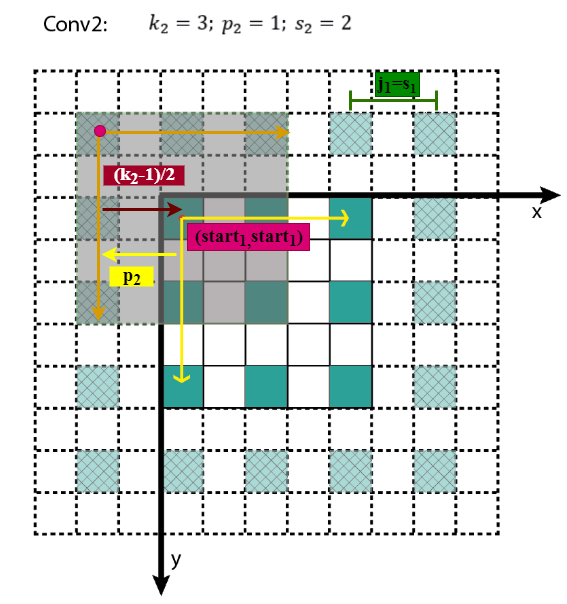
got it Layerl The central coordinate of the receptive field of the element in the upper left corner (startl,startl), The pixel distance between adjacent elements through the layer jl We can calculate the central coordinates of other elements .
Summary
Summarize the calculation of receptive field :
From the recurrence formula above , You can calculate the receptive field from front to back , The code can be found in computeReceptiveField.py, For online visualization calculation, please refer to Receptive Field Calculator.
Last , There are a few more points to note :
Layerl The size of the receptive field and sl、pl irrelevant , At present feature map The size of the receptive field of the element is independent of the pixel distance between adjacent elements of the layer ;
In order to simplify the , Will usually padding size Set to kernel The radius of , namely p=2k−1, Available startl=startl−1, bring feature map Layerl On (x,y) The element of location , The central coordinate of the receptive field is (xjl,yjl);
about Cavity convolution dilated convolution, It's equivalent to changing the size of the convolution kernel , If it contains dilation rate Parameters , Just put the kl Replace with dilation rate∗(kl−1)+1 ,dilation rate=1 Time is normal convolution ;
about pooling layer , It can be regarded as a special convolution layer , It also exists kernel size、padding、stride Parameters ;
The nonlinear activation layer is element by element operation , Do not change the feeling field .
above .
Reference material
wiki-Receptive field
wiki-Receptive Field Calculator
arXiv-Understanding the Effective Receptive Field in Deep Convolutional Neural Networks
medium-A guide to receptive field arithmetic for Convolutional Neural Networks
medium-Topic DL03: Receptive Field in CNN and the Math behind it
ppt-Convolutional Feature Maps: Elements of Efficient (and Accurate) CNN-based Object Detection
SIGAI- A summary of the receptive field
Calculating Receptive Field of CNN
The good news !
Xiaobai learns visual knowledge about the planet
Open to the outside world

 download 1:OpenCV-Contrib Chinese version of extension module

 stay 「 Xiaobai studies vision 」 Official account back office reply : Extension module Chinese course , You can download the first copy of the whole network OpenCV Extension module tutorial Chinese version , Cover expansion module installation 、SFM Algorithm 、 Stereo vision 、 Target tracking 、 Biological vision 、 Super resolution processing and other more than 20 chapters .


 download 2:Python Visual combat project 52 speak
 stay 「 Xiaobai studies vision 」 Official account back office reply :Python Visual combat project , You can download, including image segmentation 、 Mask detection 、 Lane line detection 、 Vehicle count 、 Add Eyeliner 、 License plate recognition 、 Character recognition 、 Emotional tests 、 Text content extraction 、 Face recognition, etc 31 A visual combat project , Help fast school computer vision .


 download 3:OpenCV Actual project 20 speak
 stay 「 Xiaobai studies vision 」 Official account back office reply :OpenCV Actual project 20 speak , You can download the 20 Based on OpenCV Realization 20 A real project , Realization OpenCV Learn advanced .


 Communication group

Welcome to join the official account reader group to communicate with your colleagues , There are SLAM、 3 d visual 、 sensor 、 Autopilot 、 Computational photography 、 testing 、 Division 、 distinguish 、 Medical imaging 、GAN、 Wechat groups such as algorithm competition ( It will be subdivided gradually in the future ), Please scan the following micro signal clustering , remarks :” nickname + School / company + Research direction “, for example :” Zhang San + Shanghai Jiaotong University + Vision SLAM“. Please note... According to the format , Otherwise, it will not pass . After successful addition, they will be invited to relevant wechat groups according to the research direction . Please do not send ads in the group , Or you'll be invited out , Thanks for your understanding ~边栏推荐
- 使用Cloud DB构建APP 快速入门-快游戏篇
- Overview and operation of database dense equivalent query
- The third generation Pentium B70 won the C-NCAP five-star safety performance again
- dapr 思维导图
- [azure application service] nodejs express + msal realizes the authentication experiment of API Application token authentication (AAD oauth2 idtoken) -- passport authenticate('oauth-bearer', {session:
- Opengauss AI capability upgrade to create a new AI native database
- 每日一博 - 微服务权限一二事
- 三千字教你使用MOT
- Frontier technology exploration deepsql: in Library AI algorithm
- 验证码是自动化的天敌?阿里研究出了解决方法
猜你喜欢
推开混合云市场大门,Lenovo xCloud的破局之道

Daily blog - wechat service permission 12 matters

ASEMI的MOS管25N120在不同应用场景的表现

从内核代码了解SQL如何解析

泰雷兹云安全报告显示,云端数据泄露和复杂程度呈上升趋势

网站上的 breadcrumb 使用场景浅析
openGauss企业版安装
Code farming essential SQL tuning (Part 2)

Detailed explanation of opengauss multi thread architecture startup process

使用Cloud DB构建APP 快速入门-快游戏篇
随机推荐
Database resource load management (Part 1)
[0006] title, keyword and page description
使用Cloud DB构建APP 快速入门-Server篇
一文教会你数据库系统调优
openGauss企业版安装
【0006】title、关键字及页面描述
Analysis of the execution process of opengauss simple query SQL
Go language - array
前沿科技探究之AI在索引推荐的应用
每日一博 - 微服务权限一二事
Docker uses redis image
openGauss数据库性能调优概述及实例分析
With an average annual salary of 20W, automated test engineers are so popular?
GO语言-值类型和引用类型
Import data: GS_ restore or MERGE INTO? See which one suits you better
HowNet has been filed for investigation; Byte beat established Tiktok group or listed in Hong Kong; The nail was exposed to be cut by 30%; Beijing's per capita deposit exceeds 200000 yuan | Q informat
Overview and operation of database dense equivalent query
Introduction and use of etcd
Learn automatic testing of postman interface from 0 to 1
Opengauss version 3.0.0 was officially released, and immediately experience the first lightweight version in the community