Image download 、 Domain name resolution 、 Time synchronization please click Alibaba cloud open source image station
One : The host computer of the virtual machine is interconnected ping no
Question 1 : A firewall
Omitted , It is recommended that both the host and the host turn off the firewall , And shut down seLinux(Linux The security system of )
Question two : Network card is not effective
performance
Enter the command ifcongig, If the output network card information does not contain inet [ip Address ], It means that the network card is not effective

After the network card takes effect, it will become

terms of settlement
This is caused by an error in the network card configuration file .CentOS7 System network card configuration file path :
/etc/sysconfig/network-scripts/ifcfg-[ adapter name ]
 The name of the network card is ifconfig The leftmost column of command output information
eg:/etc/sysconfig/network-scripts/ifcfg-ens32
Profile contents :

If you haven't modified this file , Then you just need to join with IP Address related IPADDR NETMASK GATEWAY DNS1, It is better to modify the green dot configuration , Start up .
If you have multiple network cards , The red dot configures different items for each network card . If UUID The loss of , It can be done by uuidgen Command regeneration . The author passed cp Copy ens32 The network card gets ens34 The network card added the synchronization option by mistake -s, Lead to ens32 Of UUID The loss of , The network card takes effect after modification .
Question 3 :IP Address , gateway ,DNS facilities
There are many specific online tutorials on how to set up . Simply speaking , Namely
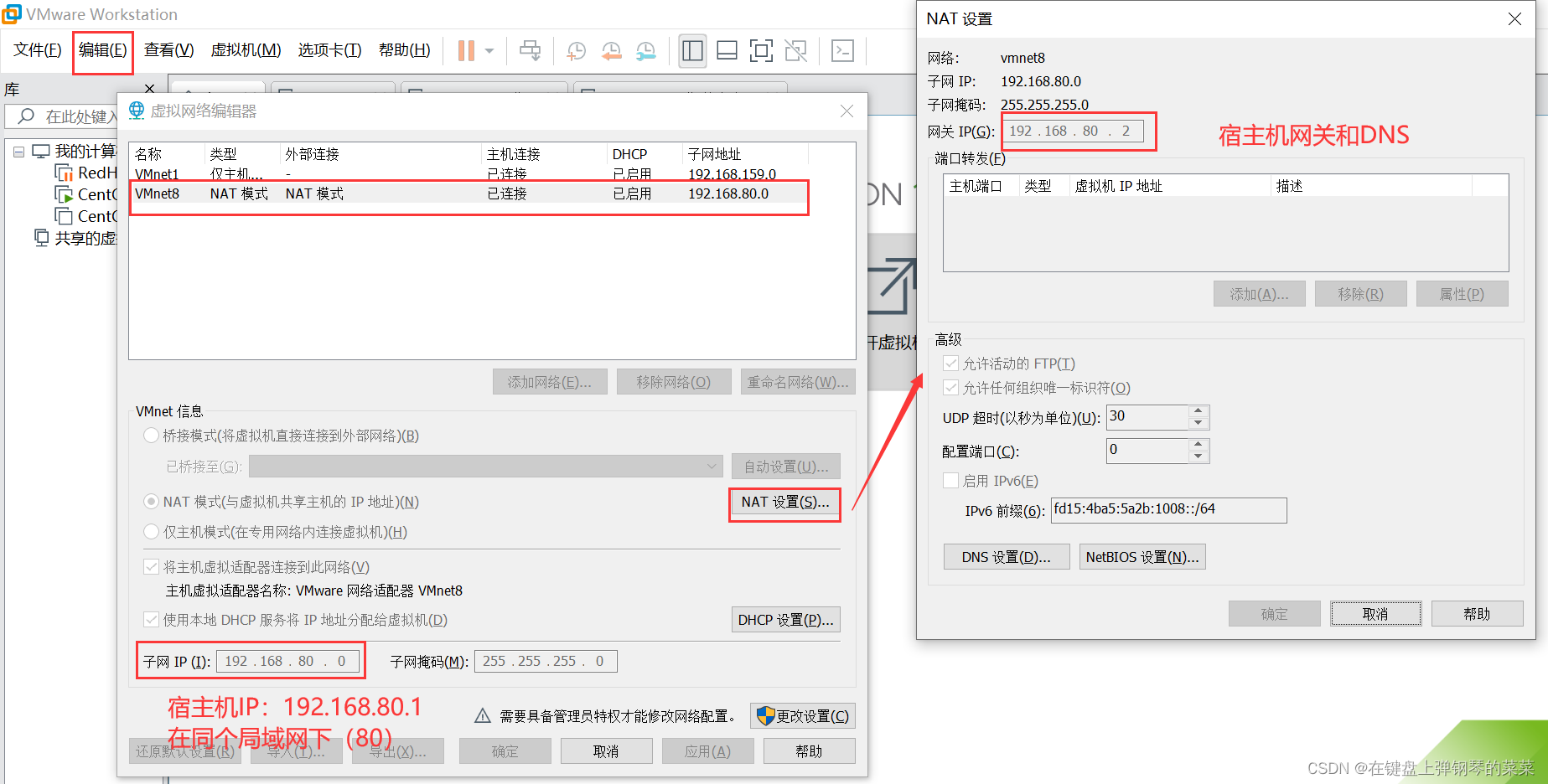
- Windows The virtual network adapter VMnet8 Of IP Address and VMWare The virtual network adapter VMnet8 Subnets of IP Address and Network card settings file IPADDR In the same LAN
- Windows The virtual network adapter VMnet8 Gateway and DNS Address and VMWare Virtual network card gateway and DNS The address is consistent
- All the above are under the same LAN (IP The third number of the address , Here is 80)
Host settings :

The virtual machine setting method is : edit -> Virtual Network Editor
Two : Virtual machine host ping no , But it can ping Extranet
Question 1 : The virtual network adapter VMnet8
The communication between the virtual machine and the host is through the virtual network card VMware Network Adapter VMnet8 Realized , Its functions can be seen in the following virtual network card closing experiment :
Control panel -> The Internet and Internet-> Network and Sharing Center -> Change adapter settings

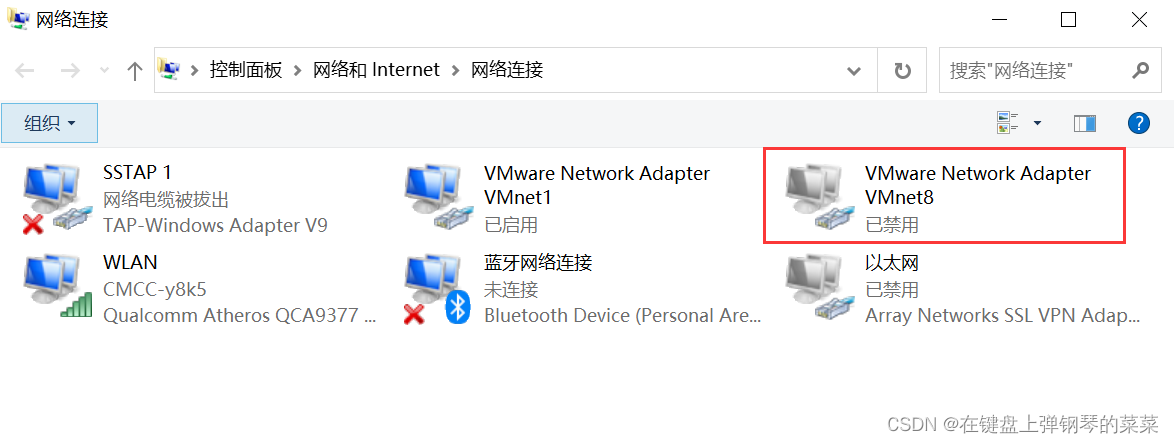
VMnet8 Disabled , The host and virtual machine cannot communicate , But it can communicate with the Internet ( Because the virtual machine and the host share the same network card ) as follows :

if VMNet8 Not disabled , Nor can it be ruled out , There may be a problem with its settings , See the previous article for details .
Question two : Switch the network during virtual machine startup ( Problems encountered by bloggers )
Such as hanging a ladder , Switch WIFI. This operation changes the gateway , The essence is virtual network card VMnet8 Why .
Question 3 : A firewall
It's recommended to turn off
3、 ... and : Virtual machine host ping through , You can't ping Extranet
problem : Gateway and DNS Problems setting up the
See article 1 for the specific setting method
In this paper, from :https://blog.csdn.net/a_vegetable/article/details/122868444