当前位置:网站首页>Hcia-r & s self use notes (23) DHCP
Hcia-r & s self use notes (23) DHCP
2022-07-26 23:02:00 【Master basket ladle Xiao Lu】
DHCP(7/26,64min)
DHCP:Dynamic Host Configure Protocol, Dynamic Host Configuration Protocol
UDP encapsulation , The server is 67, The client is 68
dynamic analysis TCP/IP Information (IP Address 、 Subnet mask 、 The default gateway 、DNS The server etc. )
The information to be removed from the allocation is lease ( Default one day ,86400s)
ipconfig /all You can see the beginning and end of the lease
In general ,DHCP The server is on the gateway ( not always )
DHCP System composition :
| DHCP Client( client ) | Need to get... Dynamically IP Address of the host |
| DHCP Server( The server ) | Can provide DHCP Function of the server or network device |
| DHCP Relay( relay ) | Generally, it is network equipment such as router or layer 3 switch |
The topology is as follows :

SW1:
<Huawei>sys
Enter system view, return user view with Ctrl+Z.
[Huawei]un in en
Info: Information center is disabled.
[Huawei]vlan batch 10 20
Info: This operation may take a few seconds. Please wait for a moment...done.
[Huawei]int gi0/0/1
[Huawei-GigabitEthernet0/0/1]p l t
[Huawei-GigabitEthernet0/0/1]p t a vlan all
[Huawei-GigabitEthernet0/0/1]qu
[Huawei]int gi0/0/2
[Huawei-GigabitEthernet0/0/2]p l a
[Huawei-GigabitEthernet0/0/2]p d v 10
[Huawei-GigabitEthernet0/0/2]qu
[Huawei]int gi0/0/3
[Huawei-GigabitEthernet0/0/3]p l a
[Huawei-GigabitEthernet0/0/3]p d v 20
SW2:
<Huawei>sys
Enter system view, return user view with Ctrl+Z.
[Huawei]un in en
Info: Information center is disabled.
[Huawei]sys SW2
[SW2]vlan batch 10 20
Info: This operation may take a few seconds. Please wait for a moment...done.
[SW2]int vlan 10
[SW2-Vlanif10]ip add 192.168.10.254 24
[SW2-Vlanif10]qu
[SW2]int vlanif 20
[SW2-Vlanif20]ip add 192.168.20.254 24
[SW2-Vlanif20]qu
[SW2]int gi0/0/1
[SW2-GigabitEthernet0/0/1]p l t
[SW2-GigabitEthernet0/0/1]p t a vlan all
[SW2-GigabitEthernet0/0/1]qu
stay PC1 Capture packets at the interface , Be careful ,PC1、PC2 No address is configured , At this time will be PC1 The address acquisition method of is changed to “DHCP”
as follows , Grab the PC Of DHCP Discovery message (Discover)

DHCP Simple configuration
SW2:
[SW2]dhcp enable
Info: The operation may take a few seconds. Please wait for a moment.done.
[SW2]int vlanif 10
[SW2-Vlanif10]dhcp select interface
[SW2-Vlanif10]qu
[SW2]int vlanif 20
[SW2-Vlanif20]dhcp select interface
here PC1、2 Can get the address , Gateway is Vlanif Address
DHCP Data packets
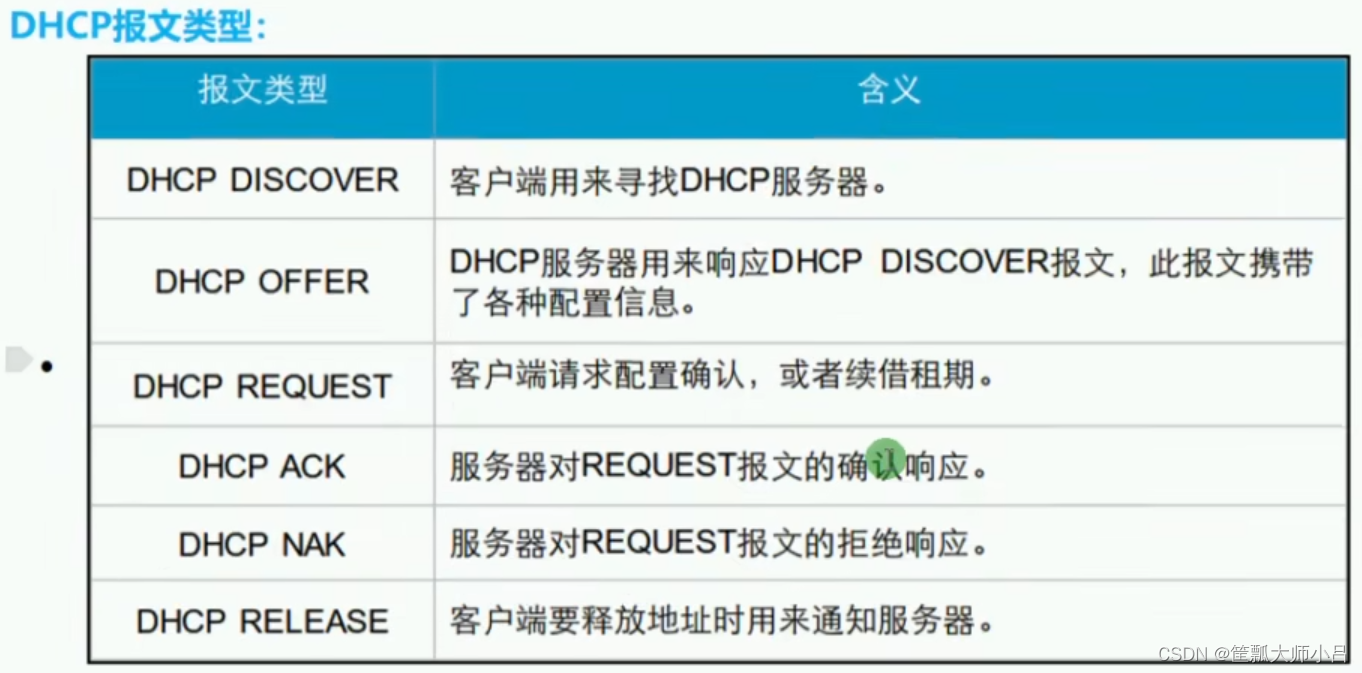
Common for the first four , The address has been rented out , But there are other hosts that want this address to pass ipconfig /release You can grab DHCP RELEASE package
Discover

I want something ( Mask 、 gateway ……)
Offer

What can I give you
There are two kinds left

why Request It's also a radio ?
Because there may be multiple DHCP The server , You may receive more than one after the broadcast DHCP Server's Offer, The host gets the first Offer
Request Radio represents me only from multiple Offer Choose one of them
DHCP Lease term

Be careful , The Request For unicast ( Ask the landlord to renew the lease );
The access switch port corresponding to the host is not set with a fast port (Portfast) Or edge port (Edged-Port) Words , The host at the bottom needs to wait stp convergence 30s(discarding To forwarding)

if 50% when , The server did not respond , be 87.5% Then broadcast ( In a hurry )
Didn't rent a house ( Sleeping Street )169.254.x.x
Automatic retention IP
APIPA(Automatic Private IP Addressing)
Window The client cannot access the DHCP Server When renting an address , Automatically use the network number as 169.254.0.0/16 Private address of , Only for those in the same situation PC Temporary communications
DHCP I'm sorry : Manually configure the address and ping DHCP The server , Check connectivity
Win Medium DHCP Client It also needs to be turned on ( If it does not start , Won't grab Discover package )
Lease term setting suggestions
Set short : Increase the network burden , It is suitable for many clients ( Mobile places , Such as airport 、 Station 、 The mall )
The setting is longer : Lighten the burden of the Internet ( Fixed place , Such as family 、 Enterprises )
The server only takes back the address after the lease expires , No matter whether the other party turns on ,
Windows The last rented address will be recorded , After the lease term discover There will be requested ip( That is, the last address ), If the environment is changed at this time ( From the company to home ), Then the other party ( The other dhcp The server ) Will refuse the request , At this point DHCP NAK Data packets
IP Address release
Or the customer takes the initiative to release ,ipconfig /release(Windows), At this time DHCP Server send out Release message
Or passively release , The server didn't respond before the lease expired , Or the shutdown time exceeds the lease term
DHCP Address pool

DHCP To configure
| dhcp enable | Global on DHCP function |
| dhcp select interface | Associate interfaces with interface address pools ( The gateway is the interface address ) |
| dhcp server dns-list x.x.x.x | Configure the interface address pool DNS The server ( You can configure multiple ) |
| dhcp server lease Numbers | Configure interface address pool lease , default 1 God |
| dhcp server excluded-ip-address x.x.x.x | Configure the excluded address range of the interface address pool |
| dhcp select global | Associate interfaces and global address pools ( The interface address is not a gateway , Such as VRRP、DHCP-Relay scene ) |
| ip pool name | Create a global address pool and name |
| network x.x.x.x | Configure the assignable network segment address of the global address pool |
| gateway-list x.x.x.x | Configure the gateway of the global address pool |
| dns-list x.x.x.x | Configure the configuration of the global address pool DNS Address ( You can configure multiple ) |
| lease Numbers | Configure the lease term under the global address pool , default 1 God |
| excluded-ip-address x.x.x.x | Configure the discharge address range under the global address pool |
| display ip pool [interface gi0/0/x all] | View the properties of the address pool |
Wireless router's DNS You can be yourself (192.168.1.1) Help forward domain name resolution to operators
The spanning tree has a small chapter to fill , I feel dizzy , Your mother
边栏推荐
- Makefile related syntax summary (openc910)
- 杰理下载器强制下载工具的使用介绍_AC695N696NAD14AD15全系列支持
- 2019生物识别论坛成功落幕:这十大看点不容错过!
- 工作一年后,我有些感悟(写于2017年)
- Parameter analysis and stone jumping board
- HCIA-R&S自用笔记(21)STP技术背景、STP基础和数据包结构、STP选举规则及案例
- Dao:op token and non transferable NFT are committed to building a new digital democracy
- Recruit | PostgreSQL database R & D engineers every week, with an annual salary of 60+, high salary for famous enterprises, and challenge yourself!
- Sort out each order when you are in love (it takes two months to sort out in detail)
- 杭州银行面试题【杭州多测师】【杭州多测师_王sir】
猜你喜欢

由若干QWidget实现日历文档

The JSON string is converted into a JSON object, the value of a key is obtained, and whether a key exists is judged
![[hcip] OSPF relationship establishment](/img/19/e03fea44f2908c7b585e7a1f87c075.png)
[hcip] OSPF relationship establishment

Eureka基本使用
![[hcip] OSPF route calculation](/img/1c/ee9eee2e723b850c401f7cddda1b27.png)
[hcip] OSPF route calculation

HCIA-R&S自用笔记(18)园区网架构基础、交换机工作原理、VLAN原理

Recruit | PostgreSQL database R & D engineers every week, with an annual salary of 60+, high salary for famous enterprises, and challenge yourself!

How to recover the original data when the U disk is damaged, and how to recover the damaged data when the U disk is damaged

Introduction to Nacos as a registry and configuration center - realize remote call, dynamically obtain configuration files and database configuration information

Arduino实验一:双色灯实验
随机推荐
Siliwei's counterattack: huiding's under screen optical fingerprint patent involved in the case was declared invalid
《强化学习周刊》第55期:LB-SGD、MSP-DRL & 对抗鲁棒强化学习
HCIA-R&S自用笔记(19)VLAN配置及实验、VLAN间路由
Xinding acquires Ziguang holdings! Wanye enterprise: comprehensive transformation of integrated circuits!
Database full stack Engineers (devdbops) have low down payment and high return, and pay after employment
Making wechat robot with go (I) sending messages
思立微的反击:汇顶涉案屏下光学指纹专利被宣告无效
Let the program do one thing in one or more seconds
MySQL 数据的导入
Ribbon负载均衡
Introduction to MySQL database
沟通中经常用到的几个库存术语
面试:你印象最深的BUG,举个例子
Mate30 series release: how far can Huawei go in reconstructing images?
The JSON string is converted into a JSON object, the value of a key is obtained, and whether a key exists is judged
Do you know the common core types of magnetic ring inductors?
每周招聘|PostgreSQL数据库研发工程师,年薪60+,名企高薪,挑战自我!
基于C语言设计的增量型安全文件系统 SFS
Kalibr calibration realsensed435i -- multi camera calibration
ESMFold: AlphaFold2之后蛋白质结构预测的新突破