当前位置:网站首页>Graphic system - 1 Layout loading
Graphic system - 1 Layout loading
2022-06-28 18:25:00 【MrPeng1991】
be based on android10 To analyze android Graphics system
Graphics system ——1. Layout loading 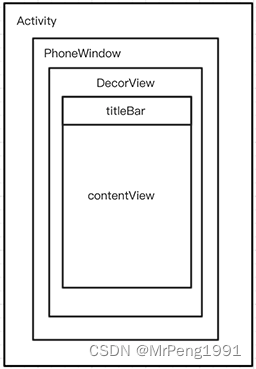
1. setContentView
public class MainActivity extends AppCompatActivity {


    public static final String TAG = "_MainActivity_";
    private TextView mTv;

    @Override
    protected void onCreate(Bundle savedInstanceState) {

        super.onCreate(savedInstanceState);
        // That's what we studied setContentView
        setContentView(R.layout.activity_main);
        mTv = findViewById(R.id.tv);

    }
}
2 AppCompatActivity.java
@Override
public void setContentView(@LayoutRes int layoutResID) {

    getDelegate().setContentView(layoutResID);
}

@NonNull
public AppCompatDelegate getDelegate() {

    if (mDelegate == null) {

        mDelegate = AppCompatDelegate.create(this, this);
    }
    return mDelegate;
}
3 AppCompatDelegate.java
@NonNull
public static AppCompatDelegate create(@NonNull Activity activity,
                                       @Nullable AppCompatCallback callback) {

    return new AppCompatDelegateImpl(activity, callback);
}

public abstract void setContentView(@LayoutRes int resId);
4 AppCompatDelegateImpl.java
@Override
public void setContentView(int resId) {

    // Make sure decorView and ContentView There is , If it doesn't exist, create it  ---> The first stage
    ensureSubDecor();
    // You can see it android.R.id.content It's ours contentView Of id
    ViewGroup contentParent = mSubDecor.findViewById(android.R.id.content);
    contentParent.removeAllViews();
    //contentView The view can only be filled after the root layout is cleared  ----> The second stage
    LayoutInflater.from(mContext).inflate(resId, contentParent);
    mAppCompatWindowCallback.getWrapped().onContentChanged();
}
4.1 The first stage
private void ensureSubDecor() {

    if (!mSubDecorInstalled) {

        // Check your Appcompat Whether the attribute exists , Configure according to your theme properties Activity
        mSubDecor = createSubDecor();
        ......
    }
}

private ViewGroup createSubDecor() {

    TypedArray a = mContext.obtainStyledAttributes(R.styleable.AppCompatTheme);

    // The following sentence is too familiar , Every time we set the theme incorrectly or do not set the theme, we will report an error
    if (!a.hasValue(R.styleable.AppCompatTheme_windowActionBar)) {

        a.recycle();
        throw new IllegalStateException(
            "You need to use a Theme.AppCompat theme (or descendant) with this activity.");
    }

    // The following is to configure according to your theme properties Activity
    if (a.getBoolean(R.styleable.AppCompatTheme_windowNoTitle, false)) {

        requestWindowFeature(Window.FEATURE_NO_TITLE);
    } else if (a.getBoolean(R.styleable.AppCompatTheme_windowActionBar, false)) {

        // Don't allow an action bar if there is no title.
        requestWindowFeature(FEATURE_SUPPORT_ACTION_BAR);
    }
    if (a.getBoolean(R.styleable.AppCompatTheme_windowActionBarOverlay, false)) {

        requestWindowFeature(FEATURE_SUPPORT_ACTION_BAR_OVERLAY);
    }
    if (a.getBoolean(R.styleable.AppCompatTheme_windowActionModeOverlay, false)) {

        requestWindowFeature(FEATURE_ACTION_MODE_OVERLAY);
    }
    mIsFloating = a.getBoolean(R.styleable.AppCompatTheme_android_windowIsFloating, false);
    a.recycle();

    // The following two lines are important , It's about and Window The binding of
    // So we need to know this first mWindow What is it ?
    ensureWindow();


    mWindow.getDecorView(); // The code is shown  4.3PhoneWindow.java
    ...
    mWindow.setContentView(subDecor);// The code is shown  4.3PhoneWindow.java
    .....
}

private void ensureWindow() {

    ...
        if (mWindow == null && mHost instanceof Activity) {

            //(Activity) mHost).getWindow() What the hell is it ?
            attachToWindow(((Activity) mHost).getWindow());
        }
    ...
}

private void attachToWindow(@NonNull Window window) {

    ...
    // At present mWindow Is uniquely assigned here , The value is (Activity) mHost).getWindow()
    mWindow = window;
}
//Activity.java
public Window getWindow() {

    return mWindow;
}

//mWindow Where is it assigned ?
 final void attach(Context context, ActivityThread aThread,
            Instrumentation instr, IBinder token, int ident,
            Application application, Intent intent, ActivityInfo info,
            CharSequence title, Activity parent, String id,
            NonConfigurationInstances lastNonConfigurationInstances,
            Configuration config, String referrer, IVoiceInteractor voiceInteractor,
            Window window, ActivityConfigCallback activityConfigCallback, IBinder assistToken) {

     ...
     attachBaseContext(context);
     mWindow = new PhoneWindow(this, window, activityConfigCallback);
      // It will be mentioned later in this sentence
      mWindow.getLayoutInflater().setPrivateFactory(this);
     ...
 }
// there attach Where was the method called ? In fact, that is Activity Occurs during startup ,  Code in ActivityThread.java class
4.2 ActivityThread.java
  private Activity performLaunchActivity(ActivityClientRecord r, Intent customIntent) {

    ...
       // Notice the outerContext yes Activity
       appContext.setOuterContext(activity);
                activity.attach(appContext, this, getInstrumentation(), r.token,
                        r.ident, app, r.intent, r.activityInfo, title, r.parent,
                        r.embeddedID, r.lastNonConfigurationInstances, config,
                        r.referrer, r.voiceInteractor, window, r.configCallback,
                        r.assistToken);
  ...
}
4.3 PhoneWindow.java
@Override
public final @NonNull View getDecorView() {

    if (mDecor == null || mForceDecorInstall) {

        installDecor();
    }
    return mDecor;
}

@Override
public void setContentView(int layoutResID) {


    if (mContentParent == null) {

        installDecor();
    } else if (!hasFeature(FEATURE_CONTENT_TRANSITIONS)) {

        mContentParent.removeAllViews();
    }
    ...
}
private void installDecor() {

    mForceDecorInstall = false;
    if (mDecor == null) {

       // Generate DecorView
        mDecor = generateDecor(-1);
       ...
    } else {

        mDecor.setWindow(this);
    }
    if (mContentParent == null) {

       // Generate mContentParent
        mContentParent = generateLayout(mDecor);
         ...
    }
  {


    protected DecorView generateDecor(int featureId) {

        ...
        // Explain a PhoneWindow Also create a DecorView
        return new DecorView(context, featureId, this, getAttributes());
    }

     protected ViewGroup generateLayout(DecorView decor) {

        ...
        // Find the ID_ANDROID_CONTENT Control
        ViewGroup contentParent = (ViewGroup)findViewById(ID_ANDROID_CONTENT);
        ...
        return contentParent;
     }
4.2 The second stage
@Override
public void setContentView(int resId) {

    // Make sure decorView and ContentView There is , If it doesn't exist, create it  ---> The first stage
    ensureSubDecor();
    // You can see it android.R.id.content It's ours contentView Of id
    ViewGroup contentParent = mSubDecor.findViewById(android.R.id.content);
    contentParent.removeAllViews();
    // In fact, this is equivalent to PhoneWindow Expose an object to fill view Class using
    //contentView The view can only be filled after the root layout is cleared  ----> The second stage
    LayoutInflater.from(mContext).inflate(resId, contentParent);
    mAppCompatWindowCallback.getWrapped().onContentChanged();
}
4.3 LayoutInflater.java
public View inflate(@LayoutRes int resource, @Nullable ViewGroup root) {

    return inflate(resource, root, root != null);
}

public View inflate(@LayoutRes int resource, @Nullable ViewGroup root, boolean attachToRoot) {

    ....
   // Start parsing what we wrote XML The file
    XmlResourceParser parser = res.getLayout(resource);
    try {

        return inflate(parser, root, attachToRoot);
    } finally {

        parser.close();
    }
    ....
}
public View inflate(XmlPullParser parser, @Nullable ViewGroup root, boolean attachToRoot) {

    ...
     // First go to root node
     final View temp = createViewFromTag(root, name, inflaterContext, attrs);

    //  Analyzers view
    rInflateChildren(parser, temp, attrs, true);

    // Add all nodes to view on the tree
   if (root != null && attachToRoot) {

                 root.addView(temp, params);
     }
}

private View createViewFromTag(View parent, String name, Context context, AttributeSet attrs) {

    return createViewFromTag(parent, name, context, attrs, false);
}


View createViewFromTag(View parent, String name, Context context, AttributeSet attrs,
                       boolean ignoreThemeAttr) {

    ...
    // The parent class is  AppcompatActivity according to view name new An object comes out .
    View view = tryCreateView(parent, name, context, attrs);
    // The parent class is  Activity  Or customized View  Then reflection generates a view
    if (view == null) {

        final Object lastContext = mConstructorArgs[0];
        mConstructorArgs[0] = context;
        try {

            if (-1 == name.indexOf('.')) {

                view = onCreateView(context, parent, name, attrs);
            } else {

                view = createView(context, name, null, attrs);
            }
        } finally {

            mConstructorArgs[0] = lastContext;
        }
    }
    ...
}

public final View tryCreateView(@Nullable View parent, @NonNull String name,
    @NonNull Context context,
    @NonNull AttributeSet attrs) {

    if (name.equals(TAG_1995)) {

        // Let's party like it's 1995!
        return new BlinkLayout(context, attrs);
    }

  // A face of meng mFactory2 What is it? ?mFactor What is it? ?mPrivateFactor What is it again? ?
  // First of all mFactory2 Try loading view, If mFactory2 Use only when it is empty mFactory load
  // If both are empty or both are created view It's all empty , Will try to make mPrivateFactory Create
    View view;
    if (mFactory2 != null) {

        view = mFactory2.onCreateView(parent, name, context, attrs);
    } else if (mFactory != null) {

        view = mFactory.onCreateView(name, context, attrs);
    } else {

        view = null;
    }

    if (view == null && mPrivateFactory != null) {

        // 4.1 Activity.java mWindow.getLayoutInflater().setPrivateFactory(this);
        // mPrivateFactory In fact, that is Activity, So here is the call Activity Of onCreateView
        view = mPrivateFactory.onCreateView(parent, name, context, attrs);
    }
    return view;
}
4.4 Activity.java —> mPrivateFactory
@Nullable
public View onCreateView(@Nullable View parent, @NonNull String name,
        @NonNull Context context, @NonNull AttributeSet attrs) {

    if (!"fragment".equals(name)) {

        // This name Namely view Name , What we usually declare is TextView/Button wait
        return onCreateView(name, context, attrs);
    }
    // So we know why we use <fragment> instead of <Fragment> establish fragment Node
    // Only fragment Will be detected , Generate fragments through the fragment controller
    return mFragments.onCreateView(parent, name, context, attrs);
}

@Nullable
    public View onCreateView(@NonNull String name, @NonNull Context context,
            @NonNull AttributeSet attrs) {

        //Activity Only responsible for fragment The creation of , other view No matter
        return null;
    }
// Here you go mPrivateFactory Finished. , Let's look at the other two mFactory and mFactory2
4.5 LayoutInflater.java
// First find out where these variables are defined
@UnsupportedAppUsage
private Factory mFactory;
@UnsupportedAppUsage
private Factory2 mFactory2;

// Query the operation of assignment , There are three
protected LayoutInflater(LayoutInflater original, Context newContext) {

    ...
        mFactory = original.mFactory;
    mFactory2 = original.mFactory2;
    mPrivateFactory = original.mPrivateFactory;
    ...
}

public void setFactory(Factory factory) {

    ...
        mFactorySet = true;
    if (mFactory == null) {

        mFactory = factory;
    } else {

        mFactory = new FactoryMerger(factory, null, mFactory, mFactory2);
    }
}

// Look for places to call this method layer by layer , Then the logic is reversed   The call chain changes from order to reverse order
public void setFactory2(Factory2 factory) {

    ...
        mFactorySet = true;
    if (mFactory == null) {

        mFactory = mFactory2 = factory;
    } else {

        mFactory = mFactory2 = new FactoryMerger(factory, factory, mFactory, mFactory2);
    }
}
4.6 LayoutInflaterCompat.java
public static void setFactory2(
    @NonNull LayoutInflater inflater, @NonNull LayoutInflater.Factory2 factory) {

    inflater.setFactory2(factory);

    if (Build.VERSION.SDK_INT < 21) {

        final LayoutInflater.Factory f = inflater.getFactory();
        if (f instanceof LayoutInflater.Factory2) {

            // The merged factory is now set to getFactory(), but not getFactory2() (pre-v21).
            // We will now try and force set the merged factory to mFactory2
            forceSetFactory2(inflater, (LayoutInflater.Factory2) f);
        } else {

            // Else, we will force set the original wrapped Factory2
            forceSetFactory2(inflater, factory);
        }
    }
}
4.7 AppCompatDelegateImpl.java
@Override
public void installViewFactory() {

    LayoutInflater layoutInflater = LayoutInflater.from(mContext);
    if (layoutInflater.getFactory() == null) {

        // Parameters passed this, explain mFactory2 Namely AppCompatDelegateImpl example
        LayoutInflaterCompat.setFactory2(layoutInflater, this);
    } else {

        if (!(layoutInflater.getFactory2() instanceof AppCompatDelegateImpl)) {

            Log.i(TAG, "The Activity's LayoutInflater already has a Factory installed"
                    + " so we can not install AppCompat's");
        }
    }
}
4.8 AppCompatActivity.java
@Override
protected void onCreate(@Nullable Bundle savedInstanceState) {

    final AppCompatDelegate delegate = getDelegate();
    // Do it here installViewFactory
    delegate.installViewFactory();
    delegate.onCreate(savedInstanceState);
    super.onCreate(savedInstanceState);
}
4.9 MainActivity.java
@Override
protected void onCreate(Bundle savedInstanceState) {

    // The parent class performs the registration mFatory2 The job of
    super.onCreate(savedInstanceState);
}
Now we have a little bit of certainty ,mFactory2 stay MainActivity.java Medium super.onCreate(savedInstanceState) You get the initialization .mFactory2 Namely AppCompatDelegateImpl Instantiate objects , Let's go back to 4.4 LayoutInflater.java Continue analysis in the code
边栏推荐
- DNSLog注入
- Analysis of response parsing process of SAP ui5 batch request
- 请教大佬们,oracle cdc的NUMBER类型,打印出来为什么变成字符串了呢,怎么转换回去?
- Applet graduation design based on wechat gym private education appointment applet graduation design opening report function reference
- 如何设计业务高性能高可用计算架构 - 作业
- HTNL introduction
- 通达信能开户炒股吗?安全吗?
- Small program graduation project based on wechat campus lost and found graduation project opening report function reference
- 堆的概念和代码实现
- Why can't China produce products like idea?
猜你喜欢
![Halcon knowledge: matrix topic [01]](/img/d3/2726da70c41c7adccc3474be6f51c8.png)
Halcon knowledge: matrix topic [01]
![抓包整理外篇fiddler————了解工具栏[一]](/img/f4/fa909f30c0097fb77cea10eb0d3109.png)
抓包整理外篇fiddler————了解工具栏[一]

Small program graduation project based on wechat mobile mall small program graduation project opening report function reference

Small program graduation project based on wechat agricultural and sideline products agricultural products mall small program graduation project opening report function reference

Kubernetes visual interface dashboard

7-user input and while loop
Matlb| visual learning (plot and bar)

Applet graduation design based on wechat gym private education appointment applet graduation design opening report function reference
MySQL十种锁,一篇文章带你全解析

2022A特种设备相关管理(电梯)特种作业证考试题库及在线模拟考试
随机推荐
Can tongdaxin open an account for stock trading? Is it safe?
【云驻共创】昇腾异构计算架构CANN,助力释放硬件澎湃算力
Applet graduation design based on wechat beauty salon technician appointment applet graduation design opening report function reference
架构自治服务:构建数据驱动的架构洞察
halcon知识:矩阵专题【01】
HTNL简介
Detailed explanation of select in golang (forward)
图形系统——1. 布局加载
Go descending sort takes top n
Introduction to apifox
MCU modifies network hardware driver (PHY chip replacement)
全力冲unreal了
[flask] update and delete crud of data
Ask flynk SQL cdc Can you synchronize multiple tables and then sink them into one table? Synchronized tables can be accessed through a joi
Introduction to kubernetes resource object and common commands
终于辞职了,全职ue了
Kubeadm create kubernetes cluster
Small program graduation project based on wechat chess and card room small program graduation project opening report function reference
Google launches advanced API security to protect APIs from security threats
Redis6笔记04 主从复制,集群,应用问题,Redis6新功能