当前位置:网站首页>小程序-全局数据共享
小程序-全局数据共享
2022-07-31 00:21:00 【像费曼%】
1.什么是全局数据共享
全局数据共享(又叫:状态管理)是为了解决组件之间数据共享的问题。开发中常用的全局数据共享方案有:Vuex、Redux、Mobx等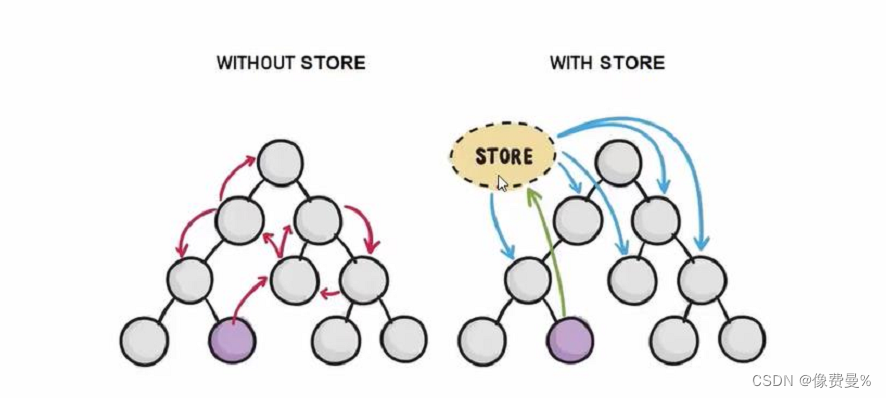
2.小程序中的全局数据共享方案
可使用mobx-miniprogram配合mobx-miniprogram-bindings实现全局数据共享。其中
- modx-miniprogram用来创建Store实例对象
- mobx-miniprogram-bindings用来把Store中的共享数据或方法,绑定到组件或页面中使用
3.安装Mobx包
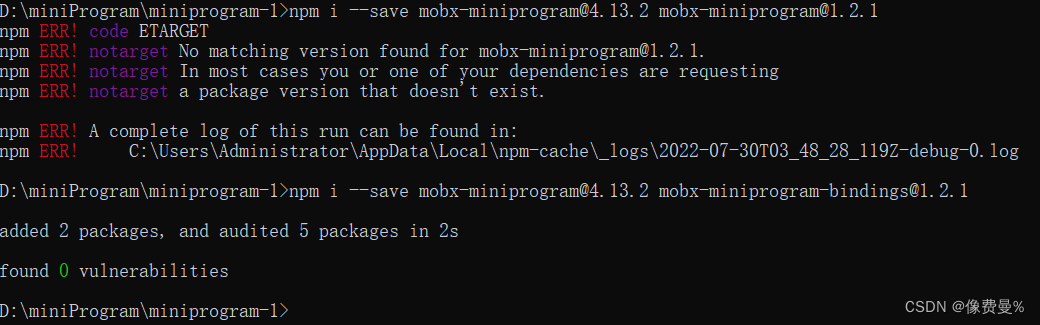
注意:Mobx相关的包安装后,记得删除miniprogram-npm目录后,重新构建npm
4.创建Mobx的Store实例

//在这个js文件中,专门用来创建Store的实例对象
import {observable} from 'mobx-miniprogram'

export const store = observable({
    //数据字段
    numA:1,
    numB:2,

    //计算属性
    get sum(){
        return this.numA+this.numB
    },

    //actions方法,用来修改store中的数据
    updataNum1:action(function (step)
    {  this.numA += step

    }),

    updataNum2:action(function (step)
    {  this.numB += step

    }),
})
5.将store中的成员绑定到页面中
//页面js
import { createStoreBindings } from 'mobx-miniprogram-bindings'
import { store } from '../../store/store'

    onLoad: function (options) {
        this.storeBindings = createStoreBindings(this,{
            store,//数据源
            fields:['numA','numB','sum'],
            actions:['updateNum1']
        })
    },


    onUnload: function () {
        //卸载这个store
        this.storeBindings.destroyStoreBindings()
    },
//页面wxml
<view>
{
{numA}}+{
{numB}} = {
{sum}}
</view>
<vant-button type="danger" bindtap="btnHandler1" data-step='{
{1}}'>numA+1</vant-button>
<vant-button type="primary" bindtap="btnHandler1" data-step='{
{-1}}'>numA-1</vant-button>
//页面js
btnHandler1(e){
// console.log(e)
this.updateNum1(e.target.dataset.step)
},6.将store成员绑定到组件中
import { storeBindingsBehavior } from 'mobx-miniprogram-bindings'
import { store } from '../../store/store'

Component({
    /**
     * 组件的属性列表
     */
    behaviors:[storeBindingsBehavior],//通过storeBindingsBehavior实现自动绑定


//不知道storeBindings是从哪冒出来的
    storeBindings:{
        store,
        fields:{//fields不能写错,写错会无法渲染
            numA:()=>store.numA,//绑定的第一种方式
            numB:(store)=>store.numB,//绑定的第2种方式
            sum:'sum'//绑定的第3种方式
        },
        actions:{
            updateNum2:'updateNum2'
        }
    },
})
在组件中使用Store中的成员
//组价.wxml结构
<view>
{
   {numA}}+{
   {numB}}={
   {sum}}
</view>

<vant-button type="danger" bindtap="btnHandler2" data-step='{
   {1}}'>numB+1</vant-button>
<vant-button type="primary" bindtap="btnHandler2" data-step='{
   {-1}}'>numB-1</vant-button>


//组件的方法列表
    methods: {
        btnHandler2(e){
            this.updateNum2(e.target.dataset.step)
        }
}边栏推荐
- Axure Carousel
- XSS相关知识
- IOT跨平台组件设计方案
- .NET 跨平台应用开发动手教程 |用 Uno Platform 构建一个 Kanban-style Todo App
- 作业:iptables防止nmap扫描以及binlog
- 牛客网刷题训练(四)
- [Deep learning] Detailed explanation of Transformer model
- joiplay模拟器rtp如何安装
- [Yugong Series] July 2022 Go Teaching Course 015-Assignment Operators and Relational Operators of Operators
- C language force buckles the rotating image of the 48th question.auxiliary array
猜你喜欢

【多线程】
【Multithreading】
Error ER_NOT_SUPPORTED_AUTH_MODE Client does not support authentication protocol requested by serv

How to solve types joiplay simulator does not support this game
How to solve the error of joiplay simulator
软件开发设计流程
牛客网刷题训练(四)
Meeting OA project pending meeting, all meeting functions
Jmeter参数传递方式(token传递,接口关联等)

MySQL数据库进阶篇
随机推荐
How to ensure the consistency of database and cache data?
软件开发设计流程
ELK部署脚本---亲测可用
IOT跨平台组件设计方案
pytorch双线性插值
【深入浅出玩转FPGA学习15----------时序分析基础】
【愚公系列】2022年07月 Go教学课程 013-常量、指针
对象集合去重的方法
Installation considerations for pytorch
MySQL Series 1: Account Management and Engine
How to solve the error of joiplay simulator
WEB安全基础 - - -漏洞扫描器
Jmeter参数传递方式(token传递,接口关联等)
mysql主从复制及读写分离脚本-亲测可用
C语言力扣第48题之旋转图像。辅助数组
C language force buckles the rotating image of the 48th question.auxiliary array
DNS解析过程【访问网站】
Axure Carousel
XSS相关知识
Word文件损坏如何修复