当前位置:网站首页>倍加福(P+F)R2000修改雷达IP
倍加福(P+F)R2000修改雷达IP
2022-06-24 19:39:00 【一叶执念】
在调试车子的时候,用到了倍加福R2000的一款雷达,设备启动建图时发现建不了图,于是查看/scan发现话题无数据,尝试ping雷达接口发现ping不通,应该是IP地址与上位机端口的IP地址不对。
首先查看雷达的IP地址,这个在雷达上有两个按键,按下后可以显示IP:
按两下右边的键再按一下左边的键雷达上会显示出IP号,这里拍的不是很清楚。
查看到开始时雷达IP地址为192.168.111.10,而上位机ping的IP地址为192.168.188.50.与实际不同,所以需要对雷达进行配置。
1、配置需求:
一台windows笔记本电脑,一根网线。
笔记本电脑上需要安装两个软件:
1、R2000_DTM_v1.3.2.1
2、P+F PACTware_4_1_SP6_Full
这里第一个为R2000的插件,第二个为配置软件,两个都需要安装,要不然到时候会找不到设备。
雷达接两根线,一根为电源线一根为网线,网线直接连接到电脑上。
2、软件安装
上面第一步中提到两个软件都需要下载安装,这里主要记录一个问题:
在安装上述软件时如果安装界面显示:
this setup requires the .net framework 3.5 installed
则需要修改一下电脑配置:
在控制面板-程序-程序和功能界面的左侧点击启动或关闭windows功能项:
勾选最上面的.NET Framework 3.5选项中的两个选择框。然后点击确定,正常来说会有一个下载安装的过程,不是很久等待一下即可。
3、设置本机IP
如果要使用windows连接倍加福的雷达还需要将本机的IP地址设置成与雷达在同一网段下,要不然软件中是检测不到的。
将雷达上电后通过网线连接到电脑,此时右键点击电脑联网标志,选择“打开网络和Intenet设置”选项。进入网络设置界面

可以看到电脑上有两个选项,一个是手机连接的热点,另一个即是雷达的以太网。
然后在控制面板-网络和Internet-网络连接选项下找到以太网,右键属性(这里必须是连接了雷达才会显示)
双击选择Internet协议版本4(TCP/IPV4),将自动获取IP地址改为“使用下面的IP地址”,然后在里面填写一个与雷达在同一网段下的IP地址,例如雷达IP为192.168.111.10,则这里可以设置为192.168.111.11。如果雷达为192.168.188.50,则这里可以设置为192.168.188.49。前三个数字一样最后一个数字不一样即可。
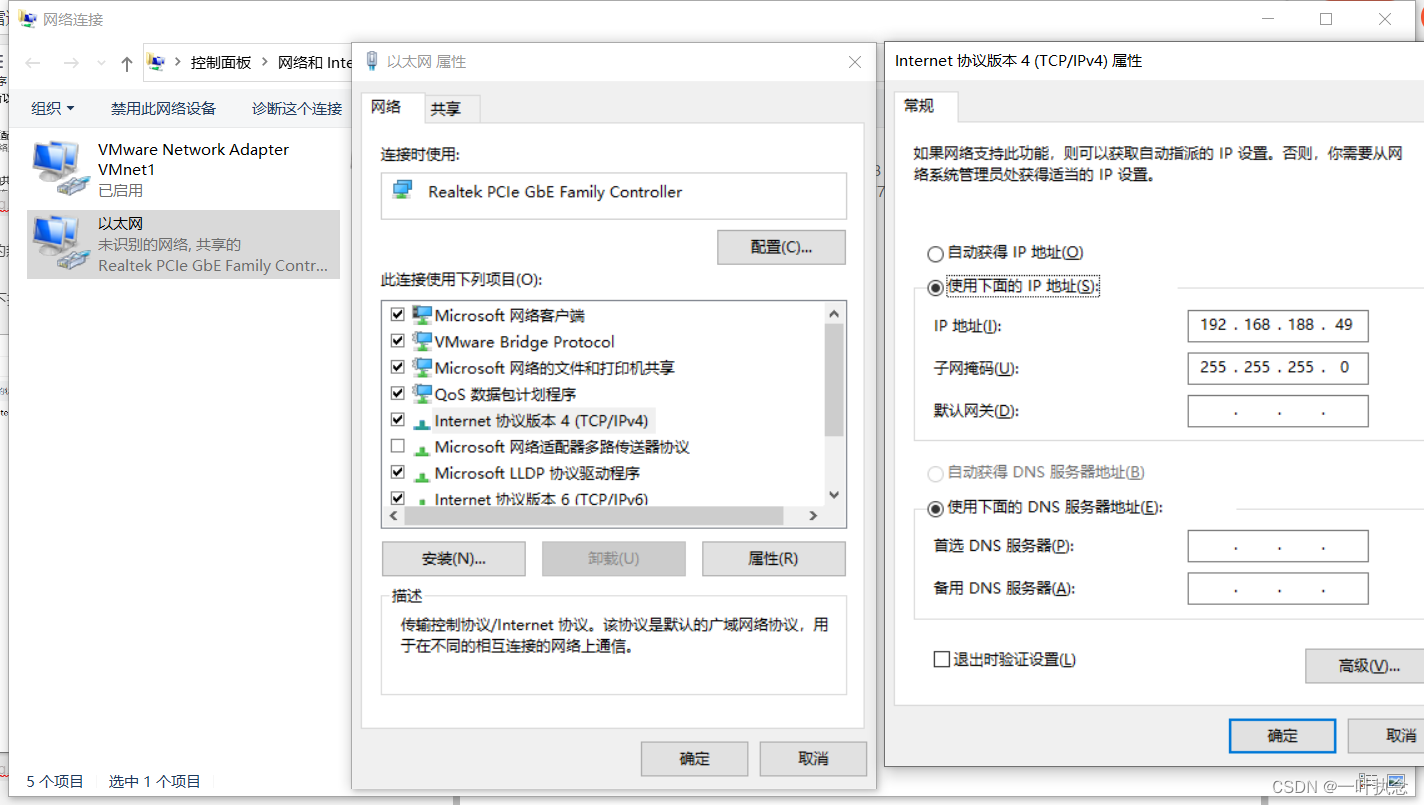
然后点击确定。
这里配置完后可以使用终端ping一下雷达看看能不能ping通,能的话说明是在同一网段下。
win+R,然后输入cmd打开终端
ping 192.168.188.50看看是否有数据
4、修改雷达IP
在雷达能ping通的情况下打开倍加福的软件:
打开之后选择设备数据中的添加设备:
然后选择要连接的设备,确定。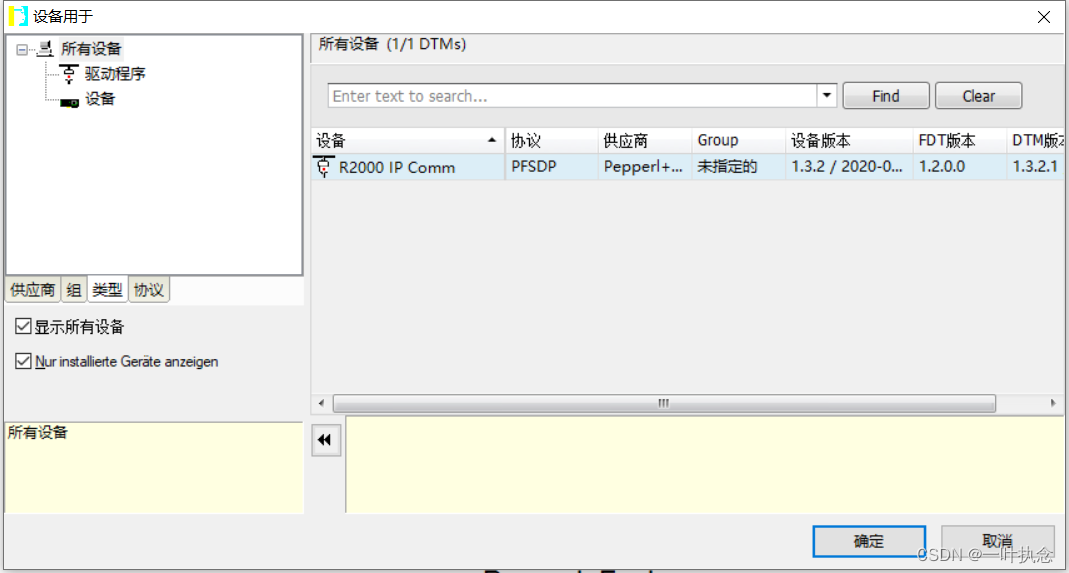
此时可以看到屏幕左侧的设备标签中出现了一个新的设备:
然后选择屏幕右侧的设备目录:

双击添加其中第三个:OMD R2000 HD
此时在R2000下会出现一个OMD R2000 HD:
右键建立连接然后双击OMD R2000 HD,可以看到当前属性: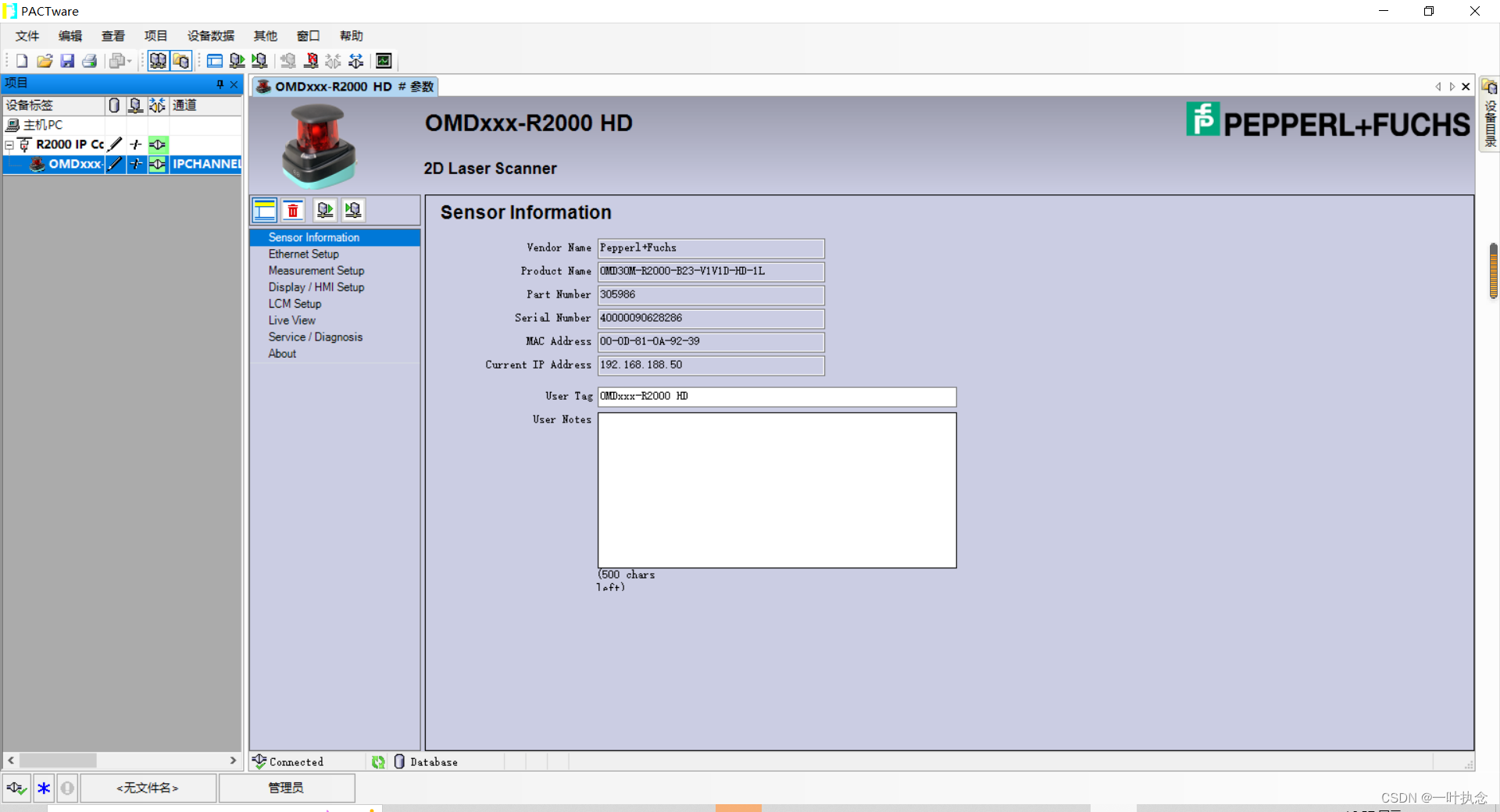
此时要修改的话可以选择“Ethernet Setup",勾选Enable update of IP configuration,然后在下面的static IP中填入需要设置的IP。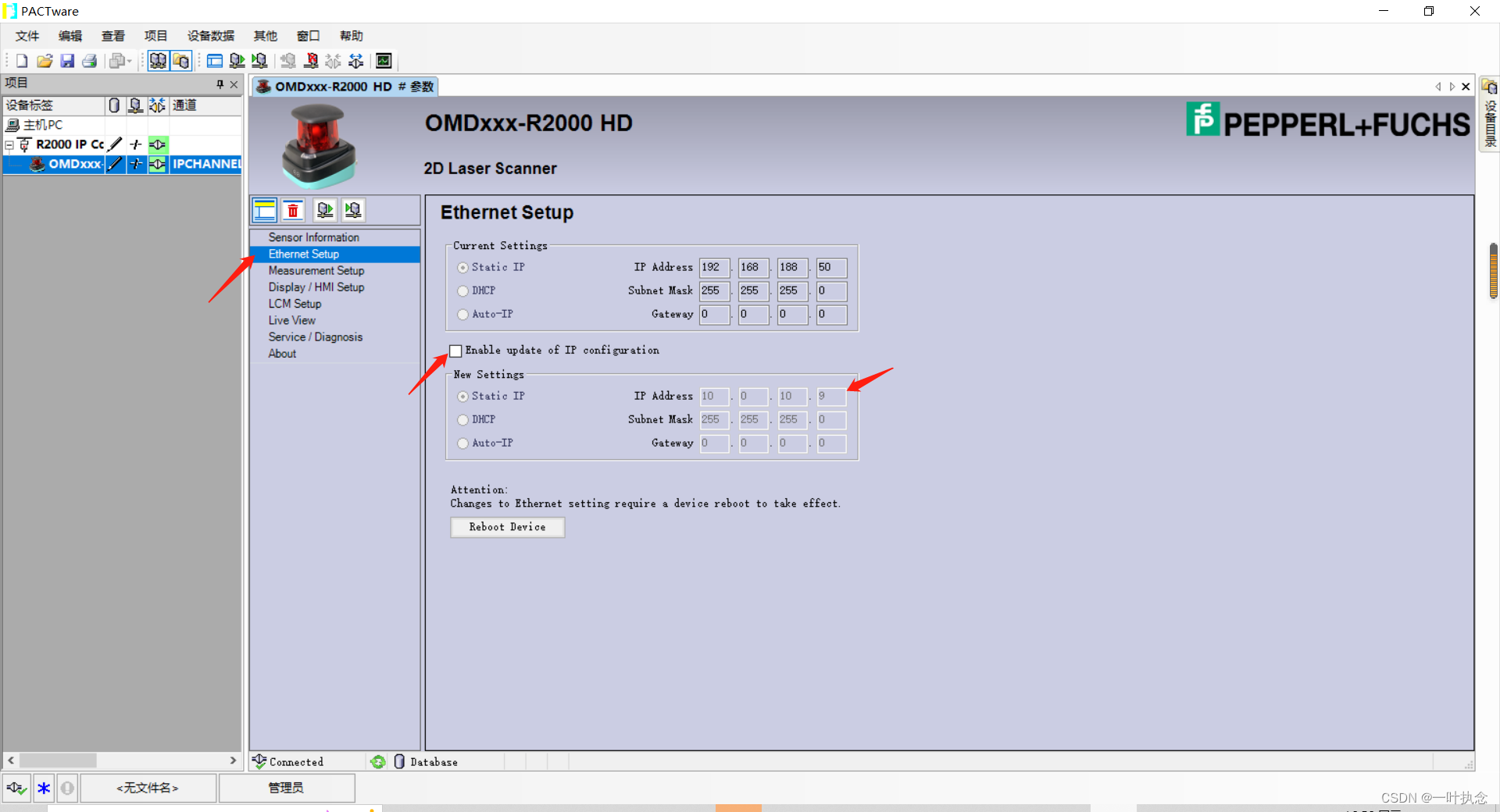
填写完成后右键OMD R2000 HD-写入设备。或者直接点击这里的reboot device估计也是有效的,没试过。
最后同样可以使用终端ping一下新的IP地址看看修改是否成功,或者直接在雷达上按键查看IP是否变化。
边栏推荐
- Layer 2 and layer 3 forwarding principle based on VLAN
- Certificate photo processing
- 面试害怕被问MySQL相关问题 ?这份三万字精华总结 + 面试100 问,吊打面试官完全够了
- Cross border e-commerce, early entry and early benefit
- Introduction, installation and use of postman tool
- 04A interrupt configuration
- High level application of SQL statements in MySQL database (II)
- 别再乱用了,这才是 @Validated 和 @Valid 的真正区别!!!
- Data center basic network platform
- Common voting governance in Dao
猜你喜欢
Technology Review: what is the evolution route of container technology? What imagination space is there in the future?

Stop using it indiscriminately. This is the real difference between @validated and @valid!!!

Main steps of system test
【个人实验报告】

Combine pod identity in aks and secret in CSI driver mount key vault

The core concept of JMM: happens before principle

2022-06-16 work record --js- judge the number of digits in string type digits + judge the number of digits in numeric type digits + limit the text length (display n words at most, exceeding...)

Description of transparent transmission function before master and slave of kt6368a Bluetooth chip, 2.4G frequency hopping automatic connection
ThreadLocal local thread

【Mongodb】READ_ME_TO_RECOVER_YOUR_DATA,数据库被恶意删除
随机推荐
Redis-跳表
Programmers become gods by digging holes in one year, carrying flags in five years and becoming gods in ten years
NIO、BIO、AIO
Can AI chat robots replace manual customer service?
Envoy obtain the real IP address of the client
[QT] QT event handling
Pinduoduo updates the merchant live broadcast service agreement and strictly punishes the illegal merchants
Unable to use the bean introduced into the jar package
OSPF basic content
LeetCode Algorithm 剑指 Offer II 027. 回文链表
C language operators and expressions
The core concept of JMM: happens before principle
[ingénierie logicielle] points clés à la fin de la période
NIO多路复用之Selector的使用
Main steps of system test
NIO 零拷贝
Genesis公链与美国一众加密投资者齐聚Consensus 2022
win10或win11打印机无法打印
证件照处理
MySQL + JSON = King fried!!