当前位置:网站首页>fluttter学习之ButtonStyle 、MaterialStateProperty
fluttter学习之ButtonStyle 、MaterialStateProperty
2022-07-30 01:38:00 【GY-93】
fluttter学习之ButtonStyle 、MaterialStateProperty
在flutter2.0之前,我们使用FlatBUtton等一系列按钮组件,但是在2.0后都被弃用了, 需要被替换成TextBButton。之前我们在设置按钮的背景颜色,等相关属性都是可以直接通过属性直接设置的。但是现在设置按钮相关属性,需要使用到一个属性ButtonStyle
除了这种方式,官方也提供了类似styleFrom等静态方法来简化代码。
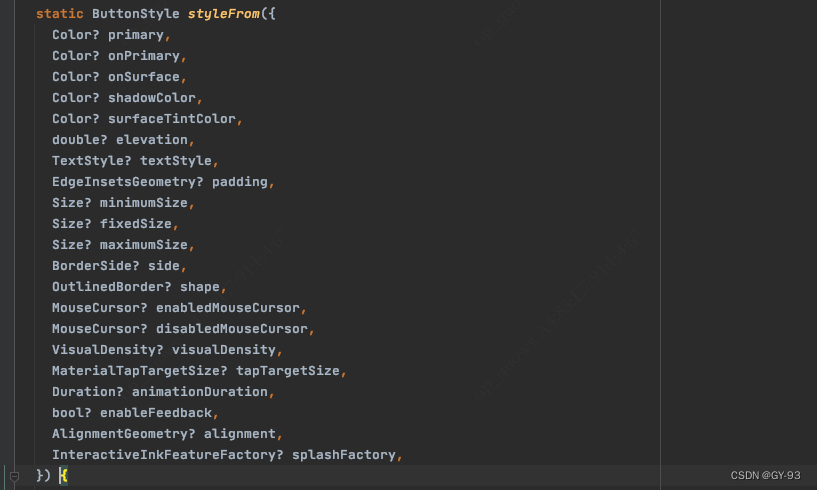


我们查看styleFrom方法源码,可以发现,系统也是给我们创建ButtonStyle对象并放回, 而且我们可以发现,里面设置颜色的方法ButtonStyleButton.allOrNull<Color>(shadowColor),也是我们上面使用的方式直接设置的颜色。
我们可以在源码中看到, ButtonStyle中很多属性的类型是MaterialStateProperty。 那么MaterialStateProperty到底是什么?
首先我们看看MaterialStateProperty,在MaterialStateProperty体系中有一个MaterialState枚举,它主要包含了:
hovered:鼠标交互悬浮停时focused:在键盘交互中突出显示pressed:通过鼠标、键盘或则触摸等方法发起的轻击或点击dragged:用户长按并移动控件时selected:例如check box的选定状态scrolledUnder:控件与下方可滚动内容重复时的状态disabled:当控件或则元素不能交互性时error:错误状态下, 比如TextFieldError

随着Web和Desktop平台的发布,原本的FlatButton无法很好的满足新的UI交互需求,例如鼠标交互下的hovered,所以TextButton开始使用MaterialStateProperty组成的ButtonStyle支持不同平台下的UI的状态展示。
在此之前,如果需要多平台适配你可能会这么写,你需要处理很多不同的状态需求,从而产生无数if或则case:
  getStateColor(Set<MaterialState> states) {

    if (states.contains(MaterialState.hovered)) {

      ///在 hovered 时还 focused 了
      if (states.contains(MaterialState.focused)) {

        return Colors.red;
      } else {

        return Colors.blue;
      }
    } else if (states.contains(MaterialState.focused)) {

      return Colors.yellow;
    }
    return Colors.green;
  }
但是现在你只需要继承MaterialStateProperty然后重写resolve方法就可以了,例如TextButton里的hovered效果,在TextButton内默认就是通过_TextButtonDefaultOverlay实现,对primary.withOpacity来实现hovered效果。
其实TextButton的内部,默认同样是通过styleFrom来配置所需要的MaterialState效果,其中有:
_TextButtonDefaultForeground:用于disabled,通过onSurface?.withOpacity(0.38)变化颜色
_TextButtonDefaultOverlay: 用于处理 hovered 、 focused 和 pressed ,通过primary.withOpacity变化颜色;
_TextButtonDefaultMouseCursor: 用于处理鼠标MouseCursor 的 disabled;
剩下的参数则是通过我们熟悉 的ButtonStyleButton.allOrNull 方式进行添加,也就是不需要特殊处理的参数。那该方法的作用是什么?
其实ButtonStyleButton.allOrNull 就是 MaterialStateProperty.all方法的可null版本,对应内部实现最终还是实现了reslove接口的MaterialStateProperty,所以如果需要支持null,你也可以使用直接使用MaterialStateProperty.all。
static MaterialStateProperty<T>? allOrNull<T>(T? value) => value == null ? null : MaterialStateProperty.all<T>(value);

当然,如果你不想创建新的class,但是又想指定逻辑,你可以使用resolveWith静态方法:
TextButton(
  style: ButtonStyle(
      backgroundColor: MaterialStateProperty.resolveWith((states) {

    if (states.contains(MaterialState.hovered)) {

      return Colors.green;
    }
    return Colors.transparent;
  })),
  onPressed: () {
    },
  child: new Text(
    "TEST",
    style: TextStyle(fontSize: 100),
  ),
),
另外,有时候你肯定不希望每个地方单独去设置style,那这时候你就需要配合Theme来实现。
事实上TextButton、ElevatedButton、OutlinedButton都是 ButtonStyleButton的子类,他们都会遵守一下的原则:
也就是 return widgetValue ?? themeValue ?? defaultValue; ,其中:
widgetValue就是控件单独配置的样式themeValue就是Theme里配置的全局样式defaultValue:就是默认内置的样式,也就是styleForm静态方法,当然styleForm里面也会用一些ThemeData的对象,例如colorScheme.primary 、 textTheme.button 、theme.shadowColor等
所以,例如当你需要全局去除按键的水波纹时,如下代码所示,你可以修改 ThemeData 的 TextButtonTheme 来实现,因为 TextButton 内的 themeStyleOf 使用的就是 TextButtonTheme 。
theme: ThemeData(
  primarySwatch: Colors.blue,
  textButtonTheme: TextButtonThemeData(
    // 去掉 TextButton 的水波纹效果
    style: ButtonStyle(splashFactory: NoSplash.splashFactory),
  ),
),
边栏推荐
- 性能测试理论1 | 性能测试难点问题梳理
- Postgresql daily operation and maintenance skills, suitable for beginners
- ufw set firewall rules
- 聊聊性能测试环境搭建
- npm ERR! code ENOTSUPnpm ERR! notsup Unsupported engine for [email protected]: wanted: {“n
- CMake Tutorial 巡礼(0)_总述
- Self-study HarmonyOS application development (56) - Use Service to ensure that the application runs continuously in the background
- [VMWARE--Shared files]
- 自学HarmonyOS应用开发(49)- 引入地图功能
- 泰克Tektronix示波器软件TDS2012|TDS2014|TDS2022上位机软件NS-Scope
猜你喜欢


随机推荐
sublime 背景透明度以及列编辑
Postgresql daily operation and maintenance skills, suitable for beginners
STM32 - OLED display experiment
关于 SAP Fiori 应用的离线使用
vscode 工作区配置插件 配置不同工作环境
SwiftUI SQLite数据库存储使用教程大合集(2022年版)
How Navicat Connects to MySQL
TCP/IP 常见问题
微信小程序开发之图片压缩方案
在服务器上运行node流程
SSM整合案例
华为“天才少年”稚晖君又出新作,从零开始造“客制化”智能键盘
记笔记!电源自动测试系统测试电源纹波详细方法
npm ERR! code ENOTSUPnpm ERR! notsup Unsupported engine for [email protected]: wanted: {“n
my creative day
What to test for app testing
Fabric 私有数据案例
性能测试理论1 | 性能测试难点问题梳理
基于SSM开发实现校园疫情防控管理系统
短期风电预测(Matlab代码实现)