当前位置:网站首页>How Navicat Connects to MySQL
How Navicat Connects to MySQL
2022-07-30 00:33:00 【m0_67393157】
There are many database connection tools on the market, such as Navicat, SQLYog, WorkBench, etc. The most used ones are Navicat.Now let's talk about how Navicat connects to Mysql. This article is only applicable to Xiaobai, and God can skip it.
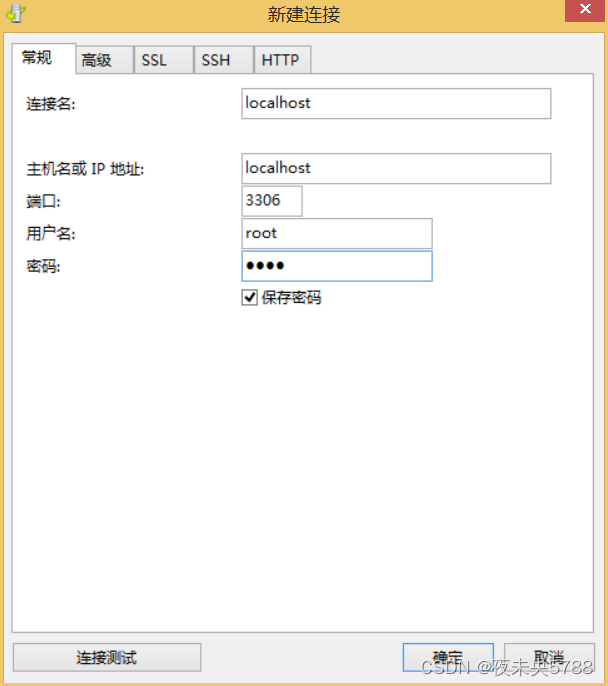
1. Open Navicat and click the [Connect] button in the upper left corner.

2. Create a new connection, everyone should pay attention. The new connection here is a new connection, not a new database. I see that many people write the connection name as the library name, which is wrong.The ability to create multiple connections means that for example, we can connect to the local mysql, the mysql of the development environment server, or the test environment, production environment and other different Mysql.
There are many friends who have forgotten the password of the MySQL database. We can use the [Connection Test] button in the lower left corner to test whether the password is correct.
3. After the connection is successful, double-click the connection name in the list on the left, and you can see the system library that comes with Mysql.
Note: Several libraries that come with Mysql here are system libraries. Don't think that this is a mess and delete it.This will cause Mysql to run abnormally.

4. After the connection is successful, we need to create a new database, right-click on the connection name and select New Database.
Fill in the database name (the database name is usually the same as the sql file name provided by the source space station), the character set is utf-8, and the collation rule is utf8_general_ci.

5. Execute the SQL file. After the database is successfully created, we need to import the SQL file, right-click on the database name, and select [Run SQL File].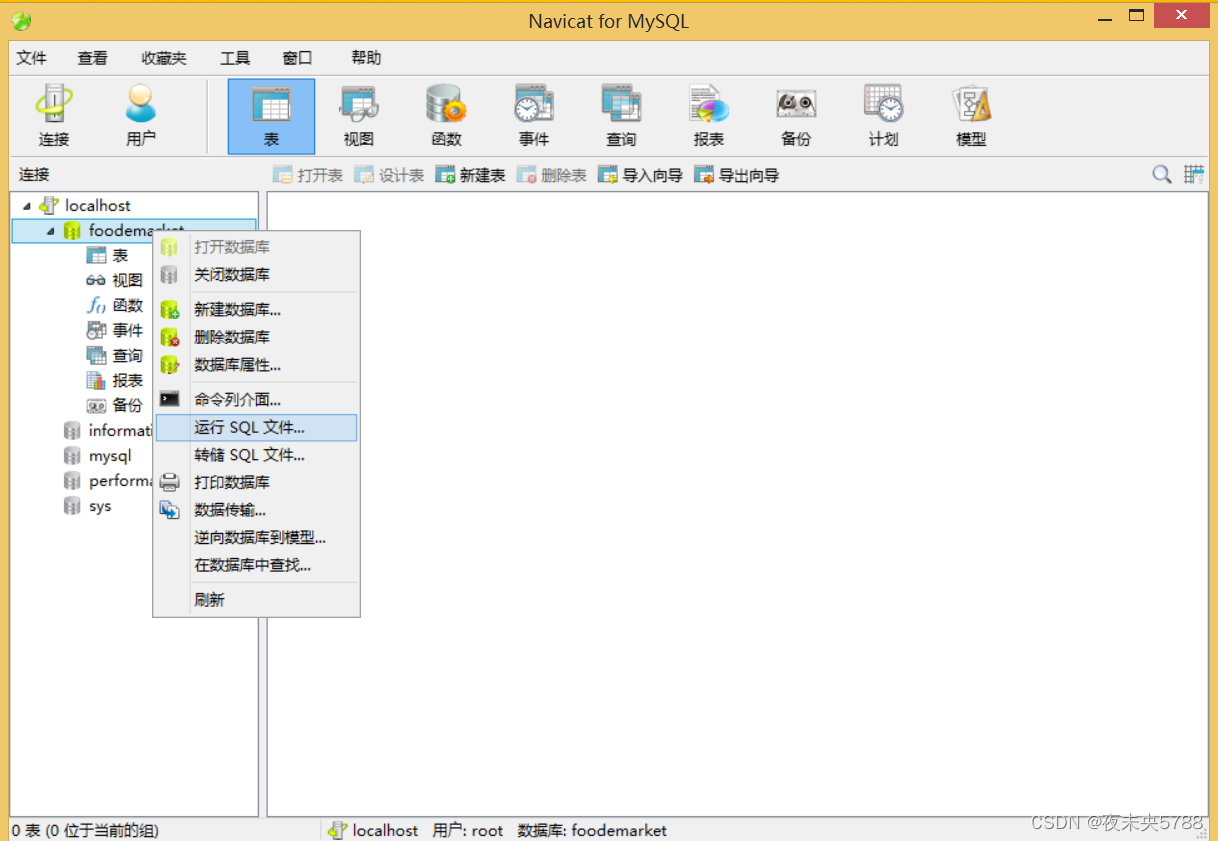
6. Find the local path where the sql file is located. After selecting it, click [Start] to execute the SQL file

7. After the execution is completed, there will be a prompt whether the execution is successful, such as success: Finished successfully.
Unsuccessful: Finished unsuccessfully. If it is unsuccessful, you need to check which statements are reporting the error, possibly because of the incompatible SQL syntax due to the version problem.

8. After successful execution, we see that the data table is still empty.At this time, many small partners are puzzled. Obviously, the implementation has been successful, why is there no table?Important: [Refresh] is required after the execution is completed.
Click the right mouse button on the [Table] and select [Refresh]. After the refresh is completed, all the tables will be displayed.


Have you learned it, my friend?
Let me introduce myself first. The editor graduated from Shanghai Jiaotong University in 2013. I worked in a small company and went to big factories such as Huawei and OPPO. I joined Alibaba in 2018, until now.I know that most junior and intermediate java engineers want to upgrade their skills, they often need to explore their own growth or sign up to study, but for training institutions, the tuition fee is nearly 10,000 yuan, which is really stressful.Self-learning that is not systematic is very inefficient and lengthy, and it is easy to hit the ceiling and the technology stops.Therefore, I collected a "full set of learning materials for java development" for everyone. The original intention is also very simple. I hope to help friends who want to learn by themselves but don't know where to start, and at the same time reduce everyone's burden.Add the business card below to get a full set of learning materials
边栏推荐
- 工厂模式
- ZLMediaKit源码分析 - WebRtc连接迁移
- 基于TNEWS‘ 今日头条中文新闻(短文本)分类
- 直播平台搭建,设置状态栏颜色
- [Training DAY16] ALFA [convex hull] [computational geometry]
- Unity Addressables
- 微信开发者工具设置制表符大小为2
- Introduction to Worthington Elastase & Hyaluronidase
- At the age of 29, I was fired from a functional test. Can't find a job after 2 months of interviews?
- Laravel 预防 SQL 注入
猜你喜欢

![[Best training DAY16] KC's Can [Dynamic programming]](/img/60/26280222faf72bd94c654b1810381d.png)


![[MySQL series] MySQL database foundation](/img/50/cc75b2cdf6e52714c1d492fa1ae2c4.png)

随机推荐
Worthington酶促细胞收获&细胞粘附和收获
更换可执行文件glibc版本的某一次挣扎
某团实习面经
News text classification
Towhee 每周模型
string replace spaces
【微服务~Nacos】Nacos之配置中心
Unity笔记——FairyGUI
账号权重怎么提升?自媒体运营的3个方法,帮你获得更多收益
Mysql internal and external connections
vim相关介绍(二)
cp强制覆盖与不覆盖拷贝方法
更换可执行文件glibc版本的某一次挣扎
【Flutter】混合开发之Flutter预加载解决第一次加载页面缓慢问题
He cell separation technology 丨 basic primary cell separation methods and materials
I.MX6U-驱动开发-3-新字符驱动
Worthington dissociating enzyme: detailed analysis of neutral protease (dispase)
Go日志库——logrus
【MySQL系列】MySQL数据库基础
【分层强化学习】HAC源码解读