当前位置:网站首页>Webapck system foundation
Webapck system foundation
2022-06-29 04:19:00 【HeyCChen】
Why study Webpack
- Understand the front end “ engineering ” Concept 、 Tools 、 The goal is
- Improve personal core competitiveness
- The only way to become a high-level front-end Engineer
What is? Webpack
What constitutes a front-end project ?—— resources

- Before the emergence of front-end engineering tools, resource files were managed manually , Such as through
<link >Label import style file , adopt<script> </script>Tags introduced JS Documents, etc. , But there will be many problems in this way :- The operation process is tedious
- When dependencies exist, they should be written in strict order
- The development is consistent with the production environment, which makes it difficult to access TS perhaps JS New features
- Difficult to access Less、Sass Tools such as
- JS、CSS、 Inconsistent picture resource management models, etc
- In order to solve these problems, many front-end engineering tools have emerged :Webpack、Vite、browserifyjs etc. , To some extent, it is the emergence of these tools , The concept of front-end engineering came into being
- Before the emergence of front-end engineering tools, resource files were managed manually , Such as through
Webpack It is essentially a front-end resource compilation 、 Packaging tools

- Multiple resource files are packaged into one Bundle
- Support Babel、Eslint、TS、CoffeScript、Less、Sass
- Support modular processing css、 Pictures and other resources
- Support HMR + Development server
- Support continuous monitoring 、 Continuous construction
- Support code separation
- Support Tree-shaking
- Support Sourcemap etc.
Webpack Usage of
install Webpack:
npm i -D webpack webpack-cliEdit profile webpack.config.js
// webpack.config.js
module.exports = {
    entry: './src/index.js',
    output: {
        filename: "[name].js",
        path: path.join(__dirname,"./dist"),
    },
    module: {
       rules: [{
           test: /\.less$/i,
           use: ['style-loader','css-loader','less-loader']
       }],
    }
}
Execute compile command :
npx webpackIt will be in the root directory dist Folder to get the compiled package file main.js( The default is main.js, You can modify )The core processes ( Extremely simplified version ): Inlet handling 、 Dependency resolution 、 Resource analysis 、 Merge and package resources

Webpack What is essentially done : modularization + Uniformity
- Multiple file resources are merged into one , Reduce HTTP Number of requests
- Support modular development
- Support typescript、CoffeeScript Language
- Unified picture 、CSS、 Processing model of fonts and other resources
Use Webpack
- About Webpack How to use , Basically all around “ To configure ” an , It can be divided into two categories :
- Process class : Act on one or more links in the process , Configuration items that directly affect the packaging effect

- Tool class : Out of the mainstream , Configuration items that provide more engineering capabilities

- Webpack The properties in are used by frequency :
- entry / output
- module / plugins
- mode
- watch / devServer / devtool
- Process class : Act on one or more links in the process , Configuration items that directly affect the packaging effect
Handle CSS: For example, in JS Introduction in CSS file import './index.css'
install Webpack:
npm i -D webpack webpack-cliInstallation dependency : Required loader:
npm i -D style-loader css-loaderEdit profile webpack.config.js add to
moduleHandle CSS fileconst path = require('path'); module.exports = { entry: './src/index.js', output: { filename: "[name].js", path: path.join(__dirname, "./dist"), }, module: { rules: [{ // test: /\.less$/i, test: /\.css$/, use: ['style-loader', 'css-loader'] }], }, mode: 'development', }Terminal use
npx webpackCompile
Use Webpack Handle JavaScript: Access Babel Will be higher version JS Code translated to a lower version JS Code
Installation dependency :
npm i -D @babel/core @babel/preset-env babel-loaderEdit profile webpack.config.js
const path = require('path');

module.exports = {
    entry: './src/index.js',
    output: {
        filename: "[name].js",
        path: path.join(__dirname, "./dist"),
    },
    module: {
        rules: [
            {
                test: /\.css$/,
                use: ['style-loader', 'css-loader']
            },
            {
                test: /\.js$/,
                use: [{
                    loader: 'babel-loader',
                    options: {
                        presets: [
                            ['@babel/preset-env']
                        ],
                    },
                }],
            },
        ],
    },
    mode: 'development',
}
Terminal use
npx webpackCompile
Use Webpack Handle HTML: Don't use loader But use HTML plug-in unit
Installation dependency
npm i -D html-webpack-pluginEdit profile webpack.config.js
const path = require('path');
const HtmlWebpackPlugin = require('html-webpack-plugin');

module.exports = {
    entry: './src/index.js',
    output: {
        filename: "[name].js",
        path: path.join(__dirname, "./dist"),
    },
    module: {
        rules: [
            {
                // test: /\.less$/i,
                test: /\.css$/,
                use: ['style-loader', 'css-loader']
            },
            {
                test: /\.js$/,
                use: [{
                    loader: 'babel-loader',
                    options: {
                        presets: [
                            ['@babel/preset-env']
                        ],
                    },
                }],
            },
        ],
    },
    plugins: [new HtmlWebpackPlugin],
    mode: 'development',
}
Terminal use
npx webpackCompile
Use Webpack Update the thermal module (HMR,Hot Module Replacement)
- The code written can be updated to the browser immediately , And you don't have to refresh the browser
- Edit profile webpack.config.js add to
devServerattributemodule.exports = { //... devServer: { hot: true, }, } - start-up Webpack Use
npx webpack servecommand
Use Webpack Conduct Tree-Shaking, Used to delete dead code
- dead code: The code is not used or unreachable 、 The execution result of the code will not be used 、 The code is read-only and not written …
- Turn on Tree-Shaking:
mode: "production"optimization: {usedExports: true}module.exports = { //... mode: "production", optimization: { usedExports: true, }, }Terminal use
npx webpackCompile
Loader Components
Loader Its function is to transform the content of resources ,Webpack Know only JS,Loader Used to deal with non-standard JS resources , Translation as standard JS
Use Loader( To deal with less File as an example ):
install Loader:
npm i -D css-loader style-loader less-loaderadd to
moduleHandle css file , among less-loader Realized less -> css Transformation ;css-loader take CSS Packaged like module.exports = “${css}” The content of , The contents of the package conform to JavaScript grammar ;style-loader take CSS Modules are packaged into require sentence , And call... At run time injectStyle Function to inject content into the style label . And these three loader It is also loaded in a chain call mode
module.exports = {
      //...
      module: {
          rules: {
              test: /\.less$/i,
              use: ["css-loader","style-loader","less-loader"],
          },
      },
}
Loader Characteristics of :
- Chain execution ( Previous loader The output of may be another loader The input of )
- Support asynchronous execution
- It is divided into normal and pitch Two modes
To write Loader
- One with no function loader:
module.exports = function(source, sourceMap?, data?){ //source yes loader The input of may also be the previous loader Output return source; };- stay webpack Call this loader:
module.exports = {
      //...
      module: {
          rules: [
            {
              test: /\.js$/,
              use: [path.join(__dirname, './loader')]
            },
          ],
      },
  }
Commonly used Loader

Plugin Components
Webpack Many functions are implemented by plug-ins
Many well-known tools like VS Code、Webstorm And so on ,Webpack Many of its functions are implemented based on plug-ins
There are many disadvantages if you do not use plug-ins :
- Newcomers need to understand the details of the whole process , High start-up cost and high function iteration cost , Pull a body
- Rigid function , Lack of growth as an open source project
- That is, the mental cost is high 、 Low maintainability 、 Weak vitality
The essence of plug-in architecture : Open to expansion 、 Closed to modification
Use of plug-ins :
- for example
npm i -D webpack-dashboard - Introduce and use plug-ins :
// import the plugin const DashBoardPlugin = require("webpack-dashboard"); // add it to your webpack configuration plugins module.exports = { // ... plugins : [new DashBoardPlugin()], // ... };- for example
Write a plug-in
- Plug ins surround ‘ hook ’ an , The function of a hook is to trigger a hook at a certain stage of compilation , To some extent, it can be understood as an event
class SomePlugin { apply(compiler){ compiler.hooks.thisCompilation.tap('SomePlugin', (compilation) => {}) } }- The core information of the hook :
- opportunity : Specific nodes of the compilation process ,Webpack It will notify the plug-in of what is happening at the moment in the form of a hook
- Context : adopt tapable Provided callback mechanism , Pass context information as a parameter
- Interaction : A lot of existence is attached to the context parameter object side effect The interface of , Plug ins can be changed through these interfaces
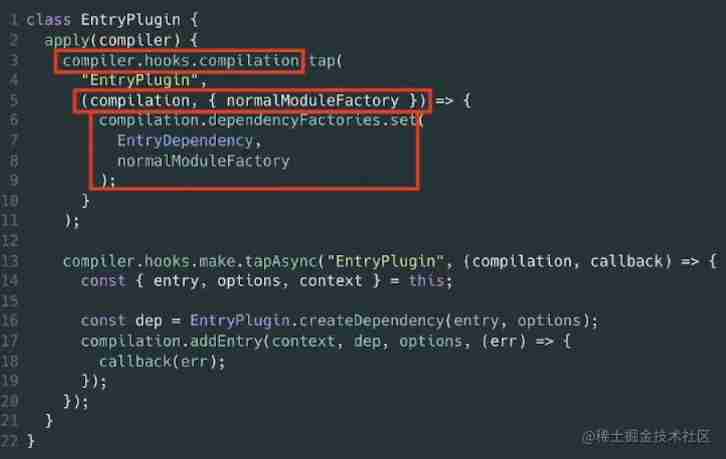
- opportunity :compier.hooks.compilation
- Parameters :compilation etc.
- Interaction :dependencyFactories.set
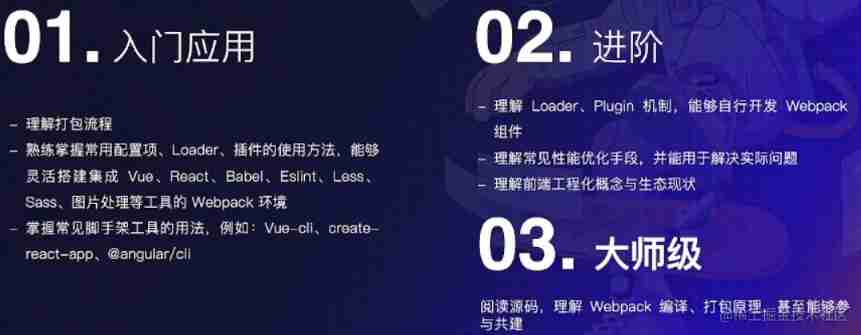
How to learn Webpack

边栏推荐
- SQL two columns become multi row filter display
- ECS 四 Sync Point、Write Group、Version Number
- moudo网络库剖析
- SQL database stored procedure writing method
- Using assetstudio/unitystudio uabe, etc
- 项目开发修养
- Analysis on the types of source code anti leakage technology
- SEAttention 通道注意力機制
- Blue Bridge Cup ruler method
- sql数据库存储过程写法
猜你喜欢
在命令行登录mysql数据库以及查看版本号

JVM_ 16_ Garbage collector

Baidu AI Cloud service grid product CSM release 𞓜 hot public beta

PostgreSQL 出现cross-database references are not implemented的bug
Runtimeerror in yolox: dataloader worker (PID (s) 17724, 1364, 18928) exited unexpectedly

I came from a major, so I didn't want to outsource

IDEA修改jvm内存

How to keep database and cache consistent

从零到一,教你搭建「以文搜图」搜索服务(一)
Remote connection of raspberry pie in VNC Viewer Mode
随机推荐
Establishment of small and medium-sized enterprise network
LabVIEW显示Unicode字符
lua-protobuff emmy-lua 轮子
Remediation for Unsafe Cryptographic Encryption
科班出身,结果外包都不要
1015 theory of virtue and talent
moudo网络库剖析
女程序员晒出5月的工资条:工资是高,但是真累,网友评论炸锅了
【Laravel系列8】走出 Laravel 的世界
Logstash starts too slowly or even gets stuck
PostgreSQL has a cross database references are not implemented bug
How to create robots Txt file?
Project development culture
NotImplementedError: Could not run torchvision::nms
JSX的基本使用
sql两列变为多行过滤显示
增额终身寿险下架了吗?现在还有哪些增额终身寿险产品?
[C language] explain the thread recycling function pthread_ join
Gocd is good, but talk about Jenkins
我的创作纪念日