当前位置:网站首页>Remote connection of raspberry pie in VNC Viewer Mode
Remote connection of raspberry pie in VNC Viewer Mode
2022-06-29 04:00:00 【YouthBlood9】
record
One 、 Download related tools
1.1 Raspberry pie mirror image
- Official website download address :https://www.raspberrypi.com/software/operating-systems/
- Select this download :

There are three different versions :
① With graphical desktop and recommended software :Raspbian Stretch with desktop and recommended software
② Desktop with graphics :Raspbian Stretch with desktop
③ The minimalist version :Raspbian Stretch Lite
We download it here ②
- Baidu network disk link :https://pan.baidu.com/s/1SOKyhSkqztpzutlP3ocNRg
Extraction code :0000
1.2 Formatting tool
- The formatting tool used this time is SDCardFormatterv5
link :https://pan.baidu.com/s/1MzEEVz1-A83yySZMPK9JxQ
Extraction code :0000
You can also find your own formatting tool .
1.3 Burn image tool
- The burning tool used this time is Raspberry Pi
link :https://pan.baidu.com/s/1a3QKpWGrVr83qRi76oQGRQ
Extraction code :0000
You can also choose other burning tools .
1.4 VNC Viewer
- link :https://pan.baidu.com/s/1x-jOhlYF8MhhtPyH5qVh1Q
Extraction code :0000
1.5 Remote tools
- This article uses putty, You can also choose other tools .
- Official website address :https://www.chiark.greenend.org.uk/~sgtatham/putty/
After downloading, the formatting tool 、 Burn image tool 、VNC And so on .
Two 、SD format
- take SD Insert into the card reader , Then plug the card reader into the computer ;
- Open the formatting tool SDCardFormatterv5;
- Select what you want to format SD Card insert picture description here ;
- Select the dialog box that pops up , Choice is ;
- And then it pops up , Prompt for formatting completion , Select OK , It's done. SD Card formatting .
3、 ... and 、 Burn image
- Double click the downloaded burning tool file to install
- The following interface will pop up

- Click on CHOOSE OS, Select the image file you just downloaded , And then click CHOOSE SD CARD Select the just formatted SD card , Then click WRITE
- Then a dialog box will pop up , choice Continue/OK, then , And started burning . This may take a while
Four 、 configure network
- The first method : Plug in the cable
There are many articles about this method on the Internet , You can check it yourself . - The second method : Use mobile hotspot
① On the computer , Open the burning image just now SD card
② stay boot Under the table of contents , Build a ssh Empty file
③ stay boot Under the table of contents , Create a text file first
④ open the text file , Copy the following into the text
country=CN
ctrl_interface=DIR=/var/run/wpa_supplicant GROUP=netdev
update_config=1

network={

	ssid=" Your wireless network name "
	psk=" Your wireless password "
	key_mgmt=WPA-PSK
	priority=1
}
- among , take ssid Change the content of to the name of the mobile hotspot ,psk Change the content of to the password of the mobile phone hotspot .
⑤ Save the text just now , And change the name to wpa_supplicant.conf
⑥ Take out SD card , take SD Insert the card into the raspberry pie , Turn on the phone hotspot and connect the raspberry pie at the same time
⑦ You can check the raspberry pie on your mobile phone ip Address
5、 ... and 、putty Remote connection
- open putty, stay Host Name It's about , Enter the results you just viewed IP Address , Then choose “open”;
- Select the dialog box that pops up , choice “ no ”;
- Enter the user and password
Default user :pi
The default password :raspberry - Start raspberry pie VNC service , Input instruction (sudo raspi-config), Configure raspberry pie .
- Select... With the up and down keys “Interfacing Options”, Then press the left and right keys to select “Select”.
- Then press the up and down keys to select “VNC”, Press the left and right keys to select “Select”.
- “would you like the vNc server to be enabled?”–> choice “Yes”.
- “The VNC server is enabled”–> Carriage return option “OK”.
- Up and down key selection “Advanced Options”, Press the left and right keys to select “Select”.
- Up and down key selection “Resolution”, Press the left and right keys to select “Select”.
- Then there is the resolution selection , choice “DMT Mode 16”, Then choose “OK”.
- “The resolution is set to DMT mode 16”–> Carriage return option “OK”.
- Back to the beginning , choice “Finish”, complete .
6、 ... and 、VNC Viewer Remote interface display
①VNC Viewer The installation process is simple .
②VNC Viewer Use .
Open after installation VNC Viewer Interface , First enter the name of raspberry pie at the top IP Address , Then enter... In the pop-up interface Username,Password, Click on “OK”. The raspberry pie interface appears , It's done. .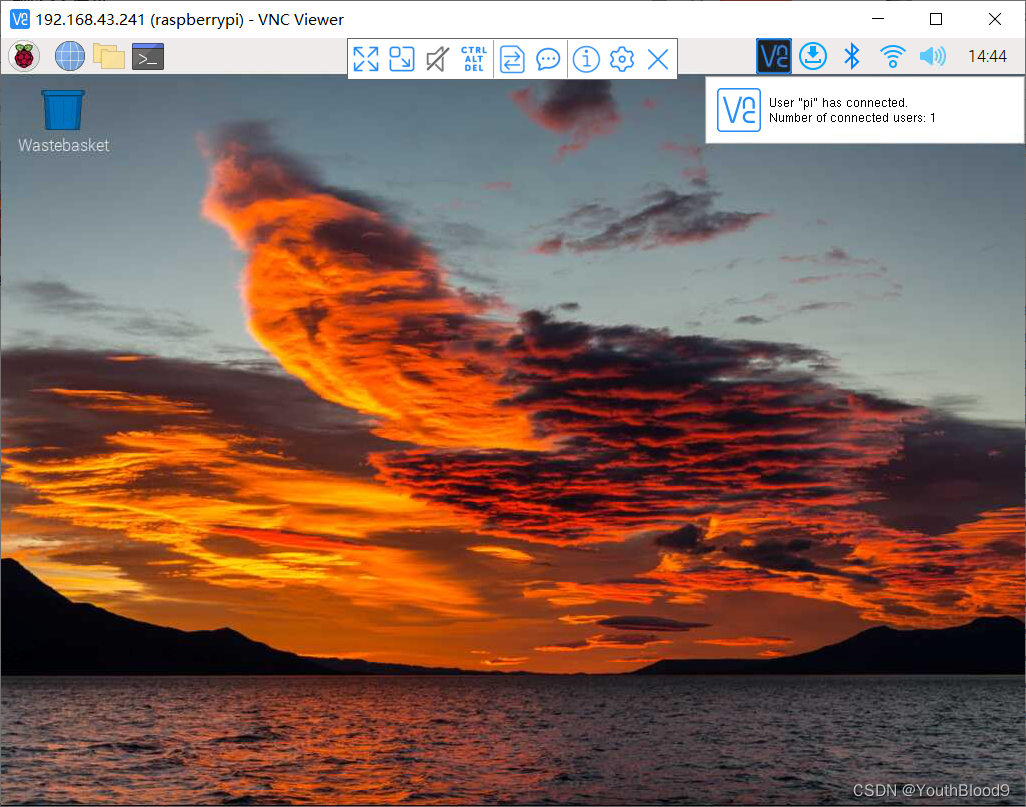
reference
边栏推荐
- Libuv库概述及libevent、libev、libuv对比(转载)
- sink端 一般都是jdbc的insert update delete么?
- [tcapulusdb knowledge base] Introduction to tcapulusdb tcapsvrmgr tool (I)
- An annotation elegant implementation of interface data desensitization
- 【FPGA+sin】基于DDS(直接数字合成)的正弦信号发生器模块FPGA实现
- SQL 数据记录如何上下行合并
- 二叉树序列化与反序列化(leetcode(困难))
- SQL two columns become multi row filter display
- 谁家的加密密钥,写死在代码里?(说的就是你)
- How to keep database and cache consistent
猜你喜欢
![[World Ocean Day] tcapulusdb calls on you to protect marine biodiversity together](/img/87/373af42f3a2ffa6b9f7fb0c0c3735b.png)
[World Ocean Day] tcapulusdb calls on you to protect marine biodiversity together

分布式id解决方案

做 SQL 性能优化真是让人干瞪眼

Technology: how to design zkvm circuit

一个注解优雅的实现 接口数据脱敏
![[tcapulusdb knowledge base] tcapulusdb technical support introduction](/img/12/83dd224d41551b9137b4e986ea8e63.png)
[tcapulusdb knowledge base] tcapulusdb technical support introduction

开发者方案 · 环境监测设备(小熊派物联网开发板)接入涂鸦IoT开发平台

Vg4131sxxxn0s1 wireless module hardware specification

访问数据库时出现错误
VG4131SxxxN0S1无线模块硬件规格书
随机推荐
Data collection and management [7]
选对学校,专科也能进华为~早知道就好了
CANoe-如何在Trace窗口解析报文并显示信息(Program Node和结构体类型系统变量的使用)
How sqlserver queries and removes results with null fields in the whole column
分享 60 个神级 VS Code 插件
Four distributed session solutions
基于xlsx的B+树索引实现
做 SQL 性能优化真是让人干瞪眼
88. (cesium chapter) cesium aggregation diagram
树莓派用VNC Viewer方式远程连接
中小型企业网络的组建
基于可变参模板实现的线程池
Data collection and management [1]
泠静的想一想自己的路
Set hardware breakpoint instruction for ejtag under the PMON of the Godson development board
Distributed ID solution
[filter design] customize the filter with MATLAB according to the design index
Use gstarwmr video conversion for yocto system of i.mx8m development board
Draft competition process of Intelligent Vision Group
2022年 6月27号 《暑假感悟篇一》路程的选择权。