当前位置:网站首页>树莓派用VNC Viewer方式远程连接
树莓派用VNC Viewer方式远程连接
2022-06-29 03:49:00 【YouthBlood9】
录
一、下载相关工具
1.1 树莓派镜像
- 官网下载地址:https://www.raspberrypi.com/software/operating-systems/
- 下滑选择这个下载:

有三种不同版本:
①带图形桌面和推荐软件:Raspbian Stretch with desktop and recommended software
②带图形桌面:Raspbian Stretch with desktop
③最简版:Raspbian Stretch Lite
我们这里下载②
- 百度网盘链接:https://pan.baidu.com/s/1SOKyhSkqztpzutlP3ocNRg
提取码:0000
1.2 格式化工具
- 本次采用的格式化工具是SDCardFormatterv5
链接:https://pan.baidu.com/s/1MzEEVz1-A83yySZMPK9JxQ
提取码:0000
也可以自行找格式化工具。
1.3 烧录镜像工具
- 本次采用的烧录工具是Raspberry Pi
链接:https://pan.baidu.com/s/1a3QKpWGrVr83qRi76oQGRQ
提取码:0000
同样也可以选择其他的烧录工具。
1.4 VNC Viewer
- 链接:https://pan.baidu.com/s/1x-jOhlYF8MhhtPyH5qVh1Q
提取码:0000
1.5 远程工具
- 本文采用的是putty,也可以选择其他工具。
- 官网地址:https://www.chiark.greenend.org.uk/~sgtatham/putty/
下载后将格式化工具、烧录镜像工具、VNC等都安装好。
二、SD格式化
- 将SD插入到读卡器中,接着将读卡器插到电脑上;
- 打开格式化工具SDCardFormatterv5;
- 选择你需要格式化的SD卡在这里插入图片描述;
- 对弹出的对话框进行选择,选择是;
- 接着会弹出,格式化完成的提示,选择确定,就完成了SD卡的格式化。
三、烧录镜像
- 双击下载的烧录工具文件安装
- 弹出以下界面

- 点击CHOOSE OS,选择到刚才下载的镜像文件,然后点击CHOOSE SD CARD 选择刚才格式化的SD卡,接着就点击WRITE
- 接着会弹出一个对话框,选择Continue/OK,然后,就开始进行烧录了。这个可能需要一段时间
四、配置网络
- 第一种方法:插入网线
这种方法网上有很多相关的文章,自己可以去查看。 - 第二种方法:使用手机热点
①在电脑上,打开刚才烧录镜像的SD卡
②在boot目录下,建立一个ssh的空文件
③在boot目录下,先建立一个文本文件
④打开文本文件,将下面的内容复制到文本中
country=CN
ctrl_interface=DIR=/var/run/wpa_supplicant GROUP=netdev
update_config=1

network={

	ssid="你的无线网名称"
	psk="你的无线网密码"
	key_mgmt=WPA-PSK
	priority=1
}
- 其中,将ssid的内容改成手机热点的名称,psk的内容改成手机热点的密码。
⑤将刚才的文本保存,并将名称修改为wpa_supplicant.conf
⑥取出SD卡,将SD卡插入树莓派中,同时打开手机热点和给树莓派接上电源
⑦可以在手机上查看得到树莓派的ip地址
五、putty远程连接
- 打开putty,在Host Name处,输入刚才查看得到的IP地址,接着选择“open”;
- 对弹出的对话框进行选择,选择“否”;
- 输入用户和密码
默认的用户:pi
默认的密码:raspberry - 开启树莓派VNC服务,输入指令(sudo raspi-config),进行树莓派配置。
- 通过上下键选择“Interfacing Options”,接着左右键选择“Select”。
- 接着上下键选择“VNC”,左右键选择“Select”。
- “would you like the vNc server to be enabled?”–>选择“Yes”。
- “The VNC server is enabled”–>回车选择“OK”。
- 上下键选择“Advanced Options”,左右键选择“Select”。
- 上下键选择“Resolution”,左右键选择“Select”。
- 接着是分辨率选择,选择“DMT Mode 16”,接着选择“OK”。
- “The resolution is set to DMT mode 16”–>回车选择“OK”。
- 回到开始,选择“Finish”,完成。
六、VNC Viewer远程界面显示
①VNC Viewer的安装过程略。
②VNC Viewer的使用。
安装后打开VNC Viewer界面,首先在最上面输入树莓派的IP地址,接着在弹出的界面中输入Username,Password,点击“OK”。出现了树莓派的界面,就完成了。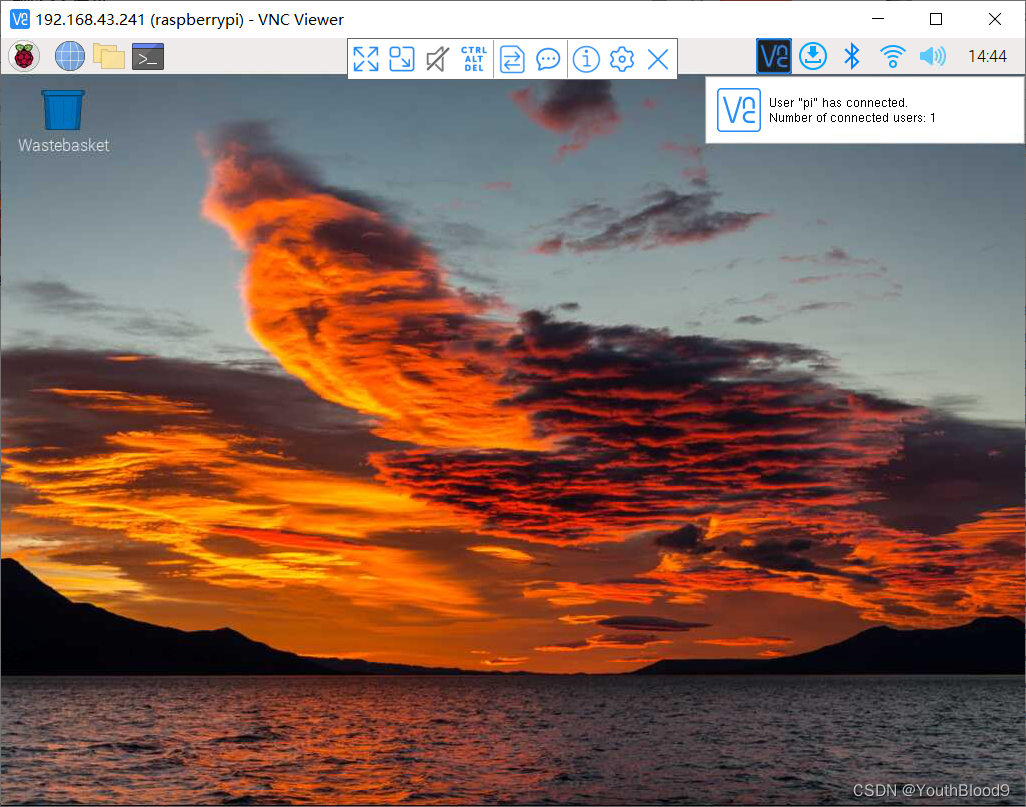
参考文献
边栏推荐
- Draft competition process of Intelligent Vision Group
- Data statistical analysis (SPSS) [8]
- Go implements distributed locks
- PostgreSQL 出现cross-database references are not implemented的bug
- [tcaplusdb knowledge base] Introduction to tcaplusdb tcaplusadmin tool
- Data collection and management [12]
- 基于redis实现的扣减库存
- 使用roslaunch为Gazebo加载自定义模型时黑屏、报错问题
- Adelaidet (detectron2) & abcnet environment configuration
- 【世界海洋日】TcaplusDB号召你一同保护海洋生物多样性
猜你喜欢

【TcaplusDB】祝大家端午安康!
![[tcapulusdb knowledge base] Introduction to tcapulusdb tcapsvrmgr tool (III)](/img/7b/8c4f1549054ee8c0184495d9e8e378.png)
[tcapulusdb knowledge base] Introduction to tcapulusdb tcapsvrmgr tool (III)

百度智能云服务网格产品CSM发布 | 火热公测中

多机局域网办公神器 rustdesk 使用强推!!!
20款IDEA 神级插件 效率提升 30 倍,写代码必备

New listing of operation light 3.0 -- a sincere work of self subversion across the times

MySQL review materials (additional) case when

VG4131SxxxN0S1无线模块硬件规格书
《运营之光3.0》全新上市——跨越时代,自我颠覆的诚意之作

【世界海洋日】TcaplusDB号召你一同保护海洋生物多样性
随机推荐
Do you feel confused when you study at three in the morning?
MySQL复习资料(附加)case when
[MCU framework][dfu] DFU upgrade example with CRC verification + timeout mechanism +led indicator + chip locking + chip self erasure
Why are you a test / development programmer? Can you recall
CANoe-如何在Trace窗口解析报文并显示信息(Program Node和结构体类型系统变量的使用)
Ling Jing thinks about her own way
微秒级 TCP 时间戳
[tcaplusdb knowledge base] Introduction to tcaplusdb tcapulogmgr tool (II)
【TcaplusDB知识库】查看tcapdir目录服务器
云原生周报 | Grafana 9正式发布;云原生词汇表中文版现已上线
做 SQL 性能优化真是让人干瞪眼
Data collection and management [12]
Data statistical analysis (SPSS) [7]
Establishment of small and medium-sized enterprise network
Data collection and management [3]
Yangzhou needs one English IT Helpdesk Engineer -20220216
【TcaplusDB知识库】TcaplusDB表数据缓写介绍
Preliminary construction of SSM project environment
Data statistical analysis (SPSS) [6]
访问数据库时出现错误