当前位置:网站首页>Good looking (dynamic) Jay fan self-made dynamic album card (front and back are different) and lyrics page
Good looking (dynamic) Jay fan self-made dynamic album card (front and back are different) and lyrics page
2022-07-27 12:19:00 【~~Code to success】
The overall effect is as shown in the figure :
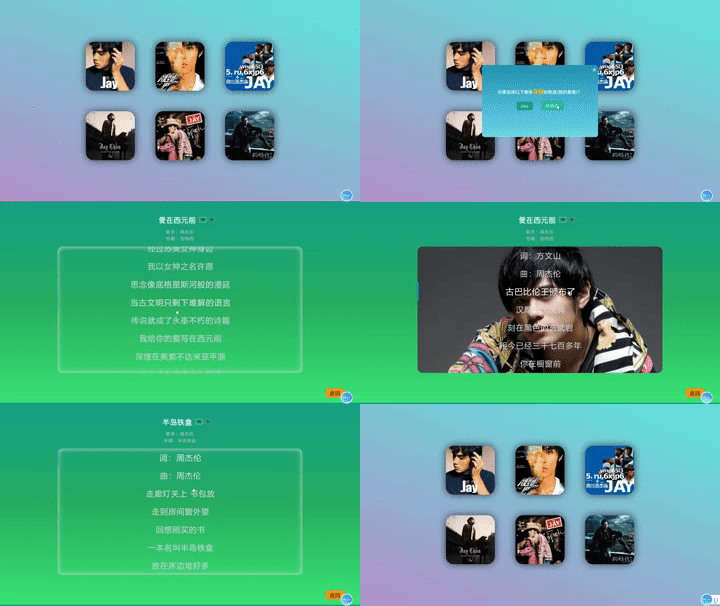
Partial screenshots :
Flip card


Lyrics page 
The page only uses the front-end foundation HTML/CSS/JQ( Native , No framework is used )
Flip the front and back cards :
Yes css Of transform attribute :
.front,.back{
    border-radius: 30px;
    position: absolute;
    top: 0;
    left: 0;
    width: 100%;
    height: 100%;
    -webkit-perspective: 1000;
    backface-visibility: hidden;
    -webkit-transition: all 1.5s;
    -moz-transition: all 1.5s;
    -ms-transition: all 1.5s;
    -o-transition: all 1.5s;

}


#back-b1 {
    position: relative;
    transform: rotateY(-180deg);
    -webkit-transform: rotateY(-180deg);
}
.item:hover #front-f1 {
    transform: rotateY(-180deg);
    -webkit-transform: rotateY(-180deg);

}

.item:hover #back-b1 {
    transform: rotateY(-360deg);
    -webkit-transform: rotateY(-360deg);
}


#back-b2 {
    position: relative;
    transform: rotateX(180deg);
    -webkit-transform: rotateX(180deg);
}
.item:hover #front-f2 {
    transform: rotateX(180deg);
    -webkit-transform: rotateX(180deg);
}

.item:hover #back-b2 {
    transform: rotateX(360deg);
    -webkit-transform: rotateX(360deg);
}
Code :
More content , Part of the code is as follows ( Bad code , Please correct any mistakes ):
<!DOCTYPE html>
<html lang="en">
<head>
    <meta charset="UTF-8">
    <meta http-equiv="X-UA-Compatible" content="IE=edge">
    <meta name="viewport" content="width=device-width, initial-scale=1.0">
    <title>Jay</title>
    <link rel="stylesheet" href="../css/style2.css">
    <script src="http://code.jquery.com/jquery-1.8.3.min.js"></script>
</head>
<body>
    <div class="container">

        <div class="up">

            <div class="item" onclick="show1()">
                <div class="front" id="front-f1">
                    <img class="img1" src="../img/front/01.jpg">
                </div>
                <div class="back" id="back-b1">
                    <img class="img2" src="../img/back/02.jpg" >
                </div>
            </div>

            <div class="item" onclick="show2()">
                <div class="front" id="front-f2">
                    <img class="img1" src="../img/front/03.jpg">
                </div>
                <div class="back" id="back-b2">
                    <img class="img2" src="../img/back/04.jpg">
                </div>
            </div>

            <div class="item" onclick="show3()">
                <div class="front" id="front-f3">
                    <img class="img1" src="../img/front/05.jpg">
                </div>
                <div class="back" id="back-b3">
                    <img class="img2" src="../img/back/06.jpg">
                </div>
            </div>
        </div>

        <div class="down">
            <div class="item" onclick="show4()">
                <div class="front" id="front-f4">
                    <img class="img1" src="../img/front/07.jpg">
                </div>
                <div class="back" id="back-b4">
                    <img class="img2" src="../img/back/08.jpg">
                </div>
            </div>
            <div class="item" onclick="show5()">
                <div class="front" id="front-f5">
                    <img class="img1" src="../img/front/09.jpg">
                </div>
                <div class="back" id="back-b5">
                    <img class="img2" src="../img/back/10.jpg">
                </div>
            </div>
            <div class="item" onclick="show6()">
                <div class="front" id="front-f6">
                    <img class="img1" src="../img/front/11.jpg">
                </div>
                <div class="back" id="back-b6">
                    <img class="img2" src="../img/back/12.jpg">
                </div>
            </div>
        </div>
    </div>
    <div class="main" id="main1">
        <span class="close" onclick="show1()">×</span>
        <div class="content">
            <span class="qt"> Which of the following do you want to choose <span class="zj"> Album </span> Song ( My favorite )?</span>
            <div class="al">
                <button id="jay">Jay</button>
                <button id="ftx"> Fantasy </button>
            </div>
        </div>
    </div>

    <div class="main" id="main2">
        <span class="close" onclick="show2()">×</span>
        <div class="content">
            <span class="qt"> Which of the following do you want to choose <span class="zj"> Album </span> Song ( My favorite )?</span>
            <div class="al">
                <button id="bdkj"> Octave space </button>
                <button id="yhm"> Ye Huimei </button>
            </div>
        </div>
    </div>

    <div class="main" id="main3">
        <span class="close" onclick="show3()">×</span>
        <div class="content">
            <span class="qt"> Which of the following do you want to choose <span class="zj"> Album </span> Song ( My favorite )?</span>
            <div class="al">
                <button id="xzzjl"> Looking for Jay Chou </button>
                <button id="qlx"> Qi li xiang </button>
            </div>
        </div>
    </div>

    <div class="main" id="main4">
        <span class="close" onclick="show4()">×</span>
        <div class="content">
            <span class="qt"> Which of the following do you want to choose <span class="zj"> Album </span> Song ( My favorite )?</span>
            <div class="al">
                <button id="bdkj"> Chopin in November </button>
                <button id="yhm"> Still van Persie </button>
            </div>
        </div>
    </div>

    <div class="main" id="main5">
        <span class="close" onclick="show5()">×</span>
        <div class="content">
            <span class="qt"> Which of the following do you want to choose <span class="zj"> Album </span> Song ( My favorite )?</span>
            <div class="al">
                <button id="bdkj"> I'm very busy </button>
                <button id="yhm"> Mage </button>
            </div>
        </div>
    </div>

    <div class="main" id="main6">
        <span class="close" onclick="show6()">×</span>
        <div class="content">
            <span class="qt"> Which of the following do you want to choose <span class="zj"> Album </span> Song ( My favorite )?</span>
            <div class="al">
                <button id="bdkj"> Cross Era </button>
                <button id="yhm"> Twelve new works </button>
            </div>
        </div>
    </div>

    <script>
        function show1(){
            document.querySelector('#main1').classList.toggle('active')
        }
        function show2(){
            document.querySelector('#main2').classList.toggle('active')
        }
        function show3(){
            document.querySelector('#main3').classList.toggle('active')
        }
        function show4(){
            document.querySelector('#main4').classList.toggle('active')
        }
        function show5(){
            document.querySelector('#main5').classList.toggle('active')
        }
        function show6(){
            document.querySelector('#main6').classList.toggle('active')
        }

        $(function(){
            $("#jay").click(function(){
                location.href="../one/1/index.html";
            })
            $("#ftx").click(function(){
                location.href="../one/2/index.html";
            })

            $("#bdkj").click(function(){
                location.href="../two/1/index.html";
            })
            $("#yhm").click(function(){
                location.href="../two/2/index.html";
            })

            $("#xzzjl").click(function(){
                location.href="../three/1/index.html";
            })
            $("#qlx").click(function(){
                location.href="../three/2/index.html";
            })

            $("#").click(function(){
                location.href="../four/1/index.html";
            })
            $("#").click(function(){
                location.href="../four/2/index.html";
            })

            $("#").click(function(){
                location.href="../five/1/index.html";
            })
            $("#").click(function(){
                location.href="../five/2/index.html";
            })

            $("#").click(function(){
                location.href="../six/1/index.html";
            })
            $("#").click(function(){
                location.href="../six/2/index.html";
            })
        })

    </script>
</body>
</html>
Flip card CSS Code :
* {
  margin: 0;
  padding: 0;
  letter-spacing: 2px;
  color: #ffffff;
}
body {
  height: 93vh;
  background-image: linear-gradient(180deg, #16a085, #27ae60, #3ae374);
}
.container {
  margin: 0 auto;
  width: 1050px;
  border-radius: 20px;
}
.container .content {
  background-color: transparent;
  border-radius: 10px;
  flex: 1;
  text-align: center;
  margin: 50px 50px 0 50px ;
  height: 615px;
}
.container .content .Title .title {
  font-size: 27px;
  color: white;
  font-family: YouYuan;
  font-weight: bold;
  cursor: pointer;
}
.container .content .Title .title::before {
  transition: all 1.5s;
  content: "";
  color: transparent;
}
.container .content .Title .title:hover::before {
  content: "";
  color: red;
}
.container .content .Title .icon {
  margin-left: 5px;
}
.container .content .Title .icon img {
  width: 13px;
  height: 13px;
  border: 2px solid grey;
  border-radius: 5px;
  padding: 2px 6px;
  transition: all 1s;
  -webkit-transition: all 1s;
  cursor: pointer;
}
.container .content .Title .icon #vip {
  border: 2px solid #d9cd82;
}
.container .content .Title .icon img:hover {
  border: 2px solid #fff;
  filter: invert(100%) sepia(0%) saturate(0%) hue-rotate(933deg) brightness(103%) contrast(103%);
}
.container .content .intro {
  margin-top: 20px;
}
.container .content .intro .singer {
  display: block;
  color: #b2bec3;
}
.container .content .intro .album {
  margin-top: 5px;
  display: block;
  color: #b2bec3;
}
.container .content .intro .singer,
.container .content .intro .album {
  cursor: pointer;
}
.container .content .intro .singer:hover,
.container .content .intro .album:hover {
  color: #ecf0f1;
}
.container .content .lyric {
  margin: 20px 0;
  max-height: 80%;
  overflow: auto;
  box-shadow: 0 0 20px gainsboro inset;
  border-radius: 20px;
}
.container .content .lyric p {
  line-height: 70px;
  font-size: 30px;
  color: #ced4da;
  transition: all 0.5s;
  cursor: pointer;
  border-left: 5px solid transparent;
}
.container .content .lyric p:hover {
  color: #f8f9fa;
  font-size: 32px;
  border-left: 5px solid #0984e3;
}
.lyric::-webkit-scrollbar {
  display: none;
}
.body::-webkit-scrollbar {
  display: none;
}
.return {
  position: absolute;
  bottom: 0;
  right: 0;
  margin-right: 60px;
  margin-bottom: 30px;
}
.return a {
  text-decoration: none;
  font-size: 20px;
  border-radius: 10px;
  border: 0;
  color: #000;
  background-color: #f39c12;
  padding: 5px 15px;
  transition: all 0.5s;
}
.return a:hover {
  background-color: #16a085;
  color: #ccc;
}
.main {
  border-radius: 10px;
  position: fixed;
  top: -100%;
  left: 50%;
  visibility: hidden;
  transform: translate(-50%, -50%);
  width: 450px;
  height: 280px;
}
.main.active {
  top: 50%;
  visibility: visible;
  background: linear-gradient(to bottom, #3CA55C, #B5AC49);
  color: white;
}
.close {
  position: absolute;
  right: 0;
  margin-right: 5px;
  font-size: 25px;
  transition: all 0.5s;
  cursor: pointer;
}
.close:hover {
  color: red;
}
#content {
  width: 100%;
  height: 100%;
}
.like {
  position: fixed;
  top: 50%;
  left: 50%;
  transform: translate(-50%, -50%);
  font-size: 26px;
  font-weight: bold;
  font-family: YouYuan;
}
.outdiv {
  height: 50px;
  overflow: hidden;
  display: flex;
  justify-content: center;
  align-items: center;
}
.outdiv .play-control {
  height: 50px;
  width: 950px;
  box-sizing: border-box;
  background-color: #40c057;
  padding: 0 15px;
  display: flex;
  flex-direction: row;
  justify-content: center;
  align-items: center;
  border-radius: 15px;
}
.outdiv .play-control span {
  color: #7048e8;
}
.outdiv .play-control .playbtn {
  float: left;
  margin-right: 10px;
  font-size: 25px;
  color: #da77f2;
}
.outdiv .play-control .playbtn i {
  width: 18.75px;
  cursor: pointer;
}
.outdiv .play-control .progressBar {
  width: 75%;
  margin: 0 15px;
  display: flex;
  align-items: center;
}
.outdiv .play-control .progressBar .progressBasr-pass {
  width: 0;
  height: 5px;
  background: #f59f00;
  float: left;
  border-top-left-radius: 20px;
  border-bottom-left-radius: 20px;
}
.outdiv .play-control .progressBar .circle {
  width: 12px;
  height: 12px;
  border-radius: 50%;
  background-color: #7048e8;
}
.outdiv .play-control .progressBar .progressBar-remain {
  width: 100%;
  height: 5px;
  background-color: #adb5bd;
  float: left;
  border-top-right-radius: 20px;
  border-bottom-right-radius: 20px;
}
( I'm back end , Front end code can only be basic , The content is redundant , Please correct any errors or better implementation methods )
边栏推荐
- I do live e-commerce in tiktok, UK
- Solve the problem of @onetomany query falling into circular reference
- Go Beginner (4)
- Wechat applet must use interface "suggestions collection"
- Lonely young people can't quit jellycat
- [product] about wechat product analysis
- Principle, concept and construction process of MySQL database master-slave replication cluster
- Sync.map of go language
- Redis data type
- When the script runs in the background, it redirects the log from the console to its own named file
猜你喜欢

Fundamentals of mathematics 01

评价自动化测试优劣的隐性指标

Solution: the idea project does not display a tree view

【产品】关于微信产品分析

N ¨UWA: Visual Synthesis Pre-training for Neural visUal World creAtionChenfei

Watermelon book chapter 3 (first & second)

JS parasitic combinatorial inheritance

STS下载教程(include官网无法下载解决方案)
Ali II: what if the AOF file in redis is too large?

Introduction to box diagram

随机推荐
Binary search decision tree (average search length of binary search tree)
go 用本地代码replace
Could not load dynamic library ‘libcudnn.so.8‘;
微信小程序必用接口「建议收藏」
Alibaba cloud RDS exception during pool initialization
Sword finger offer notes: t57 - ii Continuous positive sequence with sum s
Docker Mysql的使用note
Packet transmission: application layer - kernel - hardware
上半年火灾起数下降27.7%,广东将这样提升全民消防安全素质
Sword finger offer notes: t57 - I. and two numbers of S
omitempty在go中的使用
Newticker uses
iptables防火墙
2021-3-22-directed graph sorting
Multi activity disaster recovery construction after station B 713 accident | takintalks share
Unity shader - Laser special effect shader[easy to understand]
Pytorch shows the summary like tensorflow
Sword finger offer notes: t58 - ii Rotate string left
Shake quickly to rescue the "frustrated person"
deeplab系列详解(简单实用年度总结)