当前位置:网站首页>Samba service setup
Samba service setup
2022-07-28 23:35:00 【~407】
Catalog
Two 、samba Characteristics of service
3、 ... and 、samba The main application of
Four 、 Comparison of common file server software
5、 ... and 、samba Service establishment
4、pdbebit Parameter description
5、 Modify the configuration file
7、 Set up samba User login password
6、 ... and 、windows Client authentication
Preface :Samba Is in Linux and UNIX Implemented on the system SMB A free software of the agreement , Composed of server and client programs . Original SMB Agreement is windows and windows( Online neighbors ) An agreement to share resources between .Linux Find Microsoft , I also want to use this agreement in window and Linux On the file share of , But Microsoft didn't agree , therefore Linux Through the reverse method SMB agreement , In order to SMB Distinguish and name it SAMBA agreement .
Let's start with samba Installation and use of server
One 、samba brief introduction
Samba Is in Linux and UNIX Implemented on the system SMB A free software of the agreement , Composed of server and client programs .SMB(Server Messages Block, Information service block ) It is a communication protocol of sharing files and printers on LAN , It provides file and printer sharing services for different computers in LAN .SMB Protocol is client / Server protocol , The client can access the shared file system on the server through this protocol 、 Printers and other resources . By setting “NetBIOS over TCP/IP” bring Samba It can not only share resources with LAN hosts , And share resources with computers all over the world .
Two 、samba Characteristics of service
smaba The biggest feature is that it can be used for linux and windows File sharing and printer sharing between samba Not just for linux and windows Between
samba It can also be used for two sets linux To share
because linux The platform gave birth to a better tool ,nfs Network file sharing system , Dedicated to linux File data sharing between ● therefore samba It's more about using linux and windows Between
3、 ... and 、samba The main application of
- File sharing ( The main function is )
- Print server
- samba Login authentication
- because samba be based on Netbios, So we can do windows Host name resolution for
Four 、 Comparison of common file server software
| The service name | Using range | Server side | client | limitations |
| FTP | LAN and public network | Windows Linux | Windows Linux | Data cannot be modified directly on the server |
| Samba | Intranet | Windows Linux | Windows Linux | It can only be used on the intranet |
| NFS | Intranet and public network | Linux | Linux | Only in Linux Used between |
5、 ... and 、samba Service establishment
The experiment purpose
stay linux Virtual machine (centos7 Environmental Science ) Building a samba Service and in windows Client access
1、 install Samba service
yum install -y samba        // install samba  service


yum list samba            // List package information
yum remove samba          // Uninstall package
yum check-update samba    // Check for updatable packages
yum update samba          // to update samba software package

2、 Start the service
systemctl start smb.service
systemctl enable smb.service

systemctl stop firewalld
setenforce 0

3、 Create user
groupadd test
useradd -M liy -s /sbin/nologin/ -g test
useradd -M yong -s /sbin/nologin/ -g test

id liy
id yong
4、pdbebit Parameter description
 -a, --create                        newly build samba user
  -r, --modify                        modify samba user
  -x, --delete                        Delete samba user
  -L, --list                          List all samba user , Read passdb.tdb Database files
  -v, --verbose                       Show details
  -c, --account-control=STRING        Account control value
 -w, --smbpasswd-style               With smbpasswd Format output
  -u, --user=USER                     Users used
  -N, --account-desc=STRING           Set account description
  -f, --fullname=STRING               Set full name
  -h, --homedir=STRING                Set home directory
  -D, --drive=STRING                  Set up home devices
  -S, --script=STRING                 Set login script
  -p, --profile=STRING                Set profile path
  -I, --domain=STRING                 Set user domain name
  -U, --user SID=STRING               Set user SID or RID
  -M, --machine SID=STRING            Set up the device SID or RID
  -m, --machine                       An account is a device account
  -b, --backend=STRING                Use different passdb As the default backend
  -i, --import=STRING                 Specify the following segment to import user accounts
  -e, --export=STRING                 Export user accounts to the specified backend
  --policies-reset                    Restore the default policy
  -P, --account-policy=STRING         Value of account policy ( Such as maximum password validity )
  -C, --value=LONG                    Set account policy value
  --force-initialized-passwords       Forced initialization passdb Back end
  -z, --bad-password-count-reset      Reset the wrong password
  -Z, --logon-hours-reset             Reset login time
  --time-format=STRING                Format of time parameter
  -t, --password-from-stdin           Get the password from standard input
  -K, --kickoff-time=STRING           Set the start time
  --set-nt-hash=STRING                from nt-hash Set the password
  -d, --debuglevel=DEBUGLEVEL         Set up debug Level
  -s, --configfile=CONFIGFILE         Use an alternate configuration file
  -l, --log-basename=LOGFILEBASE      Set the basic name of the log file
  -V, --version                       Output version number
  --option=name=value                 Set from the command line smb.conf Options
  -?, --help                          Display help information
  --usage                             Display brief usage information
5、 Modify the configuration file
Edit profile , Add a to test A shared directory as a network shared file name .
[test]                 # Shared file name ( That is, the name you can see when accessing the client )
        comment = this is test        # Description of the shared folder
        path = /home/ceshi             # Shared folder path
        public = yes                    # Whether to allow guest Account access
        writable =yes                # Whether you have permission to write
        directory mask = 0777        # Default create directory permission
        create mask = 0777             # Default create file permissions
        valid users = @test,root  # Set the users who are allowed to access the shared directory @ Followed by group name , If you don't write this line, it will be open to all users
        write list = @test,root        # Set the user with write permission @ Followed by the group name
        browseable = yes                 # The specified shared directory is browsable
        available = yes                      # This specifies that shared resources can be used

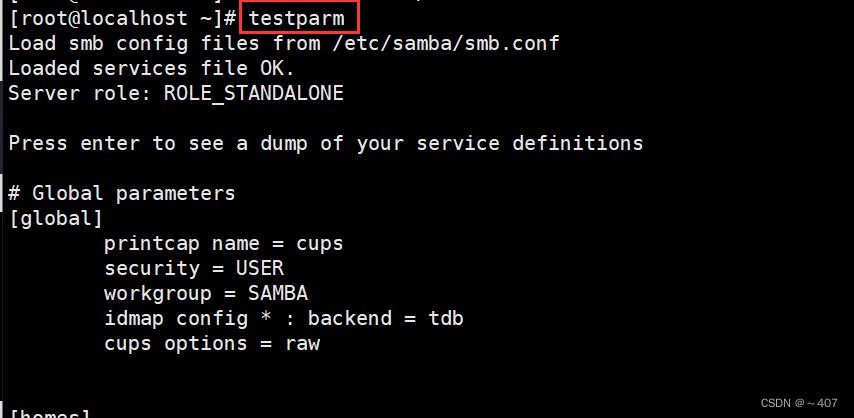
testparm It can be used to detect whether there are syntax errors in the configuration file
testparm
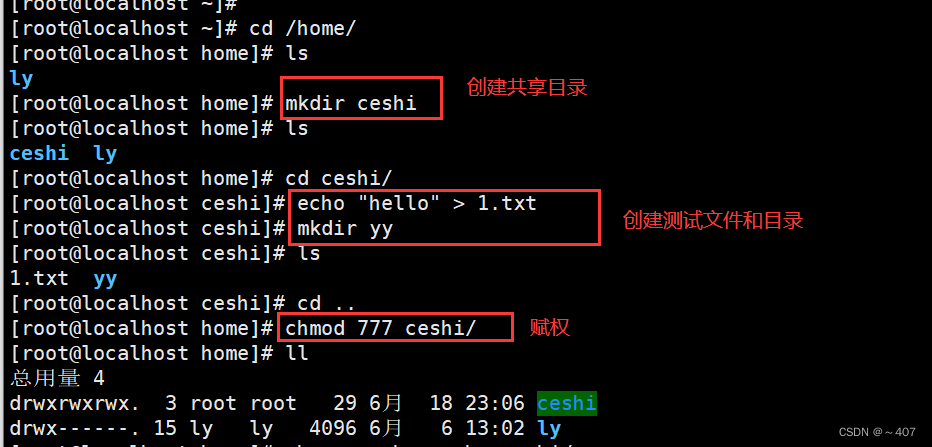
6、 Create a shared folder
mkdir ceshi
cd ceshi/
echo "hello" > 1.txt
mkdir yy
chmod 777 ceshi/
systemctl  restart smb.service  Start the service
systemctl  reload smb.service  Load profile

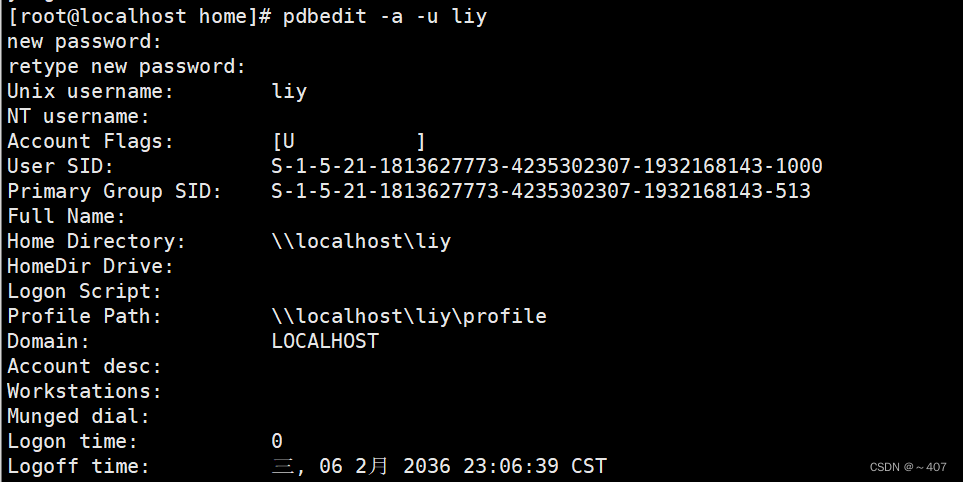
7、 Set up samba User login password
smbpasswd -a liy         #  Follow local users samba User mapping
smbpasswd -a yong

pdbedit -a -u liy
pdbedit -a -u yong

pdbedit -L # View join samba Users of the service 


6、 ... and 、windows Client authentication
win+R \\192.168.58.20

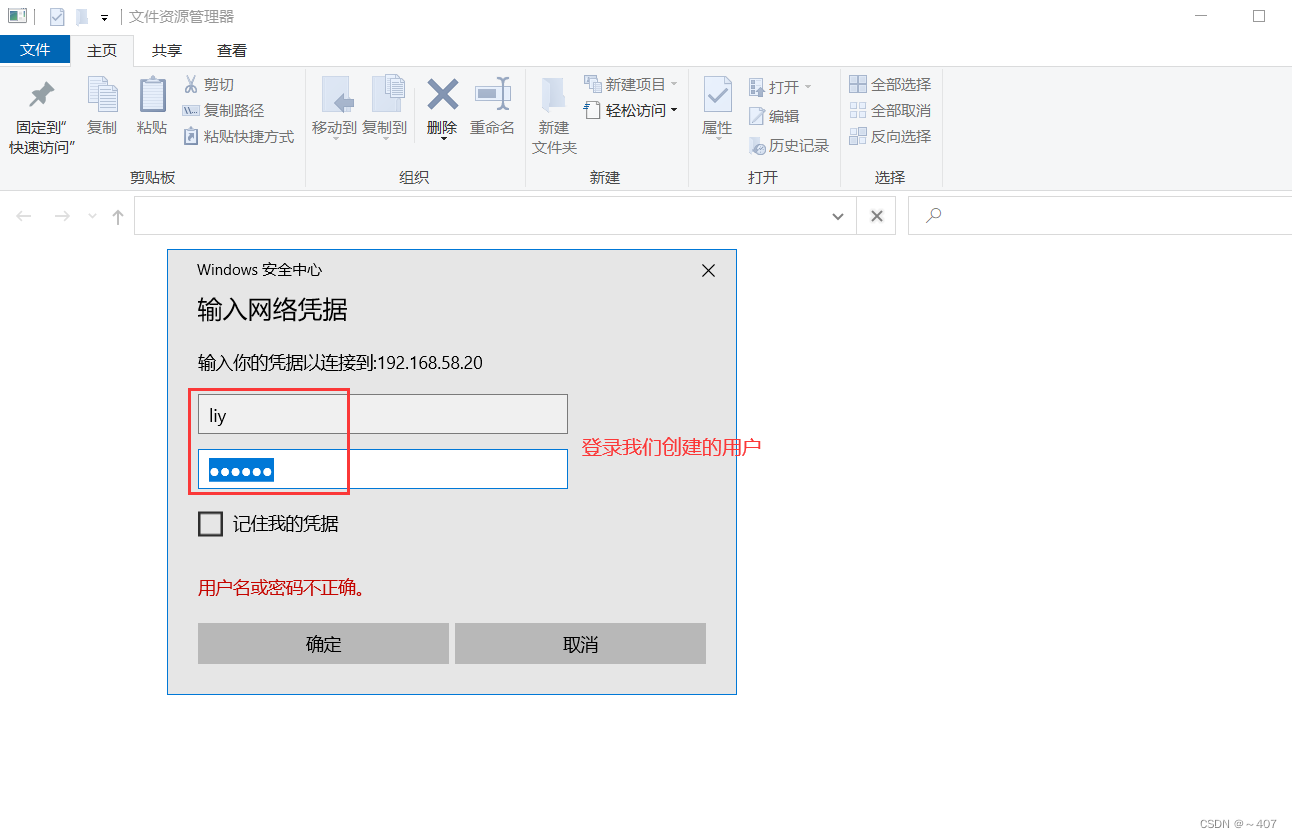
Successful landing 
Create a file test on the client

Test success

7、 ... and 、 summary
Samba It's based on SMB Protocol implemented , It is mainly used for Windows and Linux Sharing resources between .139 The port is in NBT On the basis of the agreement , close NBT agreement 139 Is waste . and 445 The port is in TCP/IP On the basis of the agreement , Nowadays, there should be few people in the network who don't use TCP/IP Agreed . Finally, if the host supports both protocols ( such as windowsxp Future operating systems ) Then the priority of port usage during shared access is :445>139, So now UNC Path access ip Addresses are used 445 port , The form of accessing host name is 139 port ( Now it's almost useless ).
close 139 Method of port :“ network connections / attribute /TCPIP agreement / attribute / senior /WINS Enable or disable NBT(NetBIOS over TCP/IP)
close 445 Method of port : Firewall blocking 445 Port or disable server Service was ok .
边栏推荐
- Use of typescript class
- Elements in the middle (one article is enough)
- 1314_ Serial port technology_ Basic information of RS232 communication
- 6 open source tutorials of super conscience!
- 二舅火了,全网刷屏,他凭什么能治好我的精神内耗?
- Mycms we media mall V3.6 release, compatible with micro engine application development (laravel framework)
- MyCms 自媒体商城 v3.6 发布,兼容微擎应用开发(Laravel框架)
- Advanced C language: pointer (3)
- Trivy [3] custom scanning strategy
- Retrofit Usage Summary
猜你喜欢

行泊ADAS摄像头前装搭载同比增长54.15%,TOP10供应商领跑
Object object

如何开一家盈利的健身房?我用1年回本的经验告诉你,别谈恋爱

Development of small programs ②

可视化全链路日志追踪

Assembly analysis swift polymorphism principle

Retrofit Usage Summary
MyCms 自媒体商城 v3.6 发布,兼容微擎应用开发(Laravel框架)

Pin mapping relationship of stm32f103c series single chip microcomputer under Arduino framework

With the "integration of driving and parking", freytek's high-performance domain controller leads the new track
随机推荐
Inheritance in swift
这款全网热评的无线路由器,到底有什么特别?
Kotlin function nesting
GCD summary
[mongodb] basic use of mongodb database, special cases, and the installation and creation process of mongoose (including the installation of mongoose fixed version)
LabVIEW对VISA Write和Read函数的异步和同步
Elements in the middle (one article is enough)
General paging - front desk
The Gerrit local code is associated to the remote warehouse
Development of small programs ②
【自】-刷题-字符串
2022起重机械指挥考试题模拟考试平台操作
General addition, deletion, modification and query of custom MVC
以流量为主导的数字零售的发展模式,仅仅只是一个开始
当初的“你“为什么做测试/开发程序员?自己存在的价值......
Zero vision technology completed the pre-A round of financing and promoted the domestic replacement of intelligent driving platform software
2022年G2电站锅炉司炉考试题库模拟考试平台操作
Rouyi cloud platform - how to realize the launch and login functions of the project and how to create new modules
Arduino UNO驱动合宙1.8‘TFT SPI屏幕示例演示(含资料包)
2022年R2移动式压力容器充装考题模拟考试平台操作