当前位置:网站首页>Squid proxy server (Web cache layer for cache acceleration)
Squid proxy server (Web cache layer for cache acceleration)
2022-06-28 00:39:00 【[email protected]】
List of articles
1 Squid proxy server
Squid It mainly provides cache acceleration 、 Application layer filtering control function .
1.1 The working mechanism of agency
- Instead of the client requesting data from the website , This can hide the user's real IP Address .
- Will get the web page data ( static state Web Elements ) Save to cache and send to client , So that the next time you request the same data, you can respond quickly .
Cache web page objects , Reduce duplicate requests
1.2 Concept and function of proxy server
A proxy server is one that is located between the client and the original ( resources ) Servers between servers , To get content from the original server , The client sends a request to the proxy server and specifies the target original server , Then the proxy server forwards the request to the original server and returns the obtained content to the client .
Cache proxy for Web crucial , Especially for large and high loads Web Site . Caching can be used as an important means of performance optimization , It can greatly reduce the load on the back-end server . Usually for static resources , Less frequently updated resources , Such as images ,css or js Wait for caching , So every time you refresh your browser , Don't ask again , It's read from the cache , This reduces the pressure on the server .
The main role
- The resource acquisition : Instead of the client, we can get resources from the original server ;
- To speed up access : The proxy server may be closer to the original server , So as to play a certain role in accelerating ;
- Caching : The proxy server holds the resources obtained from the original server , So as to achieve the client fast access ;
- Hide the real address : Proxy server instead of client to get the original server resources , So as to hide the real information of the client .
1.3 Squid Type of agent
Traditional agency : Apply to Internet, You need to specify... On the client proxy server The address and port of .
Transparent proxy : The client There is no need to specify the address and port of the proxy server , But through the default route 、 The firewall strategy will Web Access redirection to the proxy server for processing .
Reverse proxy : If Squid Reverse proxy The requested resource is cached in , The requested resource is returned directly to the client ; Otherwise, the reverse proxy server will go to the background WEB Server requests resources , Then return the requested response to the client , At the same time, the response will be stored locally , For the next requester .
2 install Squid service
Turn off firewall
systemctl stop firewalld       # Turn off the system firewall
systemctl disable firewalld    # Turn off the firewall and turn it on
setenforce 0                   # Turn off system security

1 Compilation and installation Squid
yum -y install gcc gcc-c++ make    # install gcc gcc-c++ Compilation environment and compiler
cd /opt
tar zxvf squid-3.5.28.tar.gz


cd /opt/squid-3.5.28
./configure --prefix=/usr/local/squid \				# Specify the installation directory path
--sysconfdir=/etc \									# Specify the profile path
--enable-arp-acl \									#MAC Address control , Prevent clients from using IP cheating
--enable-linux-netfilter \							# Use kernel filtering
--enable-linux-tproxy \								# Support transparent mode
--enable-async-io=100 \								# asynchronous IO, Improve storage performance
--enable-err-language="Simplify_Chinese" \			# Display language of error message
--enable-underscore \								# allow URL There is an underline in
--disable-poll \									# Turn off the default use  poll  Pattern
--enable-epoll \									# Turn on epoll Mode improves performance
--enable-gnuregex

make && make install

ln -s /usr/local/squid/sbin/* /usr/local/sbin/  # Create a soft link to the path environment variable for system recognition squid

useradd -M -s /sbin/nologin squid  # Create program users squid, Ensure system security

chown -R squid:squid /usr/local/squid/var/   # by /usr/local/squid/var The directory recursively specifies the primary group

2 modify Squid Configuration file for
vim /etc/squid.conf

--------56 Row insertion ---------
http_access allow all			# Put it in  http_access deny all  Before , Allow any client to use the proxy service
http_access deny all
http_port 3128					# Used to specify the address and port on which the proxy service listens ( The default port number is  3128)

--------61 Row insertion ---------
cache_effective_user squid		# add to , Specify the program user , Used to set initialization 、 Accounts cached at runtime , Otherwise, the startup is not successful
cache_effective_group squid		# add to , Specify account basic group

coredump_dir /usr/local/squid/var/cache/squid		# Specify cache file directory

3 Squid The operation control of
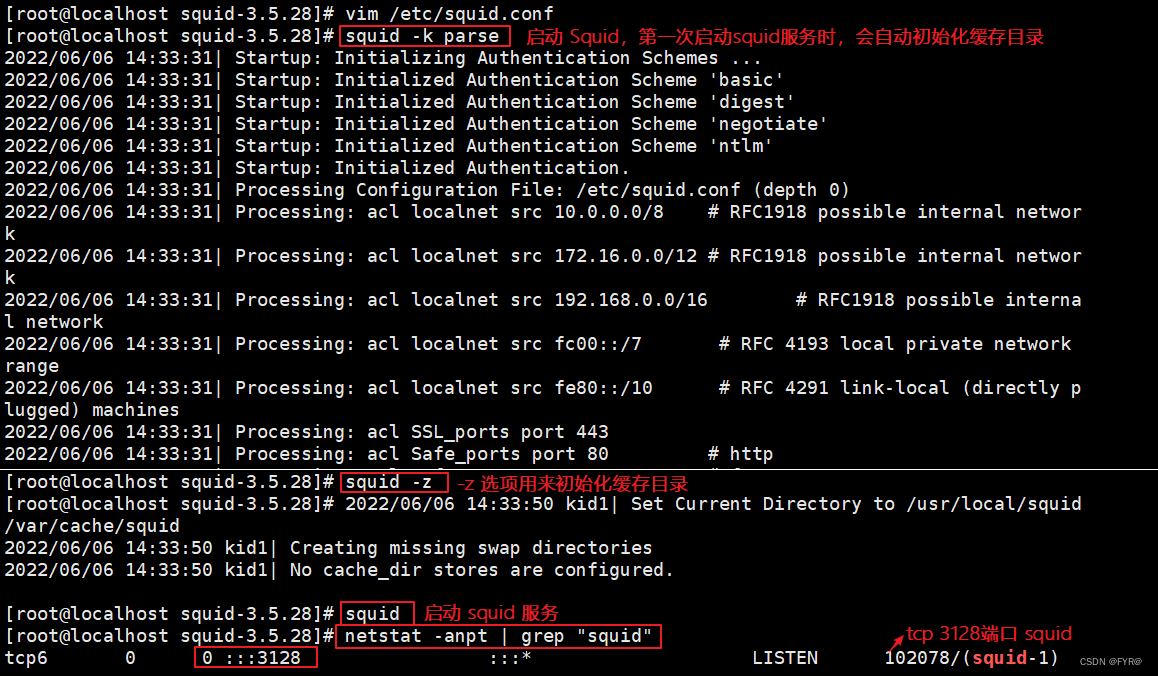
# Check that the configuration file syntax is correct
squid -k parse        # start-up  Squid
# start-up squid, First boot squid The service , The cache directory is automatically initialized
squid -z 			  #-z  Option to initialize the cache directory
squid				  # start-up  squid  service

netstat -anpt | grep "squid"
4 establish Squid Service script
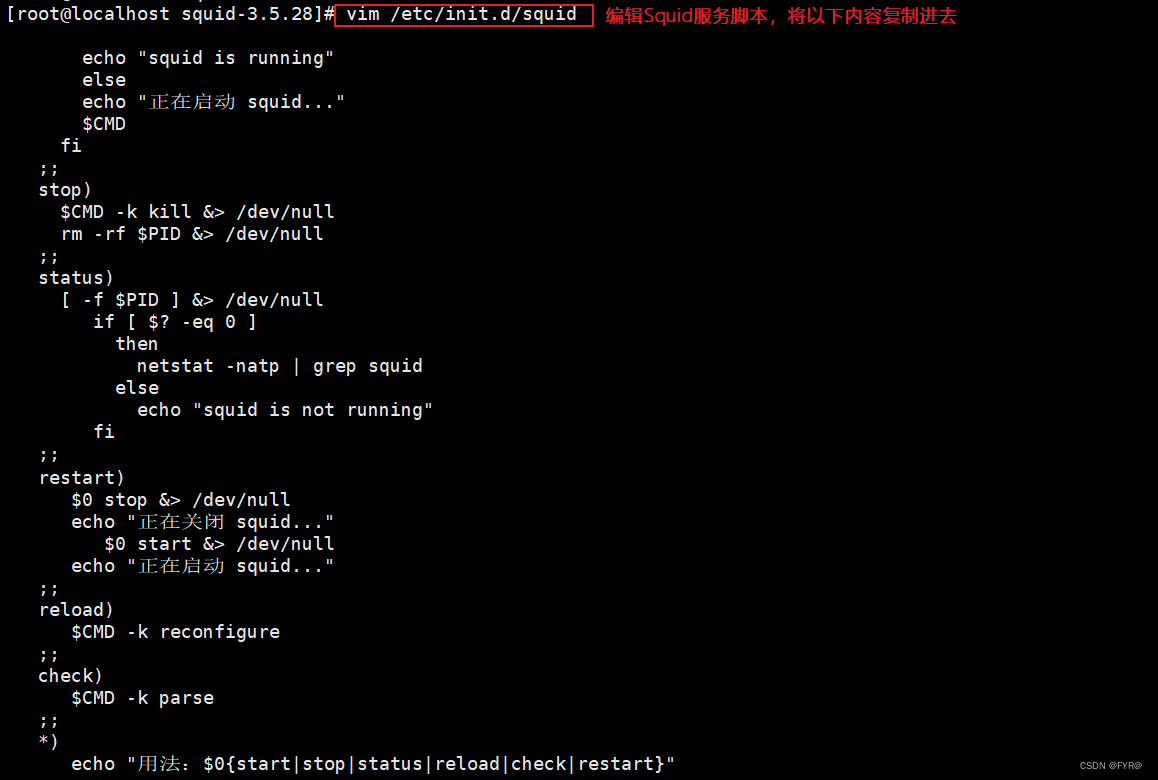
vim /etc/init.d/squid

#!/bin/bash
#chkconfig: 2345 90 25
PID="/usr/local/squid/var/run/squid.pid"
CONF="/etc/squid.conf"
CMD="/usr/local/squid/sbin/squid"

case "$1" in
   start)
     netstat -natp | grep squid &> /dev/null
     if [ $? -eq 0 ]
     then
       echo "squid is running"
       else
       echo " Starting  squid..."
       $CMD
     fi
   ;;
   stop)
     $CMD -k kill &> /dev/null
     rm -rf $PID &> /dev/null
   ;;
   status)
     [ -f $PID ] &> /dev/null
        if [ $? -eq 0 ]
          then
            netstat -natp | grep squid
          else
            echo "squid is not running"
        fi
   ;;
   restart)
      $0 stop &> /dev/null
      echo " Shutting down  squid..."
         $0 start &> /dev/null
      echo " Starting  squid..."
   ;;
   reload)
      $CMD -k reconfigure
   ;;
   check)
      $CMD -k parse
   ;;
   *)
      echo " usage :$0{start|stop|status|reload|check|restart}"
   ;;
esac

#2345 Is the default self start level , " - Represents that no level is self starting ;
#90 Is the start priority ,25 Is the stop priority , The priority range is 0-100, The greater the number , The lower the priority .
chmod +x /etc/init.d/squid    # Give the service startup script executable permission
chkconfig --add squid    # Add this service to chkconfig management
chkconfig --level 35 squid on   # Can be at level 3: Character interface , Level 5: Self start in the view interface
chkconfig  --list squid   # See which runlevels can be self started
2345 The default self start level in the script
3 Build a traditional proxy server
vim /etc/squid.conf
......
http_access allow all
http_access deny all
http_port 3128
cache_effective_user squid
cache_effective_group squid
--63 That's ok -- Insert
cache_mem 64 MB
# Specifies the amount of memory space used by the cache function , It's easy to keep a more frequent WEB object ,
# The capacity should preferably be 4 Multiple , Unit is MB, It is recommended to set it to... Of physical memory 1/4
reply_body_max_size 10 MB
# The maximum file size that users are allowed to download , In bytes , When downloading more than the specified size Web Object time ,
# The error page of the browser will appear “ Request or access is too large ” The default setting for the prompt 0 It means that there is no restriction
maximum_object_size 4096 KB
# Maximum object size allowed to be saved to cache space , With KB In units of , Files that exceed the size limit will not be cached , Instead, it is forwarded directly to the user

service squid restart
systemctl restart squid

# Firewall rules also need to be modified in the production environment
iptables -F
iptables -I INPUT -p tcp --dport 3128 -j ACCEPT

# Agent configuration for the client
 Open the browser , Tools -->Internet Options --> Connect --> LAN settings --> Turn on the proxy server ( Address :Squid The server IP Address , port :3128)

# see  Squid  Hits in the cache
tail -f /usr/local/squid/var/logs/access.log
        TCP_MEM_HIT/200

# see  Web  New record of access log
tail -f /var/log/httpd/access_log
 Type in the browser Web The server IP Address access , see Web Server access log , It shows that the proxy server accesses... For the client .
4 Build a transparent proxy server
Environment configuration
| host | operating system | IP Address | service 、 Installation package 、 Tools |
|---|---|---|---|
| Squid The server | CentOS7 | The double card , Intranet ens33:192.168.16.10 Extranet ens36:12.0.0.1 | squid-3.5.28.tar.gz |
| Web The server | CentOS7 | 12.0.0.12 | httpd |
| The client | Windows | 192.168.16.100 | —— |

4.1 Squid Server configuration
vim /etc/squid.conf
......
http_access allow all
http_access deny all
--60 That's ok -- Modify and add intranet services IP Address , And support transparent proxy options  transparent
http_port 192.168.16.10:3128 transparent   # Internal network card IP Address

systemctl restart squid

# Turn on route forwarding , Realize the address forwarding of different network segments in the machine
vim /etc/sysctl.conf
echo 'net.ipv4.ip_forward = 1' >> /etc/sysctl.conf
sysctl -p

# Modify firewall rules
iptables -F
iptables -t nat -F
iptables -t nat -I PREROUTING -i ens33 -s 192.168.16.0/24 -p tcp --dport 80 -j REDIRECT --to 3128	# For forwarding http agreement
iptables -t nat -I PREROUTING -i ens33 -s 192.168.16.0/24 -p tcp --dport 443 -j REDIRECT --to 3128	# For forwarding https agreement
iptables -I INPUT -p tcp --dport 3128 -j ACCEPT
# modify PREROUTING Destination address
4.2 Web Server configuration
yum install -y httpd
systemctl start httpd


 Access after closing the proxy server function set before the client's browser  http://12.0.0.12

# see  Squid  New record of access log
tail -f /usr/local/squid/var/logs/access.log
1631073624.552      0 192.168.16.100 TCP_MEM_HIT/200 449 GET http://12.0.0.12/ - HIER_NONE/- text/html

# see  Web  New record of access log , It shows that the external network port of the proxy server replaces the client in accessing
tail -f /var/log/httpd/access_log
5 ACL Access control
In profile squid.conf in ,ACL Access control is through the following Two steps To achieve :
- Use acl Configuration items define the conditions that need to be controlled ;
- adopt http_access The configuration item does “ allow ” or “ Refuse ” Access control .
5.1 Define access control list
 Format :
acl  List name   List the type   List content  …
vim /etc/squid.conf
......
acl localhost src 192.168.16.10/32 					# The source address is  192.168.16.10
acl MYLAN src 192.168.16.0/24 		# Client network segment
acl destinationhost dst 192.168.16.20/32			# The target address is  192.168.16.20
acl MC20 maxconn 20									# Maximum concurrent connection  20
acl PORT port 21									# Target port  21
acl DMBLOCK dstdomain .qq.com						# Target domain , Match all sites in the domain
acl BURL url_regex -i ^rtsp:// ^emule://			# With  rtsp://、emule://  Initial goal  URL Address ,-i Indicates ignore case
acl PURL urlpath_regex -i \.mp3$ \.mp4$ \.rmvb$		# With  .mp3、.mp4、.rmvb  End goal  URL  route
acl WORKTIME time MTWHF 08:30-17:30					# It's Monday to Friday  8:30~17:30,“MTWHF” For the English initials of each week
Environment configuration
| host | operating system | IP Address | Software 、 Installation package 、 Tools |
|---|---|---|---|
| Squid-Server | CentOS7 | 192.168.16.10 | squid-3.5.28.tar.gz |
| Web1 | CentOS7 | 192.168.16.20 | httpd |
| Web2 | CentOS7 | 192.168.16.30 | httpd |
| The client | Windows7 | 192.168.16.100 | —— |
5.1 Start object list management
mkdir /etc/squid
vim /etc/squid/dest.list
192.168.16.20

vim /etc/squid.conf
......
acl destinationhost dst "/etc/squid/dest.list"			# Call the list content in the specified file
......
http_access deny( or allow) destinationhost				# Be careful , If it's a rejection list , Need to put in http_access allow all front

systemctl restart squid
5.2 Web Server configuration
systemctl stop firewalld.service
setenforce 0
yum -y install httpd
systemctl start httpd

 browser (192.168.16.100) visit Web The server  http://192.168.16.20 , Show access denied , visit http://192.168.16.30 You can visit .
6 Squid Log analysis
6.1 Install the image processing software package
# Online sources are required , There is an error , Set the... In the network card configuration file dns And the gateway can be modified back to the original
yum install -y pcre-devel gd gd-devel

mkdir /usr/local/sarg
tar zxvf sarg-2.3.7.tar.gz -C /opt/

cd /opt/sarg-2.3.7
./configure --prefix=/usr/local/sarg \
--sysconfdir=/etc/sarg \							# Profile directory , The default is /usr/local/etc
--enable-extraprotection							# Additional safety protection

./configure --prefix=/usr/local/sarg --sysconfdir=/etc/sarg --enable-extraprotection
make && make install
vim /etc/sarg/sarg.conf
--7 That's ok -- uncomment
access_log /usr/local/squid/var/logs/access.log		# Specify access log file

--25 That's ok -- uncomment
title "Squid User Access Reports"					# Webpage title

--120 That's ok -- uncomment , modify
output_dir /var/www/html/sarg						# Report output directory

--178 That's ok -- uncomment
user_ip no											# Use the user name to display

--184 That's ok -- uncomment , modify
topuser_sort_field connect reverse					#top Sorting , Specify the number of connections in descending order , The ascending order is normal

--190 That's ok -- uncomment , modify
user_sort_field connect reverse						# For user access records , The number of connections is sorted in descending order

--206 That's ok -- uncomment , modify
exclude_hosts /usr/local/sarg/noreport				# Specify files that are not included in the sorted site list

--257 That's ok -- uncomment
overwrite_report no									# Whether to overwrite logs with the same name and date

--289 That's ok -- uncomment , modify
mail_utility mailq.postfix							# Send mail report command

--434 That's ok -- uncomment , modify
charset UTF-8										# Specify character set UTF-8

--518 That's ok -- uncomment
weekdays 0-6										#top Week period of ranking

--525 That's ok -- uncomment
hours 0-23											#top The time period of ranking

--633 That's ok -- uncomment
www_document_root /var/www/html						# Specify the web root


# Add not included in the site file , The added domain name will not be displayed in the sort
touch /usr/local/sarg/noreport

ln -s /usr/local/sarg/bin/sarg /usr/local/bin/
sarg --help

# verification
yum install httpd -y
systemctl start httpd

# function
sarg				# Start recording once
Browser access http://192.168.16.10/sarg , see sarg Report page .
6.2 Add scheduled tasks , Perform daily report generation
vim /usr/local/sarg/report.sh
#/bin/bash
#Get current date
TODAY=$(date +%d/%m/%Y)
#Get one week ago today
YESTERDAY=$(date -d "1 day ago" +%d/%m/%Y)
/usr/local/sarg/bin/sarg -l /usr/local/squid/var/logs/access.log -o /var/www/html/sarg -z -d $YESTERDAY-$TODAY &> /dev/null
find ./ -type d -a -name "$(env LANG=en_US.UTF-8 date -d "30 day ago" +%Y%b%d)-$(env LANG=en_US.UTF-8 date -d "29 day ago" +%Y%b%d)" | xargs rm -rf
exit 0


chmod +x /usr/local/sarg/report.sh

crontab -e
0 0 * * * /usr/local/sarg/report.sh
7 Squid Reverse proxy
If Squid The requested resource is cached in the reverse proxy server , The requested resource is returned directly to the client ; Otherwise, the reverse proxy server will go to the background Web Server requests resources , Then return the requested response to the client , At the same time, the response will be stored locally , For the next requester .
Working mechanism
- Cache web page objects , Reduce duplicate requests
- Assign the Internet request for rotation training or assign it to the intranet according to the weight Web The server
- Proxy user requests , Avoid direct user access to Web The server , Improve safety
| host | operating system | IP Address | Software 、 Installation package 、 Tools |
|---|---|---|---|
| Squid-Server | CentOS7 | 192.168.16.10 | squid-3.5.28.tar.gz |
| Web1 | CentOS7 | 192.168.16.20 | httpd |
| Web2 | CentOS7 | 192.168.16.30 | httpd |
| The client | Windows7 | 192.168.16.100 | —— |
7.1 Squid Server configuration
vim /etc/squid.conf
......
--60 That's ok -- modify , Insert
http_port 192.168.16.10:80 accel vhost vport
cache_peer 192.168.16.20 parent 80 0 no-query originserver round-robin max_conn=30 weight=1 name=web1
cache_peer 192.168.16.30 parent 80 0 no-query originserver round-robin max_conn=30 weight=1 name=web2
cache_peer_domain web1 web2 www.kgc.com
# Said to www.kgc.com Request ,squid towards 192.168.16.20 and 192.168.16.30 Of 80 Request from port
http_port 80 accel vhost vport #squid From a cache to a Web Server reverse proxy acceleration mode , This is the time squid stay 80 Port listening requests , At the same time with web server Request port (vhost vport) binding , It's time for the request squid,squid There is no need to forward requests , Instead, you can either get data from the cache or request data directly from the bound port .
| accel | Reverse proxy acceleration mode |
|---|---|
| vhost | Support domain name or host name to represent proxy node |
| vport | Support IP And port to represent the proxy node |
| parent | Represents the parent node , Up and down relationship , Non horizontal relationship |
| 80 | Agent internal web Server's 80 port |
| 0 | Not used icp( Telecom operators ), It means just one squid The server |
| no-query | No query operation , Get data directly |
| originserver | Specify the source server |
| round-robin | Appoint squid The request is distributed to one of the parent nodes by polling |
| max_conn | Specify the maximum number of connections |
| weight | Assign weights |
| name | Set alias |
7.2 Backend node server settings
# Clear the previously configured in transparent mode  iptables  The rules
iptables -F
iptables -t nat -F

systemctl stop httpd       # prevent  httpd  The service uses  80  The port number and  squid  The listening port configured by the reverse proxy conflicts
systemctl restart squid
yum install -y httpd
systemctl start httpd

# node 1:
echo "this is test01" >> /var/www/html/index.html
# node 2:
echo "this is test02" >> /var/www/html/index.html
7.3 The domain name mapping configuration of the client
 modify  C:\Windows\System32\drivers\etc\hosts  file
192.168.16.10 www.kgc.com

 The browser does not open proxy access  http://www.kgc.com

 Check cache hits
tailf /usr/local/squid/var/logs/access.log
1631164427.547      0 192.168.16.200 TCP_MEM_HIT/200 381 GET http://www.kgc.com/ - HIER_NONE/- text/html
summary

版权声明
本文为[[email protected]]所创,转载请带上原文链接,感谢
https://yzsam.com/2022/179/202206272200410939.html
边栏推荐
- Code neatness -- function
- TIME_ Solutions to excessive wait
- Matlab基本函数 length函数
- 夏日的晚会
- [untitled]
- 认识微信小程序项目的基本组成结构
- Differences and functions between intranet IP and public IP
- The development of the Internet provides new solutions for industrial transformation
- Efficient supplier management in supply chain
- The Internet industry has derived new technologies, new models and new types of industries
猜你喜欢

炼金术(7): 何以解忧,唯有重构
![Count prime [enumeration - > space for time]](/img/11/c52e1dfce8e35307c848d12ccc6454.png)
Count prime [enumeration - > space for time]

炼金术(1): 识别项目开发中的ProtoType、Demo、MVP
深入解析kubernetes controller-runtime

LabVIEW continuous sampling and limited sampling mode

【无标题】
Alchemy (1): identify prototype, demo and MVP in project development

Introduction to memory model of JVM

A summer party

Logging log usage
随机推荐
Which securities company is better and safer to open an account for stock speculation
Cloud native O & M article plan
Sell notes | brief introduction to video text pre training
Smart wind power | Tupu software digital twin wind turbine equipment, 3D visual intelligent operation and maintenance
什么是cookie,以及v-htm的安全性隐患
Introduction to memory model of JVM
Startup and shutdown of Oracle Database
Arduino UNO通过电容的直接检测实现简易触摸开关
RNA SEQ introduction practice (I): upstream data download, format conversion and quality control cleaning
Deployment and test of crtmp live video server
How to use raspberry pie (and all kinds of pies)
Learning notes for qstringlist
Translation (4): matching rules for automatic text completion
#795 Div.2 E. Number of Groups set *
【无标题】
内网IP和公网IP的区别及作用
1696D. Permutation graph thinking
数据仓库入门介绍
The Internet industry has derived new technologies, new models and new types of industries
Request object, response object, session object