当前位置:网站首页>Appium environment setup
Appium environment setup
2022-06-29 07:42:00 【Wang dada】
One 、 Download and install appium client ( Do not install 1.15.1 edition ,1.15.1 There are a lot of holes in the version )
Get into appium Official website http://appium.io/ Download version , Install the downloaded version according to the steps 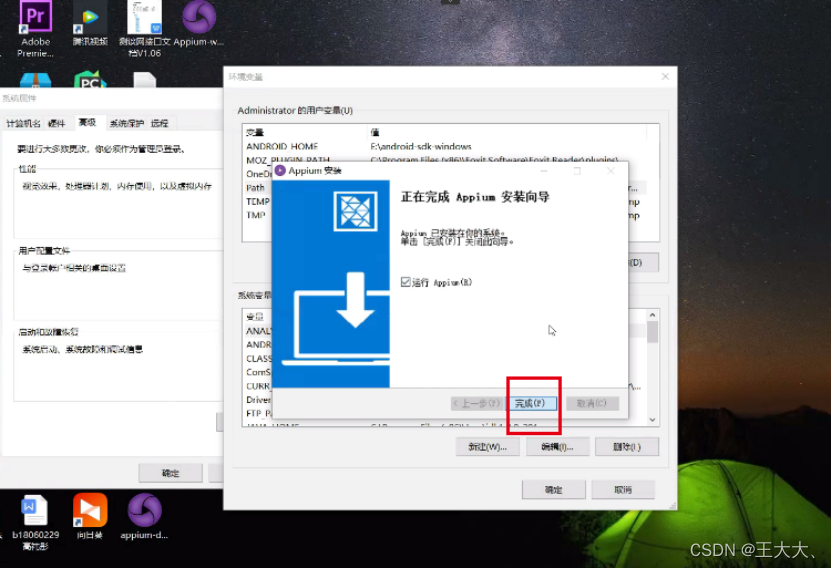


Appium-Python-Client Third party package
pip3 install Appium-Python-Client -i https://pypi.tuna.tsinghua.edu.cn/simple
Two 、 To configure jdk And Android sdk Environmental Science
2.1、jdk8 Download address :https://www.oracle.com/technetwork/java/javase/downloads/jdk8-downloads-2133151.html
Follow the steps to install jdk
2.2、Android SDK Download address :http://dl.google.com/android/android-sdk_r23.0.2-windows.zip
2.2.1、 download SDK After extracting the file , function SDK Manager install platform-tools
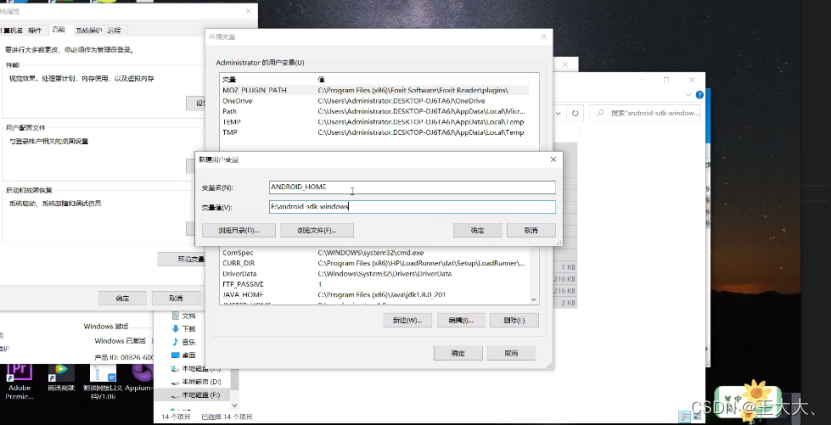
2.2.2、 To configure Android environment variable
1)、 New system variable , Variable name :ANDROID_HOME, A variable's value :Android SDK Store the root directory
2)、 In system variable path New variable in :;%ANDROID_HOME%\platform-tools;%ANDROID_HOME%\tools;



3、 ... and 、appium start-up Android app
android (vivo x21) desired capabilities:
{ “appPackage”: “com.lumiunited.aqarahome”, “appActivity”: “com.lumiunited.aqara.main.SplashActivity”, “noReset”: “true”, “platformVersion”: “9”, “deviceName”: “android”, “platformName”: “Android” }
Four 、appium start-up iOS app
4.1、iOS Real machine installation webdriveragent(appium Bring their own WDA,WDA See the problem record in the configuration environment for the path 2)
1)、 The terminal enters the directory :/Applications/Appium.app/Contents/Resources/app/node_modules/appium/node_modules/appium-xcuitest-driver/webdriveragent
2)、 Execute the script
Command line terminal to wda The root directory , function ./Scripts/bootstrap.sh
3)、 Open the project , Configure developer certificate ,WebDriverAgentRunner project build setting modify bundle Id It's the only sign ( Such as com.lumi.WebDriverAgentRunner),product-》test function
4)、 Browser input http://localhost:8100/status, The result data can be displayed , For example, next :
{ “value” : { “message” : “WebDriverAgent is ready to accept commands”, “state” : “success”, “os” : { “name” : “iOS”, “version” : “13.4.1”, “sdkVersion” : “13.4” }, “ios” : { “simulatorVersion” : “13.4.1”, “ip” : “10.0.100.19” }, “ready” : true, “build” : { “time” : “May 21 2020 18:36:31”, “productBundleIdentifier” : “com.facebook.WebDriverAgentRunner” } }, “sessionId” : “B9BE0798-C334-47BE-AFDF-F99D12CC036D” }
WebdriverAgent Environment configuration successful
5)、 start-up appium, To configure desired capability by :
{ “bundleId”: “com.lumiunited.pre.homekit”, “automationName”: “XCUITest”, “platformVersion”: “13.4.1”, “deviceName”: “iphone”, “platformName”: “iOS”, “udid”: “2e6939b70da40972c17971831a7ed4e43087b8e9” }
5、 ... and 、 Configure problem records in the environment :
1、appium To configure Android desired capabilities Prompt at startup The ANDROID_HOME environment variable is not set to the Android SDK root directory path. ANDROID_HOME is required for compatibility with SDK 23+. Checking along PATH for adb( The computer is configured Android SDK Environmental Science )
Solution :
appium-》Configurations To configure Android sdk route , restart appium Can be started normally Aqara Home app
2、appium 1.15.1 edition webdriver Path is :/Applications/Appium.app/Contents/Resources/app/node_modules/appium-webdriveragent
appium Common path is :/Applications/Appium.app/Contents/Resources/app/node_modules/appium/node_modules/appium-xcuitest-driver/webdriveragent
3、 Prompt when executing the script ./Scripts/bootstrap.sh Tips ERROR in ./js/app.js Module parse failed:/app.js Unexpected token error
Solution :1、 modify Inspector Next webpack.config.js file
2、 Get rid of babel-loader After the configuration ,“exclude: /node_modules/”
3、 Delete Inspector Next node_modules Folder
4、 Re execution “sh ./Scripts/bootstrap.sh”
4、 Prompt at run time ’assign’ property of object type may become a dangling reference; consider using ‘unsafe_unretained’
Solution : We're reporting an error , Go to the error code , take assign Change it to strong After again build
边栏推荐
猜你喜欢







随机推荐
Appium automation test foundation ADB common commands (III)
Kyushu cloud helps Inner Mongolia's "counting from the east to the west" project to drive the smart new ecology of the surveying and mapping industry
Schnuka: automatic tire grabbing installation, 3D visual positioning, automatic robot grabbing
Markdown skill tree (5): picture
[popular science materials] materials from scientific spirit to scientific knowledge
MFC中利用CDockablePane实现悬浮窗
机器学习笔记 - 时间序列使用机器学习进行预测
Matlab Simulink simulation and analysis of power grid sweep frequency
How to view software testing training? Do you need training?
498. 对角线遍历(模拟)
Swin Transformer理论讲解
tf.compat.v1.global_variables
部署Prometheus-server服务 system管理
Reflection modification final
TF.Slim的repeat和stack操作
【工控老马】基于西门子S7-200PLC的跑马灯控制系统的设计方案详解
IMX6DL4.1.15支持EIM总线(下)——配置原理分析。
jmeter 用beanshell导入自己jar包老是查找不到
systemd 管理node-exporter
Kingbasees coping with transaction rollback caused by too fast growth of table age