当前位置:网站首页>WebSocket(简单体验版)
WebSocket(简单体验版)
2022-06-28 02:31:00 【赤蓝紫】
WebSocket(简单体验版)
简介
Web Socket(套接字):就是通过一个长时连接实现与服务器全双工、双向的通信。
Web Socket使用的并不是HTTP协议而是自定义的Web Socket协议,所以如果我们使用Web Socket的时候,URL不再是http://或https://,而是ws://或wss://(但是,实际上是看红宝书才想着玩一下下,在开发中还没试过用这个来开发的)
主要特点:服务器可以主动向客户端推送信息,客户端也可以主动向服务器发送信息。
使用
实例化
要创建一个新的Web Socket,首先需要实例化一个WebSocket对象。
我们实例化WebSocket对象时,传的参数应该是一个绝对URL,同源策略不适用于WebSocket
const socket = new WebSocket("ws://localhost:8088/mysocket");
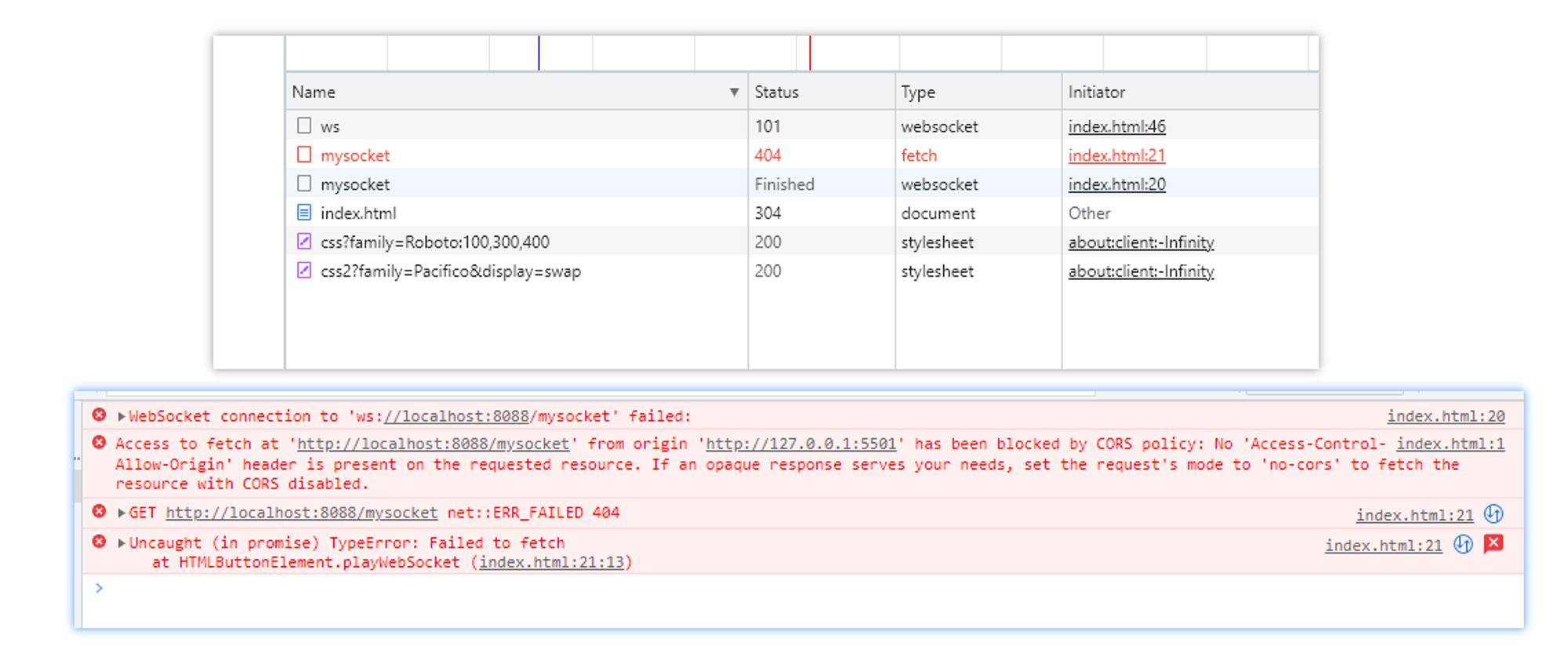
http请求会有跨域,但是WebSocket不会跨域
后端express
主要部分都注释了(需要安装 express-ws)
const express = require('express')
const expressWs = require('express-ws')

const app = express()

// 将WebSocket服务加到app里,简单来说就是让app添加了ws方法
expressWs(app)

// 建立WebSocket服务
app.ws('/mysocket', function (ws) {
  // ws:建立WebSocket的实例

  // 向客户端发送信息
  ws.send('你连接成功啦')
})

app.listen(8088, () => {
  console.log('ws://localhost:8088')
})

如果连接上了,那么http状态码会是101,因为要切换成ws协议
绑定事件
如果我们,在实例化后就开始发送信息,那就会导致信息发不出,因为还没连接上。这时候我们就得了解一下什么时候能发,进而得了解一下WebSocket的相关事件。
open:在连接成功建立时触发error:在连接发生错误时触发(此时已经不能再发信息了)close:在连接关闭时触发(此时已经不能再发信息了)message:收到消息后触发(收到的消息在事件对象中的data里)
const socket = new WebSocket("ws://localhost:8088/mysocket");
socket.onopen = function () {
    console.log("连接建立");
    socket.send('hello');
    // socket.close()
};
socket.onerror = function () {
    console.log("连接发生错误");
};
socket.onclose = function () {
    console.log("连接关闭");
};

socket.onmessage = function (e) {
    console.log(e)
}
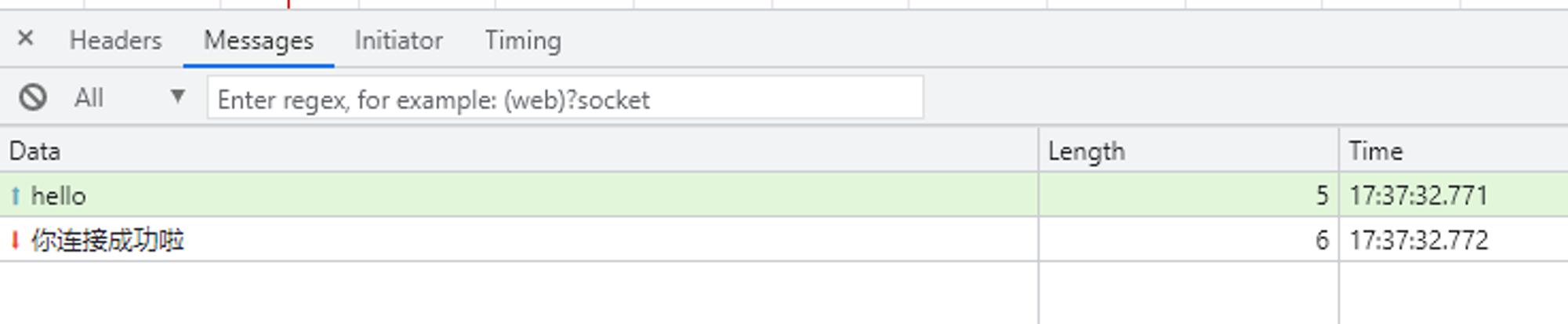

模拟两人对话
上面已经说了,收到消息会触发message事件,所以我们可以在message事件里根据收到的信息发送对应的信息。
客户端:
const socket = new WebSocket("ws://localhost:8088/mysocket");
socket.onopen = function () {
    console.log("连接建立");
    socket.send('hello');
    // socket.close()
};
socket.onerror = function () {
    console.log("连接发生错误");
};
socket.onclose = function () {
    console.log("连接关闭");
};

socket.onmessage = function ({ data }) {
    if (data.includes('你好')) {
        socket.send('再见,服务端ddd')
    } else if (data.includes('再见')) {
        // 调用close()方法关闭WebSocket连接
        socket.close()
    } else {
        socket.send('你好,我是客户端ccc')
    }
}
服务器:
const express = require('express')
const expressWs = require('express-ws')

const app = express()

// 将WebSocket服务加到app里,简单来说就是让app添加了ws方法
expressWs(app)

// 建立WebSocket服务
app.ws('/mysocket', function (ws) {
  // ws:建立WebSocket的实例
  ws.send('你连接成功啦')

  ws.onmessage = function ({ data }) {
    if (data.includes('你好')) {
      ws.send('你好,我是服务器ddd')
    } else if (data.includes('再见')) {
      ws.send('再见,客户端ccc')
    }
  }
})

app.listen(8088, () => {
  console.log('ws://localhost:8088')
})

注意:如果收发部分处理,需要注意一下,如果没有处理好,可能会出现循环卡住的情况。
比如,服务器和客户端的message事件回调都是:
socket.onmessage = function ({ data }) {
    socket.send('hello')
}

边栏推荐
- 17 `bs对象.节点名h3.parent` parents 获取父节点 祖先节点
- 业内首个!可运行在移动设备端的视频画质主观体验MOS分评估模型!
- apache、iis6、ii7独立ip主机屏蔽拦截蜘蛛抓取(适用vps云主机服务器)
- More, faster, better and cheaper. Here comes the fastdeploy beta of the low threshold AI deployment tool!
- A16z:元宇宙解锁游戏基础设施中的新机遇
- Redis cluster setup [simple]
- 一位博士在华为的22年(干货满满)
- CURDATE()和NOW()区别
- Apache——阿帕奇簡介
- Packet capturing and sorting out external Fiddler -- understanding the toolbar [1]
猜你喜欢

Tardigrade: Trino's solution to ETL scenarios

matlab习题 —— 符号运算相关练习

剑指 Offer 47. 礼物的最大价值(DP)

基于流的深度生成模型

Gateway microservice routing failed to load microservice static resources

Severe Tire Damage:世界上第一个在互联网上直播的摇滚乐队
Build your own website (17)

根据Explain查看sql执行计划,对SQL进行优化
Domain Name System

composition api在项目中的使用总结
随机推荐
View the SQL execution plan according to explain and optimize the SQL
剑指 Offer 49. 丑数(三指针法)
__getitem__和__setitem__
Ten reasons for system performance failure
crond BAD FILE MODE /etc/cron. d
Gateway microservice routing failed to load microservice static resources
RichView TRVStyle
The first in the industry! MOS sub evaluation model for subjective video quality experience that can run on mobile devices!
RichView TRVStyle TextStyles
如何编写简洁代码?(上)
空闲中断无法清除
What are the good practices of cloud cost optimization?
Apache——阿帕奇简介
启牛开的证券账户是安全的吗?如何开账户呢
Reading makes people quiet
Is it better for a novice to open a securities account? Is it safe to open a stock trading account
R语言惩罚逻辑回归、线性判别分析LDA、广义加性模型GAM、多元自适应回归样条MARS、KNN、二次判别分析QDA、决策树、随机森林、支持向量机SVM分类优质劣质葡萄酒十折交叉验证和ROC可视化
The same is MB. Why is the gap so large?
【小游戏】跑酷
云成本优化有哪些优秀实践?