当前位置:网站首页>Anaconda安装并配置jupyter notebook远程
Anaconda安装并配置jupyter notebook远程
2022-06-29 18:04:00 【Albert__Einstein】
环境:centos7.5
python版本:python 3.7.3
Part1. 下载Anaconda
直接在官网下载比较慢,建议使用清华镜像:Tsinghua Open Source Mirror
选择自己需要的版本,下载
wget https://mirrors.tuna.tsinghua.edu.cn/anaconda/archive/Anaconda3-2019.03-Linux-x86_64.sh如果没有wget,则先安装wget
yum -y install wgetPart2. 安装Anaconda
在下载目录中执行该文件
bash Anaconda3-2019.03-Linux-x86_64.sh接下来会出现一堆的License许可声明,一路回车向下,出现如下文字,输入yes
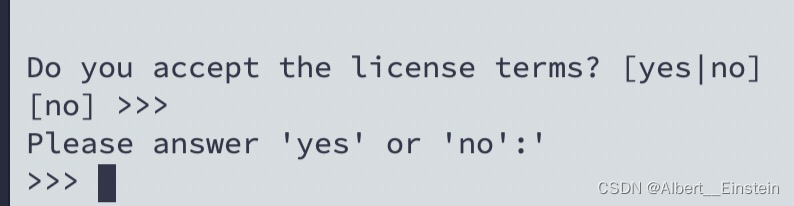
然后要选择安装目录,如果无需更改直接回车Enter,如需更改要输入绝对路径:
Anaconda3 will now be installed into this location:
/home/work/anaconda3
- Press ENTER to confirm the location
- Press CTRL-C to abort the installation
- Or specify a different location below
问是否需要进行conda的初始化,建议输入no。若选择yes,是在/root/.bashrc目录中自动添加环境变量,会使得开机自动启动base环境。
Do you wish the installer to initialize Anaconda3
by running conda init? [yes|no]
[no] >>> no
配置环境变量
vi /etc/profile#在文末添加
PATH=$PATH:/home/work/anaconda3/bin
export PATH
然后立即生效
source /etc/profileconda activate # 进入conda环境出现(base)则说明安装成功
conda deactivate # 退出conda环境
Part3. Jupyter Notebook远程服务
1、生成Jupyter Notebook配置文件
$ jupyter notebook --generate-config
2、设置Jupyter Notebook密码
设置密码用于设置服务器配置,以及登录Jupyter。打开Python终端,输入以下:
In [1]: from IPython.lib import passwd
In [2]: passwd()
3、配置Jupyter Notebook配置文件(第一步生成)
$ vim ~/.jupyter/jupyter_notebook_config.py
修改如下信息
c.NotebookApp.ip = '*' #所有绑定服务器的IP都能访问,若想只在特定ip访问,输入ip地址即可
c.NotebookApp.port = 18888 #将端口设置为自己喜欢的吧,默认是8888
c.NotebookApp.open_browser = False #我们并不想在服务器上直接打开Jupyter Notebook,所以设置成False
c.NotebookApp.notebook_dir = '/root/jupyter_projects' #这里是设置Jupyter的根目录,若不设置将默认root的根目录,不安全
c.NotebookApp.allow_root = True # 为了安全,Jupyter默认不允许以root权限启动jupyter
4\启动Jupyter 远程服务器
$ jupyter notebook
边栏推荐
- Bloom filter:
- Jar package background startup and log output
- [target tracking] |stark configuration win OTB
- Precondition end of script headers or end of script output before headers
- 金鱼哥RHCA回忆录:DO447构建高级作业工作流--创建作业模板调查以设置工作的变量
- Proxmox VE Install 7.2
- EasyCVR部署服务器集群时,出现一台在线一台不在线是什么原因?
- Request header field xxxx is not allowed by Access-Control-Allow-Headers in preflight response问题
- 3h精通OpenCV(六)-图像堆叠
- [tcapulusdb knowledge base] tcapulusdb doc acceptance - transaction execution introduction
猜你喜欢

The soft youth under the blessing of devcloud makes education "smart" in the cloud

codeforces每日5题(均1700)-第二天

Relationship among controller, service and Dao
Adobe Premiere基础-批量素材导入序列-变速和倒放(回忆)-连续动作镜头切换-字幕要求(十三)

Adobe Premiere Basics - common video effects (corner positioning, mosaic, blur, sharpen, handwriting tools, effect control hierarchy) (16)

踩坑记:JSON.parse和JSON.stringify

What technology is an applet container? Can it help Internet of things enterprises break through the red sea?

牛客小Bai月赛52 D 环上食虫(尺取+st表)

mysql -connector/j驱动下载

Kubekey2.2.1 kubernetes1.23.7 offline package production +harbor Department summer and upload image
随机推荐
DevCloud加持下的青软,让教育“智”上云端
Adobe Premiere基础-炫酷文字快闪(十四)
Programmer Resource Recommendation Guide
记录服务器被入侵病毒:ssh密码被更改登录失败、恶意程序跑满了cpu、jar包启动失败自动kill、一直弹出You have new mail in /var/spool/mail/root
牛客小Bai月赛52 D 环上食虫(尺取+st表)
Let Google search your blog
WBF: new method of NMS post filter frame for detection task?
通过 hosts文件配置本地域名
Adobe Premiere基础-常用的视频特效(边角定位,马赛克,模糊,锐化,手写工具,效果控件层级顺序)(十六)
金鱼哥RHCA回忆录:DO447构建高级作业工作流--创建作业模板调查以设置工作的变量
Adobe Premiere Basics - general operations for editing material files (offline files, replacing materials, material labels and grouping, material enabling, convenient adjustment of opacity, project pa
Encryption and decryption of 535 tinyurl
Workflow module jar package startup error: liquibase – waiting for changelog lock
程序员资源推荐指南
[tcapulusdb knowledge base] tcapulusdb system user group introduction
Goldfish rhca memoirs: do447 build advanced job workflow -- create job template survey to set work variables
Relationship among controller, service and Dao
3H proficient in opencv (V) - perspective transformation
给定一个数在序列中求最大异或值(01字典)
【网络是怎么连接的】第三章 探索集线器,交换机和路由器