当前位置:网站首页>Build a vc2010 development environment and create a tutorial of "realizing Tetris game in C language"
Build a vc2010 development environment and create a tutorial of "realizing Tetris game in C language"
2022-07-01 13:21:00 【perseverance52】
build VC2010 development environment , establish 《C Language implementation of Tetris game 》 course
- Affirming : The game comes from 《C Language implementation Tetris 》
build VC2010 development environment
- Please refer to : 《 Installation and configuration VC2010 Step by step 》
install Visual C++ 2010 Express
Install first VC2010 Chinese version , Then install SP1 Patch pack .
- VC2010 Chinese version
 Download address :https://pan.baidu.com/s/1IBaNrOtdx3b7wz7nq7BeEA
 Extraction code :7cou
- SP1 Patch pack
 Download address :https://pan.baidu.com/s/1JK-InWFnURSmNlucyoy3hQ

 Extraction code :d5ei
install EasyX
- https://easyx.cn/easyx

- Click the Install button .

C Language implementation Tetris
- This altar friend's 《C Language implementation Tetris 》 Game code
== Be careful : You need to add cancel in front of the code Unicode Macro definition and additiontchar.hThe header file , The complete code is as follows :
#undef UNICODE
#undef _UNICODE
#include <tchar.h>
#include<graphics.h>
#include<stdio.h>
#include<time.h>
#include<conio.h> //kbhit()

int score = 0;	// Total score
int rank = 0;	// Grade

#define BLOCK_COUNT 5
#define BLOCK_WIDTH 5
#define BLOCK_HEIGHT 5

#define UNIT_SIZE 20 // Small square width

#define START_X 130 // Square landing box , Square landing starting position
#define START_Y 30

#define KEY_UP 87 // The user action
#define KEY_LEFT 65
#define KEY_RIGHT 68
#define KEY_DOWN 83
#define KEY_SPACE 32

#define MinX 30 // The upper left corner of the game
#define MinY 30
int speed = 500;	// Square landing speed


int NextIndex = -1;		// Next block
int BlockIndex = -1;		// Current box

typedef enum {
    		// The square faces
	BLOCK_UP,
	BLOCK_RIGHT,
	BLOCK_LEFT,
	BLOCK_DOWN
}block_dir_t;

typedef enum {
    		// The moving direction of the square
	MOVE_DOWN,
	MOVE_LEFT,
	MOVE_RIGHT
}move_dir_t;

// Square color
int color[BLOCK_COUNT] = {

	GREEN,
	CYAN,
	MAGENTA,
	YELLOW,
	BROWN
};
int visit[30][15];	// Access array visit[i][j] = 1 Indicates that there is a square in this position
int markColor[30][15];	// Corresponding position color
int block[BLOCK_COUNT * 4][BLOCK_WIDTH][BLOCK_HEIGHT] = {

	// |  Shape of square
	{
     0,0,0,0,0,0,0,1,0,0,0,0,1,0,0,0,0,1,0,0,0,0,0,0,0 },
	{
     0,0,0,0,0,0,0,0,0,0,0,1,1,1,0,0,0,0,0,0,0,0,0,0,0 },
	{
     0,0,0,0,0,0,0,1,0,0,0,0,1,0,0,0,0,1,0,0,0,0,0,0,0 },
	{
     0,0,0,0,0,0,0,0,0,0,0,1,1,1,0,0,0,0,0,0,0,0,0,0,0 },
	 // L  Shape of square
	{
     0,0,0,0,0,0,0,1,0,0,0,0,1,0,0,0,0,1,1,0,0,0,0,0,0 },
	{
     0,0,0,0,0,0,0,0,0,0,0,1,1,1,0,0,1,0,0,0,0,0,0,0,0 },
	{
     0,0,0,0,0,0,1,1,0,0,0,0,1,0,0,0,0,1,0,0,0,0,0,0,0 },
	{
     0,0,0,0,0,0,0,0,1,0,0,1,1,1,0,0,0,0,0,0,0,0,0,0,0 },
	//  field   Shape of square
	{
     0,0,0,0,0,0,1,1,0,0,0,1,1,0,0,0,0,0,0,0,0,0,0,0,0 },
	{
     0,0,0,0,0,0,1,1,0,0,0,1,1,0,0,0,0,0,0,0,0,0,0,0,0 },
	{
     0,0,0,0,0,0,1,1,0,0,0,1,1,0,0,0,0,0,0,0,0,0,0,0,0 },
	{
     0,0,0,0,0,0,1,1,0,0,0,1,1,0,0,0,0,0,0,0,0,0,0,0,0 },
	// T  Shape of square
	{
     0,0,0,0,0,0,1,1,1,0,0,0,1,0,0,0,0,0,0,0,0,0,0,0,0 },
	{
     0,0,0,0,0,0,0,0,1,0,0,0,1,1,0,0,0,0,1,0,0,0,0,0,0 },
	{
     0,0,0,0,0,0,0,1,0,0,0,1,1,1,0,0,0,0,0,0,0,0,0,0,0 },
	{
     0,0,0,0,0,0,1,0,0,0,0,1,1,0,0,0,1,0,0,0,0,0,0,0,0 },
	// Z  Shape of square
	{
     0,0,0,0,0,0,1,1,0,0,0,0,1,1,0,0,0,0,0,0,0,0,0,0,0 },
	{
     0,0,0,0,0,0,0,1,0,0,0,1,1,0,0,0,1,0,0,0,0,0,0,0,0 },
	{
     0,0,0,0,0,0,1,1,0,0,0,0,1,1,0,0,0,0,0,0,0,0,0,0,0 },
	{
     0,0,0,0,0,0,0,1,0,0,0,1,1,0,0,0,1,0,0,0,0,0,0,0,0 },
};

/*************************** *  function : The welcome page  *  Input : *  nothing  *  return : *  nothing  **************************/
void welcome() {

	//1. Initialize canvas
	initgraph(550, 660);
	system("pause");
	//2. Set the window title
	HWND window = GetHWnd();// Get the window , Get the current window
	SetWindowText(window, _T(" tetris   Here comes Xiao Ming "));	// Set title

	//3. Set the game initial page
	setfont(40, 0, _T(" Microsoft YaHei "));		// Set the font style of the text ( high , wide (0 It means adaptive ), typeface )
	setcolor(WHITE);	//  Set the color
	outtextxy(205, 200, _T(" Russian method "));

	setfont(20, 0, _T(" Regular script "));
	setcolor(WHITE);	//  Set the color
	outtextxy(175, 300, _T(" Programming , Start with Tetris "));

	Sleep(3000);
}

/*************************** *  function : Initialize the game scene  *  Input : *  nothing  *  return : *  nothing  **************************/
void initGameSceen() {

	char str[16];	// Store scores
	//1. Clear the screen
	cleardevice();
	//2. Painting scene
	rectangle(27, 27, 336, 635);	// Box landing frame outer frame
	rectangle(29, 29, 334, 633);	// Box landing box inside the box
	rectangle(370, 50, 515, 195);	// Box prompt

	setfont(24, 0, _T(" Regular script "));		// Write “ next ”
	setcolor(LIGHTGRAY);	// gray
	outtextxy(405, 215, _T(" next :"));

	setcolor(RED);					// Write score
	outtextxy(405, 280, _T(" fraction :"));

	// In the specified format , take score write in str
	sprintf_s(str, 16, "%d", score);
	// Here, set the character set to multi character , Guarantee outtextxy You can write out variables str
	outtextxy(415, 310, str);

	outtextxy(405, 375, _T(" Grade :"));	// Grade

	// In the specified format , take rank write in str
	sprintf_s(str, 16, "%d", rank);
	// Here, set the character set to multi character , Guarantee outtextxy You can write out variables str
	outtextxy(415, 405, str);

	setcolor(LIGHTBLUE);	// Operation instructions
	outtextxy(390, 475, " Operation instructions :");
	outtextxy(390, 500, "↑:  rotate ");
	outtextxy(390, 525, "↓:  falling ");
	outtextxy(390, 550, "←:  Move left ");
	outtextxy(390, 575, "→:  Move right ");
	outtextxy(390, 600, " Space :  Pause ");
}

/***************************************** *  function : Clear the box in the box prompt box  *  Input : *  nothing  *  return : *  nothing  ****************************************/
void clearBlock() {

	setcolor(BLACK);
	setfont(23, 0, " Regular script ");
	for (int i = 0; i < BLOCK_HEIGHT; ++i) {

		for (int j = 0; j < BLOCK_WIDTH; ++j) {

			int x = 391 + j * UNIT_SIZE;
			int y = 71 + i * UNIT_SIZE;
			outtextxy(x, y, "■");
		}
	}
}

/***************************************** *  function : Clear the blocks during landing  *  Input : * x,y -  The coordinates of the square ( The position of the upper left corner of the two-dimensional array ) * block_dir_t -  Square direction  *  return : *  nothing  ****************************************/
void clearBlock(int x, int y, block_dir_t blockDir) {

	setcolor(BLACK);
	// setfont(23, 0, " Regular script ");
	int id = BlockIndex * 4 + blockDir;
	for (int i = 0; i < BLOCK_HEIGHT; ++i) {

		for (int j = 0; j < BLOCK_WIDTH; ++j) {

			if (block[id][i][j] == 1) {

				int x2 = x + j * UNIT_SIZE;
				int y2 = y + i * UNIT_SIZE;
				outtextxy(x2, y2, "■");
			}
		}
	}
}

/***************************************** *  function : In the prompt box   And   Draw a square at the starting position of the landing box  *  Input : * x,y -  The coordinates of the square ( The position of the upper left corner of the two-dimensional array ) *  return : *  nothing  ****************************************/
void drawBlock(int x, int y) {

	setcolor(color[NextIndex]);
	setfont(23, 0, " Regular script ");
	for (int i = 0; i < BLOCK_HEIGHT; ++i) {

		for (int j = 0; j < BLOCK_WIDTH; ++j) {

			if (block[NextIndex * 4][i][j] == 1) {

				int x2 = x + j * UNIT_SIZE;
				int y2 = y + i * UNIT_SIZE;
				outtextxy(x2, y2, "■");
			}
		}
	}
}

/***************************************** * function : Draw the square during the descent  * Input : * x,y -  The coordinates of the square ( The position of the upper left corner of the two-dimensional array ) * block_dir_t -  Square direction  *  return : *  nothing  ****************************************/
void drawBlock(int x, int y, block_dir_t dir) {

	setcolor(color[BlockIndex]);
	setfont(23, 0, " Regular script ");
	int id = BlockIndex * 4 + dir;
	for (int i = 0; i < BLOCK_HEIGHT; ++i) {

		for (int j = 0; j < BLOCK_WIDTH; ++j) {

			if (block[id][i][j] == 1) {

				// Erase the... Of the box i Xing di j Column
				outtextxy(x + j * UNIT_SIZE, y + i * UNIT_SIZE, "■");
			}
		}
	}
}

/***************************************** * function : A new box is generated in the box prompt  * Input : *  nothing  * return : *  nothing  ****************************************/
void nextblock() {

	clearBlock();
	// Generate random numbers , Randomly select the box
	srand((unsigned)time(NULL));	// Use the return value of the time function , As a random seed
	NextIndex = rand() % BLOCK_COUNT;	// produce 0~5 The random number
	drawBlock(391, 71);
}

 /***************************************** * function : Judge whether it can move in the specified direction at the specified position  * Input : * x,y -  Square position  * moveDir -  The direction you want to move next  * blockDir -  The direction of the current square  *  return : * true -  Can be moved  * false -  Can't move  ****************************************/
bool moveable(int x0, int y0, move_dir_t moveDir, block_dir_t blockDir) {

	// The upper left corner of the calculation box is 30×15 Location of the game area ( How many lines ,  How many columns )
	int x = (y0 - MinY) / UNIT_SIZE;
	int y = (x0 - MinX) / UNIT_SIZE;
	int ret = 1;
	int id = BlockIndex * 4 + blockDir;
	if (moveDir == MOVE_DOWN) {

		for (int i = 0; i < BLOCK_HEIGHT; ++i) {

			for (int j = 0; j < BLOCK_WIDTH; ++j) {

				// The condition of not moving down : The solid square has reached the bottom (x+i+1==30), Or there are squares at the bottom
				if (block[id][i][j] == 1 &&
					(x + i + 1 == 30 || visit[x + i + 1][y + j] == 1)) {

					ret = 0;
				}
			}
		}
	}
	else if (moveDir == MOVE_LEFT) {

		for (int i = 0; i < BLOCK_HEIGHT; ++i) {

			for (int j = 0; j < BLOCK_WIDTH; ++j) {

				// The condition of not moving to the left : The solid box has reached the left boundary (y+j==0), Or there is a square on the left
				if (block[id][i][j] == 1 &&
					(y + j <= 0 || visit[x + i][y + j - 1] == 1)) {

					ret = 0;
				}
			}
		}
	}
	else if (moveDir == MOVE_RIGHT) {

		for (int i = 0; i < BLOCK_HEIGHT; ++i) {

			for (int j = 0; j < BLOCK_WIDTH; ++j) {

				// The condition of not moving down : The solid box has reached the right boundary (y+j+1>=15), Or there is a square on the right
				if (block[id][i][j] == 1 &&
					(y + j + 1 >= 15 || visit[x + i][y + j + 1] == 1)) {

					ret = 0;
				}
			}
		}
	}
	return ret;
}

/***************************** * function : Check whether the game is over  * Input : *  nothing  *  return : *  nothing  *****************************/
void failCheck() {

	// The end condition of the game is that the newly drawn box at the top will “ curing ”, The newly drawn square at the top faces upward , The direction of motion is downward
	if (!moveable(START_X, START_Y, MOVE_DOWN, (block_dir_t)BLOCK_UP)) {

		setcolor(WHITE);
		setfont(45, 0, " Official script ");
		outtextxy(75, 300, "Game Over!");
		Sleep(1000);
		system("pause");
		closegraph();
		exit(0);
	}
}

/************************** *  function : Delay waiting for  *  Input : * *  return : *  nothing  *************************/
void wait(int interval) {

	int count = interval / 10;
	for (int i = 0; i < count; ++i) {

		Sleep(10);
		// If the user has a key during sleep , Then sleep ends
		if (_kbhit()) {

			return;
		}
	}
}

/***************************************** *  function : Judge whether the current square can rotate in the specified direction  *  Input : * x,y -  Square position ( Two dimensional array coordinates ) * dir -  The direction of rotation of the square  *  return : * true -  Can rotate  * false -  Do not rotate  ****************************************/
bool rotatable(int x, int y, block_dir_t dir) {

	// First, judge whether you can continue to move down
	if (!moveable(x, y, MOVE_DOWN, dir)) {

		return false;
	}
	int x2 = (y - MinY) / UNIT_SIZE;
	int y2 = (x - MinX) / UNIT_SIZE;
	int id = BlockIndex * 4 + dir;
	for (int i = 0; i < BLOCK_HEIGHT; ++i) {

		for (int j = 0; j < BLOCK_WIDTH; ++j) {

			// Cannot rotate condition : The left and right boundaries are out of bounds or there are blocks “ stop ”
			if (block[id][i][j] == 1 && (y2 + j < 0 || y2 + j >= 15 || visit[x2 + i][y2 + j] == 1)) {

				return false;
			}
		}
	}
	return true;
}

/***************************************** *  function : *  Input : * *  return : *  nothing  ****************************************/
void mark(int x, int y, block_dir_t dir) {

	int id = BlockIndex * 4 + dir;
	int x2 = (y - MinY) / UNIT_SIZE;
	int y2 = (x - MinX) / UNIT_SIZE;
	for (int i = 0; i < BLOCK_HEIGHT; ++i) {

		for (int j = 0; j < BLOCK_WIDTH; ++j) {

			if (block[id][i][j] == 1) {

				visit[x2 + i][y2 + j] = 1;
				markColor[x2 + i][y2 + j] = color[BlockIndex];
			}
		}
	}
}

/***************************************** *  function : Read user actions , Update the landing box from time to time  *  Input : *  nothing  *  return : *  nothing  ****************************************/
void move() {

	int x = START_X;	// Square start position
	int y = START_Y;
	int k = 0;
	block_dir_t blockDir = (block_dir_t)BLOCK_UP;
	int curSpeed = speed;	// Define the current square landing speed
	// Judge whether the game is over before reading the user's operation
	failCheck();
	// Keep falling down
	while (1) {

		int curSpeed = speed;	// Define the current square landing speed
		// Clear the box
		clearBlock(x, k + y, blockDir);
		// Judge the direction of choice
		if (_kbhit()) {

			int key = _getch();
			if (key == KEY_SPACE) {

				system("pause");
			}
			else if (key == KEY_UP) {

				block_dir_t nextDir = (block_dir_t)((blockDir + 1) % 4);
				if (rotatable(x, y + k, nextDir)) {

					blockDir = nextDir;
				}
			}
			else if (key == KEY_LEFT) {

				if (moveable(x, y + k + 20, MOVE_LEFT, blockDir)) {

					x -= UNIT_SIZE;
				}
			}
			else if (key == KEY_RIGHT) {

				if (moveable(x, y + k + 20, MOVE_RIGHT, blockDir)) {

					x += UNIT_SIZE;
				}
			}
			else if (key == KEY_DOWN) {

				curSpeed = 50;
			}
		}
		k += 20;
		// Draw box
		drawBlock(x, y + k, blockDir);
		// Sleep
		wait(curSpeed);
		// Curing treatment of blocks , After the block is fixed, end the cycle , Of the current box move completion of enforcement
		if (!moveable(x, y + k, MOVE_DOWN, blockDir)) {

			mark(x, y + k, blockDir);
			break;
		}
	}
}

/***************************************** * function : Draw the square that just landed from the top , Update the box in the prompt box , Call the block landing function move() * Input : *  nothing  *  return : *  nothing  ****************************************/
void newblock() {

	BlockIndex = NextIndex;
	// Draw the square just falling from the top
	drawBlock(START_X, START_Y);
	// Let the new box pause for a while
	Sleep(200);
	// Draw the next box in the upper right corner
	nextblock();
	// The box landed
	move();
}

/***************************************** *  function : Eliminate section i That's ok , And move all the lines down  *  Input : *  nothing  *  return : *  nothing  ****************************************/
void down(int x) {

	for (int i = x; i > 0; --i) {

		for (int j = 0; j < 15; ++j) {

			if (visit[i - 1][j] == 1) {

				visit[i][j] = 1;
				markColor[i][j] = markColor[i - 1][j];
				setcolor(markColor[i][j]);
				outtextxy(20 * j + MinX, 20 * i + MinY, "■");
			}
			else {

				visit[i][j] = 0;
				setcolor(BLACK);
				outtextxy(20 * j + MinX, 20 * i + MinY, "■");
			}
		}
	}
	// Clear the top grid
	setcolor(BLACK);
	for (int j = 0; j < 15; ++j) {

		visit[0][j] = 0;
		outtextxy(20 * j + MinX, MinY, "■");
	}
}

/***************************************** *  function : Update score  *  Input : *  nothing  *  return : *  nothing  ****************************************/
void addScore(int lines) {

	char str[32];
	score += lines * 10;
	sprintf_s(str, 32, "%d", score);
	setcolor(RED);
	outtextxy(415, 310, str);

}

/************************* *  function : Update level  *  Input : *  nothing  *  return : *  nothing  *************************/
void updateGrade() {

	// Update level
	// hypothesis 50 Level by level
	rank = score / 50;
	char str[32];
	sprintf_s(str, 32, "%d", rank);
	setcolor(RED);
	outtextxy(415, 405, str);
	// Update speed
	if (speed <= 100) {

		speed = 100;
	}
	else {

		speed = 500 - rank * 20;
	}
}

/************************* *  function : Check if there is a full line of squares  *  Input : *  nothing  *  return : *  nothing  *************************/
void check() {

	int i, j;
	int clearLines = 0;
	for (i = 29; i >= 0; i--) {

		//  Check the i Is the line full
		for (j = 0; j < 15 && visit[i][j]; j++);
		// At this point , There are two situations :
		// 1.  The first i The line is not full , That means there is a vacancy   here  j<15
		// 2.  The first i The line is full , here  j>=15
		if (j >= 15) {

			//  here , The first i The line is full , We need to eliminate i That's ok
			down(i);  // Eliminate section i That's ok , And move the top lines down
			i++;  //  Because there is... In the outermost cycle  i--,  So we first i++,  Make the next cycle , Check this one again
			clearLines++;
		}
	}
	//  Update score
	addScore(clearLines);

	//  Update level ( Update level prompt , Update speed )
	updateGrade();
}

int main() {

	welcome();
	initGameSceen();
	// Create a new square
	nextblock();
	// system("pause");
	Sleep(800);

	// Initialize access array
	memset(visit, 0, sizeof(visit));

	while (1) {

		newblock();
		// Eliminate full lines , And update scores and speed
		check();
	}
	system("pause");
	closegraph();
	return 0;
}
Specific creation methods and steps
- New projects

2. establish Win32 Console Application 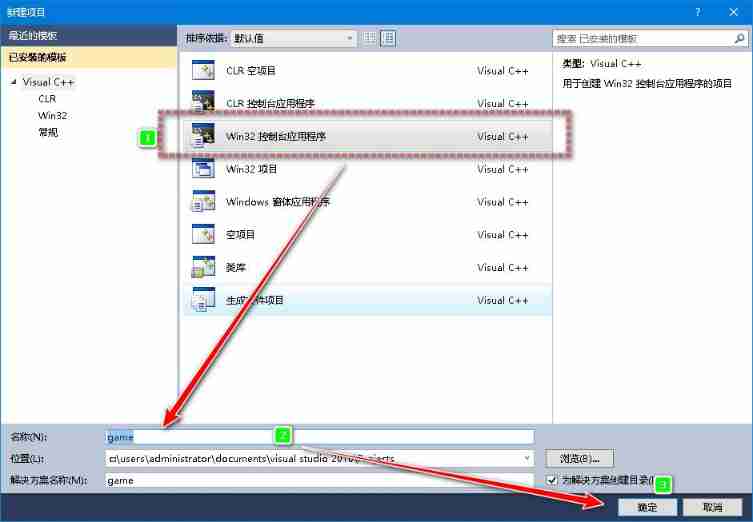
3. next step

4. choice Console Application and Empty item 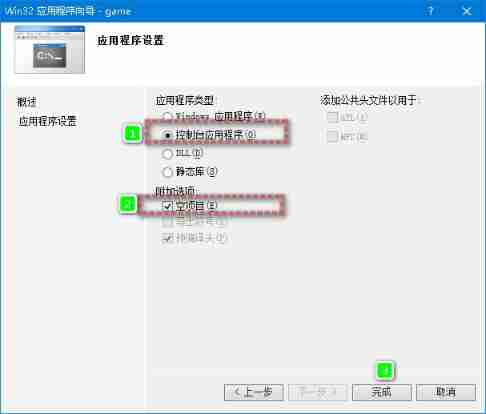
5. stay Resource file Right click on the folder , One choice add to - New item 
5. choice C++ file , Input file name , There is no need to add a suffix 
6. Add code
Copy and paste the complete code above . If you use the original author's code, you need to add or cancel Unicode Macro definition and addition tchar.h The header file .
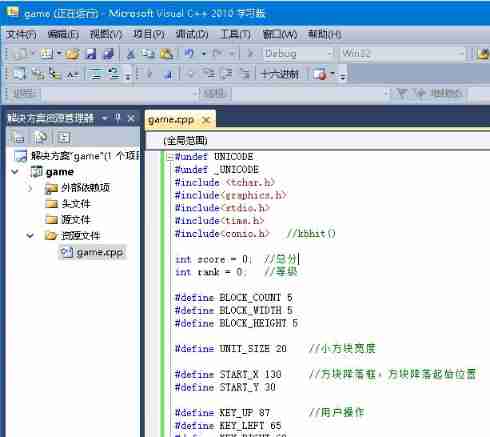
7. After adding the code ,VC2010 The program will load automatically External dependencies , Wait for loading , Click the run debug icon button .

8, Debug window , The interface is black , Press any key , Start entering the game 

8. When the game starts , The keyboard needs to be switched to uppercase input mode , That is to say CapsLk Key , To control the game .
9. Key :A S W D also Space Key ,
- Related macro definitions of control keys , It can be set according to the keyboard of personal computer .
#define KEY_UP 87 // The user action
#define KEY_LEFT 65
#define KEY_RIGHT 68
#define KEY_DOWN 83
#define KEY_SPACE 32
边栏推荐
- Meta enlarge again! VR new model posted on CVPR oral: read and understand voice like a human
- La taille de la pile spécifiée est petite, spécifiée à la sortie 328k
- Feign & Eureka & Zuul & Hystrix 流程
- Global and Chinese silicone defoamer production and marketing demand and investment forecast analysis report Ⓨ 2022 ~ 2027
- Analysis report on the development prospect and investment strategy of the global and Chinese laser chip industry Ⓑ 2022 ~ 2027
- 波浪动画彩色五角星loader加载js特效
- Machine learning - performance metrics
- Meta再放大招!VR新模型登CVPR Oral:像人一样「读」懂语音
- Flow management technology
- 北斗通信模块 北斗gps模块 北斗通信终端DTU
猜你喜欢

JS discolored Lego building blocks

The stack size specified is too small, specify at least 328k

Nexus builds NPM dependent private database

Detailed explanation of OSPF LSA of routing Foundation

VM virtual machine configuration dynamic IP and static IP access

SVG钻石样式代码

Google Earth engine (GEE) - Global Human Settlements grid data 1975-1990-2000-2014 (p2016)
Reasons for MySQL reporting 1040too many connections and Solutions

Redis explores cache consistency

逆向调试入门-PE结构-输入表输出表05/07
随机推荐
Example code of second kill based on MySQL optimistic lock
minimum spanning tree
Vs code set code auto save
Introduction to topological sorting
Yarn restart applications record recovery
leetcode 322. Coin Change 零钱兑换(中等)
Flow management technology
网络中的listen
Function test process in software testing
Camp division of common PLC programming software
Apache-atlas-2.2.0 independent compilation and deployment
学历、长相、家境普通的人,未来的发展方向是什么?00后的职业规划都已经整得明明白白......
CV顶会最佳论文得主分享:好论文是怎么炼成的?
The popular major I chose became "Tiankeng" four years later
Wang Xing's infinite game ushers in the "ultimate" battle
Has anyone ever encountered this situation? When Oracle logminer is synchronized, the value of CLOB field is lost
VM虚拟机配置动态ip和静态ip访问
简单的两个圆球loading加载
Colorful five pointed star SVG dynamic web page background JS special effect
Simple two ball loading