当前位置:网站首页>ROS知识:读取点云数据文件
ROS知识:读取点云数据文件
2022-06-23 11:53:00 【无水先生】
一、点云文件
点云文件其实很简单,就是单纯的一大群点的坐标构成的文件。本文档描述了 PCD(点云数据)文件格式,以及它在点云库 (PCL) 中的使用方式。打开一个pcd文件,看到如下:
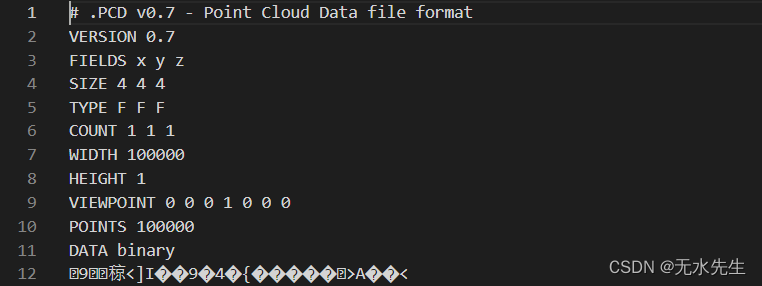
更详细信息见:(3条消息) ROS知识:点云文件.pcd格式
此处,我们从github上获取一个点云文件model.pcd,下面将演示如何从ROS读取。
二、创建工作空间:
mkdir -p ~/catkin_ws/src
cd ~/catkin_ws/src
catkin_init_workspace


cd ~/catkin_ws
catkin_make
catkin_create_pkg load_pcd pcl_conversions pcl_ros roscpp sensor_msgs
三、生成节点程序
在catkin_ws/src下生成一个新文件夹load_pcd,在里面的src目录下新建一个load_pcd.cpp文件,并把以下代码复制进去:
#include<ros/ros.h>
#include<pcl/point_cloud.h>
#include<pcl_conversions/pcl_conversions.h>
#include<sensor_msgs/PointCloud2.h>
#include<pcl/io/pcd_io.h>//which contains the required definitions to load and store point clouds to PCD and other file formats.

main (int argc, char **argv)
{
  ros::init (argc, argv, "UandBdetect");
  ros::NodeHandle nh;
  ros::Publisher pcl_pub = nh.advertise<sensor_msgs::PointCloud2> ("pcl_output", 1);
  pcl::PointCloud<pcl::PointXYZ> cloud;
  sensor_msgs::PointCloud2 output;
  pcl::io::loadPCDFile ("/home/huatec/catkin_ws/src/load_pcd/src/model.pcd", cloud);
// 修改自己pcd文件所在路径
  //Convert the cloud to ROS message
  pcl::toROSMsg(cloud, output);
  output.header.frame_id = "odom";

  //this has been done in order to be able to visualize our PointCloud2 message on the RViz visualizer
    //!!!这一步需要注意,是后面rviz的 fixed_frame 重点!!
  ros::Rate loop_rate(1);
  while (ros::ok())
  {
    pcl_pub.publish(output);
    ros::spinOnce();
    loop_rate.sleep();
  }
  return 0;
}
这里进入load_pcd/src,将model.pcd也放在该目录下。
三、修改CMakelist文件
add_executable(load_pcd src/load_pcd.cpp)
add_targate_libarary (read_pcd ${catkin_LIBRARIES})
四、package.xml中添加:
<build_depend>libpcl-all-dev</build_depend>
<exec_depend>libpcl-all</exec_depend>
五、编译功能包
5.1 终端进入catkin_ws目录:
catkin_make编译成功后就OK了。
5.2 在RVIZ里显示
1)分别在各自终端:
roscore2)再次打开终端
rosrun load_pcd load_pcd可以rostopic list看一下/output这个消息有没有发布出来
3)再次打开终端
rosrun rviz rviz
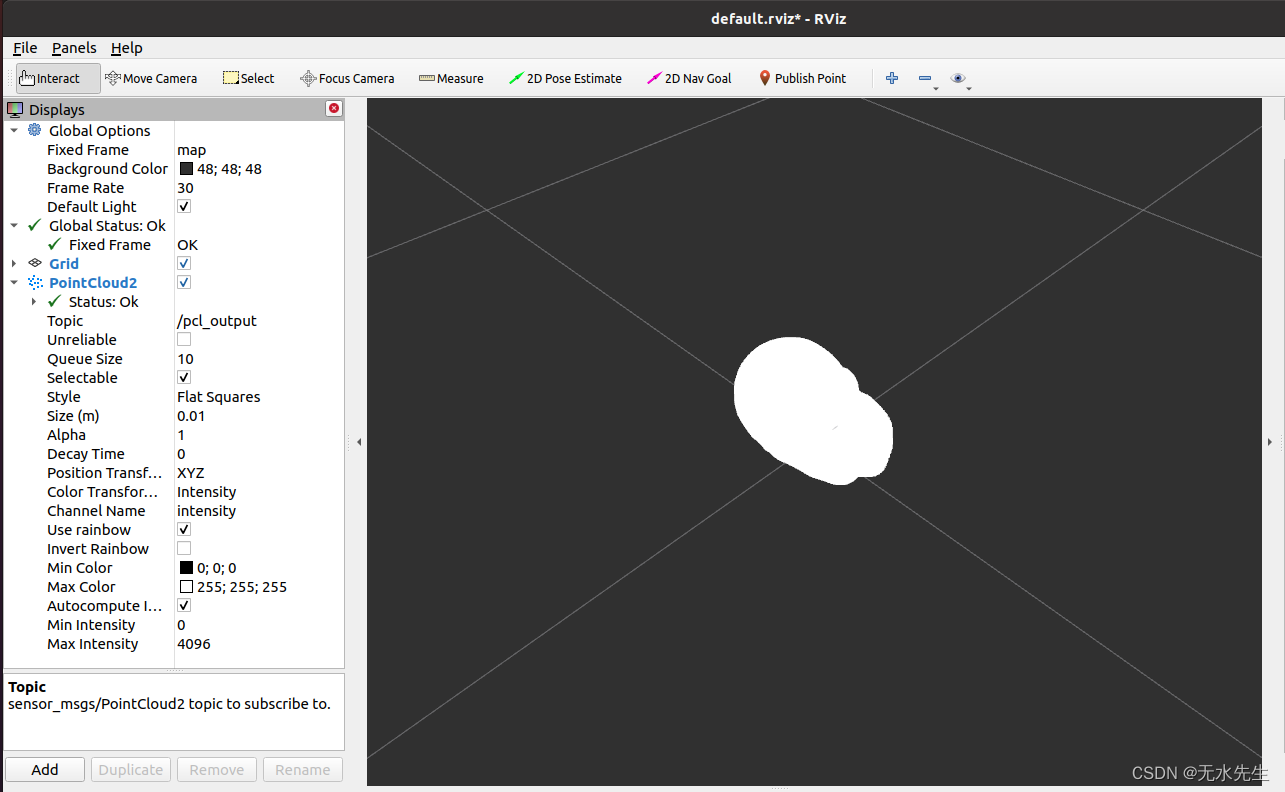
打开rviz后add一个pointcloud2,话题选择pcl_output即可看到图像。
有可能在打开rviz后status报tf相关错,这时开个终端执行以下命令即可:
rosrun tf static_transform_publisher 0.0 0.0 0.0 0.0 0.0 0.0 map odom 100
六、结果显示
进入rviz后,add按钮,加入pointcloud2,于是显示出model.pcd的图像:
边栏推荐
- Meta said that the UK security law may "scan all private information" or infringe privacy
- Comment Huawei Cloud réalise l'architecture mondiale de réseau audio - vidéo en temps réel à faible latence
- Getting started with redis - Chapter 2 - data structures and objects - linked lists
- HMS Core 视频编辑服务开放模板能力,助力用户一键Get同款酷炫视频
- Qt知识:视图框架QGraphicsWidget详解
- 2022年全国最新消防设施操作员(初级消防设施操作员)模拟题及答案
- 利用XtraDiagram.DiagramControl进行流程图形的绘制和控制
- 10-- 根据中序遍历和后序遍历,构造二叉树
- 并购增资或将有望启动东软越通新动能?
- QT5知识:QT绘制图形
猜你喜欢

PPT制作3D旋转动画从入门到进阶

Mysql, how to calculate the maximum value using stored procedures

Qt 知识:使用 QGraphicsPixmapItem类
【进程和线程】

Comment Huawei Cloud réalise l'architecture mondiale de réseau audio - vidéo en temps réel à faible latence
电脑坏了,换了台电脑,装node环境的时候出了问题,报错URL not defined

Meta said that the UK security law may "scan all private information" or infringe privacy

Redis 入门-第二篇-数据结构与对象-链表

【云原生&微服务八】Ribbon负载均衡策略之WeightedResponseTimeRule源码剖析(响应时间加权)

Common fault analysis and Countermeasures of MySQL in go language
随机推荐
How to use note taking software flowus and note for interval repetition? Based on formula template
自动化或电气专业必备软件
Deep analysis and Simulation of list
六维图剖析:中国建筑集团有限公司企业成长性分析
Which securities company is the most reliable and safe to open an account
汉源高科1路千兆光口转4路千兆以太网电口千兆1光4电光纤收发器
ESP32-C3入门教程 问题篇⑦—— fatal error: esp_bt.h: No such file or directory 找不到esp_bt.h
杜邦分析法解读:安阳钢铁股份有限公司企业投资价值何在?
汉源高科8路电话+1路百兆以太网RJ11电话光端机 8路PCM电话光端机
Is there any regulation on the redemption time of financial products?
你真的理解LDO的輸出電容嗎!?
有没有碰到过flink1.15.0 和 flink-cdc-mysql 2.2.1不兼容的情况?f
go-zero微服务实战系列(六、缓存一致性保证)
爱可可AI前沿推介(6.23)
电脑坏了,换了台电脑,装node环境的时候出了问题,报错URL not defined
[cloud resident co creation] in the code free era, how does software development go to everyone?
【云原生&微服务八】Ribbon负载均衡策略之WeightedResponseTimeRule源码剖析(响应时间加权)
Openharmony application development [01]
Easy to understand soft route brushing tutorial
Where is the safest and most formal way to open an account at present?