当前位置:网站首页>Deploy the cow like customer network project on the ECS
Deploy the cow like customer network project on the ECS
2022-06-30 08:18:00 【Kevin_ Opt】
Deploy the cow like customer network project on the ECS

Memory is better to have 4g, To run .Nginx Acting as a reverse agent , The forward proxy is the proxy browser , A reverse proxy is a proxy server .Tomcat Yes, it is Java Developed , So the installation Tomcat Before you install JRE; I want to package the program on the server , So the installation Maven, If there are environmental differences , stay windows There may be a problem with packaging and then passing it , So it's best to package on the server . In a real production environment , One software can deploy multiple instances , for example Tomcat,MySQL,Redis etc. . I am learning , Just deploy to a server . visit Linux Virtual machines can use Putty.
Command line file :
pscp file name [email protected] Address :/test
use Bitvise perhaps Xftp Wait for the software to pass .
download unzip, First cd Go to the root , In use yum search
cd /
yum list unzip*
yum install -y unzip.x86_64 java-1.8.0-openjdk.x86_64
java -version
install JRE
Note that the project needs JDK12 To run .
yum list java*
yum install -y
install Maven
Go to the official website to download 3.6.3 Version of the installation package , Download and install to /opt Under the table of contents
wget -i -c  link
tar -xzvf apache-maven-3.6.3-bin.tar.gz -C /opt
# Configure environment variables to /etc/profile
vim /etc/profile
# Append after , Save and exit
export PATH=$PATH:/opt/apache-maven-3.6.3
# Refresh
source /etc/profile
# Print PATH
echo $PATH
# View version
mvn -version
# Modification source , Get into conf Folder
vim settings.xml
stay mirrors Add :
<mirror>
    <id>nexus-aliyun</id>
    <mirrorOf>central</mirrorOf>
    <name>Nexus aliyun</name>
    <url>https://maven.aliyun.com/repository/public</url>
</mirror>
install MySQL
It has been installed here , To install, please refer to another blog . You can also go to the official website to download yum The corresponding library file , Reuse yum Install library files , Can use yum Download the latest MySQL, install mysql-community-server.x86_64.
yum install -y Library filename
start-up mysql:
systemctl start mysqld
see Mysql edition :
mysql -V
View the generated temporary password :
grep 'password' /var/log/mysqld.log
After login , Change Password :
alter user root@localhost identified by ' New password ';
to mysql Import data
unzip -d /test/sql init-sql.zip
Sign in mysql, perform sql file
create database community;
use community;
# Import files
source /test/sql/init_schema.sql;
source /test/sql/init_data.sql;
source /test/sql/tables_mysql_innodb.sql;
show tables;
Next, we need to header_url Medium localhost Of url Change to a network accessible .
select id,username,header_url from user;
update user set header_url = 'http://images.nowcoder.com/head/492t.png' where header_url like '%localhost%';
install Redis
cd /
yum list redis*
yum install -y redis.x86_64
systemctl start redis
systemctl status redis
test redis
redis-cli
keys *
exit
install kafka
tar -xzvf kafka_2.12-2.3.0.tgz -C /opt
# Enter into config Under the folder
vim zookeeper.properties
 vim server.properties
Basically, as long as the save path conforms to linux Path specification is OK .
Enter the first kafka The installation path , Don't enter bin Catalog . Because it's the server , It needs to be started in the background .
start-up zookeeper
bin/zookeeper-server-start.sh -daemon config/zookeeper.properties
start-up kafka
nohup bin/kafka-server-start.sh config/server.properties 1>/dev/null 2>&1 &
Test for successful startup kafka
bin/kafka-topics.sh --list --bootstrap-server localhost:9092
If an error is displayed :
close tomcat, Then execute the above command to restart , And test the .
shutdown.sh
install ElasticSearch
tar -xzvf elasticsearch-6.8.23.tar.gz -C /opt
unzip -d /opt/elasticsearch-6.8.23/plugins/ik elasticsearch-analysis-ik-6.8.23.zip
# Get into config Catalog
vim elasticsearch.yml
Set cluster name , Data and log storage location :
modify jvm Set up , You can set the occupied space according to the memory size
vim jvm.options

ElasticSearch Don't allow root User start , You need to create a user , And start with this user
groupadd nowcoder
useradd nowcoder1 -p  Set the password  -g nowcoder
cd /opt
chown -R nowcoder1:nowcoder *
cd /tmp
chown -R nowcoder1:nowcoder *
su - nowcoder1
# Get into elasticsearch After installing the directory , Background start ES
bin/elasticsearch -d
su
# Test for successful installation
curl -X GET "localhost:9200/_cat/health?v"
Wkhtmltopdf
cd /
yum list wkhtmlyopdf*
yum install -y wkhtmltopdf.x86_64
need gui Support , Install virtual gui Program
yum install -y xorg-x11-server-Xvfb.x86_64
# test
xvfb-run --server-args="-screen 0, 1024x768x24" wkhtmltoimage https://www.baidu.com 1.png
It is troublesome to write commands like this every time , So you can pack it
cd /opt
vim wkhtmltoimage.sh
# add to
xvfb-run --server-args="-screen 0, 1024x768x24" wkhtmltoimage "[email protected]"
chmod +x wkhtmltoimage.sh
cd /test
/opt/wkhtmltoimage.sh https://www.baidu.com 2.png
install tomcat
tar -xzvf apache-tomcat-9.0.64.tar.gz -C /opt
vim /etc/profile
# Append after
export PATH=$PATH:/opt/apache-tomcat-9.0.64/bin
source /etc/profile
echo $PATH
start-up tomcat
startup.sh
install nginx
yum list nginx*
yum install -y nginx.x86_64
vim /etc/nginx/nginx.conf
Comment out this paragraph 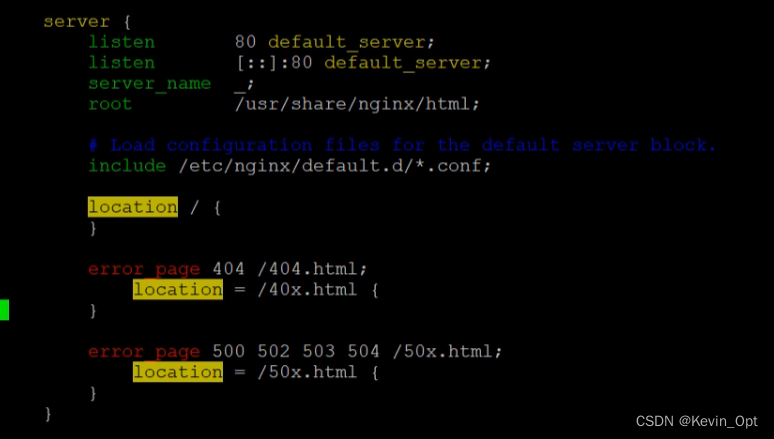
Add at the end of this paragraph :
upstream myserver {

        server 127.0.0.1:8080 max_fails=3 fail_timeout=30s;
}

server {

        listen 80;
        server_name 49.232.164.108;
        location / {

                proxy_pass http://myserver;
        }
}
start-up nginx
systemctl start nginx
Deployment code
Because the root path is not processed , Therefore access / Be equivalent to accessing /index, One way is to access / Redirect to /index, Another way
You can put webapps Delete all in , Add your own projects .
Adjust the code :
1、 stay application.properties Zhongba /community Change to empty .
2、 stay global.js Zhongba /community Change to empty 
3、 stay HomeController Medium plus
@RequestMapping(path = "/", method = RequestMethod.GET)
public String root(){

    return "forward:/index";
}
4、 stay pom.xml Modify the packaging method and packaging name in 

5、 By setting , Choose which profile to use , And modify the corresponding items 
Change to server ip
6、tomcat It has main function , One Java There can't be two programs main function , So rewrite the method
The reconstruction CommunityServletInitializer class , Inherit SpringBootServletInitializer, Rewriting methods :
@Override
protected SpringApplicationBuilder configure(SpringApplicationBuilder builder) {

    return builder.sources(CommunityApplication.class);
}
tomcat Access... From this class .
Use maven Of clean hold target Delete , And transfer the entire project file to the ECS .
unzip -d /test community.zip
# First download maven And perform packaging , Will download related dependencies , It will take some time
# Get into community Medium pack
mvn package -Dmaven.test.skip=true
If an error is reported :[ERROR] No compiler is provided in this environment. Perhaps you are running on a JRE rather than a JDK?
yum install java-devel
Copy it to tomcat in :
mv ROOT.war /opt/apache-tomcat-9.0.64/webapps/
linux Case sensitive , Log on first MySQL database
show variables like '%case%';
vim /etc/my.cnf
# add
lower_case_table_names=1
# restart
service mysqld restart
This for mysql8 no way . Manually change the table name to upper case .
边栏推荐
- 全栈最全性能测试理论-总结
- String and underlying character types of go data type
- Deep learning - brnn and DRNN
- Do you know the IP protocol?
- Why don't you know what to do after graduation from university?
- Sword finger offer II 075 Array relative sort (custom sort, count sort)
- MySQL cannot connect to the intranet database
- C# Console. Writeline() function output format
- tp5设置直接下载文件
- 小程序使用二维码插件
猜你喜欢

Sword finger offer II 075 Array relative sort (custom sort, count sort)
![[nvme2.0b 14-7] set features (Part 1)](/img/0d/c26ae2475ae69291d83b4096ea942b.png)
[nvme2.0b 14-7] set features (Part 1)
Wechat applet reports errors using vant web app

电流探头的干扰源电流谱测试

CRM&PM如何帮助企业创造最优销售绩效

Deep learning -- language model and sequence generation

【NVMe2.0b 14-1】Abort、Asynchronous Event Request、Capacity Management command

【NVMe2.0b 14-6】Format NVM、Keep Alive、Lockdown command

Redis设计与实现(二)| 数据库(删除策略&过期淘汰策略)

从0开始构建一个瀚高数据库Docker镜像
随机推荐
微信小程序使用vant weapp报错
【NVMe2.0b 14-2】Create/Delete Queue
F12 packet capture is used for the whole process analysis of postman interface test
vulfocus入门靶机
Redis设计与实现(四)| 主从复制
MySQL quotation sentence is unlocked: algorithm=insert, lock=none
Cesium learning notes (IV) visual image & Terrain
Experiment 3 remote control
Opencv video
Go 数据类型篇之字符串及底层字符类型
Deep learning -- using word embedding and word embedding features
Map,String,Json之間轉換
1162 Postfix Expression
MIME类型大全
Leetcode47. full arrangement II
Experiment 4 QT
【NVMe2.0b 14-5】Firmware Download/Commit command
Final review -php learning notes 2-php language foundation
【NVMe2.0b 14-7】Set Features(上篇)
Dlib database face