当前位置:网站首页>Flutter start from scratch 008 form
Flutter start from scratch 008 form
2022-06-30 11:15:00 【Hua Weiyun】
Forms Form
In actual business development , Before formally submitting data to the server , Will check the validity of the data in each input box , But for every TextField It's a very troublesome thing to check all of them . If the user wants to clear a group TextField The data of , And very troublesome .flutter It also provides us with a From Components , It can group input fields , Then conduct unified operation , Such as content verification , Input box reset , Input content, save, etc .
Form Inherited from StatefulWidget object , Its corresponding state class is FormState. Let's see Form The definition of a class :
Form({ required Widget child, bool autovalidate = false, WillPopCallback onWillPop, VoidCallback onChanged,})autovalidate : Check the input content automatically , When it comes to true when , Each child FormFeild When the content changes , Will automatically verify the validity of , And display error messages directly . otherwise , You need to call FormState.validate() To manually verify .
onWillPop: decision Form Whether the route can directly return to ( If you click the back button ), The callback returns a Future object , If Future The end result is false, The current route will not return ; If true, It will return to the previous route . This property is usually used to block the return button .
onChanged:Form Any one of them FormField This callback is triggered when the content changes .
Form The descendant element of must be FormField type ,FormField Is an abstract class , Define several properties ,FormState They are used internally to complete operations ,FormField Part of the definition is as follows :
const FormField({ ... FormFieldSetter<T> onSaved, // Save callback FormFieldValidator<T> validator, // Verify the callback T initialValue, // Initial value bool autovalidate = false, // Check automatically .})For ease of use ,Flutter Provides a TextFormField Components , It is inherited from FormField class , It's also TextField A packaging class of , So in addition to FormField In addition to the properties defined , It also includes TextField Properties of .
FormState by Form Of State class , Can pass Form.of() or GlobalKey get . We can use it to correct Form The descendants of FormField Carry out unified operation . Let's take a look at three common methods :
FormState.validate(): After calling this method , Would call Form descendants FormField Of validate Callback , If there is a verification failure , Then return to false, All failed items will return the error prompt returned by the user .
FormState.save(): After calling this method , Would call Form descendants FormField Of save Callback , Used to save form content
FormState.reset(): After calling this method , Will be the offspring of FormField Empty the contents of .
Example
Let's modify the above example of user login , Verify... Before submitting :
The username cannot be empty , Prompt if it is empty “ The username cannot be empty ”.
Password cannot be less than 6 position , If it is less than 6 For a hint “ The password cannot be less than 6 position ”.
class _MyHomePageState extends State<MyHomePage> { TextEditingController userController = TextEditingController(); TextEditingController passController = TextEditingController(); GlobalKey _globalKey = GlobalKey<FormState>(); @override Widget build(BuildContext context) { return Scaffold( appBar: AppBar( title: Text(widget.title), ), body: Form( key: _globalKey, // Set up globalKey, For later retrieval FormState autovalidateMode: AutovalidateMode.onUserInteraction, child: Column( children: [ TextFormField( autofocus: true, controller: userController, decoration: InputDecoration( labelText: " user name ", hintText: " User name or email ", icon: Icon(Icons.person), ), validator: (v) { return v!.trim().isNotEmpty ? null : ' The username cannot be empty '; }, ), SizedBox( height: 20, ), TextFormField( controller: passController, decoration: InputDecoration( labelText: " password ", hintText: " Input password ", icon: Icon(Icons.lock), ), obscureText: true, validator: (v) { return v!.trim().length > 5 ? null : ' The password cannot be less than 6 position '; }, ), Padding( padding: EdgeInsets.only(top: 20), child: Expanded( child: ElevatedButton( child: Padding( padding: EdgeInsets.all(16), child: Text(" Sign in "), ), onPressed: () { // adopt _formKey.currentState obtain FormState after , // call validate() Method to verify whether the user name and password are legal , check // Submit the data after passing . if((_globalKey.currentState as FormState).validate()){ print(" Verification passed , Start submission "); } }, ), ), ), ], ), ), ); }}The operation effect is as follows
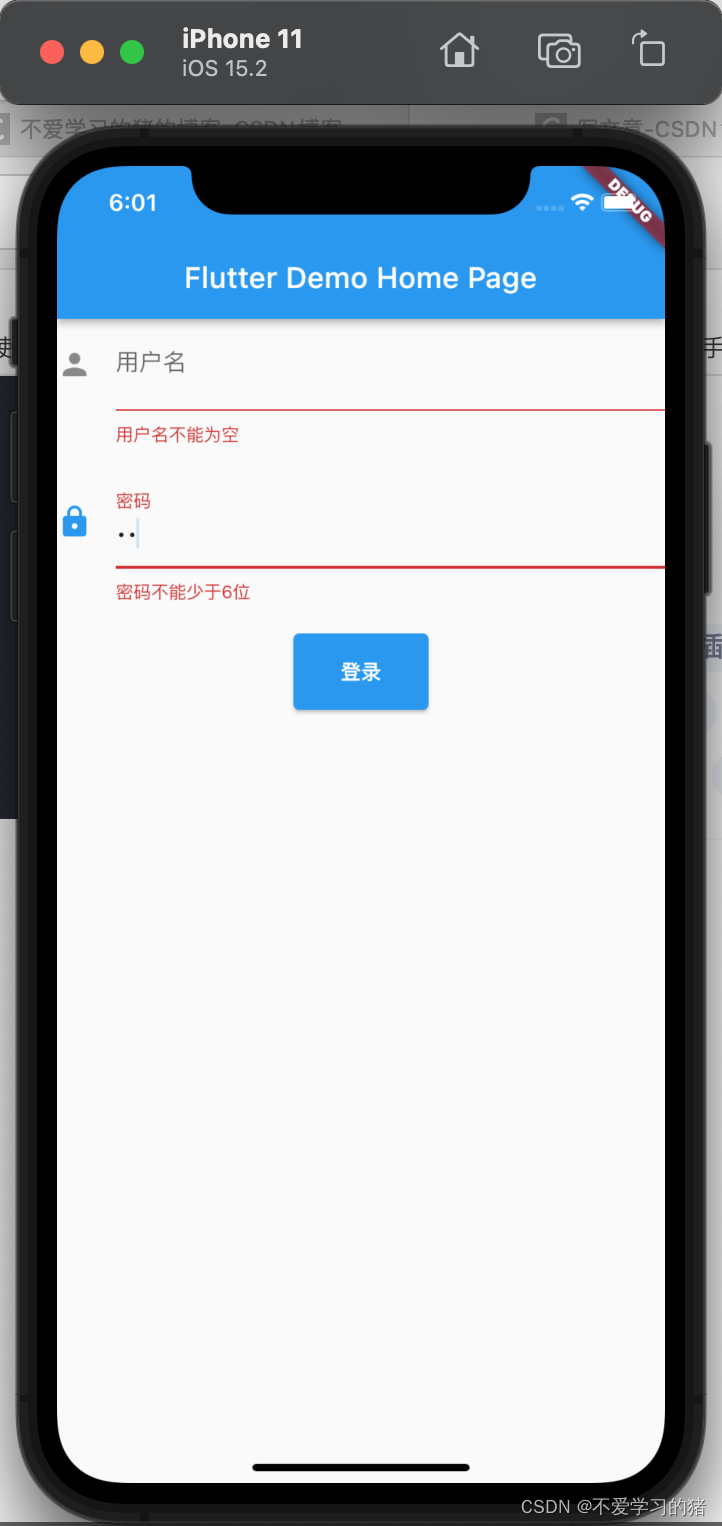
Be careful , Login button onPressed Method can't pass Form.of(context) To get , as a result of , Here context by FormTestRoute Of context, and Form.of(context) According to the designation context Find the root , and FormState Is in FormTestRoute In the subtree , So no . The right way is through Builder To build the login button ,Builder Will widget Node context As a callback parameter :
Expanded( // adopt Builder To get ElevatedButton Where widget The true of the tree context(Element) child:Builder(builder: (context){ return ElevatedButton( ... onPressed: () { // Because of this widget It's also Form The daughter of widget, So you can get FormState if(Form.of(context).validate()){ // Validation passes submission of data } }, ); }))In the next section, we will introduce indicators
边栏推荐
- 考研这些“不靠谱”的经验有多害人?
- ESP32-C3入门教程 基础篇⑫——量产烧写设备配置和序列号, NVS partition分区确认, NVS 分区生成程序, csv转bin
- [STL source code analysis] iterator
- 导致系统性能失败的10个原因
- LVGL 8.2 menu from a drop-down list
- When does the database need to use the index [Hangzhou multi surveyors] [Hangzhou multi surveyors _ Wang Sir]
- 100 important knowledge points that SQL must master: updating and deleting data
- Handler source code analysis
- 深潜Kotlin协程(十八):冷热数据流
- iptables目标TPROXY
猜你喜欢

高通发布物联网案例集 “魔镜”、数字农业已经成为现实

焕发青春的戴尔和苹果夹击,两大老牌PC企业极速衰败

The reasoning delay on iphone12 is only 1.6 MS! Snap et al. Analyzed the transformer structure latency in detail, and used NAS to find out the efficient network structure of mobile devices

第一届中国数字藏品大会即将召开

Record the memory leak of viewpager + recyclerview once

It's time for the kotlin coroutine to schedule thread switching to solve the mystery

【西安交通大学】考研初试复试资料分享

Oceanbase installation Yum source configuration error and Solutions

Handler source code analysis

Time complexity and space complexity
随机推荐
100 important knowledge points that SQL must master: using stored procedures
Use of switch statement in go language learning
时间复杂度与空间复杂度
基于HAL库的按键(KEY)库函数
我们公司使用 7 年的这套通用解决方案,打通了几十个系统,稳的一批!
SQL必需掌握的100个重要知识点:分组数据
[leetcode 239] sliding window
LeetCode Algorithm 86. Separate linked list
Classic interview question: responsible modules, how do you design test cases for these function points? [Hangzhou multi surveyors] [Hangzhou multi surveyors \wang Sir]
100 important knowledge points that SQL must master: join table
100 important knowledge points that SQL must master: updating and deleting data
H3C switch emptying configuration
The two e-commerce bigwigs' lacy news screens represent the return of e-commerce to normal, which will be beneficial to the real economy
语音识别-基础(一):简介【语音转文本】
Wireguard simple configuration
深潜Kotlin协程(十八):冷热数据流
Train an image classifier demo in pytorch [learning notes]
ArrayList与顺序表
启明星辰集团运维安全网关(堡垒机)再次夺得榜首!
第一届中国数字藏品大会即将召开