当前位置:网站首页>Cmake tutorial (I)
Cmake tutorial (I)
2022-06-28 23:09:00 【It's starting to boil】
CMake Official documents
Refer to the official cmake3.24 Course translation . I'm going to use cmake 3.16 To demonstrate examples .
https://cmake.org/cmake/help/v3.24/guide/tutorial/A%20Basic%20Starting%20Point.html
1、 The starting point of the foundation
Build and run a basic project ( Executable files built from source code files ), This will be the starting point of our tutorial .
1.1、 Create project folder
Create project folder rd-project, And enter
mkdir rd-project
cd rd-project
1.2、 Create source code file
Source code file tutorial.cxx, The content of the file is the same as the code for calculating the square root of the official tutorial tutorial.cxx ( stay cmake Source code Step1 The catalog provides )
#include <stdio.h>
#include <stdlib.h>
#include <math.h>
int main(int argc, char* argv[]){

    if(argc<2){

        fprintf(stdout, "Uage: %s number\n", argv[0]);
        return 1;
    }
    double inputValue = atof(argv[1]);
    double outputValue = sqrt(inputValue);
    fprintf(stdout, "The square root of %g is %g\n",inputValue, outputValue);
    return 0;
}
1.3、 To write CMakeLists.txt file
stay Step1 Create a CMakeLists.txt file , The most basic project only needs one three lines CMakeLists.txt file .
vi CMakeLists.txt
# cmake edition  #  see cmake edition cmake --version  Used here 3.16
cmake_minimum_required(VERSION 3.16)

#  project name
project(Tutorial)

#   add to app The source file
add_executable(Tutorial tutorial.cxx)
Be careful , This example is in the CMakeLists.txt Lower case commands are used in the file .CMake Capital letters are supported 、 Lower case and mixed case commands .
2、 Build and run
2.1、 Create a build directory
cd ..
mkdir rd_build
2.2、 Generate a local build system
Go to the build directory and run CMake To configure the project and generate a local build system
cd rd_build
cmake ../rd-project
2.3、 Actual compilation / Link items
Build the system locally to actually compile / Link items :
cmake --build .
thus , Build compilation complete .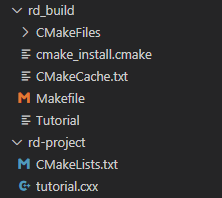
2.4、 Try running an executable
./Tutorial 4294967296
./Tutorial 10
./Tutorial
The operation results are as follows 
3、 Add the version number and configurable header file to the project
The first feature we will add is to provide a version number for our executables and projects . Although we can do this alone in the source code , But use CMakeLists.txt Provides greater flexibility .
3.1、 Use project() Command to set the project name and version number
cmake_minimum_required(VERSION 3.16)

# set the project name and version
project(Tutorial VERSION 1.0)
3.2、 Configure a header file , Pass the version number to the source code
configure_file(TutorialConfig.h.in TutorialConfig.h)
3.3、 Because the configuration file will be written to the binary tree , We must add this directory to the path list to search for included files .
target_include_directories(Tutorial PUBLIC
                           "${PROJECT_BINARY_DIR}"
                           )
3.4、 Use your favorite editor , Create in the source directory TutorialConfig.h.in, Contains the following :
// the configured options and settings for [email protected]@ The referenced variables can be accessed through CMakeLists.txt To set up
#define Tutorial_VERSION_MAJOR @[email protected]
#define Tutorial_VERSION_MINOR @[email protected]
When CMake When configuring this header file ,@[email protected] and @[email protected] The value of will be replaced .
tutorial.cxx Contains the configuration header file TutorialConfig.h
to update tutorial.cxx Source code , Print out the name and version number of the executable .cxx The contents are as follows :
#include <math.h>
#include <stdio.h>
#include <stdlib.h>
#include <iostream>
#include "TutorialConfig.h"

int main(int argc, char *argv[]) {

  if (argc < 2) {

    // report version
    std::cout << argv[0] << " Version " << Tutorial_VERSION_MAJOR << "."
              << Tutorial_VERSION_MINOR << std::endl;
    std::cout << "Usage: " << argv[0] << " number" << std::endl;
    return 1;
  }

// double inputValue = atof(argv[1]);
  const double inputValue = std::stod(argv[1]);
  double outputValue = sqrt(inputValue);
  fprintf(stdout, "The square root of %g is %g\n", inputValue, outputValue);
  return 0;
}
4、 Appoint c++ standard
Next , Let us in tutorial.cxx Lieutenant general atof Replace with std::stod, Add some... To our project c++ 11 characteristic . meanwhile , Delete
#include .
// file tutorial.cxx

// double inputValue = atof(argv[1]);
  const double inputValue = std::stod(argv[1]);
We need to be in CMake The code explicitly declares the correct standards it should use .
stay CMake Enable access to specific c++ The simplest way to support standards is to use CMAKE_CXX_STANDARD Variable .
In this tutorial , take cmakellists .txt In the document CMAKE_CXX_STANDARD The variable is set to 11, And will CMAKE_CXX_STANDARD_REQUIRED Set to True.
You have to make sure you're in add_executable Added... Above the call CMAKE_CXX_STANDARD Statement .
Tutorial to this point , complete CMakeLists.txt The contents are as follows :
# cmake edition  #  see cmake edition cmake --version  Used here 3.16
cmake_minimum_required(VERSION 3.16)

# specify the C++ standard
set(CMAKE_CXX_STANDARD 11)
set(CMAKE_CXX_STANDARD_REQUIRED True)

#  project name
# project(Tutorial)
# set the project name and version
project(Tutorial VERSION 1.0)

#   add to app The source file
add_executable(Tutorial tutorial.cxx)

#  The configuration file
configure_file(TutorialConfig.h.in TutorialConfig.h)

target_include_directories(Tutorial PUBLIC
                           "${PROJECT_BINARY_DIR}"
                           )
5、 Rebuild and test the changes
Refer to the above steps 2.2 To 2.4 refactoring , And try to run the executable , Observe changes 

边栏推荐
- Interpretation of papers (DCN) towards k-means-friendly spaces: simultaneous deep learning and clustering
- leetCode-栈类型详解
- Is the account opening of Guosheng securities really safe and reliable
- Leetcode 324 Swing sort II [tri double pointeur] le chemin du leetcode pour l'héroding
- Powerful open source API interface visual management platform Yapi
- Do you know all the wonderful functions of the vlookup function?
- Langage C - analyse des mots
- 收藏 | VLOOKUP函数的这些妙用你都知道吗?
- What is the difference between WMS warehouse management system and ERP
- LeetCode 324 摆动排序 II[排序 双指针] HERODING的LeetCode之路
猜你喜欢

一文读懂,WMS仓储管理系统与ERP有什么区别

On the necessity and solution of building a campus online teaching video convergence platform

2022年PMP项目管理考试敏捷知识点(4)

Master the usage of const

Fanuc robot_ Introduction to Karel programming (2)_ Usage of general IO signal

The love digital smart 2022 summit opens, sharing data strategy and building data-driven organization methodology

Basic knowledge diagram of K-line Diagram -- meaning of single K-line
在线文本过滤小于指定长度工具

How to analyze the trend chart of London gold market with the moving average
LINQ linked table query
随机推荐
在线SQL转HTMLTable工具
强大的开源API接口可视化管理平台-YApi
That's how he did it!
带链接跳转的微信红包封面制作教程和使用指南
k线图基础知识图解——单根K线的含义
Sample code of using redis to realize the like function
小样本利器2.文本对抗+半监督 FGSM & VAT & FGM代码实现
A password error occurred when docker downloaded the MySQL image to create a database link
TDD和自动化测试
【Try to Hack】nmap
[Chapter 2 of word tutorial series] how to set the table on each page to have a header in word
[deep learning] (3) encoder mechanism in transformer, complete pytoch code attached
hiredis的代码示例
全面掌握const的用法《一》
Fanuc robot_ Introduction to Karel programming (2)_ Usage of general IO signal
想问问,股票开账户如何优惠开户?网上开户安全么?
在线文本过滤小于指定长度工具
【Word 教程系列第 1 篇】如何去除 Word 表格中的箭头
How powerful is the Zadig build? Practice together
After crossing, she said that the multiverse really exists