当前位置:网站首页>Redis(一)--Redis入门(1)--Redis介绍、安装与启动、常用配置
Redis(一)--Redis入门(1)--Redis介绍、安装与启动、常用配置
2022-06-29 18:15:00 【其乐无涯】
Redis介绍
Redis之父 Salvatore Sanfilippo
Redis是Key-Value型NoSQL数据库。
Redis将数据存储在内存中,同时也能持久化到磁盘。
Redis常用于缓存,利用内存的高效提高程序的处理速度。
Redis特点
速度快
广泛的语言支持
持久化
多种数据结构
主从复制
分布式与高可用
Redis的安装与启动
在Linux系统安装Redis
Redis官网下载地址
https://redis.io/download/
具体安装步骤请参考Linux基础博客中的编译安装Redis部分:
服务器技术(一)–Linux基础入门(4)–安装与卸载应用程序
在Windows系统安装Redis
Redis官方只提供了Linux系统的安装包,默认是不支持Windows系统的。微软有个研发小组对Redis底层的重构,开发出了一款能在Windows平台上运行的Redis。
Github地址:
https://github.com/MicrosoftArchive/redis
打开Github地址,找到Releases鼠标点击打开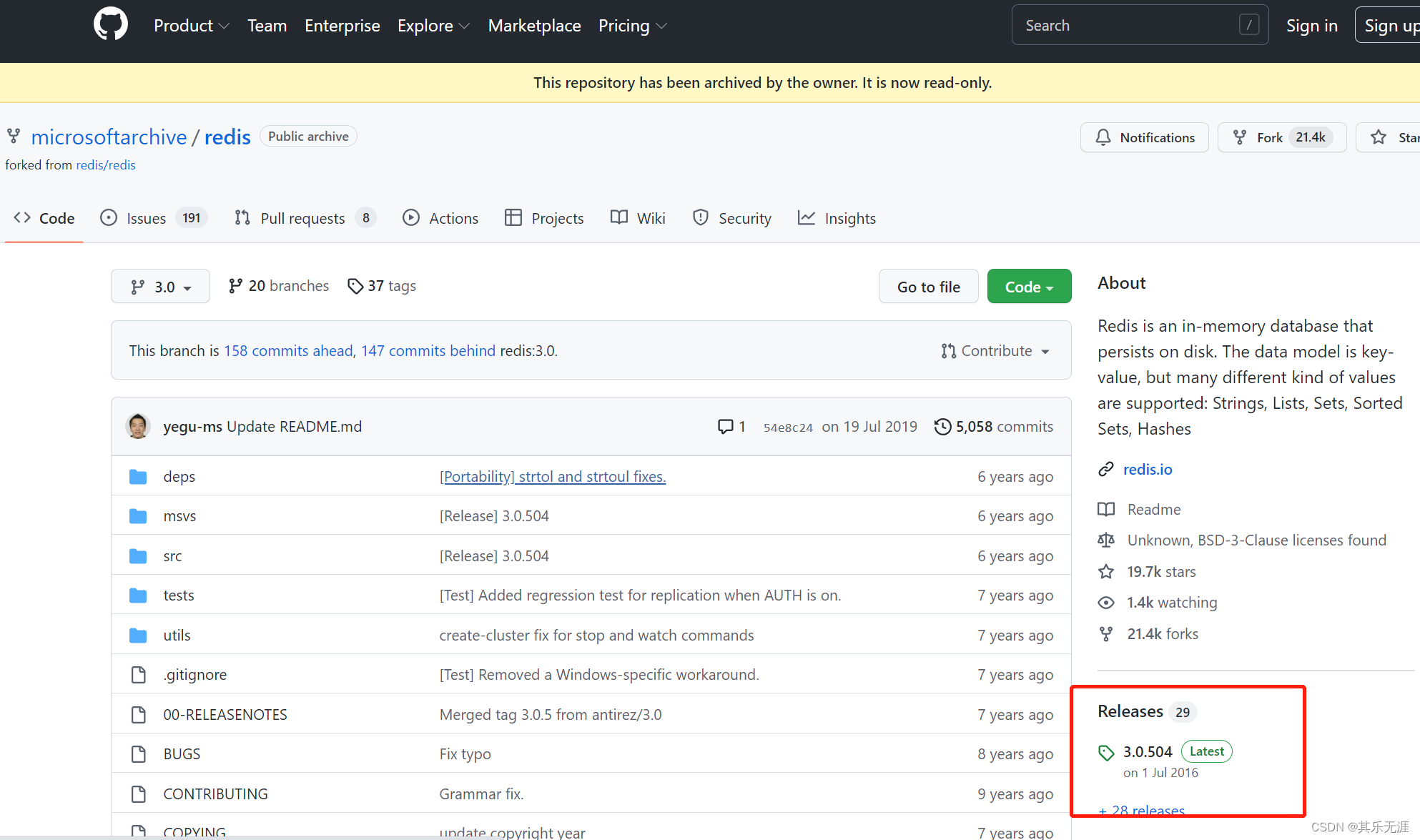
然后找到zip版本,点击下载
下载完成后解压文件
解压完后打开运行对话框(Win+R),输入cmd
在弹出的命令行中切换目录到Redis解压的路径
然后输入redis-server redis.windows.conf启动Redis。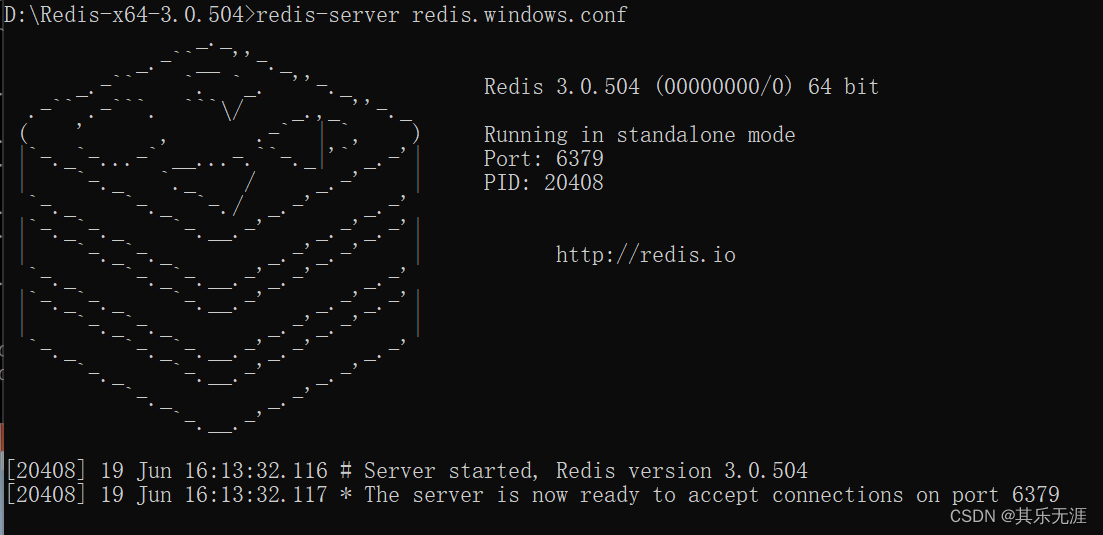
Redis的常用基本配置

打开Xshell连接虚拟机,切换目录到Redis安装的路径,执行./src/redis-server redis.conf启动Redis
启动成功后,此时Redis在前台运行,我们按下Ctrl+C回到命令行,Redis也会随之退出。
为了让Redis在系统后端运行,我们执行vim redis.conf打开配置文件按PgDn往下找到如图位置
其中daemonize为守护进程的意思,说白了就是是否后台运行,我们把参数值改为yes保存。然后我们再启动Redis并没显式启动日志
但是我们可以输入netstat -tulpn验证Redis已经后台启动。
如果想退出Redis我们可以输入kill -9 对应的进程编号,如图。(不太建议,后面有正常退出的方案)再次输入netstat -tulpn查看Redis端口就不见了。
我们再次启动Redis,然后可以输入./src/redis-cli连接Redis,我们可以输入ping看看Redis回应
输入exit退出redis-cli客户端。
可以输入./src/redis-cli shutdown关闭Redis进程
输入vim redis.conf打开配置文件,在138行有端口号配置项,我们可以改成6380
然后继续往下找,大概354行有日志文件logfile配置项
我们可以将值改为redis.log
配置完保存退出。然后重新启动Redis,当前路径下就多了个redis.log文件
我们可以执行cat redis.log查看日志
我们再想用客户端连接就需要加端口号了,如./src/redis-cli -p 6380
我们可以输入select 15切换数据库,其中Redis数据没有名称,用序号标记,从0开始(默认0),默认最多有16个数据库。
退出客户端,打开redis.conf配置文件,在379行有databases配置项,表示数据库数量。
我们可以改为255保存,输入./src/redis-cli -p 6380 shutdown关闭Redis,然后再启动,可以切换序号更大的数据库了。
退出客户端,打开redis.conf配置文件,输入/requirepass搜索,找到密码配置
把注释打开,密码值改为12345保存,重启Redis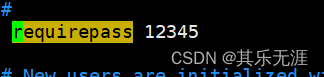
重启后,再用客户端连接,输入ping会报错,提示没有通过认证,输入auth 12345认证,在输入ping就正常了
在redis.conf配置文件504行有个dir配置,表示数据文件的保存路径,默认Redis安装目录
然后在Redis安装目录下可以找到dump.rdb为Redis全量备份的数据文件。
Redis通用命令


边栏推荐
- svg画圆路径动画
- Elegant writing controller (parameter verification + unified exception handling)
- [tcapulusdb knowledge base] tcapulusdb operation and maintenance doc introduction
- Adobe Premiere基础-不透明度(混合模式)(十二)
- Usage of BeanUtils property replication
- Anaconda installs and configures jupyter notebook remote
- Us judge ruled that the former security director of Uber accused of covering up hacking must face fraud charges
- Request header field XXXX is not allowed by access control allow headers in preflight response
- Adobe Premiere foundation - batch material import sequence - variable speed and rewind (recall) - continuous action shot switching - subtitle requirements (13)
- Failed to allocate graph: myriad device is not opened
猜你喜欢

jdbc_相關代碼

Up to 81.98%! Announcement of undergraduate study rate of more than 100 "double first-class" Universities

Adobe Premiere Basics - common video effects (cropping, black and white, clip speed, mirroring, lens halo) (XV)

Apache inlong million billion level data stream processing

Adobe Premiere基础-不透明度(蒙版)(十一)

JS text particle dynamic background

Adobe Premiere Foundation - réglage du son (correction du volume, réduction du bruit, tonalité téléphonique, changement de hauteur, égaliseur de paramètres) (XVIII)

Adobe Premiere基础-时间重映射(十)

jdbc认识上手

markdown知识轻轻来袭
随机推荐
Error building sqlsession problem
Shell basic syntax -- process control
面霸篇:MySQL六十六问,两万字+五十图详解!
mysql -connector/j驱动下载
markdown常用字体
SD6.24集训总结
CentOS 7.5 install MySQL 8.0.27---yum
Shell基本语法--流程控制
Mac: MySQL 66 questions, 20000 words + 50 pictures!
Anaconda installs and configures jupyter notebook remote
js将秒转换成“2h30min50s”的格式
Adobe Premiere基础-时间重映射(十)
BeanUtils属性复制的用法
Request header field xxxx is not allowed by Access-Control-Allow-Headers in preflight response问题
Shandong University project training (VIII) design rotation map entry page
Amazing pandaverse:meta "borderless, to activate fashion attributes in the new journey of 2.0
Adobe Premiere基础-常用的视频特效(裁剪,黑白,剪辑速度,镜像,镜头光晕)(十五)
Fluent's MSH grid learning
Adobe Premiere Foundation - réglage du son (correction du volume, réduction du bruit, tonalité téléphonique, changement de hauteur, égaliseur de paramètres) (XVIII)
Sd6.24 summary of intensive training