当前位置:网站首页>Scratch crawler framework
Scratch crawler framework
2022-07-27 16:05:00 【fresh_ nam】
List of articles
Preface
Scrapy Is a very easy to use crawler framework , Its asynchronous processing feature makes us get the content we want faster , Now let's use it to crawl some pictures .
One 、 The goal is
I want to crawl some pictures now , I looked it up on the Internet , The website decided to crawl is http://www.mmonly.cc/mmtp/, There are many beautiful pictures in it , Crawl all the pictures on its homepage .
Two 、 Use steps
1. download scrapy
Use pip Download it
pip install scrapy
2. Create project
Use cmd Enter the folder where you want to create the crawler , Enter the following command :
scrapy startproject scrapy_demo
A folder named scrapy_demo Folder , Inside is the crawler file , Use pychram Open its directory structure as follows :
then cd Command to enter the crawler folder , Enter the following command :
scrapy genspider MMspider www.mmonly.cc/mmtp/
among MMspider It's the reptile name , When starting the crawler, use , The website behind is the website to be crawled . After executing the command, it will be in spiders A folder named MMspide Of py file , Later crawler logic should be written inside , The generated domain name should be changed , The results are as follows :
MMspider.py
# -*- coding: utf-8 -*-
import scrapy


class MmspiderSpider(scrapy.Spider):
    name = 'MMspider'  #  Reptile name
    allowed_domains = ['mmonly.cc']   #  Allow crawler domain name
    start_urls = ['http://www.mmonly.cc/mmtp//']   #  The web address of the starting page where the crawler crawls for information

    def parse(self, response):
        pass

2. Analyze the structure of the web page
To crawl a web page , First understand its structure :

The target page has many pages , Every page has many photo albums , Each photo album will also have multiple pictures , Each picture is also a page . So get all the photo album pictures , Reptiles should be designed like this : Get links to all photo albums on the main page , Then crawl through the link to get all the pictures of each photo album , Then judge whether the main page has the next page , If yes, continue to crawl , Until you crawl all the pictures of the photo page corresponding to all the home pages .
3 Writing Crawlers
First of all items.py It defines the information to crawl :
items.py
import scrapy

class ScrapyDemoItem(scrapy.Item):
    # define the fields for your item here like:
    # name = scrapy.Field()
    siteURL = scrapy.Field()  #  Picture website address
    detailURL = scrapy.Field()  #  The address of the original picture
    title = scrapy.Field()  #  Picture series name
    fileName = scrapy.Field()  #  Image storage full path name
    path = scrapy.Field()  #  Image series storage path
Then write a crawler parsing page :
MMspider.py
import os
import scrapy
import datetime
from scrapy.linkextractors import LinkExtractor
from scrapy.spiders import Rule
from scrapy_demo.items import ScrapyDemoItem

# Inherit CrawlSpider
class MmspiderSpider(CrawlSpider):
    name = 'MMspider'  # Reptile name
    base = r'D:\python Grab pictures \MMspider\ '  #  Define picture storage path
    allowed_domains = ['mmonly.cc']  #  The domain name that the crawler allows to crawl information
    start_urls = ['http://www.mmonly.cc/mmtp//']
    #  Define main page crawling rules , On the next page, continue to dig deeply , Other qualified links call parse_item Resolve the original address
    rules = (
        Rule(LinkExtractor(allow=('https://www.mmonly.cc/(.*?).html'), restrict_xpaths=(u"//div[@class='ABox']")),
             callback="parse_item", follow=False),
        Rule(LinkExtractor(allow=(''), restrict_xpaths=(u"//a[contains(text(),' The next page ')]")), follow=True),
    )

    def parse_item(self, response):
        item = ScrapyDemoItem()
        item['siteURL'] = response.url
        item['title'] = response.xpath('//h1/text()').extract_first()  # xpath Parse title
        item['path'] = self.base + item['title']  #  Define the storage path , The same series is stored in the same directory
        path = item['path']
        if not os.path.exists(path):
            os.makedirs(path)  #  If the storage path does not exist, create
        item['detailURL'] = response.xpath('//a[@class="down-btn"]/@href').extract_first()  #  Parse original URL
        num = response.xpath('//span[@class="nowpage"]/text()').extract_first()  #  Analyze the number of the same series of pictures
        item['fileName'] = item['path'] + '/' + str(num) + '.jpg'  #  Splice picture name
        print(datetime.datetime.now().strftime('%Y-%m-%d %H:%M:%S'), item['fileName'], u' Parsing succeeded !')
        yield item
        try:
            #  Determine whether the current page is the last page , If not , Then get the next page
            if num != total_page:
                #  Incoming parsing item If there is a link to the next page , Continue to call parse_item
                next_page = response.xpath(u"//a[contains(text(),' The next page ')]/@href").extract_first()
                if next_page is not None:
                    next_page = response.urljoin(next_page)
                    yield scrapy.Request(next_page, callback=self.parse_item)
        except:
            pass
Is it a little confused to see this string of code , Don't worry , Listen to me slowly explain .
rule It's the crawler rule I define , I have defined two crawler rules : The first is from every page class by ’ABOX’ Of div The request in the tag is satisfied ’https://www.mmonly.cc/(.*?).html’ Regular expression links , Achieve the purpose of getting links to each page of photo album .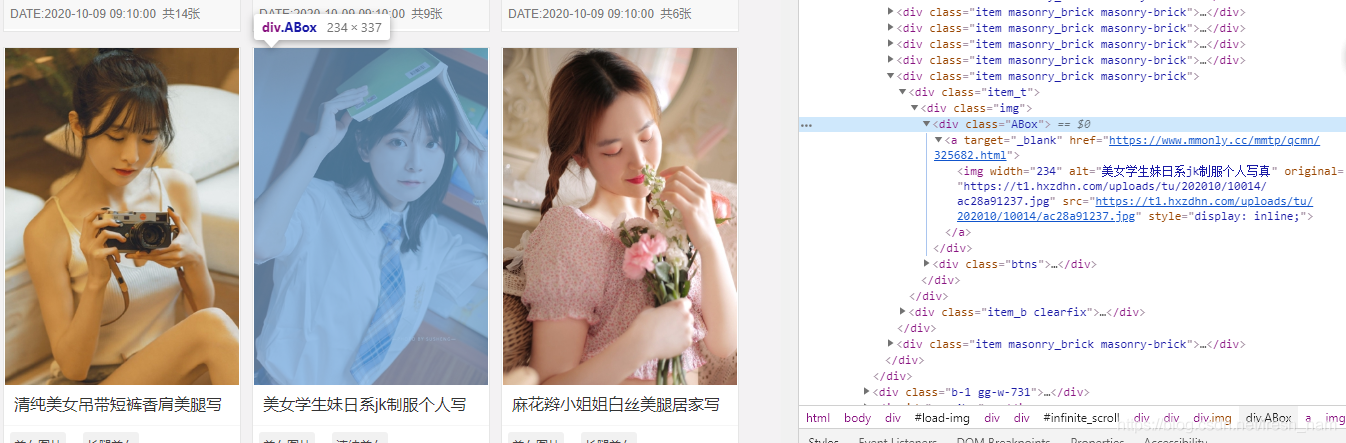
callback="parse_item" It means using parse_item() Function to parse the request page .
The second rule is to get a link to the next page and request , Find all of the pages a The corresponding text in the label is... On the next page a label , Request its corresponding link , It realizes the acquisition of the next page .
follow The parameter is a Boolean (boolean) value , Specified from... According to the rule response Whether the extracted links need to be followed up . If callback It's empty ,follow The default setting is True, Otherwise default to False.
Xpath yes html The parser , Use it to quickly locate html Some element of , for example response.xpath(’//a[@class=“down-btn”]/@href’).extract_first() Is to get all class by down-btn Of a The label corresponds to href Contents of Li 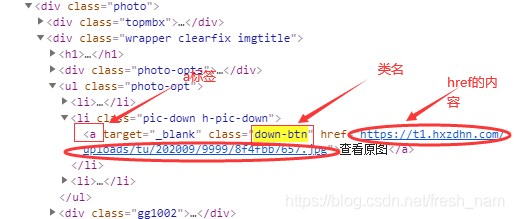
The code to download the image is written in the pipeline file . It uses requests Library requests picture links and saves pictures , First download requests:
pip install requests
The code is as follows :
pipelines.py
import requests
import datetime

class ScrapyDemoPipeline(object):
    def process_item(self, item, spider):
        detailURL = item['detailURL']  # Get links to pictures
        fileName = item['fileName']   # Get the full path of file saving
        try:
            print(datetime.datetime.now().strftime('%Y-%m-%d %H:%M:%S'), u' Saving picture :', detailURL)
            print(u' file :', fileName)
            image = requests.get(detailURL)  #  According to the analysis item Original picture link to download pictures
            f = open(fileName, 'wb')  #  Open the picture
            f.write(image.content)  #  Write picture
            f.close()
            print(datetime.datetime.now().strftime('%Y-%m-%d %H:%M:%S'), fileName, u' Saved successfully !')
        except Exception:
            print(fileName, 'other fault:', Exception)
        return item
Last , Also open the pipeline file in the configuration :
settings.py
# Obey robots.txt rules
ROBOTSTXT_OBEY = False   #True Change to False
# Remove annotations
ITEM_PIPELINES = {

   'scrapy_demo.pipelines.ScrapyDemoPipeline': 300,
}
Last command input :
scrapy crawl MMspider
Reptiles can run , Be accomplished !
Pictures are also saved :

summary
scrapy Is a very powerful framework , I only use part of its functions here . Among them, I made some modifications to the code to enable the crawler to start , There may be no steps written above , If you have any questions, please leave a message in the comment area .
边栏推荐
- C language: minesweeping games
- Network principle (2) -- network development
- Multimap case
- Reduce program ROM ram, GCC -ffunction sections -fdata sections -wl, – detailed explanation of GC sections parameters
- C: On function
- [Yunxiang book club issue 13] common methods of viewing media information and processing audio and video files in ffmpeg
- 这些题~~
- 文本截取图片(哪吒之魔童降世壁纸)
- [sword finger offer] interview question 53-i: find the number 1 in the sorted array -- three templates for binary search
- CAS比较交换的知识、ABA问题、锁升级的流程
猜你喜欢

C language: dynamic memory function
![[sword finger offer] interview question 46: translating numbers into strings - dynamic programming](/img/ba/7a4136fd95ba2463556bc45231e8a2.png)
[sword finger offer] interview question 46: translating numbers into strings - dynamic programming

数据表的约束以及设计、联合查询——8千字攻略+题目练习解答

MySQL表数据的增删查改

synchronized和ReentrantLock的区别

网络层的IP协议

C language: custom type

drf使用:get请求获取数据(小例子)
Addition, deletion, query and modification of MySQL table data

Security software related to wireless network analysis (airtrack ng)
随机推荐
Penetration test - dry goods | 80 + network security interview experience post (interview)
多线程带来的的风险——线程安全
兆骑科创创业大赛策划承办机构,双创平台,项目落地对接
UDP message structure and precautions
Live broadcast software development, customized pop-up effect of tools
Interview focus - TCP protocol of transport layer
C language: string function and memory function
无线网络分析有关的安全软件(aircrack-ng)
C language: function stack frame
Binary Insertion Sort
Paper_Book
C language: Sanzi game
Causes and solutions of deadlock in threads
C: What is the return value (revolution) in a function
43亿欧元现金收购欧司朗宣告失败!ams表示将继续收购
实现浅拷贝和深拷贝+
busybox login: can't execute '/bin/bash': No such file or directory 解决方法
初识MySQL数据库
UDP 的报文结构和注意事项
Is the array name the address of the first element?