当前位置:网站首页>Reading notes on how to connect the network - Web server request and response (V)
Reading notes on how to connect the network - Web server request and response (V)
2022-06-29 09:29:00 【Adong lazy】
《 How the network is connected 》 Reading notes - WEB Server request and response ( 5、 ... and )
Key points of this chapter
The difference between client and server And the connection process of the client response .
The difference between client and server
There are many types of servers and functions , But network related parts , Such as network card 、 Protocol stack 、Socket Libraries and other functions are the same as clients .
In addition, we can review the history of the Internet introduced in the notes in Chapter 1 , Since its birth, the network has been for military communication , This means that it is better not to distinguish between the client and the server at the data receiving and sending level , Instead, it can send data freely in a symmetrical way .
So we often say that the client and the server are only distinguished from the sender and the receiver , If the server sends a request to the client , You can also think of the server itself as “ client ”.
About the server and client, we start from Socket Check the difference between the two on the library call :
The data sending and receiving of the client needs Through the following 4 Stages .
(1) Create socket ( Create socket phase )
(2) Connect the socket on the server side with a pipe ( Connection phase )
(3) Sending and receiving data ( Receiving and sending stage )
(4) Disconnect pipe and remove socket ( Disconnection phase )
The server is the (2) Changed to Waiting for the connection
(1) Create socket ( Create socket phase )
(2-1) Set socket to wait for connection ( Waiting for connection phase )
(2-2) Accept the connection ( Accept connection phase )
(3) Sending and receiving data ( Receiving and sending stage )
(4) Disconnect pipe and remove socket ( Disconnection phase )
Connection process
The following is similar to the client connection introduced in Chapter 2 , Introduce the steps of server connection .
First call bind Write port number to socket , And set the port , After that, the protocol stack will call accept Connect , Note that the bag may not have arrived at this time , If the package does not arrive, the server will block the requests waiting for the client , Once the connection is received, it will respond and perform the connection operation .
Next, the protocol stack will make a copy of the socket waiting for connection , Then the control information such as the connection object is written into the new socket , Why do you want to create a copy here? Simply explain , Because if you use the original socket connection directly , So when a new client request comes , You must create a new socket again and then connect again . How to use duplicate sockets , The original socket can still complete the work of waiting for connection , Is not associated with the new socket copy .
In addition to the feature of copying sockets, creating sockets , Another is the use of port numbers , Because a socket needs to correspond to a port number , However, it should be noted that the newly created socket copy must have the same port number as the original socket waiting for connection , The reason is to prevent similar clients from connecting 80 Socket on port , The result is a packet returned from another port number .
In response to this question , In addition to determining the port, the socket on the server side , You need to bring IP Information and port number information of the client , Finally, it depends on the following four variables to determine which socket to interact with .
client IP Address Client port number The server IP Address Server port number 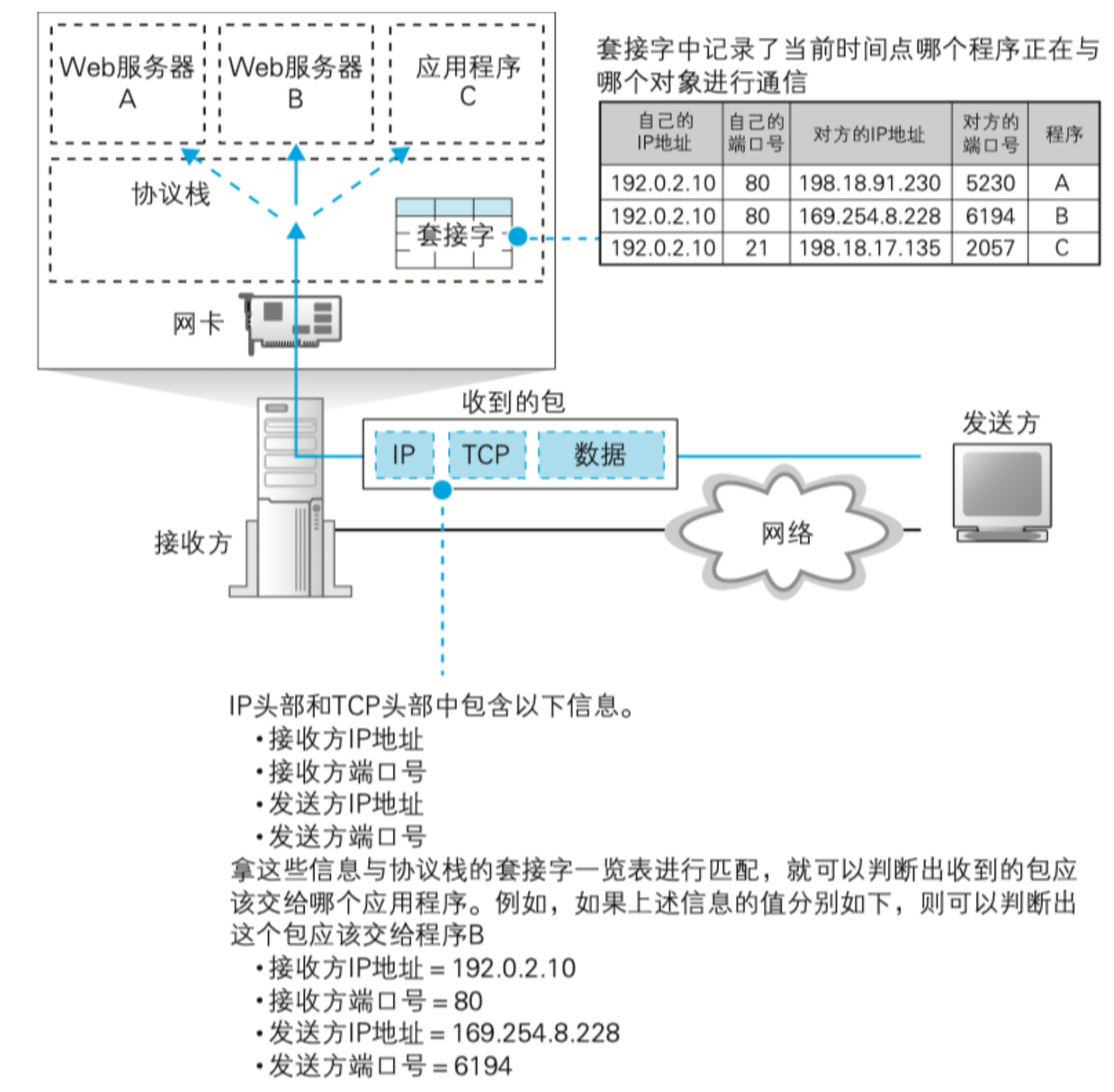
As you can see from the picture above , The server may create a copy on one port and bind many sockets , But the port of the client is completely different and random , meanwhile IP The address is not the same , Therefore, it can be determined that there will be no conflict between sockets .
After the socket is ready , Then, the network packets are FCS The check , When FCS When the data is confirmed to be correct , Next you need to check MAC In the head The recipient of MAC Address , See if this bag is sent to you , After that, the network card MAC The module restores network packets from signals to digital information , check FCS And store it in the buffer .
After the network card receives the message , The next step is to execute the interrupt handling mechanism CPU Start data processing of the network card , The content of interrupt handling can be found in another book 《Linux How does it work 》 understand CPU The interrupt handling mechanism of is used to understand the whole execution process , After that, the network card driver will MAC Header judgment protocol type , And give the package to the corresponding protocol stack .
Why use descriptors ?
Here's a review of the descriptor , The descriptor refers to after the socket is created , The server needs to return an identification message to the client , The purpose is to tell the client who they are , Protocol stack You also need to go back to The descriptor Used to identify which socket is transmitting data .
This can be simply understood as that we know who the other party is chatting with ourselves while chatting on the Internet , But if the other party doesn't “ Turn on the camera ” Tell you I am myself , It is likely that someone else is pretending that someone you know is chatting with you . And we know that the other party is chatting with us because of some “ character ” So understand .
When network packets are transferred to the protocol stack ,IP The module will start working first IP Head .IP The head is mainly the inspection specification , Check both parties' IP Address , Make sure the package is sent to you , Make sure the package is sent to you , Next, you need to check whether the package is partitioned , Then check that the IP Protocol number field in the header , And forward the package to the corresponding module .
IP Summary of module receiving operation
The protocol stack IP The module will check IP Head :
(1) Decide if it's for yourself ;
(2) Determine whether network packets have been shard ;
(3) Forward the package to TCP Module or UDP modular .
according to IP The agreement of the head is easy to find 06 Found to be TCP The content after the agreement judgment is TCP Module package , At this time, check the control bit SYN Is it 1, This also means that this is a packet that initiates a connection .
TCP The module performs the operation to accept the connection , At this time, you need to check whether there is a corresponding socket connection on the port , If not, the package of error notification will be returned to the client , If present, copy the socket , And both sides need to exchange information and store it in the buffer of the socket , At this time, the server-side program should enter the call accept The pause state of , When the descriptor of the new socket is passed to the server program , The server program will resume .
Next is TCP The module processes the data part , First, check which socket the received packet corresponds to , Here, the unique socket is judged according to the four kinds of information mentioned above , Because a server port may be bound to many client ports .
After the socket is aligned ,TCP The module will compare the data sending and receiving status saved in the socket with the received packet TCP Whether the information in the header matches , For example, check whether the received package serial number matches , If the data is correct , The corresponding reply header will be generated and calculated ACK number , Then generate a serial number and return it to the client .
The received data block enters the receive buffer , This means that the packet receiving operation is over , After that, the data will be transferred through read Wait and hand it over directly to the application , Finally, the application returns the corresponding data to the browser according to the requested content .
TCP Summary of module operation
(1) According to the sender of the received packet IP Address 、 Sender's slogan 、 The receiving party IP Address 、 The receiver finds the corresponding socket ;
(2) Put the blocks together and save them in the receive buffer ;
(3) Returns to the client ACK.
Finally, the disconnection operation , The main difference in disconnection operation is HTTP Agreement on ,HTTP1.0 Server initiation is required , and HTTP1.1 The disconnection starts from the client .
Why? HTTP1.0 and HTTP1.1 There is such a difference when disconnected , See the following supplement , This part comes from the Internet :
**http1.0 **
If in HTTP Carry... In the request content-length, Request at this time body Length can be known , Client receiving body You can accept data according to this length . After acceptance , That means the request is finished . Client active call close Go into four waves . conversely , If not content-length , be body Length is unknown , The client receives data all the time , Until the server takes the initiative to disconnect .
http1.1
If HTTP Carry... In the request content-length, here body Length can be known , The client actively disconnects . If you find that HTTP Median zone Transfer-encoding:chunked body Will be divided into multiple blocks , The beginning of each block identifies the length of the current block ,body No need to pass content-length To specify , But still know body The length of , At this point, the client actively disconnects . If the request does not come with Transfer-encoding:chunked And without content-length, Client receives data , Until the server actively disconnects .
That is to say, if we can There is a way to know the length transmitted by the server , The client is the first to disconnect . If you don't know, keep receiving data until the server is disconnected .
summary
The content of this chapter is more like checking the omissions and filling the gaps in the previous chapters , And a simple review of the previous content , In the second half, I introduced the data returned by the application , This part tends to WEB So it was not included in the notes .
Looking at this book as a whole, what we need to focus on is the contents of the previous three chapters , The latter two chapters are more like the supplement of theoretical knowledge and the supplement to the previous content .
For the last chapter, it is suggested to study the details of the server response data with the client , The effect will get twice the result with half the effort .
边栏推荐
- 微信小程序跳转公众号图文内容
- 微信小程序子组件向页面传值(父子组件间的通信)带源码
- ServerApp. iopub
- 什么是超融合?与传统架构有什么区别?.
- UE4 VS的Visual Assist插件设置
- What is hyperfusion? What is the difference with traditional architecture
- Yolo nano: a highly compact one look convolutional neural network for target detection
- CMD enter virtual machine
- 1.4 机器学习方法之回归问题
- UE4 在4.20-23版本安裝Datasmith插件
猜你喜欢

AugFPN:改进多尺度特征学习用于目标检测

Pytorch summary learning series - data manipulation

微信小程序判断url的文件格式

UE4 在4.20-23版本安裝Datasmith插件

微信小程序子组件向页面传值(父子组件间的通信)带源码
SSD改进CFENet

How to do unit test well
Gd32f4xx Ethernet Chip (ENC28J60) Drive transplantation

What is hyperfusion? What is the difference with traditional architecture

promise方法的简单使用
随机推荐
MySQL uses union all to count the total number of combinations of multiple tables and the number of tables respectively
3DMax 卡死、白屏、渲染死机问题总结
SSD改進CFENet
What exactly does Devops mean?
微信小程序项目:tab导航栏
UE4 installs the datasmith plug-in in version 4.20-23
微信小程序跳转公众号图文内容
超融合架构和传统架构有什么区别?
Wechat applet opens file stream
Simple use of promise method
训练查看(问题暂存)
两阶段目标检测原理详细版
The former security director of Uber faced fraud allegations and had concealed data leakage incidents
GPU training cloud platform record
GPU训练云平台记录
Professional structure record
Wechat applet project: tab navigation bar
UE4 在4.20-23版本安裝Datasmith插件
Mysql database and table splitting strategy and application scenarios
YOLACT实时实例分割