当前位置:网站首页>How to use 120 lines of code to realize an interactive and complete drag and drop upload component?
How to use 120 lines of code to realize an interactive and complete drag and drop upload component?
2022-07-26 00:18:00 【Ink fragrance^_^】
Preface
You will learn in this article :
How to rewrite an existing component to
React HooksFunction componentuseState、useEffect、useRefHow to replace the original life cycle andRefOf .Four events covered by a complete drag and drop upload behavior :
dragover、dragenter、drop、dragleaveHow to use
React HooksWrite your own UI Component library .
I saw this article when I was visiting a foreign community :

How To Implement Drag and Drop for Files in React
The article says React Drag and drop the simplified implementation of upload , But direct translation is obviously not my style .
So I used React Hooks Rewrite a version of , except CSS The total number of codes 120 That's ok .
The effect is as follows :

1. Add a basic directory skeleton
app.js
import React from 'react';
import PropTypes from 'prop-types';

import { FilesDragAndDrop } from '../components/Common/FilesDragAndDropHook';

export default class App extends React.Component {
    static propTypes = {};

    onUpload = (files) => {
        console.log(files);
    };

    render() {
        return (
            <div>
                <FilesDragAndDrop
                    onUpload={this.onUpload}
                />
            </div>
        );
    }
}
FilesDragAndDrop.js( Not Hooks):
import React from 'react';
import PropTypes from 'prop-types';
import '../../scss/components/Common/FilesDragAndDrop.scss';
export default class FilesDragAndDrop extends React.Component {
static propTypes = {
onUpload: PropTypes.func.isRequired,
};
render() {
return (
<div className='FilesDragAndDrop__area'>
Try passing down the file ?
<span
role='img'
aria-label='emoji'
className='area__icon'
>
😎
</span>
</div>
);
}
}
1. How to rewrite it into Hooks Components ?
Please look at the moving picture :


2. Rewrite components
Hooks Version component belongs to function component , Transform the above :
import React, { useEffect, useState, useRef } from "react";
import PropTypes from 'prop-types';
import classNames from 'classnames';
import classList from '../../scss/components/Common/FilesDragAndDrop.scss';
const FilesDragAndDrop = (props) => {
return (
<div className='FilesDragAndDrop__area'>
Try passing down the file ?
<span
role='img'
aria-label='emoji'
className='area__icon'
>
😎
</span>
</div>
);
}
FilesDragAndDrop.propTypes = {
onUpload: PropTypes.func.isRequired,
children: PropTypes.node.isRequired,
count: PropTypes.number,
formats: PropTypes.arrayOf(PropTypes.string)
}
export { FilesDragAndDrop };
FilesDragAndDrop.scss
.FilesDragAndDrop {
  .FilesDragAndDrop__area {
    width: 300px;
    height: 200px;
    padding: 50px;
    display: flex;
    align-items: center;
    justify-content: center;
    flex-flow: column nowrap;
    font-size: 24px;
    color: #555555;
    border: 2px #c3c3c3 dashed;
    border-radius: 12px;

    .area__icon {
      font-size: 64px;
      margin-top: 20px;
    }
  }
}
Then you can see the page :

2. Implementation analysis
From operation DOM、 Component reuse 、 Events trigger 、 Blocking default behavior 、 as well as Hooks Application Analysis .
1. operation DOM:`useRef`
Because you need to drag and drop files to upload and operate component instances , Need to use ref attribute .
React Hooks in Added useRef API
grammar
const refContainer = useRef(initialValue);
useRefReturn to a variablerefobject ,.Its .current Property is initialized as the passed parameter (
initialValue)The returned object will remain throughout the life cycle of the component .
...
const drop = useRef();

return (
    <div
        ref={drop}
        className='FilesDragAndDrop'
    />
    ...
    )
2. Events trigger

It's not easy to accomplish drag and drop with dynamic interaction , Four event controls are needed :
Outside the area :
dragleave, Out of rangeIn the area :
dragenter, Used to determine whether the placement target accepts placement .Move within the area :
dragover, Used to determine what kind of feedback to display to usersFinish dragging ( Fall ):
drop, Allow objects to be placed .
These four events coexist , To stop Web Browser default behavior and form feedback .
3. Blocking default behavior
The code is simple :
e.preventDefault() // Default behavior for block events ( Such as opening a file in a browser )
e.stopPropagation() //  Stop the event from bubbling
Every event stage needs to stop , Why? ? Take a chestnut :
const handleDragOver = (e) => {
    // e.preventDefault();
    // e.stopPropagation();
};

If you don't stop , It triggers the opening of the file , This is clearly not what we want to see .

4. Internal state of components : useState
Drag upload components , In addition to basic drag state control , There should also be a message reminder when the file is uploaded successfully or fails to pass the verification .
The state composition should be :
state = {
    dragging: false,
    message: {
        show: false,
        text: null,
        type: null,
    },
};
Write the corresponding useState First return to the writing method :
const [ attribute , How to operate properties ] = useState( The default value is );
So it became :
const [dragging, setDragging] = useState(false);
const [message, setMessage] = useState({ show: false, text: null, type: null });
5. You need a second stack
except drop event , The other three events are dynamic , While dragging elements , every other 350 Milliseconds will trigger dragover event .
A second... Is needed ref To unify control .
So all of ref by :
const drop = useRef(); //  Down below
const drag = useRef(); //  Drag the active layer
6. file type 、 Quantity control
When we apply components ,prop You need the type and number of incoming to control
<FilesDragAndDrop
onUpload={this.onUpload}
count={1}
formats={['jpg', 'png']}
>
<div className={classList['FilesDragAndDrop__area']}>
Try passing down the file ?
<span
role='img'
aria-label='emoji'
className={classList['area__icon']}
>
😎
</span>
</div>
</FilesDragAndDrop>
onUpload: Drag to finish processing eventscount: Quantity controlformats: file type .
Corresponding components Drop Internal events :handleDrop:
const handleDrop = (e) => {
    e.preventDefault();
    e.stopPropagation();
    setDragging(false)
    const { count, formats } = props;
    const files = [...e.dataTransfer.files];
    if (count && count < files.length) {
        showMessage(` I'm sorry , You can only upload at most at a time ${count}  file .`, 'error', 2000);
        return;
    }
    if (formats && files.some((file) => !formats.some((format) => file.name.toLowerCase().endsWith(format.toLowerCase())))) {
        showMessage(` Only upload is allowed  ${formats.join(', ')} File format `, 'error', 2000);
        return;
    }
    if (files && files.length) {
        showMessage(' Successfully uploaded !', 'success', 1000);
        props.onUpload(files);
    }
};
.endsWithIt's judging the end of a string , Such as :"abcd".endsWith("cd"); // true
showMessage Control the display text :
const showMessage = (text, type, timeout) => {
    setMessage({ show: true, text, type, })
    setTimeout(() =>
        setMessage({ show: false, text: null, type: null, },), timeout);
};
A timer needs to be triggered to return to the initial state
7. Triggering and destruction of events in the life cycle
Original EventListener The event needs to be in componentDidMount add to , stay componentWillUnmount Medium destruction :
componentDidMount () {
    this.drop.addEventListener('dragover', this.handleDragOver);
}

componentWillUnmount () {
    this.drop.removeEventListener('dragover', this.handleDragOver);
}
but Hooks There are internal operation methods and corresponding useEffect To replace these two lifecycles
useEffect Example :
useEffect(() => {
  document.title = `You clicked ${count} times`;
}, [count]); //  Only in  count  Update on change
and Every effect Can return a clear function . So you can add (componentDidMount) And remove (componentWillUnmount) The logic of subscription is put together .
So the above can be written as :
useEffect(() => {
    drop.current.addEventListener('dragover', handleDragOver);
    return () => {
        drop.current.removeEventListener('dragover', handleDragOver);
    }
})

It's too fragrant !!!
3. Complete code :
FilesDragAndDropHook.js:
import React, { useEffect, useState, useRef } from "react";
import PropTypes from 'prop-types';
import classNames from 'classnames';
import classList from '../../scss/components/Common/FilesDragAndDrop.scss';
const FilesDragAndDrop = (props) => {
const [dragging, setDragging] = useState(false);
const [message, setMessage] = useState({ show: false, text: null, type: null });
const drop = useRef();
const drag = useRef();
useEffect(() => {
// useRef Of drop.current To replace the ref Of this.drop
drop.current.addEventListener('dragover', handleDragOver);
drop.current.addEventListener('drop', handleDrop);
drop.current.addEventListener('dragenter', handleDragEnter);
drop.current.addEventListener('dragleave', handleDragLeave);
return () => {
drop.current.removeEventListener('dragover', handleDragOver);
drop.current.removeEventListener('drop', handleDrop);
drop.current.removeEventListener('dragenter', handleDragEnter);
drop.current.removeEventListener('dragleave', handleDragLeave);
}
})
const handleDragOver = (e) => {
e.preventDefault();
e.stopPropagation();
};
const handleDrop = (e) => {
e.preventDefault();
e.stopPropagation();
setDragging(false)
const { count, formats } = props;
const files = [...e.dataTransfer.files];
if (count && count < files.length) {
showMessage(` I'm sorry , You can only upload at most at a time ${count} file .`, 'error', 2000);
return;
}
if (formats && files.some((file) => !formats.some((format) => file.name.toLowerCase().endsWith(format.toLowerCase())))) {
showMessage(` Only upload is allowed ${formats.join(', ')} File format `, 'error', 2000);
return;
}
if (files && files.length) {
showMessage(' Successfully uploaded !', 'success', 1000);
props.onUpload(files);
}
};
const handleDragEnter = (e) => {
e.preventDefault();
e.stopPropagation();
e.target !== drag.current && setDragging(true)
};
const handleDragLeave = (e) => {
e.preventDefault();
e.stopPropagation();
e.target === drag.current && setDragging(false)
};
const showMessage = (text, type, timeout) => {
setMessage({ show: true, text, type, })
setTimeout(() =>
setMessage({ show: false, text: null, type: null, },), timeout);
};
return (
<div
ref={drop}
className={classList['FilesDragAndDrop']}
>
{message.show && (
<div
className={classNames(
classList['FilesDragAndDrop__placeholder'],
classList[`FilesDragAndDrop__placeholder--${message.type}`],
)}
>
{message.text}
<span
role='img'
aria-label='emoji'
className={classList['area__icon']}
>
{message.type === 'error' ? <>😢</> : <>😘</>}
</span>
</div>
)}
{dragging && (
<div
ref={drag}
className={classList['FilesDragAndDrop__placeholder']}
>
Please let go
<span
role='img'
aria-label='emoji'
className={classList['area__icon']}
>
😝
</span>
</div>
)}
{props.children}
</div>
);
}
FilesDragAndDrop.propTypes = {
onUpload: PropTypes.func.isRequired,
children: PropTypes.node.isRequired,
count: PropTypes.number,
formats: PropTypes.arrayOf(PropTypes.string)
}
export { FilesDragAndDrop };
App.js:
import React, { Component } from 'react';
import { FilesDragAndDrop } from '../components/Common/FilesDragAndDropHook';
import classList from '../scss/components/Common/FilesDragAndDrop.scss';
export default class App extends Component {
onUpload = (files) => {
console.log(files);
};
render () {
return (
<FilesDragAndDrop
onUpload={this.onUpload}
count={1}
formats={['jpg', 'png', 'gif']}
>
<div className={classList['FilesDragAndDrop__area']}>
Try passing down the file ?
<span
role='img'
aria-label='emoji'
className={classList['area__icon']}
>
😎
</span>
</div>
</FilesDragAndDrop>
)
}
}
FilesDragAndDrop.scss:
.FilesDragAndDrop {
  position: relative;

  .FilesDragAndDrop__placeholder {
    position: absolute;
    top: 0;
    left: 0;
    right: 0;
    bottom: 0;
    width: 100%;
    height: 100%;
    z-index: 9999;
    display: flex;
    align-items: center;
    justify-content: center;
    flex-flow: column nowrap;
    background-color: #e7e7e7;
    border-radius: 12px;
    color: #7f8e99;
    font-size: 24px;
    opacity: 1;
    text-align: center;
    line-height: 1.4;

    &.FilesDragAndDrop__placeholder--error {
      background-color: #f7e7e7;
      color: #cf8e99;
    }

    &.FilesDragAndDrop__placeholder--success {
      background-color: #e7f7e7;
      color: #8ecf99;
    }

    .area__icon {
      font-size: 64px;
      margin-top: 20px;
    }
  }
}

.FilesDragAndDrop__area {
  width: 300px;
  height: 200px;
  padding: 50px;
  display: flex;
  align-items: center;
  justify-content: center;
  flex-flow: column nowrap;
  font-size: 24px;
  color: #555555;
  border: 2px #c3c3c3 dashed;
  border-radius: 12px;

  .area__icon {
    font-size: 64px;
    margin-top: 20px;
  }
}
Then you can get the documents and play with them ...


边栏推荐
猜你喜欢
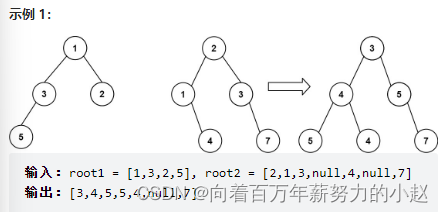
Binary tree - 617. Merge binary tree

如何用120行代码,实现一个交互完整的拖拽上传组件?

URL address mapping configuration

Getaverse, a distant bridge to Web3

Binary tree -- 222. Number of nodes of a complete binary tree

牛血清白蛋白修饰牛红细胞超氧化物歧化酶SOD/叶酸偶联2-ME白蛋白纳米粒的制备

Detailed explanation of kubernetes network plug-ins - calico chapter - Overview

Pinduoduo gets the usage instructions of the product details API according to the ID

06_ UE4 advanced_ Set up a large map using the terrain tool

Module II operation
随机推荐
Js理解之路:Object.call与Object.create()实现继承的原理
What does it mean that the web server stops responding?
测试7年,面试华为最后面议要薪1万,HR说我不尊重华为,他们没有那么低薪资的岗位~
LeetCode_ 55_ Jumping game
Niuke / Luogu - [noip2003 popularization group] stack
34 use of sparksql custom functions, architecture and calculation process of sparkstreaming, dstream conversion operation, and processing of sparkstreaming docking Kafka and offset
二进制表示--2的幂
服务器如何搭建虚拟主机?
“群魔乱舞”,牛市是不是结束了?2021-05-13
Piziheng embedded: the method of making source code into lib Library under MCU Xpress IDE and its difference with IAR and MDK
SHIB(柴犬币)一月涨幅数百倍,百倍币需具备哪些核心要素?2021-05-09
Stack and queue - 150. Inverse Polish expression evaluation
滑动窗口_
Binary tree - 110. Balanced binary tree
Stack and queue - 347. Top k high frequency elements
matlab实时作出串口输出数据的图像
"Animal coin" is fierce, trap or opportunity? 2021-05-12
【论文笔记】—目标姿态估计—EPro-PnP—2022-CVPR
What are the precautions for using MySQL index? (answer from six aspects)
什么是 Web3 游戏?